Problem with rear camera and the T800

obe

New Member
Joined
Aug 29, 2025
Messages
5
Reaction score
1
Location
jönköping
Country
Sweden
Anyone else that has had problem getting the rear camera to work?
I got everything from 4G, dongle external battery to work as it should except for the rear camera.

I have got the rear camera working but only when i connect the rear camera usb the wrong way.
If i connect it according to the instructions (the angle connector i the main unit and the straight connector in the camera) i get notification in screen that says camera connected but no image.
If i switch the cable around and connect the angle connector to the camera and the straight to the mail unit the rear camera just starts working sometimes i need to restart before it shows but often it just come alive.

It is also a bit startange the the main unit says that main rear camera is connected even if cable is only connected to the mail unit and not to the rear camera.

I have tested with other cable supplied with the camera but no other cable even says that rear camera connected.
 
I can't say that I've had the problem you're having with the T800 4K rear camera. I have the 90-degree USB-C connector plugged into the front camera and the straight USB-C connector plugged into the 4K rear camera [Premium Set]. If you don't already have the latest public firmware installed [1.1.130ww], please update to that version and test again.
 
I can't say that I've had the problem you're having with the T800 4K rear camera. I have the 90-degree USB-C connector plugged into the front camera and the straight USB-C connector plugged into the 4K rear camera [Premium Set]. If you don't already have the latest public firmware installed [1.1.130ww], please update to that version and test again.
thanks for you reply. I have received two updates of the front camera since i installed it and i was really hoping that the 1.1.130ww would fix this but i received it yesterday and unfortunately it made no difference.
It is so strange that the camera works with the cable one way but and not the correct way.

I have a support ticket with 70mai so hopefully i just have done some stupid setting but can imagine what that would be.
 
thanks for you reply. I have received two updates of the front camera since i installed it and i was really hoping that the 1.1.130ww would fix this but i received it yesterday and unfortunately it made no difference.
It is so strange that the camera works with the cable one way but and not the correct way.

I have a support ticket with 70mai so hopefully i just have done some stupid setting but can imagine what that would be.
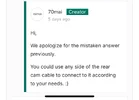
70mai confirmed in Kickstarter that you can use either end of the rear cam cable. Planning to do the same when I get mine.
 

Attachments

  • IMG_2027.webp
    IMG_2027.webp
    27.4 KB · Views: 131
70mai confirmed in Kickstarter that you can use either end of the rear cam cable. Planning to do the same when I get mine.
That is good but it isn't very confidence inspiring when it only work one way for me 🙂
Note that a problem using the straight end in the front camera could be that it interferes with the power cable that also have a 90degree bend and is designed to bend above the camera cable.
 
I will have to side with my brother to the east, it sound very confusing when it should be smooth sailing.
Hopefully 70mai can step up and shed some light on the matter
 
Note that a problem using the straight end in the front camera could be that it interferes with the power cable that also have a 90degree bend and is designed to bend above the camera cable.
I have the power cable 90-degree bend at the UP05 LTE module end of connection. I plugged the straight USB-C power cable connector into the T800 kike it shows in the T800 user manual.
1756590142913.webp
1756590265971.webp
 
It is so strange that the camera works with the cable one way but and not the correct way.

I thought so too so i reversed my cable but for me it works fine.

Note that a problem using the straight end in the front camera could be that it interferes with the power cable

Is it possible that the plug isn't seated completely? Check the cable is plugged in all the way and is squared off to the T800

With the cable in reverse for testing.
IMG_1511.webp
 
  • Like
Reactions: obe
I tried blowing, cleaning the port, pushing harder, jiggling the connector in both ends.
Testing if perhaps turning the connector 180 degreesin the port changes anything but no.
But only when 90 connector is in the rear camera i get a video stream.
I get the rear camera connected notification i both directions but only video stream in one.

70mai seem responsive so hopefully i will resolve this soon.
 
70mai confirmed in Kickstarter that you can use either end of the rear cam cable. Planning to do the same when I get mine.
Oh thank God, because I was concerned that I was limited to using the angle side for the front camera. IMO, it seems off that the cable would be angled in the front and not the rear.
 
Oh thank God, because I was concerned that I was limited to using the angle side for the front camera. IMO, it seems off that the cable would be angled in the front and not the rear.
depending on the angle of the camera i think the angled cable end can be both harder and eisier
 
Back
Top