
You are using an out of date browser. It may not display this or other websites correctly.
You should upgrade or use an alternative browser.
You should upgrade or use an alternative browser.
Reviewing and Testing the Vantrue S1 Pro Max
- Thread starter EricSan
- Start date
OP
OP

EricSan
Well-Known Member
- Joined
- Dec 28, 2023
- Messages
- 1,408
- Reaction score
- 1,066
- Location
- Central PA
- Country
- United States
- Dash Cam
- There are ALWAYS user serviceable parts inside!
It’s not a new stamp or firmware feature. I learned that trick from @TonyM - I entered the firmware version in the License Plate Stamp. It would be great to see one more stamp that indicates if HDR is enabled.I don't remember seeing the Firmware stamp before
Thank you! It’s interesting to see the differences, especially between the newly updated S1PM and the N4PS that now seem to share VERY similar video specs for the front camera, but also still show some differences in image quality.Very nice comparison @EricSan
jsmith
Well-Known Member
I'm surprised the N4 Pro S is outperforming the 4K front + Rear S1 Pro Max. I still can't part with running my N5S as a full unit, though. I also have an E3 and A139 Pro installed, too. Testing out the N4 Pro S again but need to install the new rear designed camera. Had a few things pop up in life that put me on hold for about a month.
OP
OP
EricSan
Well-Known Member
- Joined
- Dec 28, 2023
- Messages
- 1,408
- Reaction score
- 1,066
- Location
- Central PA
- Country
- United States
- Dash Cam
- There are ALWAYS user serviceable parts inside!
It's curious to observe the differences in the frame by frame comparisons. While these two cameras share the same sensor, lens, resolution, and bitrate, there are some subtle differences in the processing. The S1PM has greater contrast, the cameras differ slightly in overall color rendition, and there are still observable differences in readability of license plates. Clearly, there are different algorithms at work with each camera.I'm surprised the N4 Pro S is outperforming the 4K front + Rear S1 Pro Max.

OP
OP
EricSan
Well-Known Member
- Joined
- Dec 28, 2023
- Messages
- 1,408
- Reaction score
- 1,066
- Location
- Central PA
- Country
- United States
- Dash Cam
- There are ALWAYS user serviceable parts inside!
This is a welcome improvement! The realistic choice among the the E1 Pro, S1 Pro Max, and the N4 Pro S is now really just a matter of 1) how many channels do you want/need and 2) would you like to add some driver support systems to an older car (S1PM)? The driver support systems seem especially useful for parents of newer drivers...It does look like a decent improvement.
This greatly simplifies the choices for customers - I view this as a great strategic and marketing move.
Last edited:

symptomz
New Member
For someone looking at options what would you suggest? I drive a newer Subaru, so driver support system is already taken car of. But I can get the S1 Pro Max with the 2.5k rear camera for $150 right now. Which is making me wonder if that's going to be the best bang for the buck unless I want to spend a extra 120ish for the S1 Pro Max with the 4k rear camera, then double for the N4 Pro S.This is a welcome improvement! The realistic choice among the the E1 Pro, S1 Pro Max, and the N4 Pro S is now really just a matter of 1) how many channels do you want/need and 2) would you like to add some driver support systems to an older car (S1PM)? The driver support systems seem especially useful for parents of newer drivers...
This greatly simplifies the choices for customers - I view this as a great strategic and marketing move.
I mostly drive in the day time if that matters at all. Occasional traveling in the evening from time to time.
OP
OP
EricSan
Well-Known Member
- Joined
- Dec 28, 2023
- Messages
- 1,408
- Reaction score
- 1,066
- Location
- Central PA
- Country
- United States
- Dash Cam
- There are ALWAYS user serviceable parts inside!
For someone looking at options what would you suggest?
At this point, the choices are pretty clear and depends on the number of video channels you want. If you are looking for front only, the E1 Pro is hard to beat. If you want front + rear, the S1 Pro Max is where it's at. If you have some extra cash, the 4k rear camera is nice. If you are looking to save some money, the 2.5k rear camera also works very well. If you want three channels (front + cabin + rear) then go with the N4S (2.5k front) or the N4 Pro S (4k front) - both use the same rear 2.5k camera. If you want 4 channels (front + front cabin + rear cabin + rear) then go with the new N5S (2.5k front and rear, 1k for both cabin cameras).
If you don't do rideshare stuff, there might be less need for a cabin camera, so I'd recommend the S1 Pro Max (with either the 2.5k or 4k rear camera). It's a GREAT performer with the latest firmware update!
The E1 Pro will be the easiest to install (just need to run a power cord). The others are slightly more complex (but not difficult at all), as you'll need to run both a power cord and a video cord to the rear camera.
Last edited:
OP
OP
EricSan
Well-Known Member
- Joined
- Dec 28, 2023
- Messages
- 1,408
- Reaction score
- 1,066
- Location
- Central PA
- Country
- United States
- Dash Cam
- There are ALWAYS user serviceable parts inside!
@Hack_man - I have "fully" installed one or two cameras, with all of the wiring tucked under the headliner and out of sight. Depending on the day, I have 2-3 additional cameras installed in a more "quick and dirty" manner with the wires tied to the handles above the side doors to keep them out of the way. It's time to clean things up a bit, remove a camera or two and run another set of wires under the headliner for a cleaner install.
jsmith
Well-Known Member
@Hack_man - I have "fully" installed one or two cameras, with all of the wiring tucked under the headliner and out of sight. Depending on the day, I have 2-3 additional cameras installed in a more "quick and dirty" manner with the wires tied to the handles above the side doors to keep them out of the way. It's time to clean things up a bit, remove a camera or two and run another set of wires under the headliner for a cleaner install.
My car is the same way. 2 Cameras installed properly. One with a 12v cable annoying me and dangling. I plan on replacing the E3 at some point for a more permanent install.
I've got 3 Cameras in my car. 3 in another family member's car. and 1 in Another Family Member's. Dashcams Rock!

Hack_man
Well-Known Member
I had my A229 Pro professionally installed in a new car because I was concerned about popping off the air bag covers and then accessing the headliner. With my car there were stories about messing it up and never getting the headliner to be wrinkle free and it's tricky removing the clips from the A pillar covers. Its not cheap getting a pro install but even after watching Utubes for my car and being a DYI-er I don't feel too confident.
When I test dashcams I have annoying cables hanging all over the place. The most # of dashcams I would want installed at once would be two, due to obstruction.
When I test dashcams I have annoying cables hanging all over the place. The most # of dashcams I would want installed at once would be two, due to obstruction.
OP
OP
EricSan
Well-Known Member
- Joined
- Dec 28, 2023
- Messages
- 1,408
- Reaction score
- 1,066
- Location
- Central PA
- Country
- United States
- Dash Cam
- There are ALWAYS user serviceable parts inside!
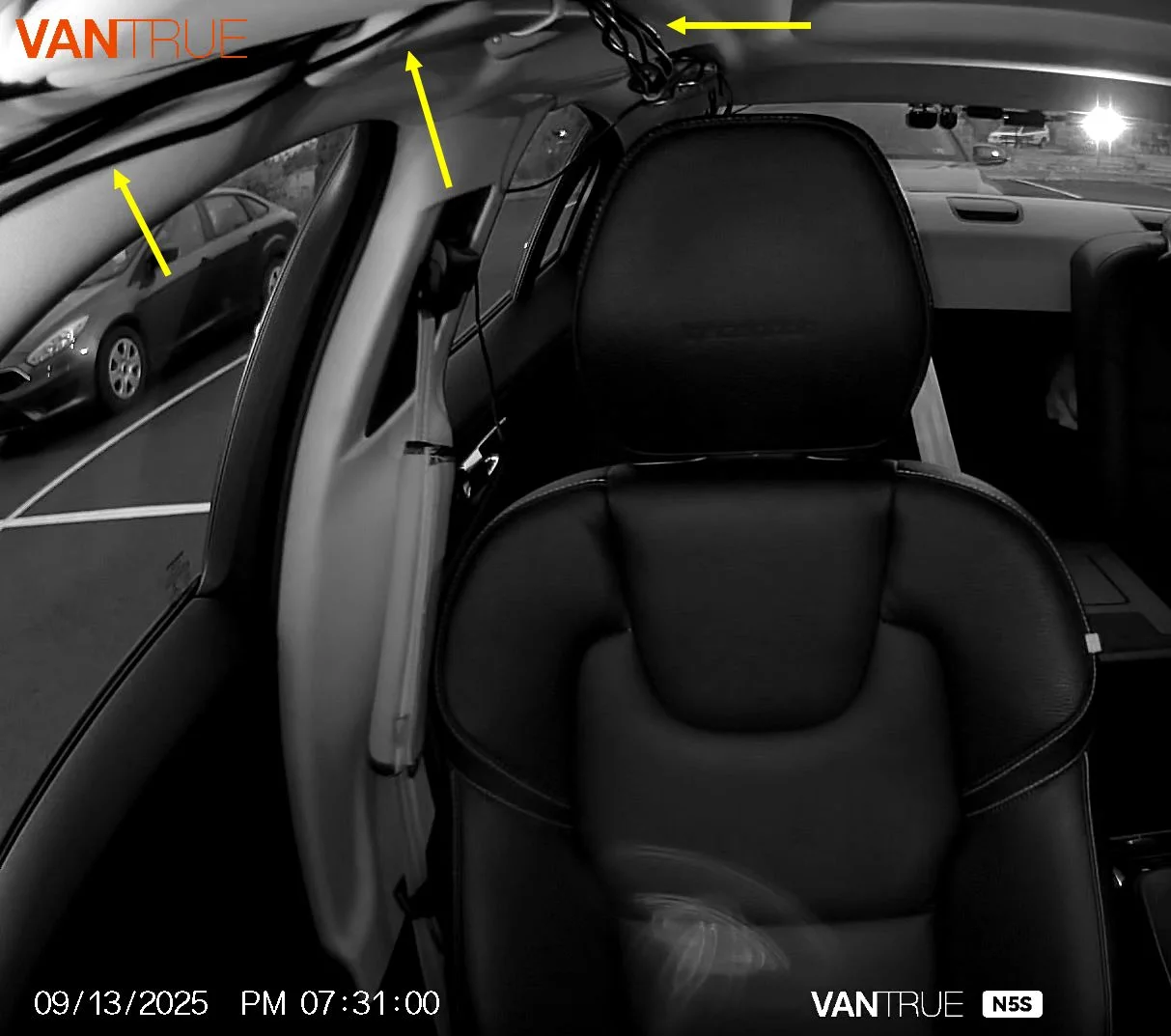
Here's a quick screen grab from a video from my N5S camera that shows the wiring running across the tops of the doors. Not the best install by any means, but I figure if the airbags deploy, they'll pop out of the bottom of the trimwork, so the wires shouldn't interfere too much. Looks like I have 5 rear cameras at the time this image was made.
OP
OP
EricSan
Well-Known Member
- Joined
- Dec 28, 2023
- Messages
- 1,408
- Reaction score
- 1,066
- Location
- Central PA
- Country
- United States
- Dash Cam
- There are ALWAYS user serviceable parts inside!
Yep, gotta remove A-pillar and C-pillar covers to gain access to the headliner. In my Volvo, each is held in by a screw. For Camry and Mustangs, I believe the pillar covers just pop off- you gotta give them a yank to open the clips. From there, I made a custom jig to push the wires through:

I came up with a pretty easy way to run a cable to the rear camera or to run a power cable to the trunk if your are mounting a parking mode battery in the trunk. I tried to run cables above the headliner to the back of the car before, but I gave up because I couldn't figure out how to remove the headliner and avoid the side curtain airbag system. Then I had another idea tonight that I wanted to share. Maybe it helps you out a little. Using this method requires pulling only the A-pillar and C-pillar covers. There is no need to mess with the B-pillar cover or play with door seals or...


Julian23
Well-Known Member
- Joined
- Nov 16, 2016
- Messages
- 1,315
- Reaction score
- 1,914
- Country
- Germany
- Dash Cam
- Several brands :)
I've got 3 Cameras in my car
Please tell me that you two also get funny looks from other people with so many cameras installed 🤣Depending on the day, I have 2-3 additional cameras installed
I can't be the only one haha
Julian23
Well-Known Member
- Joined
- Nov 16, 2016
- Messages
- 1,315
- Reaction score
- 1,914
- Country
- Germany
- Dash Cam
- Several brands :)
Why run the cables to the headliner and not down to the door sill and back to the rear?I was concerned about popping off the air bag covers and then accessing the headliner.
I usually take this approach to avoid the airbags and messing with the headliner. The cables are long enough, even with bigger station wagons.
OP
OP
EricSan
Well-Known Member
- Joined
- Dec 28, 2023
- Messages
- 1,408
- Reaction score
- 1,066
- Location
- Central PA
- Country
- United States
- Dash Cam
- There are ALWAYS user serviceable parts inside!
Ha, yeah, I get a few looks now and then. The few at work few that know always want to park by me so their cars will be covered, too....Please tell me that you two also get funny looks from other people with so many cameras installed 🤣
Two reasons: 1) it's a shorter path to travel to the back across the top of the doors (going down the A-Pillar is actually back-tracking) and 2) it's easier in the rear to come down the C-pillar than to come up from the door sill. Having just that little bit extra cable is important for my install.Why run the cables to the headliner and not down to the door sill and back to the rear?
Hack_man
Well-Known Member
How do you get the Power and rear cable down the A pillar to the dash without popping that cover?Why run the cables to the headliner and not down to the door sill and back to the rear?
I usually take this approach to avoid the airbags and messing with the headliner. The cables are long enough, even with bigger station wagons.
I'll have to take a closer look at running the rear cable down towards the door sill, I tried that when we had the CRV and there was a lot of trim that would have to be popped but I don't think it gets involved with air bag.
I really don't want to mess with air bags or headliner which is why I had my ES350 dashcam and PC8 professionally installed, this outfit I found was a class act in professional.
Maybe even as good as @SafeDriveSolutions !
Hack_man
Well-Known Member
How do you cross over the B and C pillars to get to the rear window without popping those covers?Two reasons: 1) it's a shorter path to travel to the back across the top of the doors (going down the A-Pillar is actually back-tracking) and 2) it's easier in the rear to come down the C-pillar than to come up from the door sill. Having just that little bit extra cable is important for my install.
Do you tuck the cable behind the rubber door gasket and then tuck under the top of the B/C pillar covers without removing them?