BlackVue ELITE 9 - Initial Videos, Settings Review, and Impressions coming from a U1000

Dashcamuser567

Active Member
Joined
Jul 2, 2018
Messages
167
Reaction score
87
Country
United States
I recently installed my Elite 9 and wanted to share initial videos, my current settings, and impressions coming from a U1000 in an informal post.

Initial impressions of the Elite 9 from the U1000 in no order:
  • I prefer the wedge style that Thinkware uses. The Elite 9 was a bit more annoying to get installed and cables arent super hidden compared to the U1000 where I could hide them behind the rear mirror. It is also really close to my R8 I have installed behind the rear mirror due to this.
  • Video quality is noticeably better than the U1000, which is no surprise. Everything seems more clear and colors are less dull. Plates are easier to read in the daylight or overcast conditions.
  • WiFi seems slower than my U1000, but the Elite 9 does have larger clips than the U1000, so it makes sense, but sometimes it will hang for a couple seconds, start working, then hang for a sec, then keep going, and repeat.
  • I cannot seem to remove the BlackVue watermark on the top left of videos unless I missed a setting. Big negative IMO. If you want the advertising, put the brand name out of the way in the date overlay area, like the U1000.
  • I think the Elite 9 causes my Uniden R8 to MRCD false when downloading videos? Anyone notice this?
  • I love that the BlackVue is quieter booting up from parking mode compared to the U1000. I hated the whole "2 events, and 10 motion events in parking mode, GPS CONNECTED" thing that the U1000 does every single time you turn it on.
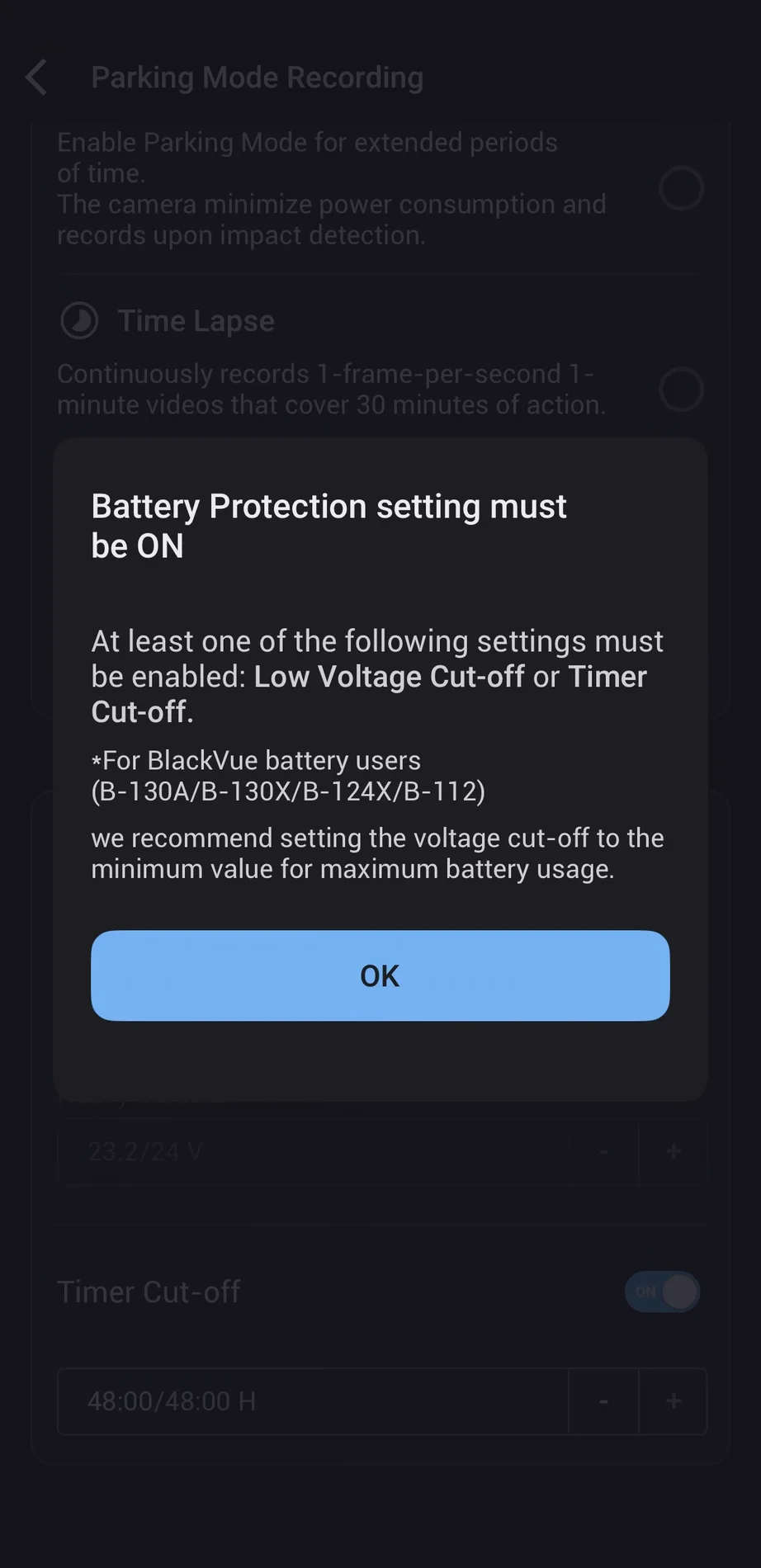
  • Speaking of parking mode, you cannot turn off the battery cutoff feature. I wish you could completely turn this off since I use an external battery and don't need it on. Its either voltage cutoff or timer cutoff. I opted for the timer cutoff since 48 hours should be long enough, but it would be better if they could let us power users disable it completely.
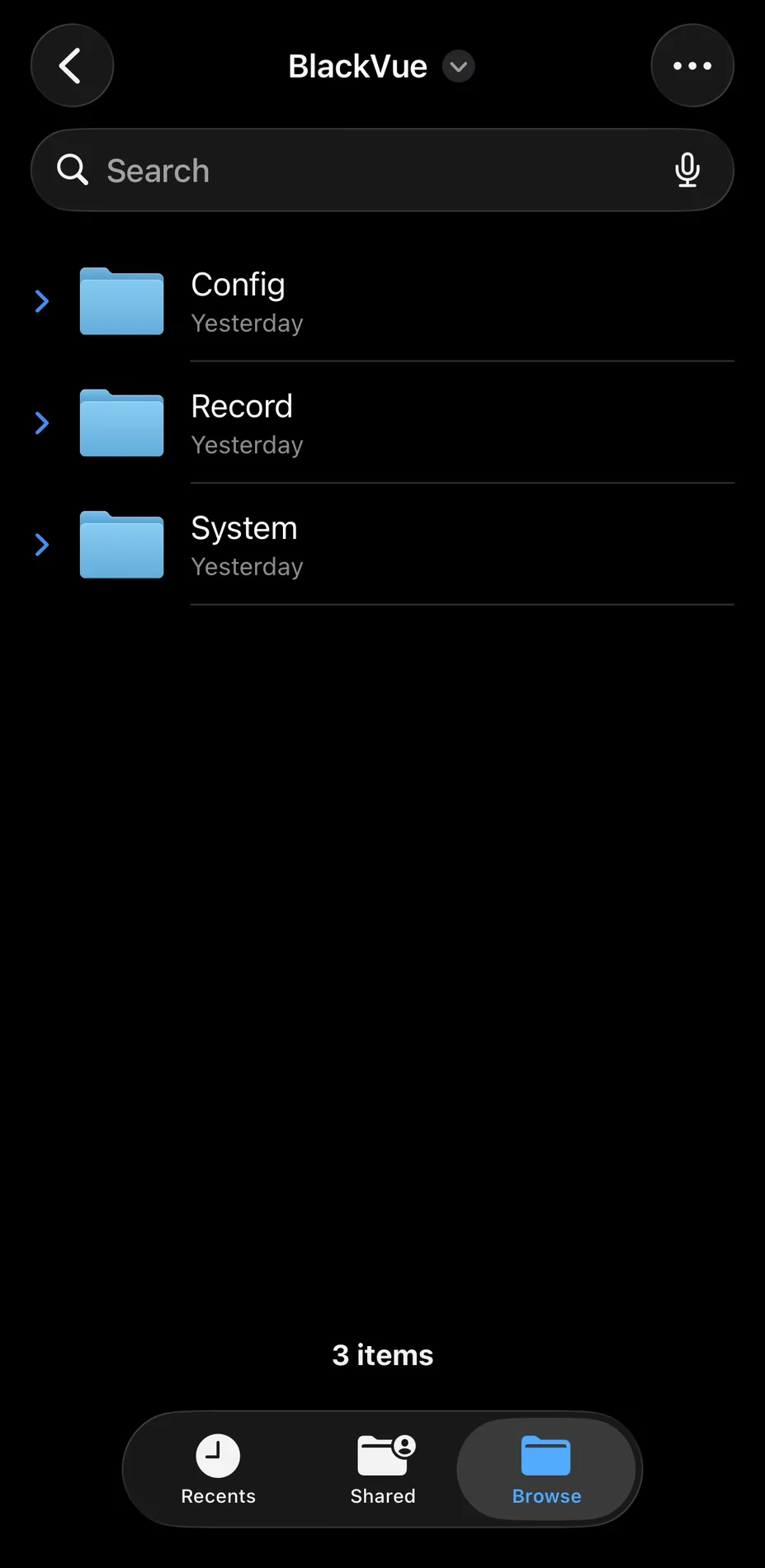
  • On my U1000, the partitions were set up with separate folders per incident type (continuous, parking, motion, manual, etc.), which allowed for longer retention for certain types of videos. For example, on my 256 GB SD card, I had parking events from months ago that didn't get overwritten by the motion recording or any other recording type. It seemed every partition on the U1000 had its own retention period based on the SD card size. This proved useful when I noticed a small dent on my car and found the video from weeks ago. However, as mentioned before, BlackVue stores everything in a single timeline with an optional setting for "Event File Protection" which is disabled by default but seems useful. It only stores 50 events, which hopefully should be enough, but it would be nice if this value could be customized, considering it supports up to 1 TB cards.

App Impressions: The app has some features that are better or worse than Thinkware.

App Feedback in no order:
  • You need to create an account, which, for the Thinkware Cloud app, was optional.
  • The BlackVue app shows the GPS location and speed in the video clip; the U1000 didn't do this. Nice feature.
  • The BlackVue app sometimes hangs, so I have to force close and reopen it.
  • BlackVue app seems to be online-first (or at least prefers online). This is a huge downgrade IMO since the Thinkware app could be used without an internet connection for downloading clips and changing settings. BlackVue does allow an offline mode if there is no internet but it would be nice if it didn't need a network to start.
  • The app shows all the events in a single timeline. I really like this compared to the U1000 where you needed to go to different folders to find the clip you might need. It may also help in getting the whole story in an incident.
  • I don't think you can select multiple clips to download at once like the U1000. Unless I missed it in the app.

Screenshots:

IMG_5150.webp

Cannot disable battery protection.

IMG_5154.webp

SD card structure


IMG_5157.webp

Event File Protection feature mentioned above.

IMG_5158.webp

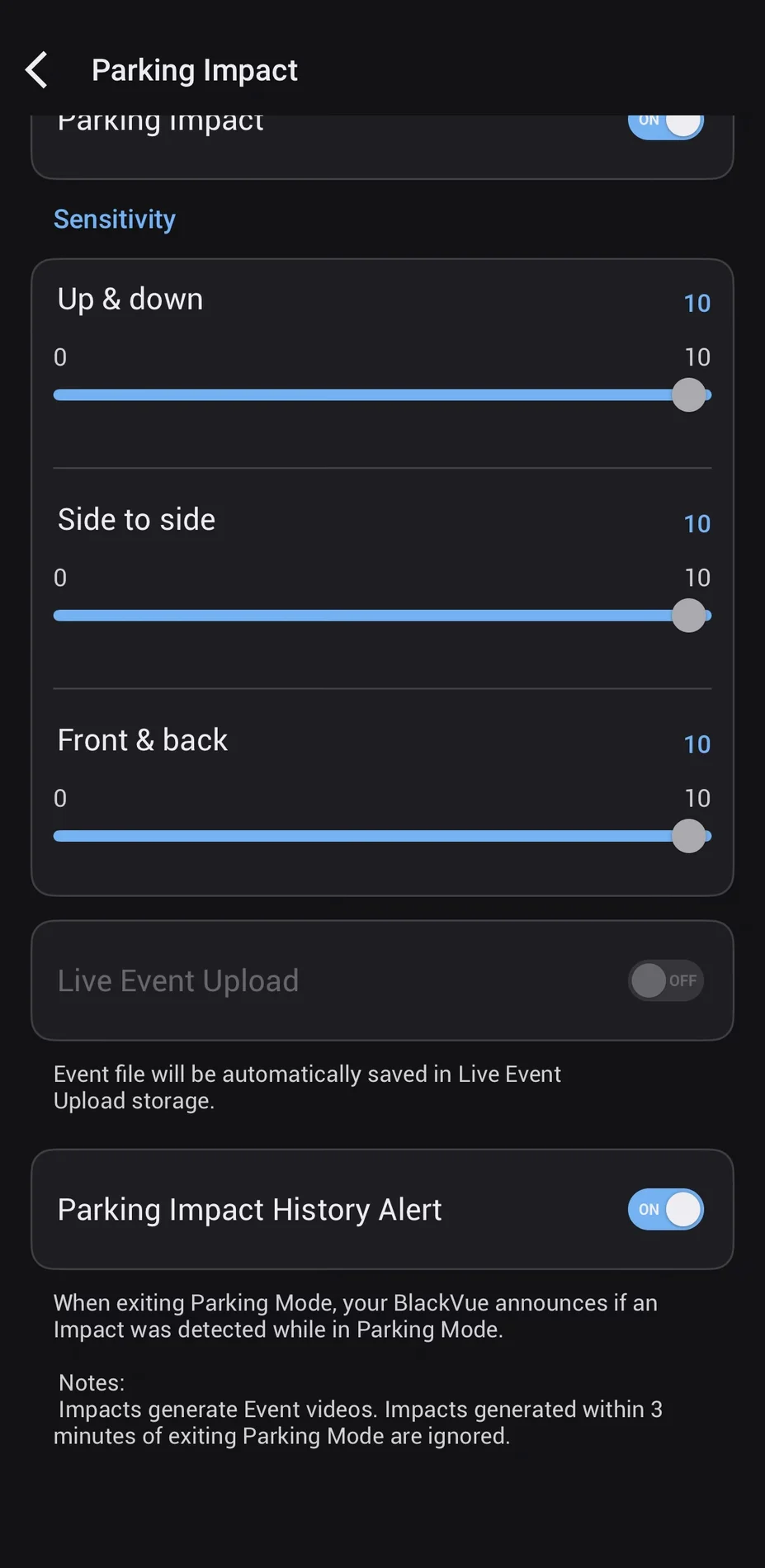
Parking impact settings. Also mentions that impacts within 3 minutes of exiting parking mode are ignored. Which I don't think matches my experience?
 
Last edited:
Let me know if anyone has any questions or anything.

I was able to test the parking mode event timer briefly, and unlike the U1000, the Elite 9 almost instantly goes into parking mode. And the door shutting triggered an alert, as shown below when leaving the car. This means the feature in the app that BlackVue has advertised does not work?

I parked the car in the second clip, waited a couple of seconds for parking mode to turn on, then slammed my car door like I'm getting out, and it still registers as a parking event despite the feature stating it disregards the first 3 minutes. I wish there were a way to set the parking mode entry delay once it detects ACC power from the battery.

Am I understanding this feature correctly?

IMG_5177.webp

1767926905691.webp
 
Last edited:
I think the 3 minutes after starting parking mode and ignoring events is only for the impact alert history (audible notification of an impact).
It would still record and log any impacts though as a consistency thing.
Parking up and someone crashing into you within 3 minutes. Would you not want the camera to log that?
It's just the audible notification that is ignore ("an impact was detected in parking mode").
 
Last edited:
IMG_5214.webp


Also noticing the GPS lock delay. To be fair I noticed before replacing my U1000 it would take a couple minutes to lock on to GPS compared to instantly when I first got it. The Elite 9 connected when I got on to the highway.

Also, the Elite 9 is confirmed to cause my Uniden R8 to MRCD false. I was downloading a video in my driveway and also work parking lot and both times it false alerted.
 
The form factor of the Elite 9 is preferable for me - it does show the wide variance in windscreen 'layout' across car manufacturers, despite there being a screen with a mirror and maybe a couple of sensors to play with.
The GPS lock delay was a big factor in my decision to remove the Elite 9, I'm currently using a Thinkware ARC 900, whilst the footprint is larger, it is more 'landscape' than 'portrait' and isn't as visually intrusive as the U3000 Pro.
Until Vueroid come up with something along the lines of the S1 4k in a form factor similar to the Elite 9, then I'll be sticking with the ARC 900, it seems to maintain GPS lock, or achieve it very quickly unlike the Elite 9 which took up to 20 minutes on occasion - mostly in the 5-10 minute range and the weather made a big difference, it's a shame as otherwise I found the Elite 9 to be a good - not quite great, Dashcam.
 
I asked BlackVue support about the Battery Protection feature and if there is any possibility to disable it. Here is their reply:

The reason why the Battery Protection cannot be fully disabled is because of the introduction of the Power Saving Mode. ELITE models were designed to have the ignition-based parking mode (cf. older BlackVue models are GPS-based parking mode).This means, an ELITE dashcam should either be (a) powered by an external battery accessory or (b) connected to the car's fuse box via hardwiring for the parking mode recording to kick in. However, in these two setup, the camera does not have the ability to distinguish the power source (external battery or car's battery). That is why, the Battery Protection must be activated in order to protect and prolong the life of the batteries.

I will update their response to my follow up question.
 
I asked BlackVue support about the Battery Protection feature and if there is any possibility to disable it. Here is their reply:


I will update their response to my follow up question.
Thanks for posting their response.
Whilst the camera may not automatically distinguish between car battery and external battery pack, that doesn't explain why they can't have a manual setting for the customer to tell the camera which setup they have.
I'm all for an option to disable it if you have an external battery back - even if having the settings gives a warning when selecting that it's only for external battery pack use, and to enable protection if connecting to car battery
 
Thanks for posting their response.
Whilst the camera may not automatically distinguish between car battery and external battery pack, that doesn't explain why they can't have a manual setting for the customer to tell the camera which setup they have.
I'm all for an option to disable it if you have an external battery back - even if having the settings gives a warning when selecting that it's only for external battery pack use, and to enable protection if connecting to car battery
I agree. I am contacting their regular support so maybe @rcg530 has a direct connection to someone higher up as to why this can't be turned off. I will await their reply to my follow up question but I will try to at least submit feedback if allowed.
 
I agree. I am contacting their regular support so maybe @rcg530 has a direct connection to someone higher up as to why this can't be turned off. I will await their reply to my follow up question but I will try to at least submit feedback if allowed.
I asked about this while at CES. They're investing whether they can add the ability [like their older models allow] to disable the low voltage cutoff setting needing to be enabled when it's powered by a dash camera battery pack.
 
Speaking of parking mode, how long is the buffered recording in parking mode for you guys? I am noticing sometimes I hear the beep at 10 seconds while other times its been closer to 20 seconds in the clip.
 
IIRC, the Parking Mode Recording - Power Saving Mode will not buffer and will boot up when impact is detected to start recording.

I've set my Parking Mode Recording to Motion Detection, which currently keeps the dashcam on at "all times".
 
IIRC, the Parking Mode Recording - Power Saving Mode will not buffer and will boot up when impact is detected to start recording.

I've set my Parking Mode Recording to Motion Detection, which currently keeps the dashcam on at "all times".
Yes the motion detection recording. Thats the one i use
 
Has anyone noticed that when disconnecting from the app sometimes (as in only twice since I have gotten the cam) the camera will reboot?

I connected to view some video clips via the app. After I was done, I disconnected and forced closed the Blackvue app. Then I noticed all three light were on, then off, then the camera booted up fresh with the Blackvue audio cue.

I connected again and it was fine disconnecting. I didn't change any settings or anything either times. I didn't think much of it since it seems its only happened when disconnecting from the app.
 
Yep, I had that - thought it was an 'undocumented feature' - didn't seem to change anything so I didn't really worry about it.
 
Anyone notice the white noise when theres no sound in the environment on the Elite 9?

I turn the volume on my phone to 100% when watching downloaded videos on parking mode videos and its not "quiet" if that makes sense. It has a white noise type sound that sometimes makes hearing softer sounds or tones harder.
 
I've heard that too when parked and playing normal video (not times lapses).
It's usually the ambient noise of the camera and vehicle - because it's normally very quiet - the camera focuses in harder on it and amplifies it which gives it a white noise type sound.
 
Gotcha, I don't believe I noticed it on my old U1000 so it's a new sound that made me think something was up with the mic.
 
i too come from the Thinkware U1000 (had this brand for the last 10+ years or so)

biggest changes (for better or worse);

- can't switcht off battery protect. this is terrible when you have an external battery

- app is much better.
easier to find footage,
MUCH easier to set up cloud and add hotspots.
No need to manual connect to the camera's wifi, app does it automatically.
bit easier to setup the camera, as menus are clearer.

- you get free cloud service , but when you have 2 cameras (like me) and you want to have them under the same account, then all of sudden you need to pay ?!
so the more cameras you buy from BV the more they want to charge you. strange business model... (thinkware is completely free)

- personally don't miss the partition feature too much as 50 events seem more than enough for me.

- I like the design of BV better. i always did and used to have one, but the reason i switched to thinkware was that 10+ years ago the BV cams would overheat very quickly.

- btw, the U1000 can also start up silently if you set it . It can also show the speed in the footage, though not GPS i think

Have not installed the cams yet, as still debating whether to return them due to the "battery protect" issue and the way they try to squeeze you on cloud...

TBC...
 
i too come from the Thinkware U1000 (had this brand for the last 10+ years or so)

biggest changes (for better or worse);

- can't switcht off battery protect. this is terrible when you have an external battery

- app is much better.
easier to find footage,
MUCH easier to set up cloud and add hotspots.
No need to manual connect to the camera's wifi, app does it automatically.
bit easier to setup the camera, as menus are clearer.

- you get free cloud service , but when you have 2 cameras (like me) and you want to have them under the same account, then all of sudden you need to pay ?!
so the more cameras you buy from BV the more they want to charge you. strange business model... (thinkware is completely free)

- personally don't miss the partition feature too much as 50 events seem more than enough for me.

- I like the design of BV better. i always did and used to have one, but the reason i switched to thinkware was that 10+ years ago the BV cams would overheat very quickly.

- btw, the U1000 can also start up silently if you set it . It can also show the speed in the footage, though not GPS i think

Have not installed the cams yet, as still debating whether to return them due to the "battery protect" issue and the way they try to squeeze you on cloud...

TBC...
To be fair there is no perfect dashcam. I would say the viofo A329T comes close based on the telephoto cam and video quality but has its own quirks. And viofo has let me down in the past with the A129 a long time ago.

Id say despite the weird or dumb decisions that BV has made I still like it more than the U1000 and think its a big step up video quality wise. It already helped resolve a parking lot dispute i witnessed this month.
 
Back
Top