VIOFO A229 Pro FIRMWARE

^^ Good datapoint!
Honestly I think 8 seconds is just too long, but I get that Viofo doesn't want a false OFF trigger.
I would prefer the only long press command to be for a power off.
 
^^ Good datapoint!
Honestly I think 8 seconds is just too long, but I get that Viofo doesn't want a false OFF trigger.
I would prefer the only long press command to be for a power off.
I agree. I was quite happy with the old behavior with a shorter button press time for a power off of the dash camera. My wife has been powering off the A229 Pro in her car [98% of the time 🙂] with the older firmware with the shorter power off button press time. I've been getting my wife accustomed to the new longer power off button press time in our other vehicle with an A229 Plus.
 
I agree. I was quite happy with the old behavior with a shorter button press time for a power off of the dash camera. My wife has been powering off the A229 Pro in her car [98% of the time 🙂] with the older firmware with the shorter power off button press time. I've been getting my wife accustomed to the new longer power off button press time in our other vehicle with an A229 Plus.
We thought most of users don't need to power off the camera manually.
But there are many complaints about entering the menu, that's why we changed this.
 
Thanks everyone for your feedback.

So as suggested, I woke the screen by only pressing the menu button once. Once screen is on I pressed and held menu button for 5s and the dashcam powered down.
Not too bad. I still prefer before the fw update when I could just press and hold menu button from a black screen but it's not the end of the word, I'm happy with this.

We thought most of users don't need to power off the camera manually.
But there are many complaints about entering the menu, that's why we changed this.

Just providing a different perspective.
I power off my dashcam every single night. In a year I power down my dashcam easily 300 times (each day) minus when I'm on holiday or the car isn't sleeping in my garage where I will leave the dashcam on.
In comparaison, I probably use the lock video button only 5 times/ year.

I never interact with the dashcam (as intended). The only interaction is pretty much turning it off. Next day when I start the car, dashcam powers up by itself and then throughout the day will switch in and out parking mode by itself. It's only at the end of the day when I park the car in my garage than I interact with the dashcam to turn it off.

That's maybe why I felt "strongly" about the change 😆

But to reiterate, I don't mind the new procedure, it's just the first time I didn't know I had to wake the screen. Make sure to update the owner's manuals to reflect this and soon people will get used to it.
 
@Arese I strongly suggest you consider ordering the BTR200 and programming one button to power off the camera.
It's so much easier.

The only "complaint" I can think of that Viofo may be referring, is previously you had to first stop recording (press REC once) before being able to enter the menu settings.
 
@Arese I strongly suggest you consider ordering the BTR200 and programming one button to power off the camera.
It's so much easier.

The only "complaint" I can think of that Viofo may be referring, is previously you had to first stop recording (press REC once) before being able to enter the menu settings.

I will, I didn't know it was an option.
I need to think about where I would place it in the car.
 
In the recent app update notes, it says 'added compatibility for ... A229 Pro models V1.5'. I wonder what's new..
 
In the recent app update notes, it says 'added compatibility for ... A229 Pro models V1.5'. I wonder what's new..
Where do you see the app update notes? My iPhone updates the app automatically but I've never seen update notes anywhere.
 
Where do you see the app update notes?
 
In the recent app update notes, it says 'added compatibility for ... A229 Pro models V1.5'. I wonder what's new..
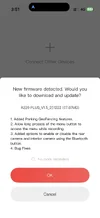
It showed up 1 time after I updated the app, I was not home so I pressed cancel (without ticking no more reminder button) after I get home I could not make that update pop up show up anymore. I have tried restart dashcam, reinstall app but nothing worked. Looks like V1.5 is OTA only at this movement.

PS my screenshot says A229 plus but it should be the same for A229 Pro.
 

Attachments

  • IMG_3123.webp
    IMG_3123.webp
    47.4 KB · Views: 67
The new firmware version for A229 Pro FWA229P_V1.5_251222 is available for download on the Viofo website.


1. Added: GeoFencing capabilities.

2. Added: Wi-Fi manual status memory.

3. Fixed: Other minor bugs.
 
Last edited:
The new firmware version for A229 Pro FWA229P_V1.5_251222 is available for download on the Viofo website.

Geofencing was added!
The Power OFF command is back to previous, a single long press of the Menu button.
 
Last edited:
The new app is nice, it installed the new firmware flawlessly as soon as connecting. Just wish they would add the option to backup your current settings to the cloud before upgrading so you dont have to re-enter everything. I've got screen shots of the lot but always forget which folder I've saved them to.
 
@VIOFO-Support

Please add:
● Add only the critical alert voice notification option.
● Add Voice notification of parking events.

I don't see how this would be limited by hardware.
 
Geofencing was added!
The Power OFF command is back to previous, a single long press of the Menu button.
Does Geofencing work with the A229 Pro? I thought it was only the newer models?
 
Does Geofencing work with the A229 Pro? I thought it was only the newer models?
Yes, I saw it in the A229 Pro menu after updating the F/W.
I have not played with it yet.
 
The new app is nice, it installed the new firmware flawlessly as soon as connecting. Just wish they would add the option to backup your current settings to the cloud before upgrading so you dont have to re-enter everything. I've got screen shots of the lot but always forget which folder I've saved them to.
For some odd reason most of my setting remained intact except for the Time Zone and Loop time setting.
I was happy to see the HDR auto time kept its settings, which surprised me. I reset to factory default but it did not reset the HDR auto timer, as did previous F/W upgrades.
 
The new app is nice, it installed the new firmware flawlessly as soon as connecting. Just wish they would add the option to backup your current settings to the cloud before upgrading so you dont have to re-enter everything. I've got screen shots of the lot but always forget which folder I've saved them to.
Can you clarify? You mean updating the phone app will cause the dash cam firmware to update when connecting to it via wifi? And then you lose all your settings after the firmware update?

Geofencing was added!
The Power OFF command is back to previous, a single long press of the Menu button.
With regards to the Power OFF command. How was it done before this firmware update? It would be nice if there was a voice command for Power OFF also.
 
Can you clarify? You mean updating the phone app will cause the dash cam firmware to update when connecting to it via wifi? And then you lose all your settings after the firmware update?


With regards to the Power OFF command. How was it done before this firmware update? It would be nice if there was a voice command for Power OFF also.
So I updated to the new Viofo Android app and then connected it to the A229 Pro via Wifi and it offered the new firmware update that was just released. Update went perfectly but afterwards all settings were back to default and I had to reset up everything.
 
Back
Top