Does the camera enter parking mode directly when your car is parked in that area? Please help to verify the coordinate stamp in the video clips recorded immediately before and after the engine was switched off to confirm that the GPS signal is active and that the recorded coordinates closely match the position set in the menu.Twice now the geofencing function to turn off the camera has not worked. The two malfunctions were not twice in a row, it had worked in-between.
Both times there was a GPS lock prior to shutting off ignition (center LED ON, A229 Pro).
Geofencing was enabled on zone 1 for 15 M
It had reliably worked in the past.
Edit - the Geofencing did not work for a third time today. Something is clearly wrong. I even reset the coordinates prior to the third malfunction.

You are using an out of date browser. It may not display this or other websites correctly.
You should upgrade or use an alternative browser.
You should upgrade or use an alternative browser.
VIOFO A229 Pro FIRMWARE
- Thread starter Karagandinez
- Start date

Hack_man
Well-Known Member
@VIOFO-Support Thank you for the response
Yes the camera enters parking mode directly when the car is parked in the Geofencing area. It previously switched OFF due to the Geofencing settings.
The coordinate stamp in the video clips before and after the engine was switched off (from driving to parking modes) match within three decimal places and also match what is stored in the GPS Parking setting for Zone 1 which was enabled.
I was tempted to try reformatting the SD card but did not want to lose videos if it helped understand the problem.
I have confirmed Geofencing has completely stopped working during my last 4 parking events.
I have an A229 Plus installed in another car with Geofencing that parks in the same garage, and that camera has been working perfectly with Geofencing. It's the A229 Pro that recently stopped working for Geofencing.
Last edited:
Do you mean that the Geofencing feature on A229 Pro stops working completly? Please update the firmware and reset the camera to test if it helps.@VIOFO-Support Thank you for the response
Yes the camera enters parking mode directly when the car is parked in the Geofencing area. It previously switched OFF due to the Geofencing settings.
The coordinate stamp in the video clips before and after the engine was switched off (from driving to parking modes) match within three decimal places and also match what is stored in the GPS Parking setting for Zone 1 which was enabled.
I was tempted to try reformatting the SD card but did not want to lose videos if it helped understand the problem.
I have confirmed Geofencing has completely stopped working during my last 4 parking events.
I have an A229 Plus installed in another car with Geofencing that parks in the same garage, and that camera has been working perfectly with Geofencing. It's the A229 Pro that recently stopped working for Geofencing.
Arese
Active Member
Hi @VIOFO-Support, did you implement the geofencing feature after our discussion here? 🙂
After I posted this back in Dec 2025, I haven't been on the forum until a couple of weeks ago. After checking this thread for news I saw people taking about a new geofencing feature in the new fw. I updated the fw and turned on the geofencing feature and THANK YOU so much, that is such a great feature for someone like me who turns off my dashcam every night. This is genuinely such a great quality of life improvement for me. It may seem like nothing but not having to wait 5s to power the dashcam each time I park home (sometimes multiple times a day) is awesome! Been running it for 3 weeks and it's been flawless.
Big thanks for coming up with this great feature 👍
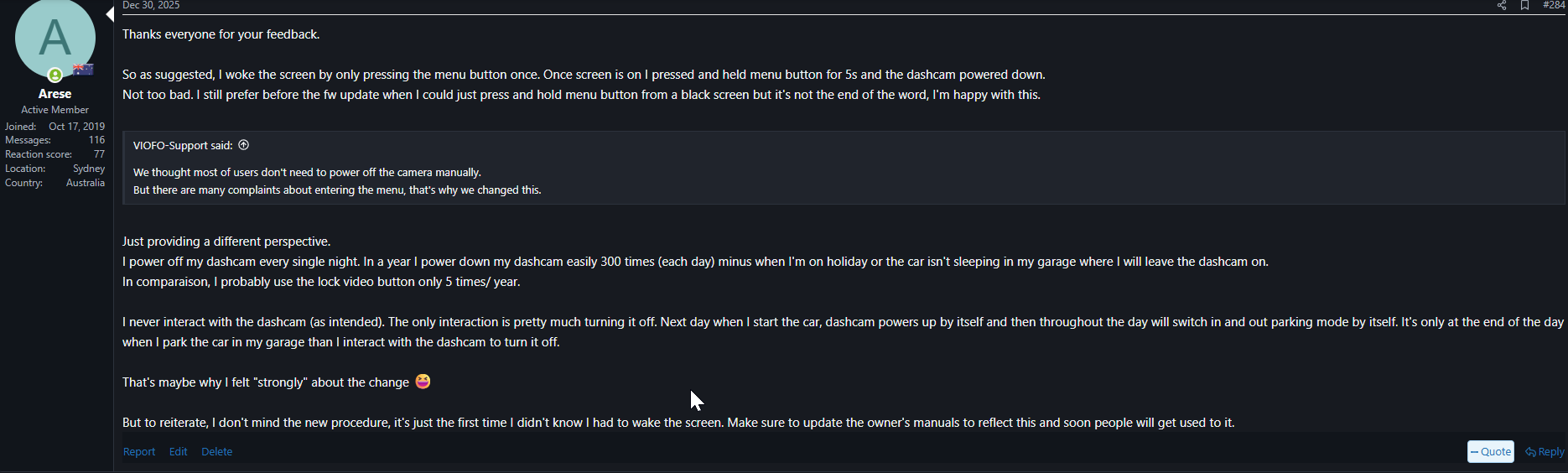
After I posted this back in Dec 2025, I haven't been on the forum until a couple of weeks ago. After checking this thread for news I saw people taking about a new geofencing feature in the new fw. I updated the fw and turned on the geofencing feature and THANK YOU so much, that is such a great feature for someone like me who turns off my dashcam every night. This is genuinely such a great quality of life improvement for me. It may seem like nothing but not having to wait 5s to power the dashcam each time I park home (sometimes multiple times a day) is awesome! Been running it for 3 weeks and it's been flawless.
Big thanks for coming up with this great feature 👍
OP
OP

Karagandinez
Well-Known Member
- Joined
- Nov 27, 2020
- Messages
- 3,262
- Reaction score
- 4,747
- Location
- Deutschland
- Country
- Germany
- Dash Cam
- At the moment Viofo, Vueroid and Vantrue
OP
OP
Karagandinez
Well-Known Member
- Joined
- Nov 27, 2020
- Messages
- 3,262
- Reaction score
- 4,747
- Location
- Deutschland
- Country
- Germany
- Dash Cam
- At the moment Viofo, Vueroid and Vantrue
OP
OP
Karagandinez
Well-Known Member
- Joined
- Nov 27, 2020
- Messages
- 3,262
- Reaction score
- 4,747
- Location
- Deutschland
- Country
- Germany
- Dash Cam
- At the moment Viofo, Vueroid and Vantrue

QuozL
Member
- Joined
- Oct 16, 2023
- Messages
- 41
- Reaction score
- 20
- Location
- Brisbane
- Country
- Australia
- Dash Cam
- Viofo A229 Pro
Is this available to update via the app yet? When I connect to the A229 Pro via the app it's not offering any firmware upgrade.
firmware
Download the latest VIOFO firmware updates for every dash cam model. Step-by-step instructions, version notes, and SD card requirements.www.viofo.com
A229 Pro = V1.5_260602

Chuck McCoy
Well-Known Member
- Joined
- Jun 9, 2022
- Messages
- 5,435
- Reaction score
- 5,183
- Location
- California
- Country
- United States
- Dash Cam
- 2027 Min. Spec: STARVIS 3 & HDR & 1mA LPID & 4CH & FastBoot
When A229 Pro Telephoto was released Winter 2025, I tried to update my “old” A229 Pro (September 2023) with new A229 Pro Tele firmware.When I connect to the A229 Pro via the app it's not offering any firmware upgrade.
It no worky.
That’s when I realized A229 Pro, and A229 Pro Tele are two different cameras using two different firmware.
Which camera do you have?
1.) A229 Pro
2.) A229 Pro Tele
Check APP in 24 hours.Is this available to update via the app yet?
Attachments


QuozL
Member
- Joined
- Oct 16, 2023
- Messages
- 41
- Reaction score
- 20
- Location
- Brisbane
- Country
- Australia
- Dash Cam
- Viofo A229 Pro
A 229 Pro. I replied to the post about the updated A 229 Pro firmware HERE not the tele post.When A229 Pro Telephoto was released Winter 2025, I tried to update my “old” A229 Pro (September 2023) with new A229 Pro Tele firmware.
It no worky.
That’s when I realized A229 Pro, and A229 Pro Tele are two different cameras using two different firmware.
Which camera do you have?
1.) A229 Pro
2.) A229 Pro Tele
Check APP in 24 hours.
Chuck McCoy
Well-Known Member
- Joined
- Jun 9, 2022
- Messages
- 5,435
- Reaction score
- 5,183
- Location
- California
- Country
- United States
- Dash Cam
- 2027 Min. Spec: STARVIS 3 & HDR & 1mA LPID & 4CH & FastBoot
I see three different ones.A 229 Pro. I replied to the post about the updated A 229 Pro firmware HERE not the tele post.
So confusing.
Sorry about that.
Attachments

OP
OP
Karagandinez
Well-Known Member
- Joined
- Nov 27, 2020
- Messages
- 3,262
- Reaction score
- 4,747
- Location
- Deutschland
- Country
- Germany
- Dash Cam
- At the moment Viofo, Vueroid and Vantrue
There’s nothing complicated about it.I see three different ones.
So confusing.
You see three different options in three different posts.
The post by user QuozL links directly to the post containing the firmware for the A229 Pro.

firmware
Download the latest VIOFO firmware updates for every dash cam model. Step-by-step instructions, version notes, and SD card requirements.
www.viofo.com
A229 Pro = V1.5_260602

Chuck McCoy
Well-Known Member
- Joined
- Jun 9, 2022
- Messages
- 5,435
- Reaction score
- 5,183
- Location
- California
- Country
- United States
- Dash Cam
- 2027 Min. Spec: STARVIS 3 & HDR & 1mA LPID & 4CH & FastBoot
Ohhhhhhhhhh.There’s nothing complicated about it.
You see three different options in three different posts.
The post by user QuozL links directly to the post containing the firmware for the A229 Pro.
I see it now.
I'm wee-todd-ed 🙃
OP
OP
Karagandinez
Well-Known Member
- Joined
- Nov 27, 2020
- Messages
- 3,262
- Reaction score
- 4,747
- Location
- Deutschland
- Country
- Germany
- Dash Cam
- At the moment Viofo, Vueroid and Vantrue
OP
OP
Karagandinez
Well-Known Member
- Joined
- Nov 27, 2020
- Messages
- 3,262
- Reaction score
- 4,747
- Location
- Deutschland
- Country
- Germany
- Dash Cam
- At the moment Viofo, Vueroid and Vantrue
The note for this update says, NOTE 1, to backup custom settings. This is a feature I have always thought would be useful but how is it possible and how could they then be reloaded into the dashcam? I see nothing in the manual. Perhaps they mean write them down somewhere.

Last edited:

TheSpanishInq
Active Member
- Joined
- Feb 26, 2020
- Messages
- 144
- Reaction score
- 75
- Location
- ~/
- Country
- Netherlands
- Dash Cam
- Viofo A229 Pro 2CH
This backup may very well involve you, scrolling through the settings screen of your dash cam, a piece of paper and a pencil...
Or a modern version were you film the settings screen, while scrolling.
Or a modern version were you film the settings screen, while scrolling.
Chuck McCoy
Well-Known Member
- Joined
- Jun 9, 2022
- Messages
- 5,435
- Reaction score
- 5,183
- Location
- California
- Country
- United States
- Dash Cam
- 2027 Min. Spec: STARVIS 3 & HDR & 1mA LPID & 4CH & FastBoot
Use this tool made by @Julian23The note for this update says, NOTE 1, to backup custom settings. This is a feature I have always thought would be useful but how is it possible and how could they then be reloaded into the dashcam? I see nothing in the manual. Perhaps they mean write them down somewhere.
Attachments
Thanks Chuck but as far as I can see, there is no way to export the config file from an A229 Pro. However, using Julian123 demonstration file I can make a template for writing down my settings. So, thanks again.Use this tool made by @Julian23
Last edited:
Chuck McCoy
Well-Known Member
- Joined
- Jun 9, 2022
- Messages
- 5,435
- Reaction score
- 5,183
- Location
- California
- Country
- United States
- Dash Cam
- 2027 Min. Spec: STARVIS 3 & HDR & 1mA LPID & 4CH & FastBoot
Oops, I guess Export Settings has not been rolled out for A229 Pro yet.Thanks Chuck but as far as I can see, there is no way to export the config file from an A229 Pro. However, using Julian123 demonstration file I have a temp]let for writing down my settings. So, thanks again.
Only on A329S & A119M Pro.
