VIOFO A329S - Walkaround Install Demo - Remote SD Card & LTO Battery Pack

Chuck McCoy

Well-Known Member
Joined
Jun 9, 2022
Messages
4,630
Reaction score
4,604
Location
California
Country
United States
Dash Cam
2026 Minimum Spec: STARVIS 2 & HDR & Low Power Parking Mode
This video deserves it’s own thread.
Check out this super clean install from my man @GPak

1.) Viofo A329S 3CH (IR Interior & Rear)
2.) Remote Mounted SD Card Reader
3.) Custom LTO Battery Pack for Parking Mode


Q&A

Q: Amazon link for SSD Cable?
Q: Amazon link for SD Card Reader?
Q: Will this work / have you tested this configuration with 1TB / 2TB SD Card?
Q: LTO Battery Pack Wh Capacity?
Q: How many hours of Low Bitrate Parking Mode in this configuration?
Q: Based on your testing, what are the PROS & CONS of using SD Card Reader with Micro SD Card vs. “dedicated” SSD?

Thanks again for the show & tell.
This makes me want to make a walkaround of my setup.
-Chuck

@viofo @VIOFO-Support
 
Thanks, Chuck, for starting this thread! I really appreciate it and your kind evaluation of my setup.
I'll try to answer all your questions in a few messages.

Q: Amazon link for SSD Cable?
A:
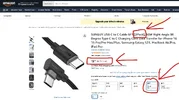
Here's a link to the cable. I'm using the 6ft version, which is actually 6.6ft/2m, but 8ft/2.4m cable is also available there, though I haven't tested it.
This cable cost is only about $5 each:
https://www.amazon.com/gp/B09CCL8H1Z

It's worth noting that the Viofo SSD Cable, which also works with SD Card Reader, is about 4.9 mm in diameter and a bit stiff, while the cable linked here is only about 3.8 mm in diameter and is softer, making it easier to install.

Q: Amazon link for SD Card Reader?
A:
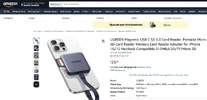
Here's a link to the Card Reader:
https://www.amazon.com/gp/B0DRNXG4X5

It works with all of my MicroSD cards: SanDisk High Endurance; SanDisk Extreme; SanDisk Extreme PRO; Samsung; VIOFO Industrial; from 128GB to 512GB.
However, it should be noted that Viofo dash cams do not recognize standard-sized SD cards in dual-slot card readers.
 
Last edited:
Reply function not working:

@GPak said;
It's worth noting that the Viofo SSD Cable, which also works with SD Card Reader, is about 4.9 mm in diameter and a bit stiff, while the cable linked here is only about 3.8 mm in diameter and is softer, making it easier to install.

Chuck said;
There’s gotta be 100’s of posts here about OEM Viofo SSD Cable vs. Aftermarket.
If I recall, every time Viofo-Support has replied it’s been something like;
“Our OEM Cable is thicker because of shielding, non-OEM cables may have interference with other equipment”
Or something like that.
It’s good to know you found an aftermarket that works for your specific application.
For only $9.49 for a 2Pak it's not a huge gamble.

GPak said;
It works with all of my MicroSD cards: SanDisk High Endurance; SanDisk Extreme; SanDisk Extreme PRO; Samsung; VIOFO Industrial; from 128GB to 512GB.
However, it should be noted that Viofo dash cams do not recognize standard-sized SD cards in dual-slot card readers.

Chuck said;
Good to know this configuration ONLY works with Micro SD Cards.
Not the “regular” standard size.
I actually got my hands on a 1TB Micro SD Card for testing, and I’ve been meaning to test it with the UGREEN SD Card Reader & 6ft Type-C Male to Female cable you sent over, but ever since I measured the A329S "longish" boot up speed I put it off, until we get the “quick boot” firmware update.
 

Attachments

  • 2Pak for $9.49 .webp
    2Pak for $9.49 .webp
    130.5 KB · Views: 53
  • Reply Function Not Working .webp
    Reply Function Not Working .webp
    29.7 KB · Views: 47
  • Card Reader .webp
    Card Reader .webp
    108.3 KB · Views: 48
Chuck said;
There’s gotta be 100’s of posts here about OEM Viofo SSD Cable vs. Aftermarket.
If I recall, every time Viofo-Support has replied it’s been something like;
“Our OEM Cable is thicker because of shielding, non-OEM cables may have interference with other equipment”
Or something like that.
.......
A little more on Cables.
Viofo is right that “non-genuine cables may cause interference”, and in the case of SSD and SD Card Rider it is specifically interference with the Viofo’s GPS.

Using the high-speed USB-C male to female cable (the one that you and I tested) I initially didn't notice any interference with the GPS signal since GPS was disabled (I didn't want my speed to be displayed).
However, with the advent of the geo-fencing, which I really love, I enabled GPS and noticed that the GPS signal was mostly absent or unstable.

I did some research on this and found that the key is to avoid using the newest and fastest USB-C 3.0+, 5Gbps+ cables.
Instead, use a USB-C 2.0 cable, with data transfer speed of up to 480Mbps. (I believe, Viofo uses USB-C 2.0 port/protocol)
But even among USB-C 2.0 cables, not all are compatible with Viofo’s GPS, so after trying a couple of options, including a shielded cable with ferrites on each end which also didn’t work, I finally found one that has been working consistently and reliably for about three weeks now in my 2026 Honda Passport.

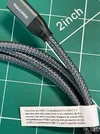
For reference, attached is a photo of an interesting label on one of my USB-C 3.1 cables that surprised me;
I always assumed USB-C cables were symmetrical and worked regardless of orientation.
Also, the newer USB-C 3.1+ cables are generally thicker and stiffer than older USB-C 2.0 cables.
 

Attachments

  • Cable Note.webp
    Cable Note.webp
    358.1 KB · Views: 48
Q: Will this work / have you tested this configuration with 1TB / 2TB SD Card?
A:
I don't have any MicroSD cards with a capacity of 1TB or more (I might get one soon).
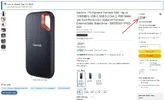
However, I do have SanDisk 1TB Extreme Portable SSD.
Here is link:
https://www.amazon.com/gp/B08GTYFC37
This morning I replaced the SD card reader with this 1TB SSD and I can confirm that it works, including GPS, without any issues.
Note that I only tested it for one day, but I'll leave it for a few more to ensure it is consistently reliable. EDIT: It isn't.

If anything goes wrong during this time, I'll edit this post accordingly.
EDIT: This morning, the Dashcam didn't recognize the SSD.
I tried disconnecting and reconnecting it, but to no avail. The dash cam voiced and displayed the same "Insert SD card" message.
It seems the dash cam didn't see the connected SSD. I'm not sure why.
So, No, this Cable/SSD combination doesn't work consistently and reliably.

Therefore, I removed the SSD and installed the original Card Reader, and everything works fine again.


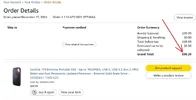
BTW, about a year and a half ago, when I bought this SanDisk SSD, I paid less than $100 for it. Today, the same SSD costs over $200!
 

Attachments

  • 1tB SanDisk SSD old price.webp
    1tB SanDisk SSD old price.webp
    59.5 KB · Views: 49
  • 1tB SanDisk SSD current price.webp
    1tB SanDisk SSD current price.webp
    136.3 KB · Views: 45
Last edited:
Q: LTO Battery Pack Wh Capacity?
A:
This specific LTO battery has an energy capacity of 276Wh

Q: How many hours of Low Bitrate Parking Mode in this configuration?
A:
I've tested the capacity of this and my other LTO batteries many times, but not specifically in this configuration.
However, it's easy to estimate with reasonable accuracy:
A329S, 3CH in LBR mode, consumes approximately 6W.
The battery+installation efficiency is approximately 90% (or 0.9).
Therefore, the LBR Parking duration would be about (0.9 x 276)/6 = 41.4 hours.

EDIT: Nevertheless, this battery allows for capacity expansion—either by connecting an expendable battery and by charging via solar panels or an auxiliary portable power station while parking.

More information about this particular LTO battery can be found here and in subsequent posts there:
https://dashcamtalk.com/forum/threads/lto-lithium-titanate-oxide-–-the-ultimate-battery-for-dash-cam-parking-mode-diy.50484/post-646472
 
Last edited:
Q: Based on your testing, what are the PROS & CONS of using SD Card Reader with Micro SD Card vs. “dedicated” SSD?
A:
Using an SD Card Reader instead of an SSD essentially boils down to comparing the SD card itself with an SSD drive.
The Pros and Cons for SD Card and SSD are mutually opposite: what is Pro for SD Card is a Con for SSD, and vice versa.

Micro-SD Card Pros:
-The most significant Pro is reliability. The microSD cards represents a well-established technology; most dashcam manufacturers produce their own branded microSD cards, thereby guaranteeing their quality, compatibility, and reliability. SSDs, on the other hand, are a relatively new technology and, as such, do not yet offer a high level of reliability—a fact clearly substantiated by the discussions here on DCT.
-The second most significant advantage is that power consumption when using an SD card is noticeably lower than when using an SSD—both in normal recording mode and, particularly importantly, in parking mode.
-MicroSD Cards are available in a wide range of capacities—from 32 GB to 2 TB—and span a broad price spectrum, allowing users to select an option that fits their budget; SSDs, on the other hand, typically feature very large capacities and, consequently, high price tags.
- Most users already own microSD Cards—for Drones, GoPro, Photo/Video Cameras and other devices - which, hopefully, will also be suitable for dashcams, so they won't have to purchase expensive SSDs.

SSD Pros: - are quite specific, perhaps relevant to fewer than 0.1% of users
-Faster data transfer from SSD to PC (Backup)
-Available for capacities exceeding 2TB

Everything stated above is merely my opinion.
 
Back
Top