A329 Test & Review PP

We are still optimizing the IQ for A329, such as reducing the sharpness for daytime 4K 60fps, reducing motion blur, etc.
Any update?
As soon as this rain storm passes I’ll be ready to gather daytime 4K60fps test footage.
I’m excited to see how it compares to the A119 Mini 2 (2K60fps).


Attachments

  • 11 .webp
    11 .webp
    30.4 KB · Views: 102
Any update?
Good News: Just received new unofficial firmware with Image Quality improvements for DAYTIME 4K60fps.
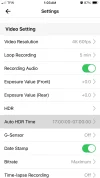
More Good News: They forgot to remove 93 Mbps Bitrate (approx) 1-CH configuration.
Woohoo! Guess what I’ll be using.
Bad News: We got rain for the next 7 days.
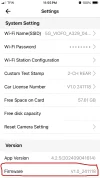
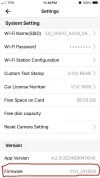
Old: V1.0 241009
New: V1.0 241118
If you want a copy contact Viofo, (I doubt they want me distributing unofficial firmware).
Let’s gooooooooooo!


Attachments

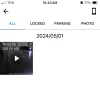
  • 1-CH Approx. 93 Mbps .webp
    1-CH Approx. 93 Mbps .webp
    34.3 KB · Views: 107
  • Who'll Stop The Rain .webp
    Who'll Stop The Rain .webp
    40 KB · Views: 133
  • V1.0 241118 .webp
    V1.0 241118 .webp
    43.7 KB · Views: 118
  • V1.0 241009 .webp
    V1.0 241009 .webp
    44.2 KB · Views: 115
  • Hi Dad .webp
    Hi Dad .webp
    42.6 KB · Views: 126
Last edited:
As soon as this rain storm passes I’ll be ready to gather daytime 4K60fps test footage.
Good News: Just received new unofficial firmware with Image Quality improvements for DAYTIME 4K60fps.
More Good News: They forgot to remove 93 Mbps Bitrate (approx) 1-CH configuration.
Woohoo! Guess what I’ll be using.
Bad News: We got rain for the next 7 days.
Rain is not ideal for dashcam testing, but real-world testing is still valuable. We all drive in the rain sometimes, and statistically I assume there's a higher risk of accidents in the rain.

I think top-end dashcams lose their advantage when the windshield is wet, although 60fps vs 30fps might give you 2x greater chance at capturing details in-between the rain drops?
 
Rain is not ideal for dashcam testing, but real-world testing is still valuable. We all drive in the rain sometimes, and statistically I assume there's a higher risk of accidents in the rain.

I think top-end dashcams lose their advantage when the windshield is wet, although 60fps vs 30fps might give you 2x greater chance at capturing details in-between the rain drops?
I just happen to have some 60fps rain test footage.
The bad news is YouTube automatically deleted the song I was playing for this test footage.
So I’ll put it under the video, just play both at the same time. Lol
 
Only 4 more days until I have beautiful sunshine to gather DAYTIME 4K60fps test footage with A329, and new unofficial V.10 241118 firmware.
I’m getting the comparison cameras prepped.
1.) 50/50 Road & Sky Lens Alignment
2.) Custom Text Stamps
3.) Super Cleaning Windows In/Out

COMPARISON CAMERAS;
4K60fps: A329 1-CH
4K30fps: A229 Pro 1-CH
2K60fps: A119 Mini 2
2K60fps: A229 Plus 1-CH

FIRMWARE;
V1.0 241118: A329
V1.3.1 241024: A229 Pro
V2.1 241010: A119 Mini 2
V1.3.1 241024: A229 Plus

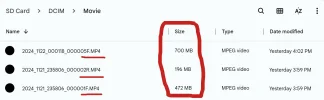
1 MINUTE FILE SIZE;
700MB: A329 1-CH
430MB: A229 Pro 1-CH
226MB: A119 Mini 2
208MB: A229 Plus 1-CH

BITRATE;
93 Mbps: A329 1-CH
57 Mbps: A229 Pro 1-CH
30 Mbps: A119 Mini 2
28 Mbps: A229 Plus

Anyone see mistakes / changes that need to be corrected?

1.) A229 Pro .webp

2.) A329 .webp

3.) A119 Mini 2 .webp

4.) A229 Plus .webp
 

Attachments

  • 7.) A119 Mini 2 1 Minute File Size .webp
    7.) A119 Mini 2 1 Minute File Size .webp
    20.3 KB · Views: 125
  • A119 Mini 2 1 Minute Clip .webp
    A119 Mini 2 1 Minute Clip .webp
    95.2 KB · Views: 113
  • 6.) A329 1 Minute File Size .webp
    6.) A329 1 Minute File Size .webp
    15.3 KB · Views: 110
  • 9.) Who'll stop the Rain .webp
    9.) Who'll stop the Rain .webp
    36.1 KB · Views: 114
  • 8.) A229 Plus 1 Minute File Size .webp
    8.) A229 Plus 1 Minute File Size .webp
    15.8 KB · Views: 123
  • 5.) A229 Pro 1 Minute File Size .webp
    5.) A229 Pro 1 Minute File Size .webp
    15.8 KB · Views: 106
Did you just forget to include the GPS coordinates for the A229 Pro? 😉
I always include GPS coordinates.
Sometimes cameras loose GPS signal in my garage due to interference.
But, good eye.
 
@viofo @VIOFO-Support
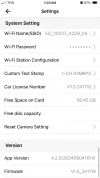
I keep forgetting to report this because it’s just a small nit pick.
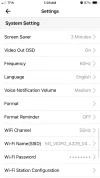
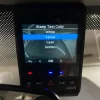
Thank you for adding the 4 color choices for the text stamp.
However, the setting is missing from the App.
You must use the on screen LCD menu on the unit.
If it’s not too much trouble can you add it to the shopping list for the next APP update?

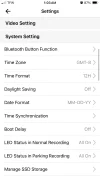
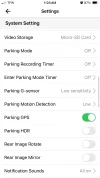
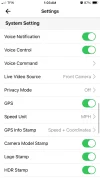
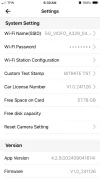
Settings & Configuration;
iOS APP: 4.2.5(202409041614)
Device: iPhone SE 2020
Firmware: V1.0 241118

Yellow Is My Favorite .webp
 

Attachments

  • 1 .webp
    1 .webp
    36.1 KB · Views: 124
  • 2 .webp
    2 .webp
    37.4 KB · Views: 104
  • 3 .webp
    3 .webp
    39.7 KB · Views: 114
  • 4 .webp
    4 .webp
    39 KB · Views: 120
  • 5 .webp
    5 .webp
    36.5 KB · Views: 107
  • 6 .webp
    6 .webp
    42.3 KB · Views: 100
  • Pick A Color Any Color .webp
    Pick A Color Any Color .webp
    287.2 KB · Views: 96
@viofo @VIOFO-Support
I keep forgetting to report this because it’s just a small nit pick.
Thank you for adding the 4 color choices for the text stamp.
However, the setting is missing from the App.
You must use the on screen LCD menu on the unit.
If it’s not too much trouble can you add it to the shopping list for the next APP update?

Settings & Configuration;
iOS APP: 4.2.5(202409041614)
Device: iPhone SE 2020
Firmware: V1.0 241118

View attachment 75495
Today I updated A329 with firmware: V1.0_241118.
Setting 4 stamp colors in the Android V3.2.18 application is present.
 
Today I updated A329 with firmware: V1.0_241118.
Setting 4 stamp colors in the Android V3.2.18 application is present.
The "current" VIOFO apps (iOS and Android) both don't account for the inclusion of the new 1-fps super night vision parking mode that was added to several of the VIOFO dash camera models. VIOFO added that option at the top of the list in the firmware menu for parking mode which shifted all pre-existing parking mode options by one. The app sends an "option" number to the dash camera for the parking mode option selected in the app and since the new 1-fps SNV parking mode now occupies the first position the wrong parking mode option is selected on the dash camera side.

Early last week, I sent an email to VIOFO asking when the next versions of the VIOFO app would be available to properly support all of the current options in all of the various settings. I was told that the parking mode issue is resolved in the next version of the app, but they are still working on fixing other bugs in the VIOFO app before it will be released.
 
Okay, then you can do the first 3 Albums ´from DAD / Disneyland After Dark

Call of the wild. 1986
DAD Draw a circle. 1987
No fuel left for the pilgrims. 1989


PS: i do not own much music this side of 1980, my oldest are from 1928 ( Blues vinyl put on CD )
 
Okay, then you can do the first 3 Albums ´from DAD / Disneyland After Dark

Call of the wild. 1986
DAD Draw a circle. 1987
No fuel left for the pilgrims. 1989


PS: i do not own much music this side of 1980, my oldest are from 1928 ( Blues vinyl put on CD )
I checked 'em out.
It's not floating my boat.
 
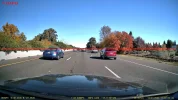
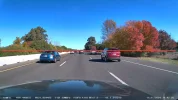
DAYTIME 4K60fps HIGHWAY (next post DAYTIME 4K60fps CITY)

Well congrats to Viofo, and the engineering team baking up the firmware.
As far as image quality goes, it looks like we finally have an acceptable DAYTIME 4K60fps firmware.
NIGHT TIME 4K30fps HDR was nailed right from the get go.
I’m sure Viofo is still working around the clock to tighten up loose ends with functionality of certain functions, and features but, I don’t see why this firmware can’t be release to the public on the official Viofo website.
Great job team.

Rain is gone, sun is back.
I gathered DAYTIME 4K60fps test footage with “new” unofficial firmware to fix over sharpness, and other image quality improvements.
Looking at A329 video footage by itself is almost impossible for me to analyze, and find malfunctions so I have 3 other cameras on the front windshield.
I also sent the raw / original files to rcg530 for analysis of dropped / duplicated frames, and other red flags.
He reported no issues so far.
He noted my 93 Mbps in the A329 text stamp is incorrect, and the true Bitrate is 97.5 Mbps.
I have no way of checking actual Bitrate on video footage, so a while back I googled a mathematical formula to calculate approximate Bitrate by knowing the files size for a 1 Minute Clip.
Example: 700MB ÷ 7.5 = 93.3 Bitrate.
I’ve been watching the footage from the A329, and comparison cameras on my 43” 4K monitor, and the 2K cameras seem to fall apart, compared to watching on my 6.6” FHD Samsung Galaxy A14 5G (1080x2408).

I’m pleased to report I didn’t screw up the 50/50 road & sky lens alignment.
I was able to get all 4 camera matched up almost identical.
@Mtz said this is critical for comparing footage between cameras, and I agree.
I uploaded the videos to YouTube for easy viewing, (I insert Micro SD Card into my Chromebook and press “upload” no editing software, or video player).
For a limited time (24-72 hours) I have placed all video files in a public Google Drive folder.
Feel free to view, download, make screenshot comparisons, and post them in this thread.
There is some good oncoming plate grab opportunities in the last minute of the videos.

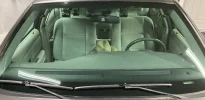
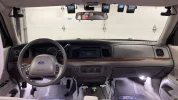
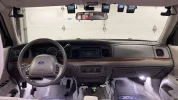
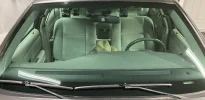
Driver Seat Left To Right (see attached photos):
1.) A229 Pro 1-CH
2.) A329 1-CH
3.) A119 Mini 2
4.) A229 Plus 1-CH

Setting & Configuration:
All Cameras Have CPL Filters
All HDR Off
V1.3.1 241024: A229 Pro
V1.0 241126: A329
V2.1 241010: A119 Mini 2
V1.3.1 241024: A229 Plus
Maximum / Highest Bitrate
All other settings default

RESOLUTION & FPS:
4K30fps A229 Pro
4K60fps A329
2K60fps A119 Mini 2
2K60fps A229 Plus

BITRATE (approx):
57 Mbps: A229 Pro 1-CH
93 Mbps: A329 1-CH
27 Mbps: A119 Mini 2
28 Mbps: A229 Plus

1 MINUTE FILE SIZE:
430MB: A229 Pro 1-CH
700MB: A329 1-CH
192MB: A119 Mini 2
208MB: A229 Plus 1-CH

TEXT STAMP COLOR:
GOLDEN A229 Pro
YELLOW A329
WHITE A119 Mini 2
CYAN A229 Plus

Public Google Drive - Original / Raw Files
https://drive.google.com/drive/folders/1-1woH-XAGAC55UKqExFnkyicXd1Fhz4_?usp=sharing
All Clips Are 5 Minutes;
2.1GB A229 Pro
3.4GB A329
1.0GB A119 Mini 2
1.1GB A229 Plus


Bonus Footage:
If you’re wondering what was going on behind me I had an A229 Pro 2-CH Telephoto filming on the back window.


Stay tuned for city footage.
@rcg530 @safedrivesolutions @Vortex Radar @Nigel @Mtz
 

Attachments

  • 50-50 Road & Sky 4 .webp
    50-50 Road & Sky 4 .webp
    163.8 KB · Views: 115
  • 50-50 Road & Sky 2 .webp
    50-50 Road & Sky 2 .webp
    177.7 KB · Views: 107
  • 50-50 Road & Sky 3 .webp
    50-50 Road & Sky 3 .webp
    134.4 KB · Views: 97
  • 50-50 Road & Sky 1 .webp
    50-50 Road & Sky 1 .webp
    169.9 KB · Views: 100
  • Exterior View   .webp
    Exterior View .webp
    174.1 KB · Views: 100
  • rcg530 Skunkworks Lab 1 .webp
    rcg530 Skunkworks Lab 1 .webp
    20.2 KB · Views: 110
  • Driver Seat .webp
    Driver Seat .webp
    241.7 KB · Views: 102
  • rcg530 Skunkworks Lab 2 .webp
    rcg530 Skunkworks Lab 2 .webp
    53.2 KB · Views: 109
DAYTIME 4K60fps CITY

Driver Seat Left To Right (see attached photos):
1.) A229 Pro 1-CH
2.) A329 1-CH
3.) A119 Mini 2
4.) A229 Plus 1-CH

Setting & Configuration:
All Cameras Have CPL Filters
All HDR Off
V1.3.1 241024: A229 Pro
V1.0 241126: A329
V2.1 241010: A119 Mini 2
V1.3.1 241024: A229 Plus
Maximum / Highest Bitrate
All other settings default

RESOLUTION & FPS:
4K30fps A229 Pro
4K60fps A329
2K60fps A119 Mini 2
2K60fps A229 Plus

BITRATE (approx):
57 Mbps: A229 Pro 1-CH
93 Mbps: A329 1-CH
27 Mbps: A119 Mini 2
28 Mbps: A229 Plus

1 MINUTE FILE SIZE:
430MB: A229 Pro 1-CH
700MB: A329 1-CH
192MB: A119 Mini 2
208MB: A229 Plus 1-CH

TEXT STAMP COLOR:
GOLDEN A229 Pro
YELLOW A329
WHITE A119 Mini 2
CYAN A229 Plus

Public Google Drive Link - Original / Raw Files
https://drive.google.com/drive/folders/1-1woH-XAGAC55UKqExFnkyicXd1Fhz4_?usp=sharing


Bonus Rear Footage A229 Pro 2-CH Telephoto
 

Attachments

  • Driver Seat .webp
    Driver Seat .webp
    241.7 KB · Views: 108
  • Exterior View   .webp
    Exterior View .webp
    174.1 KB · Views: 99
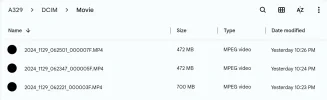
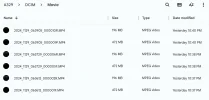
Firmware V1.0 241126 - Bitrate & 1 Minute Files Size

1-CHANNEL Configuration
700MB / 97.5 Mbps: 4K60fps
472MB / 65.7 Mbps: 4K30fps HDR Off
472MB / 65.7 Mbps: 4K30fps HDR On

2-CHANNEL Configuration
472MB / 65.7 Mbps: 4K60fps Front HDR Off
196MB / 27.3 Mbps: 2K30fps Rear HDR Off

472MB / 65.7 Mbps: 4K30fps Front HDR Off
196MB / 27.3 Mbps: 2K30fps Rear HDR Off

472MB / 65.7 Mbps: 4K30fps Front HDR On
196MB / 27.3 Mbps: 2K30fps Rear HDR On

Q: Is it worth running the A329 in 1-CH configuration to increase the Bitrate from 65.7 Mbps to 97.5 Mbps?
A: I need (2) A329 units side by side to verify.
Look at the side by side difference between;
4K60fps / 97.5 Mbps A329
4K30fps / 59.9 Mbps A229 Pro


Attachments

  • Firmware V1.0 241126 .webp
    Firmware V1.0 241126 .webp
    42 KB · Views: 104
  • 1-CH .webp
    1-CH .webp
    29.1 KB · Views: 108
  • 2-CH .webp
    2-CH .webp
    52.8 KB · Views: 123
Q: Is it worth running the A329 in 1-CH configuration to increase the Bitrate from 65.7 Mbps to 97.5 Mbps?
A: I need (2) A329 units side by side to verify.
I think the difference is big enough that you don't need two identical units to see the difference, just stopping mid test and changing the setting makes it quite obvious.

It does depend on the purpose of the footage though, if it is purely for accident evidence then you don't really need every fallen tree leaf and every stone chip on the road surface to be recorded in great detail.

And if it is going to be played through Youtube, then you can't see the extra detail anyway!
 
@viofo @VIOFO-Support
I’ve been meaning to bring this up since the RTC300 Telephoto.
But I hate bothering you guys for little things that aren’t related to image quality, reliability, durability.
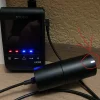
But now the A329 Rear camera has the same LED Status Light.
Every Korean dash cam I’ve tested, (BlackVue, Thinkware, FineVu, GNET) has a firmware setting to enable / disable the LED Status Light on the Rear camera.
I’m sure users would appreciate reduced power consumption for longer parking mode run times, and the capability to be conspicuous / inconspicuous.
If it’s not too much trouble can you add this setting to the next firmware & APP version?
 

Attachments

  • 1 .webp
    1 .webp
    263.2 KB · Views: 105
Last edited:
@viofo @VIOFO-Support
I’ve been meaning to bring this up since the RTC300 Telephoto.
But I hate bothering you guys for little things that aren’t related to image quality, reliability, durability.
But now the A329 Rear camera has the same LED Status Light.
Every Korean dash cam I’ve tested, (BlackVue, Thinkware, FineVu, GNET) has a firmware setting to enable / disable the LED Status Light on the Rear camera.
I’m sure users would appreciate reduced power consumption for longer parking mode run times, and the capability to be conspicuous / inconspicuous.
If it’s not too much trouble can you add this setting to the next firmware & APP version?

Yes, there is no need to have a light on the rear camera.

IR light can be controlled on IR cameras without A229 Pro/Plus or A139/A139 Pro processor.

However, although I am not sure, it may not be possible to control the standard LED because the A329's rear camera does not have a separate processor and the working principle of the IR light is different.
It totally depends on the design.
I hope it can be done and chosen.
 
Back
Top