A329 Test & Review PP

However, although I am not sure, it may not be possible to control the standard LED because the A329's rear camera does not have a separate processor and the working principle of the IR light is different.
It totally depends on the design.
I was worried you were going to say my request was "unreasonable". lol
 
Yo @GPak check it out.
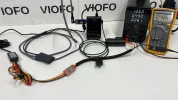
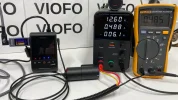
I bought a new USB Power Meter (Type-C) to measure the A329’s new CLA Type-C Charger (45 Watt).
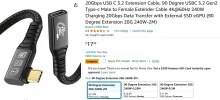
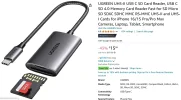
I wanted to see if it would work with the UGREEN 2 Meter Type-C Extension, and UGREEN SD Card reader.
I checked the recorded files on the SD Card, and they were all present, and accounted for.

Q: Is this $10 tester accurate?
A: If you can’t afford Dugout Seats sometimes it worth watching the game through a crack in the fence from the parking lot for free. lol
Q: What is SSD power consumption in Normal Recording Mode?
A: See for yourself, (around 0.57 Watts).
Q: What is SSD power consumption in Low Bitrate Parking Mode?
A: See for yourself, (hard to say because it fluctuates wildly, and the meter doesn’t have MIN / MAX / AVG like my Fluke.

Settings & Configuration;
Firmware: V1.0 241126
4K60fps + 2K30fps: Normal Recording Mode
All HDR Off
Maximum Bitrate
Parking Mode: Low Bitrate
All other settings default
SD Card: Viofo Brand 512GB

Normal Recording Mode


Low Bitrate Parking Mode


Attachments

  • Card Reader .webp
    Card Reader .webp
    115.9 KB · Views: 142
  • Type-C Tester .webp
    Type-C Tester .webp
    67.1 KB · Views: 132
  • Test Configuration .webp
    Test Configuration .webp
    135 KB · Views: 138
  • Test Configuration Close Up .webp
    Test Configuration Close Up .webp
    144.8 KB · Views: 119
  • Firmware .webp
    Firmware .webp
    44.7 KB · Views: 124
  • 2 Meter Cable .webp
    2 Meter Cable .webp
    113.2 KB · Views: 126
Last edited:
Q: Is this $10 tester accurate?
It is not going to be as accurate as a Fluke, but they tend to be reasonable and are definitely good for comparison purposes.
Remember that the hardwire kit is not 100% efficient, so the power consumption in watts should not match that shown by the Fluke, it should be lower.

Q: What is SSD power consumption in Low Bitrate Parking Mode?
A: See for yourself, (hard to say because it fluctuates wildly, and the meter doesn’t have MIN / MAX / AVG like my Fluke.
You sort of have an average, because it gives you a total and the time over which the total is totalled, so you can calculate the average, which if you are using it for parking mode is probably the best answer anyway, since the SSD will occasionally do some housekeeping and use a lot more than normal for a while.
 
It is not going to be as accurate as a Fluke
should not match that shown by the Fluke, it should be lower.
Just to clarify for onlookers;
Fluke is measuring total power consumption, (Hardwire Kit + Camera + SSD).
USB Tester is measuring SSD power consumption only.
 
Yo @GPak check it out.
I bought a new USB Power Meter (Type-C) to measure the A329’s new CLA Type-C Charger (45 Watt).
I wanted to see if it would work with the UGREEN 2 Meter Type-C Extension, and UGREEN SD Card reader.
I checked the recorded files on the SD Card, and they were all present, and accounted for.

Q: Is this $10 tester accurate?
A: If you can’t afford Dugout Seats sometimes it worth watching the game through a crack in the fence from the parking lot for free. lol
Q: What is SSD power consumption in Normal Recording Mode?
A: See for yourself, (around 0.57 Watts).
Q: What is SSD power consumption in Low Bitrate Parking Mode?
A: See for yourself, (hard to say because it fluctuates wildly, and the meter doesn’t have MIN / MAX / AVG like my Fluke.

Settings & Configuration;
Firmware: V1.0 241126
4K60fps + 2K30fps: Normal Recording Mode
All HDR Off
Maximum Bitrate
Parking Mode: Low Bitrate
All other settings default
SD Card: Viofo Brand 512GB

Normal Recording Mode


Low Bitrate Parking Mode

I'd like to clarify, the USB-C tester results are for the remotely connected Viofo brand 512GB SD card right? Not an SSD as mentioned couple of times in your posts.
If so, these results are in good agreement with previous tests where you compared LBR power consumption between the baseline camera and the camera with an external SD card.

The fact that the A329 is reliably writes to an external SD Reader even with the USB-C tester connected to it, tells me that it is not that sensitive and probably can work with many brands of extension cables and SD card readers.
Not sure if the same applies to SSDs.
 
I'd like to clarify, the USB-C tester results are for the remotely connected Viofo brand 512GB SD card right? Not an SSD as mentioned couple of times in your posts.
Correct, (see photo in original post).
I called it SSD erroneously because if I called it what is really is, it may confuse onlookers months from now when they're skimming this thread.
Here is the photo in LARGE size.

Test Configuration .webp
 
I find all the measurements you are taking very interesting.
They will help me when I make mine so I can compare them.

One thing I don't understand about this forum.
I have been participating in forums for 20 years and if memory serves, in all or almost all of them there was the option to edit the post to correct errors or add new information to the main post.

In this forum, either I can't find that editing option or it doesn't exist. If it doesn't exist, I see it as a serious error, since it forces the creators of research threads as interesting as this one to put their progress and research republished on countless pages. It makes it very difficult to locate this information, with the editing mode everything could be compiled in the first post.
 
In this forum, either I can't find that editing option or it doesn't exist. If it doesn't exist, I see it as a serious error, since it forces the creators of research threads as interesting as this one to put their progress and research republished on countless pages. It makes it very difficult to locate this information, with the editing mode everything could be compiled in the first post.
The "Edit" link does exist for any post I've created, including the first post in a thread.

1733300048678.webp
 
I find all the measurements you are taking very interesting.
They will help me when I make mine so I can compare them.

One thing I don't understand about this forum.
I have been participating in forums for 20 years and if memory serves, in all or almost all of them there was the option to edit the post to correct errors or add new information to the main post.

In this forum, either I can't find that editing option or it doesn't exist. If it doesn't exist, I see it as a serious error, since it forces the creators of research threads as interesting as this one to put their progress and research republished on countless pages. It makes it very difficult to locate this information, with the editing mode everything could be compiled in the first post.
I think it's because you are a new member.
Editing is possible.
 
I think it's because you are a new member.
Editing is possible.
TRUE.
When I started posting on the forum, I could swear that I looked at that report section several times and I didn't get the post editing option.

Maybe it would be because he had very few publications and it was an option that would be unlocked if he was a little more senior.

Thank you for clearing up this doubt, it has made my participation much easier since sometimes the translator plays tricks.
 
Yo @GPak check it out.
I bought a new USB Power Meter (Type-C) to measure the A329’s new CLA Type-C Charger (45 Watt).
I wanted to see if it would work with the UGREEN 2 Meter Type-C Extension, and UGREEN SD Card reader.
I checked the recorded files on the SD Card, and they were all present, and accounted for.

Q: Is this $10 tester accurate?
I see you splashed out on the colour version. I saved a few pennies and bought the mono version.

As Nigel suggested, you can measure total Wh then divide by the time to get an average Watts.
In this example I charged my 185Wh powerbank using 208Wh over 4h49min. 208/4.82=43W average.
1733305034383.webp
 
I see you splashed out on the colour version. I saved a few pennies and bought the mono version.
I didn't know there was two versions. lol
I got lucky for $10.38 on cyber Monday.
 

Attachments

  • 1 .webp
    1 .webp
    101 KB · Views: 122
Side by side testing requires two identical units so test footage can be gathered simultaneously under the same driving / lighting conditions.
This is helpful when testing things like HDR On/Off, CPL Filter On/Off, and other settings / configurations.

It post #255 I gathered DAYTIME test footage from the A329 1-CH configuration 4K60fps 97Mbps Bitrate.
After comparing the footage with the A229 Pro’s 4K30fps 1-CH 65 Mbps I saw an increased level of detail in the A329’s footage, (maybe my new 43” 4K monitor has something to do with it).
Nigel said the increased Bitrate from 65 to 97 is great for leaves on trees, and cracks in the road surface.
But, I think it might offer more detail for license plate capture.
All previous dash cam comparisons of 60fps vs. 30fps have not proven 60fps grabs plates any better.
Well now I think it’s worth a look because of the A329’s substantial increased Bitrate in 1-CH configuration.

I visited the famous Durock Test Loop, and @rcg530 world headquarters in beautiful Gold Country next to pristine Lake Tahoe.
He was kind enough to lend me his retail / production A329 unit to perform a side by side test of 4K60fps 97Mbps vs. 4K30fps 65Mbps.
The Durock Test Loop is ideal because it offers a mix of city street intersections with traffic lights, highway, and back country roads with oncoming vehicles for license plate capturing.

For a limited time I have placed the both original / raw files in a public google drive folder.
Feel free to download, view, compare the two video samples, (they are 5 minutes each).

Settings / Configuration:
All Cameras Have CPL Filters
All HDR Off
V1.0 241126
RESOLUTION / fps / Bitrate / 5 Minute File Size:
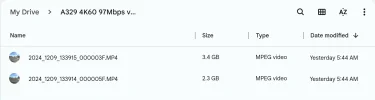
4K60fps @ 97.5 Mbps Bitrate 3.4 GB
4K30fps @ 65.7 Mbps Bitrate 2.3 GB

TEXT STAMP COLOR:
4K60fps: YELLOW
4K30fps: CYAN

Additional Test Notes:
The song for this test footage was chosen by destiny / coincidence, (the CD was already in my car’s CD player).
The song written in 1955 was recorded 10 miles from Durock Road in front of a live captive audience in 1968.

For easy viewing I have uploaded both clips directly to YouTube without any editing, or video processing.
What to you guys think?
Keep in mind if you do not view the original / raw footage on a 4K monitor you may be unable to see the difference.
If you offer feedback, please indicate if you watched the original / raw files, and the resolution of the monitor you watched on, (720p, 1080p, 2K, 4K).


@viofo
@safedrivesolutions
@Vortex Radar
@rcg530
@Nigel
@Karagandinez
@Julian23
@Agie
@ogzogz
@GPak
@kamkar
@mentadent
@LateralNW
@TonyM
@vvs49
 

Attachments

  • File Sizes .webp
    File Sizes .webp
    25.2 KB · Views: 122
Last edited:
Side by side testing requires two identical units so test footage can be gathered simultaneously under the same driving / lighting conditions.
This is helpful when testing things like HDR On/Off, CPL Filter On/Off, and other settings / configurations.

It post #255 I gathered DAYTIME test footage from the A329 1-CH configuration 4K60fps 97Mbps Bitrate.
After comparing the footage with the A229 Pro’s 4K30fps 1-CH 65 Mbps I saw an increased level of detail in the A329’s footage, (maybe my new 43” 4K monitor has something to do with it).
Nigel said the increased Bitrate from 65 to 97 is great for leaves on trees, and cracks in the road surface.
But, I think it might offer more detail for license plate capture.
All previous dash cam comparisons of 60fps vs. 30fps have not proven 60fps grabs plates any better.
Well now I think it’s worth a look because of the A329’s substantial increased Bitrate in 1-CH configuration.

I visited the famous Durock Test Loop, and @rcg530 world headquarters in beautiful Gold Country next to pristine Lake Tahoe.
He was kind enough to lend me his retail / production A329 unit to perform a side by side test of 4K60fps 97Mbps vs. 4K30fps 65Mbps.
The Durock Test Loop is ideal because it offers a mix of city street intersections with traffic lights, highway, and back country roads with oncoming vehicles for license plate capturing.

For a limited time I have placed the both original / raw files in a public google drive folder.
Feel free to download, view, compare the two video samples, (they are 5 minutes each).

Settings / Configuration:
All Cameras Have CPL Filters
All HDR Off
V1.0 241126
RESOLUTION / fps / Bitrate / 5 Minute File Size:
4K60fps @ 97.5 Mbps Bitrate 3.4 GB
4K30fps @ 65.7 Mbps Bitrate 2.3 GB

TEXT STAMP COLOR:
4K60fps: YELLOW
4K30fps: CYAN

Additional Test Notes:
The song for this test footage was chosen by destiny / coincidence, (the CD was already in my car’s CD player).
The song written in 1955 was recorded 10 miles from Durock Road in front of a live captive audience in 1968.

For easy viewing I have uploaded both clips directly to YouTube without any editing, or video processing.
What to you guys think?
Keep in mind if you do not view the original / raw footage on a 4K monitor you may be unable to see the difference.
If you offer feedback, please indicate if you watched the original / raw files, and the resolution of the monitor you watched on, (720p, 1080p, 2K, 4K).


@viofo
@safedrivesolutions
@Vortex Radar
@rcg530
@Nigel
@Karagandinez
@Julian23
@Agie
@ogzogz
@GPak
@kamkar
@mentadent
@LateralNW
@TonyM
@vvs49


I watched the comparison images here.

For bitrate comparison, I think if high bitrate and low bitrate are to be compared, they should both have the same fps value.

For example,

4K60 fps @ 97.5 Mbps vs 4K60 fps @ 65.7 Mbps

or

with 4K30fps @ 97.5Mbps
4K30fps@ 65.7 Mbps

Yes, this comparison is not possible for single use, but if the rear camera of the second camera is used actively, the bitrate values I mentioned can be compared.
This comparison can give a better idea about the result.

While watching the videos consecutively, I set the playback speed of both videos to 0.25. Of course, it is more enjoyable to watch at 60 fps.

Also, light colors are slightly lighter in 30fps recording. I attribute this to the camera angle being millimetrically lower. If the color difference is between 60 fps and 30 fps, it will appear in the configuration I mentioned above, that is, when the same frame rates are tested at different bit rates.

Coming to the conclusion, these test images are enough to give an idea.
The higher the single camera bitrate and frame rate, the better. It becomes a fluid video. For detail you need low fps and high bitrate.

In daytime use, 60fps or 30 FPS on the same camera generally highlights the difference in fluidity. If the better image is higher frame rate, of course 60 fps is ahead. However, it cannot be used with HDR at night. For this reason, if there is no storage space problem and energy consumption is not important, the ideal usage is HDR 30 fps at night and 60 fps during the day is fine.

@viofo
The A329 still hasn't been sent to me for testing. Therefore, I can only evaluate the situation by watching the video.

How about 60 fps HDR with A329 2k resolution option?
Or a229 pro 2k 60fps with HDR?
 
What to you guys think?
I just looked at both videos on YouTube and the drive files on my WQXGA+ Tablet.
The biggest difference as @ogzogz already said is the 60fps vs 30fps.
I looked at the same spots with trees and cars, but in my opinion, both videos performed just about the same.
The 60fps make it look a lot better.
 
Well now I think it’s worth a look because of the A329’s substantial increased Bitrate in 1-CH configuration.
Watching the original files, there may be a substantial increase in bitrate, but I can't see a substantial increase in image quality, other than one having double the number of frames, in fact I'm having difficulty finding any difference other than the positioning of the cameras, a slight difference in exposure and a fairly clear difference in audio, but that is probably just the microphone positioning and what is blocking the sound path.

It is said that 60fps needs about 30% more bitrate, but this has closer to 50% more, so we should see more improvement.

The A329 60fps vs the A229 30fps was showing a substantial improvement, but there are other differences there, such as a new processor.

If you still have both cameras, you could try reducing the bitrate on one until we can see a difference, then we would know how much bitrate is worth using on these new cameras, maybe we don't need 65.7Mb/s either, and 45 will do, although I doubt it...

Of course, you are not driving under trees, it is a perfectly good test route, and you do get up to a good speed, but you are not running out of bitrate on either camera, and a tree tunnel definitely needs more bitrate than this route does, so it could be that the extra bitrate is definitely useful in some situations.
 
I just looked at both videos on YouTube and the drive files on my WQXGA+ Tablet.
The biggest difference as @ogzogz already said is the 60fps vs 30fps.
I looked at the same spots with trees and cars, but in my opinion, both videos performed just about the same.
The 60fps make it look a lot better.
Thanks for taking a look.
Based on this test footage;
1.) Do you think 60fps @ 97Mbps is better than 30fps @ 65Mbps for license plate capture?
2.) Or is there no benefit for license plate capture?
 
Watching the original files
Thanks for taking a look.
Based on this test footage;
1.) Do you think 60fps @ 97Mbps is better than 30fps @ 65Mbps for license plate capture?
2.) Or is there no benefit for license plate capture?
 
Back
Top