70mai 4K Omni - Testing/Review RCG

I collected some video footage from the 4K Omni in a 1-channel configuration to allow it to record video at 60 fps. I also gathered 60 fps footage from my VIOFO A329 to compare with the 4K Omni footage.

 
I collected some video footage from the 4K Omni in a 1-channel configuration to allow it to record video at 60 fps. I also gathered 60 fps footage from my VIOFO A329 to compare with the 4K Omni footage.

The video is very similar most of the time, but the audio sounds like a very different resolution.
You have given the video details, resolution and bitrate, but nothing for the audio...

Might be good to have a slightly more detailed test of the audio, the music is fine, but maybe not all the way through the test, that is as much a test of your audio system as the cameras, hard to know what effect the audio system has on it. Maybe have something very quiet to see if they can both pick it up in reasonable detail, and something loud to see if they get distorted, for example fuel pump and horn, while parked in the garage, your turn signal click seems quite clear on both, but you never switched mics while it was on, so hard to compare.

Just a suggestion...
 
Does it still do the cool eyes animation on the screen?
 
Does it still do the cool eyes animation on the screen?
They couldn't get rid of MaiX the bear!
Hopefully he has been upgraded...
 
The video is very similar most of the time, but the audio sounds like a very different resolution.
You have given the video details, resolution and bitrate, but nothing for the audio...
  • Audio Info: as reported by ffprobe utility
    • 70mai 4K Omni: aac 16000 Hz, mono, 67 kb/s
    • VIOFO A329: aac 48000 Hz, mono, 69 kb/s
I included the full screen 4K Omni video segments so you can see [in daytime footage] that the front camera is still bouncing up/down a bit with this second unit. There weren't any obvious examples of the left/right shifting while I was gather this particular footage, but I have many examples of that issue. I'm still waiting to hear back from 70mai why the looseness in the front camera gimbal gearing is still present with this unit.
 
  • Audio Info: as reported by ffprobe utility
    • 70mai 4K Omni: aac 16000 Hz, mono, 67 kb/s
    • VIOFO A329: aac 48000 Hz, mono, 69 kb/s
Ahh, the A329 is 3x the audio resolution, I though it sounded better!
Could have a bit more audio bitrate though.

I included the full screen 4K Omni video segments so you can see [in daytime footage] that the front camera is still bouncing up/down a bit with this second unit.
That is quite fast vibration on the left edge of the image, must be from the pan mechanism, not ideal, but much better than the last one.
The original Omni appears to have zero vibration, quite impressive, they can do better!
 
Without having compared to any other, my feeling about the sound being " a little strange " seem to be right.
Dont bother me much though, i have yet to try and see how it will pick up voices at a distance thru open window.

It is a bit funny there is no manual resolution selection so no 1 channel 30 FPS + HDR possible
 
It is a bit funny there is no manual resolution selection so no 1 channel 30 FPS + HDR possible
Resolution selections available for the 70mai 4K Omni:
  • 1-channel mode
    • 3840 x 2160 HDR
      • Recorded at 30FPS even though the setting label does not state that the FPS value [which makes sense with HDR enabled].
    • 3840 x 2160 60FPS
      • Only way to get 60FPS from the front camera is to not connect the rear camera.
    • 1743108278350.webp
  • 2-channel mode
    • 3840 x 2160 HDR
    • No other resolution options are presented in 2-channel mode, so there's no way to turn off HDR in 2-channel mode.
    • 1743108256366.webp
 
I'm liking the continual improvement in your videos, @rcg530. I like your labeling process for each video, plus how you're playing music in the car that won't cause issues with YouTube and letting us hear it through the camera mics rather than adding it in post. That's a nice touch.

The Omni looks pretty similar to the A329. The vibration from the mount is the main thing I notice different.
 
I'm liking the continual improvement in your videos, @rcg530. I like your labeling process for each video, plus how you're playing music in the car that won't cause issues with YouTube and letting us hear it through the camera mics rather than adding it in post. That's a nice touch.
Thanks. About 1.5 years ago, I started using music I downloaded from my music subscription services [Epidemic Sound, Soundstripe] to my phone to play while driving so the dash camera microphones will record music/audio that can be used in my YouTube videos. I created a playlist in the iOS music app with all of the music files from my subscription services. I have the music app play the music files using the shuffle feature. The manner in which the music files are "heard" in the vehicle is different for each of my dash camera test vehicles.

My 2006 Toyota Highlander has no Bluetooth and no aux-in connection port so I simply play the music on my phone's speakers. Not the best option, but it "works". My 2014 Chevy Caprice's stereo has Bluetooth audio streaming support, so I stream the music over Bluetooth to the stereo system in that car. My 2007 Chevy HHR's stereo has no Bluetooth support, but it does have an aux-in port. I connect a USB-C to audio jack adapter into my iPhone 15 Plus and I then connect that to the aux-in port with another cable. I wish all three cars had Bluetooth audio streaming support to make it easier.

The Omni looks pretty similar to the A329. The vibration from the mount is the main thing I notice different.
I agree, the 4K Omni 60fps front camera video looks very similar to the A329 60fps front camera video.
 
I wish all three cars had Bluetooth audio streaming support to make it easier.
There are cheap Bluetooth aux dongles.
Even available on AliExpress for a few bucks.
Well worth it!
 
There are cheap Bluetooth aux dongles.
Even available on AliExpress for a few bucks.
Well worth it!
That would make streaming audio to my Chevy HHR's radio a little easier. I already had the cables that I'm using in that car, so that's why I went that route. I'll check into getting a Bluetooth aux dongle.
 
70mai 4K Omni "Motion Detection" Sentinel [Parking] Mode

I've been testing this parking mode the last several days. This parking mode does not capture every thing moving within the field of view of the front camera. It's using AI logic to look for humans moving within the field of view of the front camera.

Point One: No Rear Camera Detection

It does NOT detect any movement within the field of view of the rear camera [if installed]. That's one strike against it in my opinion. If you have a 2-channel configuration, you're losing out on it detecting anything [anyone] moving near the rear of your vehicle. During today's drive, I approached the rear of my vehicle several times and opened the rear tailgate of my vehicle to place items in my vehicle. There was never a motion detection [suspicious person] recording/event for any of those situations.

Point Two: Sluggish Front Camera Detection

It takes several seconds for the front camera / AI logic to detect a suspicious person is moving near/around the front of your vehicle. The "Sensitivity" setting defaults to "Medium". I had the sensitivity setting set to "High" for my tests.

[click on image to see full size screenshot]
1743202008258.webp


During today's drive, my vehicle was parked in a Costco parking lot. A lady was pushing a cart across the front camera's field of view [left-to-right] and she stopped at the vehicle to the right of my vehicle. Using a VIOFO A329 front camera in low bitrate parking mode as a "control camera", the lady was visible 14 seconds before the 4K Omni AI logic decided she was a suspicious person and start a 30-second recording event. I did receive a suspicious person alert on my phone for this event and the videos were uploaded to the cloud.

Here are two frame grabs from the A329 front camera low bitrate video. The first one is when the lady first appeared within the field of view [to get a timestamp info]. The second one is from when the 4K Omni started recording video of the "suspicious person". I'm guessing the act of walking through the field of view was not enough to trigger the recording event. There's 14 seconds not recorded by the 4K Omni of this suspicious person.

Control Camera Frame Grabs
viofo_a329_sp_01_2025_0328_100735_014650PF.MP4_snapshot_00.39.webpviofo_a329_sp_02_2025_0328_100735_014650PF.MP4_snapshot_00.52.webp

4K Omni Front Camera - First Frame of "Suspicious Person".
70mai_x800_sp_first_frame_PA20250328-100816-000480F.MP4_snapshot_00.00.webp

I understand that 70mai is trying to reduce false positives for motion detection parking mode, but I believe the AI logic might be filtering out too much. I'm not a fan of motion detection parking modes. There's always a chance that something will be missed by the dash camera in that parking mode.

A negative to the 4K Omni's motion detection parking mode AI logic is that it only records when humans are detected as being suspicious. If a shopping cart, vehicle, or other object is moving within the field of view, it won't record that "motion event". If a shopping cart were to hit your vehicle, you'd have to have the "Collision Detection" parking mode on as well for the 4K Omni to record the resulting impact event of the shopping cart hitting your car. It seems like the 4K Omni will best protect your vehicle while parked only when multiple parking modes are enabled.
 
If a shopping cart were to hit your vehicle, you'd have to have the "Collision Detection" parking mode on as well for the 4K Omni to record the resulting impact event of the shopping cart hitting your car.
But would it actually record the shopping trolly scratching your paint as it was carelessly pushed past, rather than bumped into your car?

Might be better if it had recorded the whole event from her first becoming visible, having decided it was suspicious and that there was a need to alert you, then it might have recorded the scratch as she arrived; except that this wasn't a suspicious event, there was no scratch, so the notification is just something to worry you, make you abandon your shopping trolly, rush out of the supermarket to check your car, only to find that someone was simply unloading their shopping trolly next to your car and that you can relax and go back to whatever you were doing, except by now your trolly has been impounded by the supermarket staff as a potential bomb threat, and the supermarket evacuated by the bomb disposal guys ruining everybody's day, not just yours!
 
But would it actually record the shopping trolly scratching your paint as it was carelessly pushed past, rather than bumped into your car?

Might be better if it had recorded the whole event from her first becoming visible, having decided it was suspicious and that there was a need to alert you, then it might have recorded the scratch as she arrived; except that this wasn't a suspicious event, there was no scratch, so the notification is just something to worry you, make you abandon your shopping trolly, rush out of the supermarket to check your car, only to find that someone was simply unloading their shopping trolly next to your car and that you can relax and go back to whatever you were doing, except by now your trolly has been impounded by the supermarket staff as a potential bomb threat, and the supermarket evacuated by the bomb disposal guys ruining everybody's day, not just yours!
Not from my limited testing, it only provides a notification saying there was a "Collision event please check your vehicle". Nothing about recording a video for that, but if there's a motion detection event (which takes 10-15 seconds for the camera to wake up and start recording when I tested). Which matches up with Robert's testing in terms of timeframes.

It's slow to wake and hopefully they can change the timings so it wakes up earlier.
 
My mention of a shopping cart hitting my vehicle was not directly related to the lady pushing her shopping cart in my previous motion detection example.

Theoretical example: If a shopping cart had not been fully placed/parked into the cart collection area located across the lane and it started traveling on its own [pushed by wind] toward my vehicle, that would not have triggered a motion event because the AI logic did not detect a human within the field of view. If I only had motion detection parking mode enabled, nothing would be recorded when the cart hit my vehicle.
 
I'm guessing the act of walking through the field of view was not enough to trigger the recording event. There's 14 seconds not recorded by the 4K Omni of this suspicious person.
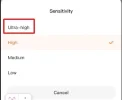
Yes, but you can set the value to "ultra-high" and then the detection of a person will be reduced to 5 seconds.
Screenshot_1.webp
 
Yes, but you can set the value to "ultra-high" and then the detection of a person will be reduced to 5 seconds.
View attachment 79101
While I understand there is a setting higher than the one I selected, that in itself does not necessarily translate to a specific number of seconds before it detects a human within the field of view. If each setting is a number of "seconds" 70mai should document the setting in that unit of measure. If the "high" setting resulted in it taking 14 seconds, then I would hate to see how long "medium" [default] and "low" settings would take to trigger a recording.
 
Theoretical example: If a shopping cart had not been fully placed/parked into the cart collection area located across the lane and it started traveling on its own [pushed by wind] toward my vehicle, that would not have triggered a motion event because the AI logic did not detect a human within the field of view. If I only had motion detection parking mode enabled, nothing would be recorded when the cart hit my vehicle.
Shouldn't be too difficult for the AI to identify a shopping cart, and then artificially think "Moving shopping cart, minus human = high risk of damage", best to sound the alert before impact, not after! 🤔
 
It would be nice to see the difference between high compression and non-compressed recording modes.
 
Back
Top