Blackvue Elite 9 - Test & Review - Vortex Radar

Vortex Radar

Well-Known Member
Joined
Mar 26, 2014
Messages
1,597
Reaction score
2,776
Location
Seattle, Washington
Country
United States
So I've had an Elite 9 on hand for a little over a week. Time to share some initial impressions.

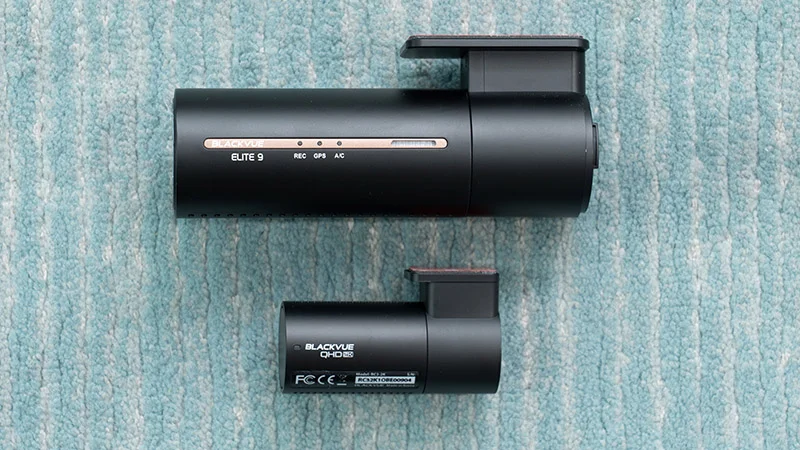
Blackvue Elite 9 2CH front.webp


Blackvue Elite 9 2CH rear.webp


So far I've really been liking it over the DR970X Plus line. I'm seeing better clarity and less grainy noise compared to the 970, presumably due to the updated processor. Impressively, the results are much closer to what I'm used to from dashcams like the Viofo A329S and the Vueroid S1 4K and thus I don't feel like I need to run another dashcam alongside a Blackvue to get both good cloud features AND good video quality. This one is finally giving me both all in one package which is great.

Here's some sample footage from both the front and rear cams.


I'm also liking the low power parking mode and quick startup times like we had with the Elite 8. Also unlike the Elite 8 which is 2K / 2K, this one is 4K / 2K which I think is a better way to go when spending top dollar. (Elite 8 2CH 64GB is $400, Elite 9 2CH 64GB is $495).

The cloud stuff is pretty similar to the previous line, but I've been having a bunch of issues getting livestreaming working properly, both over WiFi and with the CM100G LTE. The DR970X Plus on my WS right next to it is streaming just fine. I'm also seeing similar issues on the Elite 8. Blackvue has been helping me troubleshoot the issue and they said they've identified the issue so hopefully the livestreaming will resume working reliably again on the Elite series.
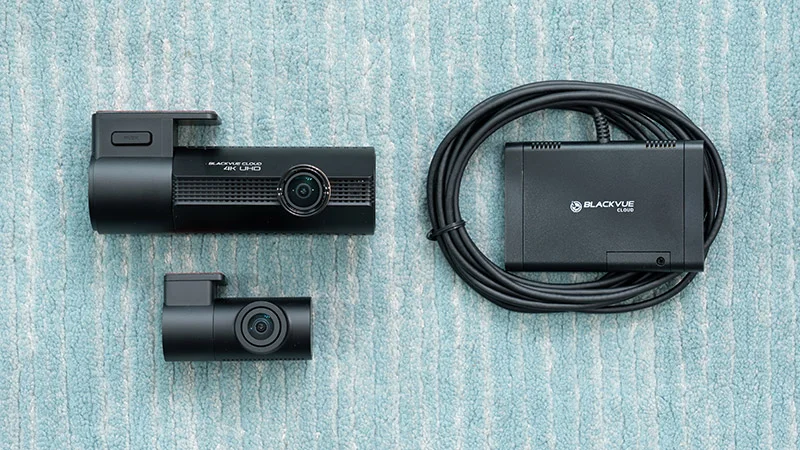
Blackvue Elite 9 2CH and CM100G LTE.webp


I've also been testing the cloud on the Vantrue N4 Pro S and the Thinkware U3000 Pro recently and overall Blackvue is still quite a bit ahead of the other two in this.

Right now I'm focused on editing my video on the best dashcams and so my windshield looks a little crazy, lol, but it's been super helpful to test lots of new models and get familiar with the pros and cons of each.

Lots of dashcams on the WS.webp


I'd like to do more testing in time, but so far my initial impressions are quite good.
 
Last edited:
u are amazing
i have a329t and vueroid s1
i will buy elite 10
but I'm very disappointed
i canot use thinkware u3000pro in chinese mainland
@Thinkware
why do this things
thinkware app donot show the u3000pro when i open it in shanghai city in China
so the app cannot link the u3000pro
 
Dude...with all that gear on your windshield, every panel on an AWACS flying overhead would light up! πŸ™‚
lol... did I mention I also have realtime overhead aircraft monitoring too? πŸ™‚

I heard back from Blackvue over the weekend that it looks like they've discovered the issue with livestreaming on the Elite 8/9 and it will require a firmware update to resolve.
 
What issue have you been having with live streaming?
I've not been having any issues with either Elite 8 or Elite 9 - each time I've checked - both in live driving and whilst in time lapse parking - the live video via android app has been working normally on firmwares 1.0.2 and 1.0.5 for me.

I wonder if it just affects iPhone users?
 
AWACS flying overhead would light up
I have been contemplating, the F-35 planes that some times visit our range at a reasonable low height, i wonder if the laser range finder on my digital scope can light up a alarm in one of those if i "paint " it
 
What issue have you been having with live streaming?
I've not been having any issues with either Elite 8 or Elite 9 - each time I've checked - both in live driving and whilst in time lapse parking - the live video via android app has been working normally on firmwares 1.0.2 and 1.0.5 for me.

I wonder if it just affects iPhone users?
Interesting. I've seen the issue on both iOS and Android. Basically when I tried to livestream, it would usually try and pull up the video feed, but would eventually fail. GPS and everything else would work, but not the video.

Blackvue Elite 9 livestreaming issue.webp

I could play back prerecorded video, change settings, update the fw, etc., but just not livestream.

I have occasionally been successful at streaming here and there, but the vast majority of the time, it would fail. I tested on 3 different WiFi hotspots and over LTE.
 
I have been contemplating, the F-35 planes that some times visit our range at a reasonable low height, i wonder if the laser range finder on my digital scope can light up a alarm in one of those if i "paint " it
What's the worst that can possibly happen? πŸ˜€

That said, I have tried targeting planes with laser radar finders / speed guns and haven't had much luck. Usually it's because the distances are too far. They work far better on car, trains, and motorcycles.
 
Interesting. I've seen the issue on both iOS and Android. Basically when I tried to livestream, it would usually try and pull up the video feed, but would eventually fail. GPS and everything else would work, but not the video.

View attachment 88807
I could play back prerecorded video, change settings, update the fw, etc., but just not livestream.

I have occasionally been successful at streaming here and there, but the vast majority of the time, it would fail. I tested on 3 different WiFi hotspots and over LTE.
That's weird.
I've never seen that at all on either of mine.
I've only been using them using the LTE module.
I initially set up on WiFi hotspot when at home, but the time disconnect annoyed me when a vehicle set off and gets out of range of the hotspot WiFi, it takes a couple of minutes to switch over to LTE sometimes - so I just leave it on LTE for the time being.

I've not seen that error at all, it has been working fine every time for me.
 
Well they are very low, not on the deck of course but i will guesstimate about 200 M up, so low i am worried about my nieces horses CUZ she live about a mile from my friends place.
easy within range of my LRF

My friend and i, would not mind if they came even lower, even if the F-35 planes are SOB loud compared to the F-16, but we like loud.
 
Interesting. I've seen the issue on both iOS and Android. Basically when I tried to livestream, it would usually try and pull up the video feed, but would eventually fail. GPS and everything else would work, but not the video.

View attachment 88807
I could play back prerecorded video, change settings, update the fw, etc., but just not livestream.

I have occasionally been successful at streaming here and there, but the vast majority of the time, it would fail. I tested on 3 different WiFi hotspots and over LTE.

A shot in the dark here....and without the use of @kamkar 's laser range finder. πŸ™‚

Look in your cell phone settings for Cellular and see what your settings are for Data Mode, Limit IP Address Tracking, and Voice & Data.

Turn off Roaming ( probably does not matter )
Voice and Data try straight LTE, or 5G on. Avoid the 5G Auto.
Data Mode try Standard if on LTE
Limit IP Address Tracking ... disable this setting.

No idea it that will help...but it is worth giving it a try. I would also disable any VPN service on the cell phone.
 
A shot in the dark here....and without the use of @kamkar 's laser range finder. πŸ™‚

Look in your cell phone settings for Cellular and see what your settings are for Data Mode, Limit IP Address Tracking, and Voice & Data.

Turn off Roaming ( probably does not matter )
Voice and Data try straight LTE, or 5G on. Avoid the 5G Auto.
Data Mode try Standard if on LTE
Limit IP Address Tracking ... disable this setting.

No idea it that will help...but it is worth giving it a try. I would also disable any VPN service on the cell phone.
Good suggestions, but I tested on not only an Android with tethering, but also a dedicated T-Mobile hotspot, my home WiFi, and via LTE using a CM100G LTE, so 4 different methods, just one of which involved tethering. The only thing that truly resolved the issue for me was the firmware update.
 
Are you using the BlackVue app or the Fleeta app?
BlackVue only allow one to run, so if you've got Fleeta it locks you out of the BlackVue app, and visa Vera.

The Fleeta app (paid) has a lot better accuracy and also displays the vehicle's last known location when in parking mode - something the BlackVue app (free) doesn't do - when the vehicle is parked, it doesn't display the location on map.

The reason I raise this, is that the two apps have different background configurations, so this may cause/contribute to your issue requiring a firmware update.
Your new YouTube video for the best dashcams of 2025 includes the Elite 9, and your footage of it suggests you're using the Fleeta app.
Just a thought.
 
Yeah I'm using the Fleeta app. I haven't really messed with the Blackvue app given that I have multiple dashcams and I assumed that the features would otherwise be comparable. I have also been seeing GPS location issues while parked with the latest version of Fleeta. That feature used to work properly, so maybe something has broken on Blackvue's end?
 
Yesterday I finally got around to swapping out my front DR970X Plus for the Elite 9.


I'm glad I can reuse the existing power cable. I'm also leaving in the same front/rear cable that was originally installed from a DR900S and it seems to be working fine so far. The front mount had to be replaced and I'm glad to swap out that 1080p cam. The Elite 9's rear cam does look better.

I also discovered this morning that you can use the cloud with the power saving parking mode enabled! I wasn't sure about that, but when I went out to my car with the dashcam in the low power parking mode, it woke up when it detected the impact, connected to my in-car WiFi hotspot (I could hear the "cloud connected" announcement inside the car), and then it uploaded the video like normal and sent me the image previews. I'm sure after X minutes, it goes back to sleep like normal, and it's awesome to see that we can still use the cloud features while also using the power saving mode too.

I'm going to run my A329S in normal buffered recording mode since its wakeup time is slower and power draw is higher, and leave the Blackvue running as the long term parking recording fallback.
 
You've got a duplicate post πŸ™‚


Great install.
Yes, the Elite series can still connect to Cloud when in low power mode option, but only when the camera is 'awake'.

If the camera has fallen asleep and gone into low power and detects an impact/movement, it will wake up and continue recording whilst also reconnecting back to the Cloud until the camera goes back to sleep again (usually a few minutes later if no further movement).
This allows for the impact video to be uploaded to Cloud (if you've got auto-backup enabled).

It just can't connect to Cloud when sleeping, but auto-reconnects each time it wakes up for any reason (impact or driving)
 
Last edited:
Back
Top