How Much SIM Data Does a 4G Dash Cam Actually Need?

Becky_70mai

Member
Manufacturer
Joined
Aug 4, 2025
Messages
45
Reaction score
50
Location
Melbourne
Country
Australia
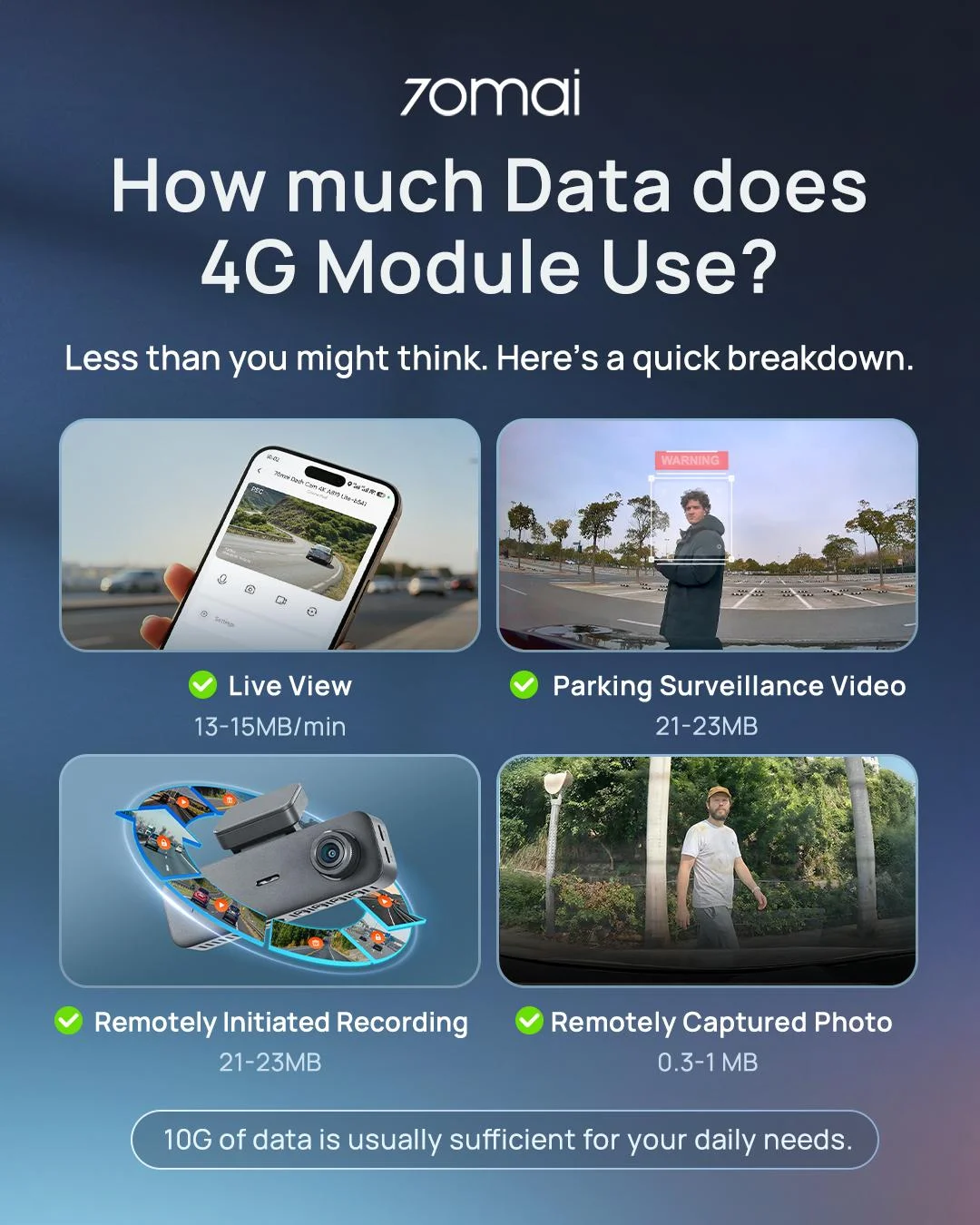
Unlike a smartphone, a 4G dash cam isn't continuously uploading video to the network. For most users, monthly data consumption mainly comes from Live View, remote playback and downloading recorded clips.
So the right data plan depends more on how often you access the camera remotely than on the fact that the dash cam has 4G.
1.webp
 

Light Usage—Around 8–10 GB/month​

For users who:
  • Check Live View 2–3 times per week
  • Occasionally receive parking/vehicle notifications
  • Rarely download recorded footage
An 8–10 GB/month plan should generally provide enough capacity for this type of usage. This is a typical setup for users who mainly use 4G for occasional remote checks rather than continuous monitoring.

Frequent Usage—20 GB+/month​

A larger plan makes more sense if you:
  • Use Live View more than 5 times per week
  • Frequently download recorded clips
  • Regularly check the vehicle while away
  • Use remote functions during longer trips
In this case, 20 GB or more per month provides more room for heavier usage.
 

The Key Point​

There isn't a fixed "correct" data allowance for a 4G dash cam. More remote viewing + more video downloads = higher data consumption.
If you only check your vehicle occasionally, a smaller plan can be sufficient. If remote access is something you use frequently, a larger plan gives you more flexibility.
 
@Becky_70mai

Most people aren't staying logged in to their dashcams and viewing their vehicle for extended periods. The point is to simply check in on the car briefly or download an alert / event video. Usually event videos are short and compressed.

I have 4GB a month on my Vantrue LTE Module and have never exceeded that amount ever.
 
@Becky_70mai

Most people aren't staying logged in to their dashcams and viewing their vehicle for extended periods. The point is to simply check in on the car briefly or download an alert / event video. Usually event videos are short and compressed.

I have 4GB a month on my Vantrue LTE Module and have never exceeded that amount ever.
Thank you for sharing. It’s true—unless you’re constantly connected to a remote server, you’d rarely exceed 5–6 GB.
However, we’ve also emphasized that the cost and data allowance of a plan depend on how frequently you use it. 8–10 GB is a conservative estimate we recommend. I know that some carriers charge exorbitant rates per GB once you exceed the 5 GB plan—rates that can even exceed the cost of the 10 GB plan itself.

Still, your situation serves as a useful reference for others. Thank you for your reply!
 
Thank you for sharing. It’s true—unless you’re constantly connected to a remote server, you’d rarely exceed 5–6 GB.
However, we’ve also emphasized that the cost and data allowance of a plan depend on how frequently you use it. 8–10 GB is a conservative estimate we recommend. I know that some carriers charge exorbitant rates per GB once you exceed the 5 GB plan—rates that can even exceed the cost of the 10 GB plan itself.

Still, your situation serves as a useful reference for others. Thank you for your reply!

You're welcome. I've never tested MAI dashcams as a tester here (maybe one day such an opportunity will arise), but I would imagine most have similar experience regardless of brand.

1. Check Car for a minute or two if alert is sent
2. Download video if there's event
3. Locate your car (at least Vantrue App lets you see where the car is located).
4. Remote in and Look for where I parked the car (Yes, I often forget HAH... I have no navigational skills). In fact, I have done this quite a bit. Very useful feature (Live View).

My remote module is also LTE Modem with ability to act as Wifi. I also use that with 4GB card + Dashcam LTE and still not hit 4GB. It takes a lot of usage to hit 4GB honestly.
 
In Australia there are plans that allow unlimited data.
The gotcha isn't what you would expect eg some hidden fee but rather just a simple slowing down of the transfer rate. 1.5Mbs and upload I don't remember but it is slower.
My home security uses this as I usually only need to login to check the state of things occasionally.

70mai gave me access to use their full cloud storage functions (normally a subscription) using a brand new sim card that did allow data transfer after the quota had been reached without further charge.
I don't have storage usage available to me now as I no longer have access to it.

Look out for this option in your country. Generally 1.5Mbs is the max speed once my data is exceeded and then throttled to is still fast enough to check on footage that is stored.
Of course if you are an impatient person then this might be to slow for you.

Keep in mind that any video that is stored to the cloud is going to be the same size as the one on the camera so it really comes down to how many times your dashcam has sent a video to the cloud.
70mai uses H265 compression so it will be smaller than the same quality video with H264 encoding.

So if your vehicle has been hit or your dashcam is set to capture motion there could be many files uploaded per day.

eg 30secs 114MB at 15fps ( parking mode on the T800 )
or
1.21min 284MB at 24fps (normal recoding frame rate in emergency video )
or
1min 210MB 30fps

All the above in UHD (4K)

To reach say 30GB in a month would require

Parking mode (114 MB): ~270 files total in the month (or about 9 files per day).
or
Emergency video (284 MB): ~108 files total in the month (or about 3.6 files per day).
or
UHD 30fps (210 MB): ~146 files total in the month (or about 4.9 files per day).
or
a combination of the above.

The Key Point​

There isn't a fixed "correct" data allowance for a 4G dash cam. More remote viewing + more video downloads = higher data consumption.
If you only check your vehicle occasionally, a smaller plan can be sufficient. If remote access is something you use frequently, a larger plan gives you more flexibility.
 
In Australia there are plans that allow unlimited data.
The gotcha isn't what you would expect eg some hidden fee but rather just a simple slowing down of the transfer rate. 1.5Mbs and upload I don't remember but it is slower.
My home security uses this as I usually only need to login to check the state of things occasionally.

70mai gave me access to use their full cloud storage functions (normally a subscription) using a brand new sim card that did allow data transfer after the quota had been reached without further charge.
I don't have storage usage available to me now as I no longer have access to it.

Look out for this option in your country. Generally 1.5Mbs is the max speed once my data is exceeded and then throttled to is still fast enough to check on footage that is stored.
Of course if you are an impatient person then this might be to slow for you.

Keep in mind that any video that is stored to the cloud is going to be the same size as the one on the camera so it really comes down to how many times your dashcam has sent a video to the cloud.
70mai uses H265 compression so it will be smaller than the same quality video with H264 encoding.

So if your vehicle has been hit or your dashcam is set to capture motion there could be many files uploaded per day.

eg 30secs 114MB at 15fps ( parking mode on the T800 )
or
1.21min 284MB at 24fps (normal recoding frame rate in emergency video )
or
1min 210MB 30fps

All the above in UHD (4K)

To reach say 30GB in a month would require

Parking mode (114 MB): ~270 files total in the month (or about 9 files per day).
or
Emergency video (284 MB): ~108 files total in the month (or about 3.6 files per day).
or
UHD 30fps (210 MB): ~146 files total in the month (or about 4.9 files per day).
or
a combination of the above.

Even with those numbers, it's unlikely to exceed a few GB as most people check on their vehicle for a minute or less and aren't continuously watching the footage. Likewise, files are only downloaded if there's an immediate event / event alert.
 
Even with those numbers, it's unlikely to exceed a few GB as most people check on their vehicle for a minute or less and aren't continuously watching the footage. Likewise, files are only downloaded if there's an immediate event / event alert.
I think you are crystal balling a bit or its your personal experience.

Consider
How did the files get to the cloud to start with? Using data.

You don't have to watch anything. I was only referring to what could be uploaded.

Watching or downloading is another interesting point.

It is Totally hypothetical.
I am just showing what amount of files and types of files could use up 30GB of data in a month using a 70mai dashcam.
 
I think you are crystal balling a bit or its your personal experience.

Consider
How did the files get to the cloud to start with? Using data.

You don't have to watch anything. I was only referring to what could be uploaded.

Watching or downloading is another interesting point.

It is Totally hypothetical.
I am just showing what amount of files and types of files could use up 30GB of data in a month using a 70mai dashcam.

Event files should be parking mode files, which are recorded in lower bitrate or time lapse depending on MAI's setup. And files should only be uploaded to the cloud if an event is triggered. You seem to be overestimating the amount of events and/or events worth checking.

Yes, it's possible to hit a large number of data, but it seems unlikely. I drive 30,000 KM a year and I'm hitting nowhere near your figures.
 
Event files should be parking mode files, which are recorded in lower bitrate or time lapse depending on MAI's setup. And files should only be uploaded to the cloud if an event is triggered. You seem to be overestimating the amount of events and/or events worth checking.

Yes, it's possible to hit a large number of data, but it seems unlikely. I drive 30,000 KM a year and I'm hitting nowhere near your figures.

I don't think LateralNW is overestimating. I don't own a 70Mai, but if impact or motion sensitivity is set too high, it records and uploads every movement outside the car. In a busy parking lot, that can be a lot of files. This would be an issue for any brand that offers Cloud services.

With my car in the garage and parking mode enabled (Vueroid S1-4K), it records a parking event if there are lightning flashes outside or headlights from cars driving by. Essentially, that is wasted data usage on a Cloud feature, but it reminds me that Cloud features can't discern people walking past the front of my car or when another car strikes my car in a parking lot.
 
I don't think LateralNW is overestimating. I don't own a 70Mai, but if impact or motion sensitivity is set too high, it records and uploads every movement outside the car. In a busy parking lot, that can be a lot of files. This would be an issue for any brand that offers Cloud services.

With my car in the garage and parking mode enabled (Vueroid S1-4K), it records a parking event if there are lightning flashes outside or headlights from cars driving by. Essentially, that is wasted data usage on a Cloud feature, but it reminds me that Cloud features can't discern people walking past the front of my car or when another car strikes my car in a parking lot.

Adjusting sensitivity appropriately of course.
 
I want to share my experience with this.
The data usage will strongly depend on where you park your car and how sensitive the settings are.

A high sensitivity with a lot of people around will cause many events and also cause a lot of data usage.

The past few days my car was always parked in areas with many people and cars around. I also used the live view feature quite often. I would describe it as a very extensive usage.
If I calculate the data usage from the past few days into a month, then I could reach up to 9GB.

10GB is definitely possible in a busy area.

However if the car is parked at home without the dashcam running, it will likely cut the data usage in half.

This was with the 70mai T800 running in 3ch mode.
 
Back
Top