How to format Samsung T7 4TB on a Mac for A329?

sf_pb

New Member
Joined
Nov 18, 2024
Messages
5
Reaction score
3
Location
CA
Country
United States
Can someone post all the commands you used to format the drive on a Mac?

I'm trying to do it on a Mac, but the camera just wont recognize it no matter how I format it or not format it. I used the following to just create a partition but thats not working. I have used other ones to partition the disk for less than 2TB usage. But none of it is working.

Code:
diskutil partitionDisk /dev/disk2 GPT "Free Space" "" 100%

Thanks
 
Welcome to the club.
This is my biggest fear of buying the Samsung T7 Shield 4TB to test with the A329.
I don't own a Windows PC.
I don't own a MAC computer.
All I have is a $99 Chromebook.
I think there is someone who figured this out in one of the testing forums.
Use the "search" box at the top right of the screen to find it.
-Chuck
 
This is my biggest fear of buying the Samsung T7 Shield 4TB to test with the A329.
Doesn't appear to be any problem if you buy a new one and plug it into the A329.

The problems arise if you plug it into something else first, which then formats it incorrectly.

There are some posts about formatting, but I'm not aware of a good guide for using a Mac to do so yet...
 
I use Linux Debian, so I am not a MAC user but this may be of help, the trick is to get the drive to ExFAT.

Format Mac SSD to ExFAT

It seems the trick is to get a MBR/GPT but do not format on the computer, let the dash cam do the format.
 
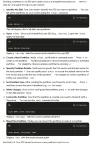
First, you can use the MAC tool Disk Utility to format the SSD, and choose the exFat file system.

After formatted, there will be two partitions, it requires to delete the small capacity one.

1. Using the diskutil list to show the disk info.
2. Find that small capacity partition EFI, and the IDENTIFIER is disk2s1.
3. Delete the EFI partition using this command: sudo diskutil eraseVolume free none disk2s1.
format ssd on mac.webp
 
First, you can use the MAC tool Disk Utility to format the SSD, and choose the exFat file system.

After formatted, there will be two partitions, it requires to delete the small capacity one.

1. Using the diskutil list to show the disk info.
2. Find that small capacity partition EFI, and the IDENTIFIER is disk2s1.
3. Delete the EFI partition using this command: sudo diskutil eraseVolume free none disk2s1.
View attachment 75353

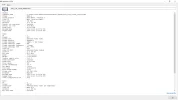
I did this but this still wont recognize the ssd. Am I missing something?

Screen Shot 2024-11-24 at 5.39.59 PM.webp
 
Does it still show memory card full issue?
 
@sf_pb
Is this the same Samsung T7 Shield you’re using?
Model Number: MU-PE4T0S/AM
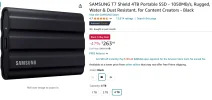
I just noticed the price drop from $307 to $263.
I want one so bad for testing, but I can’t justify the cost. lol
https://www.amazon.com/gp/B0BHZQGN26
 

Attachments

  • $263 .webp
    $263 .webp
    85.5 KB · Views: 120
Does it still show memory card full issue?

No, it just turns the blue light of the SSD on so it is getting the power supply. But the camera wont recognize it and nothing happens after that.
 
Yeah thats the one I'm using, but its not working yet.
Thanks for the update.
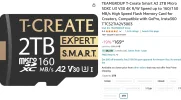
I wonder if this would be easier, and reliable with a Type-C card reader;
https://www.amazon.com/gp/B0CYSTRR5T
 

Attachments

  • Screenshot 2024-11-30 10.04.10 AM.webp
    Screenshot 2024-11-30 10.04.10 AM.webp
    202.4 KB · Views: 143
I did this but this still wont recognize the ssd. Am I missing something?

View attachment 75487

I had the same issue did some internet searching and this is what finally got it to work for me and make sure no volumes are mounted from the external disk when you run the command below.


sudo diskutil eraseDisk -noEFI exFAT NONAME /dev/disk2


once the above command was done executing, I just plugged the Samsung T7 4TB into the dash cam and all has been good since then.
 
Thanks for the update.
I wonder if this would be easier, and reliable with a Type-C card reader;
https://www.amazon.com/gp/B0CYSTRR5T
looking at your attachment in this post, would you really use or suggest to use an sd card that, even though that card is impressive and has all the high speed specs, isn't rated as endurance or "industrial" for the A329 (or any dashcam for that matter)? I imagine a 4TB SSD as mentioned in the title/OP is safe enough as it's such a high storage and more/different memory cells, there would be less constant overwriting with the loop recording, but any sd card (even one as large as 2TB at that)?
 
 
would you really use or suggest to use an sd card
You are correct, it would be risky.
The user would accept all risk.
I’m suggesting it should be tested to confirm & verify operation.
4TB Micro SD Cards are right around the corner;

The reason Micro SD Cards would be attractive to someone like me is, it looks like getting a 4TB SSD to function with A329 is going to require a Windows PC, or MAC computer.
I own neither, I use a $99 Chromebook.
The Micro SD Card will be plug & play.
The 4TB SSD requires a bit more equipment, and technical knowledge.

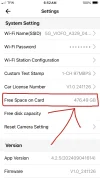
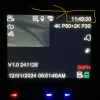
A 512GB Viofo Brand SD Card provides approximately 12 hours of Normal Recording Mode (2-CH) 668 Mbps Total Bitrate.
4TB would be approximately 96 hours, (4 days).
I guess if the average commute was 1 hour per day with 9 hours of Low Bitrate parking mode 8 Mbps it would take around 2 months for the SD Card to fill up.
If this was my use application I would download any important files, and then format the card every 2 months.
This way the camera, and SD Card would never have to worry about Loop Recording.
Does that sound right?
 

Attachments

  • 476GB Free Space .webp
    476GB Free Space .webp
    48.6 KB · Views: 137
  • 11 Hours 49 Minutes .webp
    11 Hours 49 Minutes .webp
    251.1 KB · Views: 122
Back
Top