LTO (Lithium Titanate Oxide) – The Ultimate Battery for Dash-Cam parking mode (DIY)

Ah, that makes sense. I wasn't thinking about it that way, because that's not how I use it. Duh 😉. I just connected red & yellow in order to get the regulator to turn on and never separated the wires after that.

In other news, my LTO cells arrived today. Majority of other parts should arrive in a few days. Then I need to pick up lots of misc little stuff.
 
I've got most of the parts necessary to start assembling my LTO battery. I'm thinking about high temperatures inside the car and potentially higher temps inside the battery box and am wondering if there is any utility to leaving a small 1-2mm air gap between the rectangular LTO batteries in order to facilitate some air flow for cooling. My plan is to include a small 40 or 50mm 12v Noctua fan to draw some air through the box while it operates. There are a number of them that draw only 0.5w or so.

Also, did you use any of the P1, P2, or P3 headers on the charging board? It doesn't look like they are particularly useful for these purposes...
 
I've got all of my parts except the Drok voltage regulator - it should arrive in a few days. I'm thinking I'll use the Viofo regulator to power the camera and the Drok regulator to provide the drive/parking mode 5v signal. The chassis arrived today so I was able to start building the battery pack and test fitting the rest of the components. I used 1" x 1/8" copper for the buss bars and cut/drilled them by hand. I taped the edges of the batteries with kapton tape, put a thin piece of plywood between the battery layers, and then wrapped the final bundle with the kapton tape again. I wanted the entire stack of batteries to be rigid and not flex when I tape it to the bottom of the box.

IMG_09937.JPG


Then I installed the buss bars and the BMS sense wires. I chose this configuration to keep the Pos and Neg terminals on the battery close to one another so I can just crimp eyelets onto the BMS wires without having to extend them. Good thing that I chose 1/8" thick copper bar stock (instead of 1/4") - after adding the crimp ends and a washer, there wasn't much thread left over for the nuts. I used lock nuts with nylon bushing inserts.
IMG_09948.JPG


I think the BMS and the charger will go on the front panel of the box, facing the battery terminals, with some double sided thermal transfer tape. Here is the positioning I'm likely to use. This will keep the voltage and current adjustment pots easily accessible after popping the front panel off.
IMG_09938.JPG


I connected the charger input to a 12v power supply and the output to a big bank of power resistors that I have for amplifier testing. With the resistors attached, I adjusted the charger output to 16.5v with a 4A load. 16.8v is the max voltage for the battery pack (2.8v * 6). I figure this will get me close enough for when I connect the charger to the BMS. Based on some of the images I've seen on AliExpress, I'm wondering if I received the correct (newer version) of the charger or not. It seems that some sellers show the BMS with all of the printing (like what I received, pictured above) as the "old" version that needs 7S batteries and the BMS with no printing on the front as the "new" version that works with 6S batteries. I'll have to connect it with alligator clips and see how it behaves. I spent a bit of time searching for a vendor that appeared to be selling the newer version...

Next steps will have to wait until Monday, have some weekend travel.
 
I've got most of the parts necessary to start assembling my LTO battery. I'm thinking about high temperatures inside the car and potentially higher temps inside the battery box and am wondering if there is any utility to leaving a small 1-2mm air gap between the rectangular LTO batteries in order to facilitate some air flow for cooling. My plan is to include a small 40 or 50mm 12v Noctua fan to draw some air through the box while it operates. There are a number of them that draw only 0.5w or so.

Also, did you use any of the P1, P2, or P3 headers on the charging board? It doesn't look like they are particularly useful for these purposes...
Sorry for the late response, I was on vacation out of country.

I do use P1, which is for the temperature controlled cooling Fan, however this charger is running relatively cool, and so far, I have not seen Fan to turn on.
I don’t use P2(1-4) or P3, although possibility of being able to remotely adjust output current or turn the unit off looks attractive.
Using some separators between the cells is a right thing to do, I believe special sheets are available to buy.
I used about 0.8mm thick, some flexible plastic kitchen cutting boards.

I do check or test everything that goes inside the box to make sure it is fire resistant and does not absorb moisture.
Plywood is not a good material in this regard.

BTW, unlike LFP cells, these Toshiba LTO cells practically do not expand/contract during charging/discharging, and remain cool, so the separators are mostly to prevent chafing between the cells.
No need for airflow between individual cells.
 
Ah, good tip on moisture and flammability, thanks! I was just thinking about a rigid spacer. Should be easy to find 1/8” plastic to replace with.

Edit to add: I did pick up a Noctua 40x10mm fan that is supposed to be able to move about 6-8cubic meters of air in a minute and only consumes 0.25w. Since the fan is 5v, I was planning to run it from the same regulator output as the dashcam itself. This way, the fan will provide air circulation as long as the circuit is live. At only 0.25w, it shouldn’t appreciably impact battery life during parking mode. My concern is temp rise of the electronics over ambient when ambient hits 120-130F.
 
Last edited:
I've got all of my parts except the Drok voltage regulator - it should arrive in a few days. I'm thinking I'll use the Viofo regulator to power the camera and the Drok regulator to provide the drive/parking mode 5v signal. The chassis arrived today so I was able to start building the battery pack and test fitting the rest of the components. I used 1" x 1/8" copper for the buss bars and cut/drilled them by hand.
With a 6S configuration using HK4 with original regulator, you don’t need additional Drok voltage regulator for the signal, any additional parts add to complexity and reduce the overall efficiency and reliability.
With the currents we use for dashcam application the 1/8” buss bar is really overkill, I use 1/16” thick which is more than enough.
Also, for low power wires, I use 18AWG, and for high power wires 14AWG, which is enough for such short wires and much easier to work with, compere to 12AWG.

I adjusted the charger output to 16.5v with a 4A load. 16.8v is the max voltage for the battery pack (2.8v * 6). I figure this will get me close enough for when I connect the charger to the BMS. Based on some of the images I've seen on AliExpress, I'm wondering if I received the correct (newer version) of the charger or not. It seems that some sellers show the BMS with all of the printing (like what I received, pictured above) as the "old" version that needs 7S batteries and the BMS with no printing on the front as the "new" version that works with 6S batteries. I'll have to connect it with alligator clips and see how it behaves. I spent a bit of time searching for a vendor that appeared to be selling the newer version...
As for the cell voltage range, I think it is best to limit it between about 1.85-2.65V per cell, or 11-16V for a pack, based on my capacity tests, going full range 1.5-2.8V doesn’t add any appreciable capacity and only stresses the cells.
Also at extreme voltage levels we get the most dis-balance between cells so the BMS will stop charge/discharge as one cell reaches the limit before entire pack, this is more so for LFP cells and not so much for Toshiba LTO cells.

Your BMS looks similar, mine has similar markings, here is the model JK-BD4A8S4P
I know similarly rated BMSs may differ in balancing Amp rating, but I had no idea there was a new and old version.
I am sure you will have no problem with 6S configuration either way.
 
Edit to add: I did pick up a Noctua 40x10mm fan that is supposed to be able to move about 6-8cubic meters of air in a minute and only consumes 0.25w. Since the fan is 5v, I was planning to run it from the same regulator output as the dashcam itself. This way, the fan will provide air circulation as long as the circuit is live. At only 0.25w, it shouldn’t appreciably impact battery life during parking mode. My concern is temp rise of the electronics over ambient when ambient hits 120-130F.
If the box has vents, the fan will exhaust hot air from the battery box and draw cooler air from the car.
If there are no vents, the fan will move the air inside the box to improve heat transfer through the metal walls of the box.
This only works when the air in the car is colder than the air in the box - when driving, the charger & relay generate heat inside the box, and the air conditioner or open windows keep the air in the car cooler)

Parking mode is different.
In my experience, no noticeable heat is generated inside the box while in parking mode (especially if there are no any voltage converters), and without air conditioning and with closed windows, pretty soon the temperature inside the battery box and in the car will reach equilibrium, after which the fan will no longer help.
As you mentioned, running the fan directly from the battery will increase the overall parking power consumption, and using an additional 5V regulator will further increase the parking power consumption and generate a little heat, albeit small, but still.
Finally, when the dash cam stops parking recording (usually time limited), how do we stop the fan, which is powered by the battery?
Maybe I'm missing something.

I'm usually powering the fan with the incoming power from the car, usually at charger's or relay's input terminals, unless charger has a dedicated port for the fan.
My BMS protection settings for the battery, include 60°C cutoff charging and 65°C cutoff discharging for LTO and 55°C and 60°C respectively for LFP.
At those temps in battery and cabin, I think dashcam in direct sunlight will be even hotter and probably will turn off due to its own protection.
 
Last edited:
I replaced the plywood with a 1/8” sheet of plastic so I could reuse the copper buss bars that I made. I hear you on the wire gauges. The 1/8" copper is total overkill for this application. I was just looking for added rigidity in the battery pack. 14g is also totally fine for wiring high current charging. I'd wager most US homes have all of their wall outlets wired with 14g wire (except for kitchens and bathrooms).

Thanks for the tips on battery limits. Adding a bit of "padding" on each end of the battery range sounds like a good approach to help maximize battery stability and life. I was planning to use the original Viofo regulator to power the camera and the Drok regulator to provide the 5v park/drive mode signal. I figured this way, I wouldn't need to worry about the low voltage cut-off of the Viofo regulator. Maybe I'll try just using the Viofo unit and see how much time I get before the voltage cutoff happens. I figure I'll run the camera for a week or two in the house so I can monitor its behavior before packing it all into the box and putting it in the car.

For fan/camera timing, my plan so far is to manually power down the BMS when the car is in the garage, so the timing of when the fan goes off isn't a concern right now. If that doesn't work out, maybe I'll switch to a 12v fan and then power consumption won't matter since it will be powered by the car instead of the battery.

Thanks for the ongoing feedback, GPak! I do appreciate it!
 
Last edited:
I ran into an unanticipated snag and hoping someone might have some input to help. My problem is that I've clipped the Viofo regulator from the long USB-C cable that plugs into the camera and I don't know which wire on the USB end goes up and down with the ACC signal on the yellow input wire to enter/leave parking mode. I was just trying to avoid purchasing another HK3-C that I really don't "need."

I've reconnected the Viofo regulator to a USB-A male plug and am using a USB-A to USB-C adapter to plug into the Viofo camera. I've connected red-to-red and black-to-black. The camera turns on and off properly. But I didn't know whether to connect the yellow output trigger wire to the Data- (USB pin #2 white) or the Data + (USB pin #3 green). So I tried each one by themselves. Neither connection (yellow to white - or - yellow to green) would toggle the camera between parking mode and drive mode. Next, I experimented with connecting both white and green together and then connecting this to the yellow output trigger wire. This didn't work either. Then I connected the yellow trigger wire to the shield wire. None of these combinations would toggle the camera between parking mode and drive mode.

Any insights on what I'm missing here? Which wire on the USB-A side goes up and down in voltage with parking mode? Or, is the park/drive mode trigger wire a pin that exists on the USB-C connector pinout that is missing from the USB-A connector pinout? I'm leaning toward the latter one here, which will make my test impossible without an intact regulator and cable...

USB A pinout.jpg
 
Last edited:
HA- solved it! I picked up a USB-C extension cable from Walmart, cut it in half (so I have both a male and a female end) and made some voltage measurements in my car.

The cable is a cheap one, and only has five conductors plus an outer wire/foil shield, but it gave me what I need. Here is the usable pinout for a USB-C cable:
Outer Foil/Shield: not used
Red: +5v for dashcam power
Blue: +5v for dashcam drive/park mode toggle
White: unused
Green: unused
Bare Conductor: Ground for +5v voltages

Now I can finish my wiring and testing...
 
Last edited:
Got everything assembled and tested and it seems to work great (though it looks like a rat's nest of alligator clip wires right now). The JK BMS doesn't appear to have an automatic turn on/turn off feature, so it will require using the illuminated button for power cycling. This will work fine for my son's car, where the battery will live on the rear passenger side floor, so it will be within reach of the driver's seat. I wonder if I can make an extension cable for my car as my plan is to keep the battery in the trunk.

One of the screen caps from the app that I found online showed a device timeout setting in the app, but I don't see it the app that I downloaded. I'm curious how long this battery pack with last in parking mode with two cameras.

Overall, I have to say that I'm impressed with the overall simplicity of this arrangement. There are really only 4 components: the battery pack, the charger, the BMS, and the Viofo regulator. The best part is that all of these components are rated for fairly high temps. The Viofo has the lowest operating temp of 60c. The batteries are closer to 70c, the BMS indicates 80c and the charger is rated to 85c. Everything stays pretty cool. The BMS only gets to 4c over ambient, though the charger hits 16c over ambient with a 7A charge rate. I suspect the temp rise will be lower once it is coupled to the larger metal panel of the box.
 
.........
One of the screen caps from the app that I found online showed a device timeout setting in the app, but I don't see it the app that I downloaded. I'm curious how long this battery pack with last in parking mode with two cameras.
.......
It should be in a App settings that you can adjust
 
Last edited:
Just verified:
In the "Settings" page it's called "Time Smart Sleep" - you can adjust/set it in hours.
It will show as "Time Enter Sleep" on the main "Status" page, in seconds.
For this to work, I believe you also need to enable "Smart Sleep On" on the "Control" page.

I know these settings are confusing, I am still not sure about some of them 🤔 🙂
 
Last edited:
....... The JK BMS doesn't appear to have an automatic turn on/turn off feature, so it will require using the illuminated button for power cycling. This will work fine for my son's car, where the battery will live on the rear passenger side floor, so it will be within reach of the driver's seat. I wonder if I can make an extension cable for my car as my plan is to keep the battery in the trunk.
.........

I think the "Discharge" switch on the "Control" page will turn-Off the dash cam, but I'm not sure if it can be turned back On, it depends on whether Bluetooth remains active or not, also I'm not sure if the "Discharge" switch will automatically go to "On" the next time we start charging with the ignition.

Some testing is needed.
 
Hmmm I’m not seeing those settings in the app. Here is the version of the app that I installed (for iOS) and a screencap of the Control page in the app. Do you have a different version?


IMG_4699.png


IMG_4700.jpeg
 
Last edited:
So here are some images of my LTO box in progress.

I replaced the 1/8" plywood with 1/8" rigid plastic. I taped up the edges of the batteries, then taped two together side by side, then sandwiched a sheet of plastic between each battery layer to keep them rigid. I also added some plastic plumbers strap across each side of the battery pack as well as double stick tape on the bottom of the battery pack. I figure that should help keep it from sliding around inside the box. I also put some of the foam from the battery shipping box behind the battery pack.

IMG_10148.JPG


Here is a shot from the front of the battery pack. Most of the wires are connected at this point:
IMG_10150.JPG


The BMS and Charger are mounted to the front plate of the box. I sanded the powder coat on the inside of the panel smooth and added some thermal paste to help transfer heat from the charger plate to the blue panel. Finally, I added two screws to keep it from moving around. The BMS is simply held in place with double stick thermal transfer tape. I'm not sure if that's a good solution long term or not, though... I'm not sure what else to do to hold it more securely. I was happy to be able to connect the BMS without needing to extend the high-current wires. These were connected directly to the battery pack and charger.
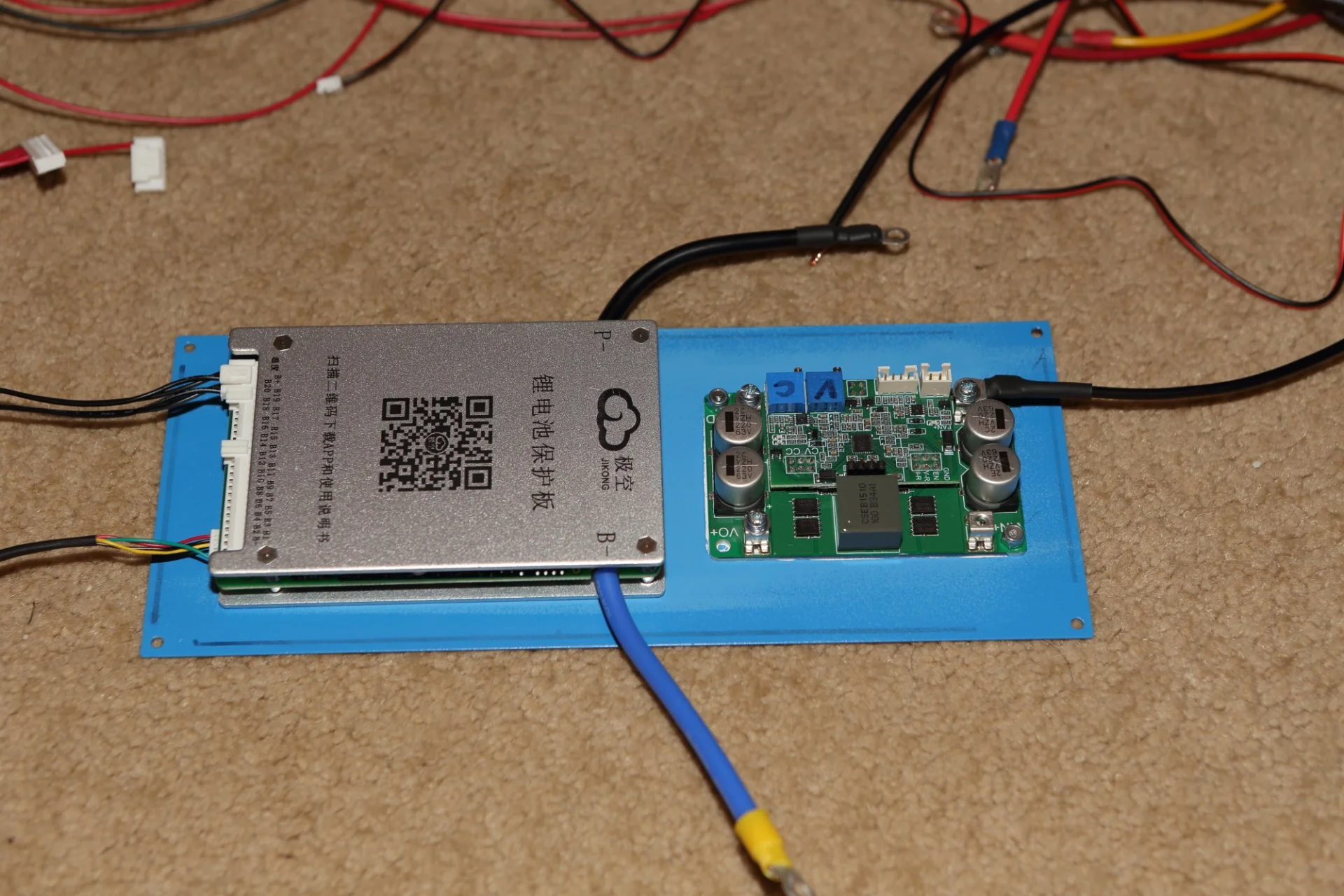
IMG_10152.JPG


And here is the box before I screwed the front plate in place. I taped one of the BMS temp sensors into the space between two of the batteries and the other one is taped to the joint where the charger mounts to the front panel. I applied multiple layers of tape to the top of the caps on the charger as well as to the top plate of the BMS. A leftover piece of 1/8" plastic will go between the battery pack studs and the BMS to keep things separated and prevent shorting in the event that the BMS comes off of the front panel.
IMG_10153.JPG


And here is where things are now, the box is mostly assembled. I still need to cut holes in the lid for the power meter and BMS power switch. I will add a chassis-mount XT60 power entry module and power out for the dashcam to the other side of the box. I spent some time looking around at different boxes and didn't find anything that was a close match to the dimensions that I needed, so I just copied the link from your parts list 😉
IMG_10158.JPG


I will re-wire the output wires from the Viofo regulator and then put it back in its plastic box to keep it electrically insulated and just tape it to the battery stack. I also needed to cut and extend the 4-conductor power cable from the BMS because it wouldn't reach where I want to put it. The last detail will be to fuse the power entry and power exit.

I charged it up last night and turned it on with only one camera (no GPS and no rear camera) to see how long it would last. After 12 hours of runtime, I still had about 74% of the battery left according to the external voltage meter. The app says I still have about 94% of the battery left (each cell was at 2.42v), so I'm guessing the BMS needs a full charge-discharge cycle in order to calibrate it's internal meter correctly. However the actual battery life plays out will still be plenty of power to match our driving patterns. Right now, I want to run it until it shuts off and see how many hours I get and see if the Viofo regulator actually shuts it down at 11.8v. Before I finished the wiring, I connected the Viofo to fewer battery cells so it had only a 9v power supply and it still provided output power...

I left all of the default battery parameters from the LTO setting in the BMS where they were. I just had to set the number of cells and capacity of each cell for it to stop complaining.

Overall, I'm a bit surprised at the simplicity of the box, it only has a battery, BMS, charger, and the Viofo regulator. Despite that, I was surprised at how many hours it took to cut, wrap, and wire everything together. Definitely deceptive...
 
Last edited:
Hmmm I’m not seeing those settings in the app. Here is the version of the app that I installed (for iOS) and a screencap of the Control page in the app. Do you have a different version?


View attachment 73515

View attachment 73516
Looks like yours is different or may be updated version?.
Control page is the same except I don't have "Port Switch" and you don't have "Smart Slip On"

I checked "3 dot" "About"
Software Ver: V11.XW (probably BMS)
Version: V4.22.0 (probably App)
 
Just verified:
In the "Settings" page it's called "Time Smart Sleep" - you can adjust/set it in hours.
It will show as "Time Enter Sleep" on the main "Status" page, in seconds.
For this to work, I believe you also need to enable "Smart Sleep On" on the "Control" page.

I know these settings are confusing, I am still not sure about some of them 🤔 🙂
Hmmm... I just found a "Smart Sleep On" function listed on the Google Play app download page:
https://play.google.com/store/apps/details?id=com.jktech.bms

This same functionality does not seem to exist in the iOS app. I also don't seem to be able to do anything on my windows machine with the Google Play environment. Are you using an Android phone?
 
Here is my About page in the app. Seems like the app versions we have match, but are somehow different... I’m confused.

BMS App About Page.jpg
 
Last edited:
I also use IOS and mine looks the same on versions.
I also cheched the JKBMS webside and there is nothing different there. I just assume they can slightly change App without changing the version.

Meanwhile I just received 2 more chargers, and soon will update my 4S LTO into 5S and my 7S LTO into 6S.

Also, today temperature in my parked car reached 53°C, same was showing my LFP battery BMS which I am currently testing. After I started my approximately 12 min drive home temperature in the car slowly started to cool down due to air-conditioning and at the end was about 46°C, in the box at the end of the trip temperature was about 51°C also less then parking. Fan never turn On, I am not sure at what temperature it will turn On.
I remember in similar conditions my other chargers would increase temperature inside the box even with fan running by few degrees at the end of the trip (much longer trip is needed to cool the battery down).

This charger is very efficient at 97%, based on innovative aluminum PCB, the same technology is used on the newest Victron Orion XS 12/12-50A DC-DC charger, also 97% efficient.

I have tested probably over 20 different charges, it is day and night difference, we got lucky finding this one.
 
Last edited:
Back
Top