Model option in recordings

Display model on video


  • Total voters
    10
  • Poll closed .

LateralNW

Well-Known Member
Joined
Nov 7, 2016
Messages
1,985
Reaction score
1,237
Country
Australia
Dash Cam
VArious
I've noticed that some videos have the brand and the model in the videos.

Providing there is an option to display it or not, which do you prefer.

The argument for displaying the camera model:
Easy to identify make and model
Proof of which make and model the video is from.

The argument not to have it display:
Takes up screen space
Is distracting
Doesn't look good.


So in the poll the questions is

'Yes add camera model'
'No Remove camera model'
 
Can I have 2 answers?
Yes for testing
No for personal use
 
Can I have 2 answers?
Yes for testing
No for personal use
Lol
I did say with the option to disable it.
So you do want it! Lol

I would like the choice to enable and disable everything on the screen.

I would love it if Dashcam companies place the speed and time in the middle bottom of the screen

I do like it when watching those crash car videos being able to see what model of dashcam is used.

Thanks for participating.
 
I don't see a reason to have the camera model displayed unless you are reviewing the camera, or advertising it. That kind of thing should be in the metadata anyway.
 
Can I have 2 answers?
Yes for testing
No for personal use
Same.
It's kind of tacky but understandable a manufacturer puts it there for free advertising.
 
Only 8 people have an opinion if they like or dislike the idea of the model of Dashcam stamped on their video. (With the option of being able to disable it)

I know you could argue that you already know the model because it is in your car which is fair enough however when you update your Dashcam will you be able to work out what model the videos stored on your computer/cloud came from?
 
Same.
It's kind of tacky but understandable a manufacturer puts it there for free advertising.
From the apps I've used I'm pretty sure you can disable their logo but I agree it is tacky given how much you pay for some of these models.

I'm referring to the model eg M800 A329 E1Pro etc not the brand and also would like it added as an option not hard coded eg you have the choice to turn it off.

I think two of those examples do have the option already.
 
I don't see a reason to have the camera model displayed unless you are reviewing the camera, or advertising it. That kind of thing should be in the metadata anyway.
Re the Meta data having the info might be true but isn't it easier having it stamped on the video?
 
Only 8 people have an opinion if they like or dislike the idea of the model of Dashcam stamped on their video. (With the option of being able to disable it)
I was going to vote, and leave a paragraph of rambling when you first posted this.
But I didn’t because my low IQ brain does not understand the point of this post, or how this information will be used / constructive.
If you can convince me, I’ll vote, and give you more useless rambling. lol
 
I was going to vote, and leave a paragraph of rambling when you first posted this.
But I didn’t because my low IQ brain does not understand the point of this post, or how this information will be used / constructive.
If you can convince me, I’ll vote, and give you more useless rambling. lol
Similar to your wish lists.

I would like to see 70mai add their camera models to the video as an option.

I thought doing a poll in general would help all Dashcam manufacturers to see if there is a need to consider to supply this option.

I don't think a handful of votes is going to make a difference.

It's true doing reviews and having the camera model listed does help to prove where the footage came from and indirectly helps my poor filing system.

Perhaps I'm barking up the wrong tree!

Thanks for making a post.
 
barking up the wrong tree
OK, you got me hook, line, and sinker.
The first time I remember any kind of text stamp on video footage was VHS / Betamax camcorders.
I remember they had a timer / counter in the bottom right corner because tapes were only 30 / 60 minutes long.
Ever since then I’ve been fascinated with embedded information right on video footage.
I’m all for the maximum info in the text stamp on recorded footage, of course with the ability to disable / enable at will.
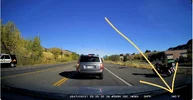
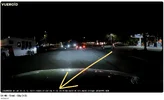
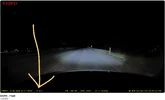
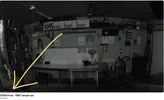
I’m still hoping we get Processor Temperature so we can see how hot the camera got just before an overheating shut down event.
This is why Viofo followed suit from the Korean Brands by putting system voltage in the text stamp.
It aids malfunction diagnosis.


Attachments

  • Processor Temp .webp
    Processor Temp .webp
    149 KB · Views: 51
  • Vueroid .webp
    Vueroid .webp
    83.4 KB · Views: 63
  • VIOFO .webp
    VIOFO .webp
    47.3 KB · Views: 36
  • BlackVue .webp
    BlackVue .webp
    50.5 KB · Views: 56
  • Thinkware .webp
    Thinkware .webp
    101.1 KB · Views: 39
  • GNET .webp
    GNET .webp
    184.1 KB · Views: 59
Last edited:
OK, you got me hook, line, and sinker.
The first time I remember any kind of text stamp on video footage was VHS / Betamax camcorders.
I remember they had a timer / counter in the bottom right corner because tapes were only 30 / 60 minutes long.
Ever since then I’ve been fascinated with embedded information right on video footage.
I’m all for the maximum info in the text stamp on recorded footage, of course with the ability to disable / enable at will.
I’m still hoping we get Processor Temperature so we can see how hot the camera got just before an overheating shut down event.
This is why Viofo followed suit from the Korean Brands by putting system voltage in the text stamp.
It aids malfunction diagnosis.

Voltage and temperature would be very good things to add to the metadata, but I'd rather not embed them in the video image. It would be much better to have a video player that could turn that data on or off when playing.
 
@DAP
Well of course I agree.
But why not enable / disable Voltage & Temp in the firmware settings like we already do?
Oh yeah, I've been testing dash cams since 2018, and I still have not ever used any Video Player to watch / analyze test footage.
How can that be?
I don't own / use Windows PC, or MAC computer.
I only use Google Chromebook, and iPhone.
Crazy, right? lol
-Chuck
 
Oh yeah, I've been testing dash cams since 2018, and I still have not ever used any Video Player to watch / analyze test footage.
Actually you do. You are using the built in player in Google Chrome. There is no way to view video files without some kind of player. Sort of like not being able to play a record without a record player.

The reason I want the data in the meta-data rather than the video is that it give the viewer the option to turn that stuff on or off. Embedding the data in the video forces it to always be displayed.
I think the biggest problem is that not all video players will give you the option to display the meta-data, and many video editors will strip out the meta-data.
 
Reply function not working.

@DAP said:
Actually you do. You are using the built in player in Google Chrome. There is no way to view video files without some kind of player. Sort of like not being able to play a record without a record player.
@Chuck McCoy said:
You got me there. lol
But I was talking about VLC, Official Viofo Player, Dash Cam Viewer, etc.
Or the fancy ones that are paid / subscription based.
All those require Windows PC, or MAC computer.

@DAP said:
The reason I want the data in the meta-data rather than the video is that it give the viewer the option to turn that stuff on or off.
Embedding the data in the video forces it to always be displayed.
@Chuck McCoy said:
I don’t think this is true.
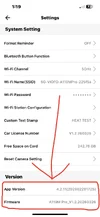
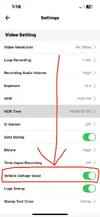
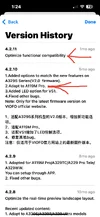
Around January 2026 Viofo release a firmware update to add Voltage Value in the text stamp stamp for several cameras that are compatible with HK6 Bluetooth signal;
A329S
A229 Pro
A229 Plus
A119M Pro
A229 Ultra

Shortly after some customers complained they do NOT want to see Voltage Value in the text stamp.
So Viofo updated the Smartphone APP to enable / disable Voltage Value.
Customers have full control if Voltage Value gets displayed on the text stamp or not.
We can do the same with Processor Temp.
Are you talking about something else?
See attached screenshots.
-Chuck
 

Attachments

  • 4 .webp
    4 .webp
    58.7 KB · Views: 39
  • 3 .webp
    3 .webp
    49.8 KB · Views: 41
  • 2 .webp
    2 .webp
    107.5 KB · Views: 43
  • 1 .webp
    1 .webp
    74.3 KB · Views: 46
Shortly after some customers complained they do NOT want to see Voltage Value in the text stamp.
So Viofo updated the Smartphone APP to enable / disable Voltage Value.
Customers have full control if Voltage Value gets displayed on the text stamp or not.
We can do the same with Processor Temp.
Are you talking about something else?
Being able to turn on or off the voltage or temperature at playback time means that that data is stored in the meta-data, not burned into the image. That is the way it should be.
 
Reply function not working.

@DAP said:
Being able to turn on or off the voltage or temperature at playback time means that that data is stored in the meta-data, not burned into the image. That is the way it should be.
@Chuck McCoy said:
Ohhhh, I apologize for the confusion.
I don't have a full understanding what meta-data is.
I was thinking if the customer turns off voltage or temperature in the settings it will not be "burned" into the image.
Is that not acceptable?

It sounds like I want to control what gets put on the text stamp BEFORE the footage is recorded.
And it sounds like you want to control what gets on the test stamp in Post-Production "editing".
Is that correct?
 
Reply function not working.

@DAP said:
Being able to turn on or off the voltage or temperature at playback time means that that data is stored in the meta-data, not burned into the image. That is the way it should be.
@Chuck McCoy said:
Ohhhh, I apologize for the confusion.
I don't have a full understanding what meta-data is.
I was thinking if the customer turns off voltage or temperature in the settings it will not be "burned" into the image.
Is that not acceptable?

It sounds like I want to control what gets put on the text stamp BEFORE the footage is recorded.
And it sounds like you want to control what gets on the test stamp in Post-Production "editing".
Is that correct?
Meta data is information that is stored with the image, but not part of the image. For pictures, it includes the camera model, focal length, aperture, exposure, latitude & longitude, and many other things. For most picture viewing tools, this stuff is shown in a separate window outside the picture, so it does not affect the picture itself. I have attached an example of the image viewing tool "Pix" showing an image alongside the metadata displayed outside the image on the right. All of this information is saved in the same .jpg file, but the meta data is not part of the image.

What most dash cams do is embed the data as a bunch of white pixels drawing text on top of the image. That text is a permanent part of the image and can't be removed.

I prefer to have that data stored as metadata and not clutter the image. There is no need to be able to turn off storing metadata in the camera since it can be stripped off after the fact with video editing software. Embedding text in the image itself needs to be optional. Some people like this, but I do not, so I'd like to be able to turn this off. Once text is added to the image, the only way to get rid of it is to crop the image.

So, to summarize, what I want is to always have the data stored in the metadata, and optionally, also burned into the image by the camera.
Screenshot from 2026-04-03 13-45-23.webp
 
Last edited:
Reply function not working.

@DAP
Thank you for the explanation.
OK, it sounds like you're an "expert level" computer guy, and videographer.
And that is driving your preference of text stamps on recorded footage.

Me on the other hand, I'm the reason manufacturers aim to make their products "idiot proof". lol
K.I.S.S. is my may favorite design strategy.
The "average" consumer in 2026 does not use a computer, they all use smartphones & tablets.
This means they will most likely never have access to video players / video editing software / or other protocols that can manipulate meta-data to control what gets displayed on recorded footage.
They just need to download a clip, and send it off to police / insurance / courts / YouTube.
So it will be "easier" to control what gets displayed on the text stamps of recorded footage before it's filmed.
They can choose these settings upon initial set up; resolution / Bitrate / time zones, etc.
 
Doesn't the Viofo app allow users to select the information displayed on the video?
 
Back
Top