Mph not showing on screen

Mike Callahan

New Member
Joined
Apr 20, 2026
Messages
3
Reaction score
4
Location
Blackshear
Country
United States
I purchased a Vantrue n4s last week and updated the firmware due to the mph not matching vehicle speed. After firmware update everything worked as should. I leave for work this morning and the speed is not showing on the screen. I’m wondering if I messed with something last night that could be causing this. Thank you
 
Welcome to the club @Mike Callahan
It's possible at the moment you left for work, and powered up the camera the "GPS satellites" were not "over your head" or some other kind of signal interference.
I would try again later, and give it a few minutes to acquire signal.

Sometimes when I power up dash cams in my garage they get GPS signal within 2-3 seconds, and sometimes it takes 5 minutes.
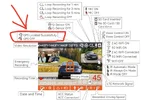
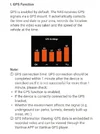
Check the settings in your camera for a GPS Signal Strength Display.
This might help you diagnose GPS signal reception issues.
See attached screenshots from the user manual.
-Chuck
 

Attachments

  • Page 12 User Manual .webp
    Page 12 User Manual .webp
    178.4 KB · Views: 6
  • Page 30 User Manual .webp
    Page 30 User Manual .webp
    96.2 KB · Views: 7
Last edited:
Hey Chuck, thank you for the fast reply. I do park under a metal roof with the front and back open. So, that could very well be the case. I have about a 15 mile drive to work and it still didn’t show on the screen. I will check the gps strength when I get off. Thank you again. 😊
 
If this keeps happening try "turning it off, and on again" after you leave the metal roof area. lol

 
Back
Top