

DJ70
Active Member
- Joined
- Jun 5, 2021
- Messages
- 183
- Reaction score
- 61
- Location
- NW England
- Country
- United Kingdom
- Dash Cam
- Viofo A329T + SanDisk Extreme 1Tb || BlackVue DR900S-2Ch
VIOFO being new to me I may well be misunderstanding, if so an explanation would be appreciated.
Using the VIOFO player I can't see all the files that it says are loaded, unless I first delete some (10) shown.
(30 was just an example, it could be 15 or 50).
Maybe the image will help explain...
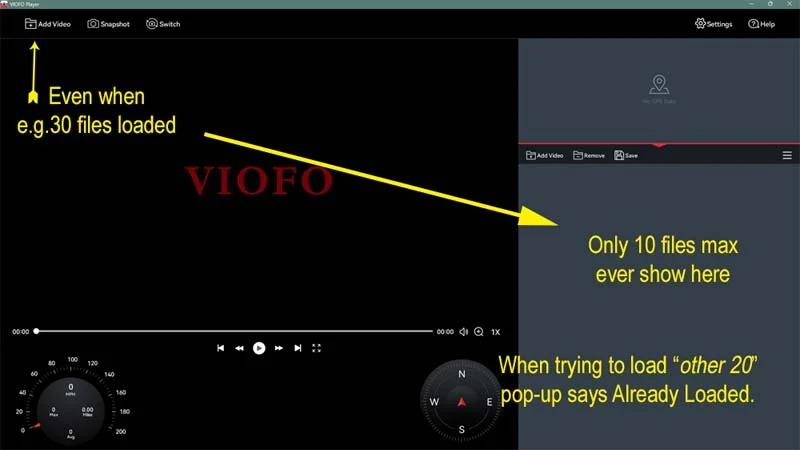
What I am not getting?
@viofo
@VIOFO-Support
Also, on the subject of the player.
Clicking "Remove" in the menu brings up a dialogue box asking to "Delete" the selected files.
I was at first confused as I thought they might be deleted from the SD or SSD but then found it only means delete from the player.
Wouldn't it make more sense if, in the pop-up, "Delete" was replaced by "Remove" (as in the menu)?
Using the VIOFO player I can't see all the files that it says are loaded, unless I first delete some (10) shown.
(30 was just an example, it could be 15 or 50).
Maybe the image will help explain...
What I am not getting?
@viofo
@VIOFO-Support
Also, on the subject of the player.
Clicking "Remove" in the menu brings up a dialogue box asking to "Delete" the selected files.
I was at first confused as I thought they might be deleted from the SD or SSD but then found it only means delete from the player.
Wouldn't it make more sense if, in the pop-up, "Delete" was replaced by "Remove" (as in the menu)?
