Review : 4K + 4K - Vantrue S1 Pro Max

I haven't finished this yet and I'll update it when I can fill in the holes, but here are some start up times from Collision Detection Mode that I made earlier today.

EDIT: I updated the table with the SD card size that is in each camera and the firmware version of each camera. The fastest wake up time that I observed was with the S1PM camera (~2.3s) that had an empty 128GB SD card in it at the time.
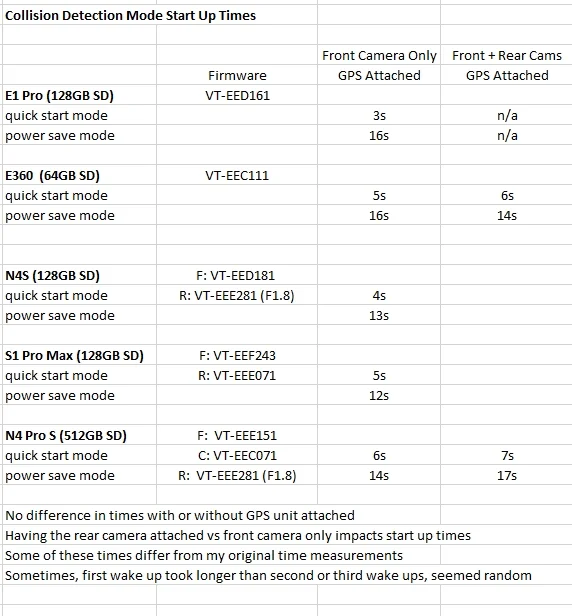
Colision Wake Up Times.webp
 
Last edited:
Rear Camera - CPL Filter - DIY Modification

I decided to add a CPL filter to the rear camera after seeing results from @EricSan who did the same. I used a CPL from an older dashcam and secured it in place using two strips of VHB above and below the lens.

1753947629289.webp


A look at the camera view before & after shows slight vignetting in the corners. The angle of the sun (left to right) does not show off the effect of the CPL.

20250730_No_CPL.webp
20250730_CPL.webp


The effect of the CPL can be seen here with a big reduction in windscreen reflections.

20250730_CPL_2.webp
 
Rear CPL - HDR On / Off

Having a CPL on the rear camera can be useful for capturing the actions of drivers following you. However, the car interior is often much darker than the surrounding scene, making it difficult for the dashcam to record the driver.

Enabling HDR on the rear camera makes a big difference by brightening the shadows, at the expense of some motion blur.

RearCPL_HDR_OFF.webp
RearCPL_HDR_ON.webp


1753951191126.webp
1753951247949.webp


I would like to have HDR always-on for the rear camera, and HDR timed for the front camera, but at the moment the settings do not allow this.

@Jeff_Vantrue please can I ask (again) if we can have separate HDR timers for the front and rear cameras? Perhaps just one timer, but each camera could be set to On/Off/Timed?
 
Would you mind trying again with a different microSD card? Normally, with quick start enabled, it should begin recording within 3 seconds of impact.

Collision Detection Parking Mode - Quick Start ?

What startup times are you seeing in collision detection parking mode with quick start enabled? I did some testing this week and the time from impact to video start was 17 seconds,

@EricSan @jsmith @Julian23 @Karagandinez @Jeff_Vantrue

My setup is:
2CH 4K+4K
FW version VT-EEF243
512GB Vantrue microSD card
Connected to LTE module


- Dashcam is waiting in collision detection parking mode. The recording indicator is off.
- Dashcam wakes up instantly when I close the car door. Recording indicator is on (solid)
- After 17 seconds at 14:02:19, the screen turns on, the video timer starts and the indicator is flashing. Photo auto saved has 14:02:19 time stamp.
- The dashcam records for 30 seconds, then appears to go into standby mode (the indicator light is solid). I get an instant notification of the Event on my phone and paired smartwatch. I think the dashcam is now uploading the video to the Vantrue Cloud over the LTE module. However whilst the green light remains on, the dashcam did not respond to a further impact test a minute later.
 
Rear CPL - HDR On / Off

Having a CPL on the rear camera can be useful for capturing the actions of drivers following you. However, the car interior is often much darker than the surrounding scene, making it difficult for the dashcam to record the driver.

Enabling HDR on the rear camera makes a big difference by brightening the shadows, at the expense of some motion blur.

View attachment 83450 View attachment 83451

View attachment 83453 View attachment 83454

I would like to have HDR always-on for the rear camera, and HDR timed for the front camera, but at the moment the settings do not allow this.

@Jeff_Vantrue please can I ask (again) if we can have separate HDR timers for the front and rear cameras? Perhaps just one timer, but each camera could be set to On/Off/Timed?
We'll evaluate it later~ there are currently too many combined conditions to consider.
 
A look at the camera view before & after shows slight vignetting in the corners.
That's a pretty nice improvement with the polarizer added! The vignetting isn't too big of a deal, as it's primarily in the corners that don't often capture much that is of value for a dashcam. I also understand Jeff's response - at some point, there gets to be too many switches, which just complicates things for users. I'm thinking we're likely pushing and exploring the limits to a greater degree than a more "typical" customer would. 😉
 
My rear camera fell off the rear window last week. The adhesive pad was still stuck to a clear static sheet. The plastic sheet came way from the glass.

It looks like an air bubble forms under the static sheet when it's placed over the rear screen heater traces.

It's the first time I've used one of these sheets - I'm still learning how and where to apply them.

1756292107005.webp
 
My rear camera fell off the rear window last week. The adhesive pad was still stuck to a clear static sheet. The plastic sheet came way from the glass.

It looks like an air bubble forms under the static sheet when it's placed over the rear screen heater traces.

It's the first time I've used one of these sheets - I'm still learning how and where to apply them.

View attachment 84289

Clean the area where you'll place camera with rubbing alcohol, and let dry, prior to adhering the clear plastic sheet. It cleans and preps the surface. Then, place the plastic pad onto windshield and smooth out to remove all air bubbles. I do the alcohol surface prep prior to placing camera on the windshield with VHB 3m and/or plastic sheet. I've never had a camera fall off thereafter, except my A139 Pro after 2-3 years as I think the adhesive pad failed over time.
 
Some time ago, I turned the static cling square around and mounted it backwards on the inside of the windshield. It didn't stick any longer than 3-5 seconds before it fell off. But I've never had the VHB come loose from the static cling rectangle. I agree with the advice @jsmith provided - a little rubbing alcohol will clean up any skin oils that can cause problems.
 
I will try to find a mounting location away from the screen heater traces - I think they're the reason I'm getting a bubble under the static sheet.
 
I noticed a bubble with some of my installs. I've tried mounting the camera in different orders and none of them are "ideal" in this context. I've applied the static mount to the windshield first and can get it in place without any bubbles, but then I can't avoid a bubble between the 3M VHB and the static sheet. This has to do with the shape and contour of the plastic mount behind the VHB layer. If I attach the VHB to the static sheet first, then apply the sheet to the window, I get bubbles for sure. This seems to vary a bit from camera to camera or from manufacturer to manufacturer. I have a number of static sheets that sit on top of the defrost lines and haven't any trouble yet...
 
Bus Lane Short Cut

This morning the S1 Pro Max recorded 9 impatient drivers using the bus lane to get their kids to school. I was also doing the school run, but I waited in the queueing traffic until the end of the bus lane (at the end of the solid white line).

The rear camera with the non-Vantrue CPL filter did well to capture oncoming cars despite looking towards the sun.

Settings: 4K+4K, HDR Off, PlatePix On, CPL Front+Rear


1757069530269.webp


1757069566388.webp


1757069669097.webp


1757069711513.webp
 
Last edited:
I haven't finished this yet and I'll update it when I can fill in the holes, but here are some start up times from Collision Detection Mode that I made earlier today.

EDIT: I updated the table with the SD card size that is in each camera and the firmware version of each camera. The fastest wake up time that I observed was with the S1PM camera (~2.3s) that had an empty 128GB SD card in it at the time.

View attachment 83479
So would you recommend a 3-channel e360 or an s1 pro max that according to others seemed to have a wake-up from the 2-second collision?

It's very important for me I'm trying to choose between these two
 
So would you recommend a 3-channel e360 or an s1 pro max that according to others seemed to have a wake-up from the 2-second collision?

It's very important for me I'm trying to choose between these two
When choosing between the E360 and the S1 Pro Max, I think many would prefer the second option.
 
It's very important for me I'm trying to choose between these two

Wake up time seems to be highly variable, depending on three factors:

1) the specific camera - each model/brand seems to be somewhat different
2) the size of the memory card you are using, larger cards seem to slow things down
3) the quantity of files already on that memory card, it seems to take greater time when there is a larger number of files

Given the confluence of these three variable factors, there is no clear and consistent winner of the "start up time" race. Of course, this means (in general) that using a large memory card and allowing it to fill up (which is the entire reason for using a larger card - so you can preserve evidence for longer periods of time) will lead to longer wake up times. It's got to do with the firmware and chipset that wants to scan the memory card for problems before attempting to drop more files on that same card.

Of course, all of this is insight that I gathered after comparing wake up times across a variety of cameras (go figure). In order to conduct this same test more methodically, I'm thinking about the following arrangement for the test case:

Measure wake up time for:
a) a variety of cameras
b) each camera with an empty, smaller SD card (say, 128G)
c) each camera with a full, smaller SD card (same 128G)
d) each camera with an empty, larger SD card (say, 512G or 1T)
e) each camera with a full, larger SD card (same 512G/1T)

My guess is that a clear winning in all cases is unlikely to emerge.
 
When choosing between the E360 and the S1 Pro Max, I think many would prefer the second option.
Could you tell me why?

Did you get to try both?

The only reason why I would choose e360 is the wide field of view
 
Could you tell me why?
Because of the video quality. The S1 Pro Max has much better performance.
For me, reading the license plates of oncoming cars is my number one priority.
Did you get to try both?
Yes, I am personally familiar with both models.
The only reason why I would choose e360 is the wide field of view
This is a big plus when filming in a parking lot, as well as when using a dash cam at a picnic or on an excursion, but not while moving.
 
First of all, I thank you for your willingness to answer my many questions, it is rare to find people who have had direct experiences with multiple devices and who want to share their thoughts 🙂

I'll explain my situation, I'm using a vantrue n4 pro s and these are my considerations:

-It has an excellent field of vision, but for sure with the e360 it would be even wider;

-I tried both motion detection and low-bitrate recording, but both drain my car's battery in just 8-12 hours and this is not good for me.

(The solution would be to buy a battery pack for dash cam like the one of the 70 mai, but I don't want to spend another 200 euros), I haven't tried the timelapse yet

With the collision mode instead I can keep the battery at a higher voltage, but it bothers me that the recording starts only 6-7 seconds after the collision.

So I'm looking at the s1 pro max and the e360 3ch plus.

I like the latter better for the wide field of view even if reading the plates could be a problem, (a quick solution would be to pronounce them out loud while the dashcam records)

I drive about 20-30 minutes a day, what do you recommend?

To buy or not a battery for dashcam?

Switch to e360 or s1 pro max ?( Taking into account that my priority is parking)

I'm really undecided and I need the opinion of someone who knows more than me, help me!!
For me, reading the license plates of oncoming cars is my number one priority.

Yes, I am personally familiar with both models.

This is a big plus when filming in a parking lot, as well as when using a dash cam at a picnic or on an excursion, but not while moving.
 
The S1 Pro Max is 4K Front + 4K Rear. Hang tight on that and you'll get a barrel shaped rear camera that's much sturdier than the previous design.

For 3 channel, consider the N4 Pro S.
 
Back
Top