SanDisk 1tb won't format

aps

Member
Joined
Jul 9, 2015
Messages
45
Reaction score
8
Country
United Kingdom
Hi all , after purchasing the above to go with my A329 I have had absolutely no luck in getting it work on my a329.
Plug the SSD into the cam and message appears format ssd.. so I continue and it fails.
Taken to the pc and it formats just fine .
But the cam will not accept this and states format is required.

I have lost the will and returned the SSD back to SanDisk.

Anyone else had this issue as by all accounts it should really be plug and play after formatting. Also tried with the short lead and long lead.
Thanks in advance
 
Hi all , after purchasing the above to go with my A329 I have had absolutely no luck in getting it work on my a329.
Plug the SSD into the cam and message appears format ssd.. so I continue and it fails.
Taken to the pc and it formats just fine .
But the cam will not accept this and states format is required.

I have lost the will and returned the SSD back to SanDisk.

Anyone else had this issue as by all accounts it should really be plug and play after formatting. Also tried with the short lead and long lead.
Thanks in advance
Did you try to format it on the camera? The camera usually ask to format after it has been formatted on PC, especially on a MAC.
 
Yes , thought I'd mentioned that .
Format fails on cam .
But can format on pc.
But still asks to format when plugged back into cam.
 
External SSD memory has been hit-or-miss for most folks. Which model number SSD did you purchase, from whom, and when?

Do you still have the serial number of the SSD?
 
1tb extreme pro from SanDisk direct. Returned already so no idea of s/n
Trying another and see if it was a singular issue .
 

Attachments

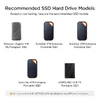
  • Official VIOFO Recommended SSD's .webp
    Official VIOFO Recommended SSD's .webp
    107.4 KB · Views: 9
1.) Just to confirm, which model do you have?
These two are different models.
a.) A329 2CH (2024)
b.) A329S 3CH (2025)

2.) What firmware is in your dash cam?


As of April 25, 2026 there are only 5 Official VIOFO Recommended SSD’s, (see attached photo).


4.) Here’s an ALTERNATIVE TO SSD
It provides;
a.) Remote mounting location
b.) Reduced temperatures
Hi , a329 1ch
Firmware V2.0_20260127 (latest)
And SanDisk extreme "pro" 1tb.
I'm attempting another one when it arrives today on the chance the first one was a duff. Or perhaps being the "pro" it's not a compatible version. Thinking more about it that maybe an issue knowing how tech works.
As mentioned when I did plug it in, it did see the SSD but failed format each time I tried from the camera .

I've also gone for the 2tb none pro version as was on offer .
When that arrives I'll be right on it and see what happens.
 
a329 1ch
Firmware V2.0_20260127
Thank you for the confirmation.
SanDisk extreme "pro" 1tb
It’s possible SanDisk SSD “Pro” version is not compatible.
It’s possible your A329 (2024) is defective.
If you don’t get a working SSD you may want to SUBMIT A TICKET for warranty.
A329 (2024) was discontinued around six months after release, and replaced with A329S (2025).
Maybe they would replace your A329 (2024) with A329S (2025).
Who knows?
 
1tb extreme pro from SanDisk direct. Returned already so no idea of s/n
Trying another and see if it was a singular issue .

Well, let's look at some basics, just to be sure.

What Windows version are you using? Did you sign on as Administrator? Did you use Disk Management for the format?
What USB-C cable are you using? Viofo provided or another brand?
How are you powering the dashcam? These SSD are a little sensitive to voltage drops. Remove other cameras from the A329 and only plug in the SSD. Ensure you have good power.

This should no longer be an issue, but check your SN at the link below. Your kit is probably newer stock but one never really knows.

Sandisk Firmware Fix
 
Just installed new SSD (SanDisk extreme) none pro version and working first time.
So unable to determine if it was simply an issue with that particular one or the pro version is the issue.
Anyway, now ok . So far so good.

Thank you all for the input
 
Just installed new SSD (SanDisk extreme) none pro version and working first time.
So unable to determine if it was simply an issue with that particular one or the pro version is the issue.
Anyway, now ok . So far so good.

Thank you all for the input

SanDisk had some manufacturing issues with the PMIC. This usually manifested after a unit had been used and was heat-related. However, it is possible that those manufacturing issues would also appear on a new device. '

Glad to read you have a good working SSD now.
 
Back
Top