The VUEROiD S1 4K Infinite Has Arrived

Currently I am in Virginia in the Blue Ridge Mountains. Altitude is about 1300 AGL, lots of clear sky and direct sun. We have had a handfull of +90F days. I am eager to get the S1 4K Infinite into my car. Presently I am going through the hardware and HUB app looking for issues that can be corrected prior to release. I received a copy of the VUEROiD S1 PC Viewer today and was pleased to see it would install on Windows 7 Pro, 64-bit. I am a Linux Debian user so that saves me from buying, or borrowing a Win 11 PC.

Could always dual boot or use Wine....

I wonder how many testing units @Vueroid mailed out. Seems you're the only one with the S1 Infinite in hand.
 
Viofo has wonderful customer service, but the A139 I believe was notorious for overheating and shutting down (by design). When the camera reached 65C, it powered off to prevent damage to electronics. In a country like UAE where your temperatures are extreme, the A139 Pro wouldn't have fared well.

I had another Viofo A139 Pro before this unit, and the supercap died. Replacement camera has worked fine now without issue.
Most of the people use without hardware kit so the dashcam doesn't run all the time which gives time to cool down. Do you have experience with iRoad?
 
Could always dual boot or use Wine....

I wonder how many testing units @Vueroid mailed out. Seems you're the only one with the S1 Infinite in hand.

I actually have some Win 10 and Win 11 .iso files I could use. I do not know the number of reviewers, or who they are that have received a unit. My guess is these same reviewers may be working on the A329x series at the moment.

Some of the reviewers I am sure will go very deeply into the power usage. I am working to find any unforeseen issues so the customer will have confidence they are buying a reliable and capable dashcam.
 
Last edited:
Looking very nice.
Is it possible to rename SSID ? i am not super crazy with SSIDs that can not be changed and more or less blare out what it is.

The SSID cannot be changed by the customer, nor is a WiFi password selected by the customer. There is a security reason for this and I will copy/paste the explanation here.

Vueroid has given considerable thought to overall security. In balancing connection convenience and security, we’ve focused primarily on physical security.

We believe that if someone gains physical access to the dashcam inside the vehicle and removes the SD card, no security measure can fully prevent data exposure.

To prevent external access to the dashcam from outside the vehicle, we’ve implemented several security measures:

  1. Wi-Fi will not be enabled unless the Wi-Fi button is physically pressed on the dashcam.
  2. Even if Wi-Fi is turned on, if a phone attempts to connect for the first time, the dashcam must approve the connection attempt.
  3. If the app goes into the background on the phone, the Wi-Fi connection is automatically terminated after about 20 seconds.
Additionally, all data exchanged during connection is encrypted, and we’ve taken multiple steps to ensure secure communication.

My thoughts are this is a good decision by VUEROiD. I realise that many of us are accustomed to picking a password and altering a factory SSID, but that is not necessary on the S1 4K Infinite. The HUB app is designed to provide a secure connection between the dashcam and the cell phone, and with data transfers being encrypted.

In my testing, I did see that with HUB opened and connected to the dashcam, if I opened up the Camera on my iPhone, which drops the HUB to the background, the WiFi did immediately disconnect between the S1 4K Infinite and my iPhone. This is why I stated earlier that once a user is connected to the S1 4K via HUB, stay in there and complete the optioning or downloading, pushing HUB to the background drops the WiFi connection.
 
Last edited:
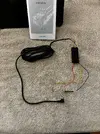
The VUEROiD S1 4K Infinite main chassis camera has been installed. The wire harness is well made, of sufficient length, and with the input power leads and ground wire labeled for their purpose. This harness does have an in-line 3 amp fuse on the BAT and ACC lead, if there is a tight space in the dash area, the cylindrical housing can be opened up and the fuse and housing removed. Once wiring is in place simple replace the fuses and housings.
.
.
IMG_1652.webp IMG_1645.webp IMG_1647.webp
.
.
The S1 4K is powered through the GPS / Power module at 12 to 14 volt levels, thus there is no voltage regulator on the harness, power management for parking modes is done within the dashcam.

Prior to mounting the dashcam you will want to put on the CPL filter, if you choose to use one, and insert the microSDXC memory card. The CPL filter is impressive in its heavy build quality and reminds me of something you would find on a 35mm camera. The CPL installs easily, has matching marks for alignment, and has a rubbery interior surface that grips the lens housing, but enables relaxed turning of the filter should you need to adjust it.
.
.
IMG_1689.webp IMG_1690.webp IMG_1692.webp
.
.
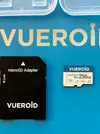
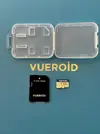
The microSDXC memory card is a VUEROiD branded 256 GB card, comes with a SD adapter and a case. No issues have been noted with the card, it has behaved well during S1 4K system formats, and during extensive forty minute or longer downloads, attempting to heat up and fail the card. The card has held up quite well.
.
.
IMG_1700.webp IMG_1701.webp
.
.
When powering up, the S1 4K, readily boots into service, with the GPS module syncing to GPS in less than an minute. The S1 4K did not experience any reluctance to sync up in the garage, the driveway, or areas where I know there are high levels of electrical and wireless noise. Impressively enough, the GPS sync held during an hour of dark and heavy clouds, lightening, thunder, and heavy rain.
 
Last edited:
CPL look like it require a sledgehammer blow to accidental dislodge it
 
I was rather surprised at what feels like a heavy metal ring with a knurled surface. What we usually see are plastic housings, VUEROiD went a step better with this CPL. I do not know if it was special made for the S1 4K or if this is a design already available. Either way, it is of excellent quality.
 
Last edited:
The app used to interface the S1 4K Infinite is the VUEROiD HUB, which is available for Apple iOS and Android. Connection is established by first activating the S1 4K WiFi with the bottom right button. The S1 4K will then announce the WiFi has started and to connect with the mobile app. HUB must be used to start the WiFi and provide a secure link between the S1 4K and the mobile device.

Starting HUB, you will be prompted to start Bluetooth which you can simply answer with 'Close' as BT is not needed at this time.
You are now presented with the Home screen for HUB, from here you select 'Connect Wi-Fi'.
The next prompt is to Join the mobile WiFi and the S1 4K, this will also power on the WiFi on the mobile device.
There will be a voice notification the connection is successful.
.
.
IMG_1737.webp
.
.
Once connected and on the Home screen, you will see a field for battery voltage. If the S1 4K is connected to the vehicle 12 VDC start battery, the voltage value shown will be the sampled voltage of the battery. In this example the 'Volt' reading is '0,0V' as the S1 4K is connected via the USB-C 5 VDC port. This USB-C port is not sampled for voltage input.

During connection, should HUB not connect to the S1 4K, a pop-up will be presented, if this happens, simply try again. There can be a rare failure if the mobile device and the S1 4K are too close to each other, of if the S1 4K WiFi has timed out and disconnected.

edit::some pictures have been removed for developmental changes. The procedures remain the same though.
 
Last edited:
Here are a few image from the S1 4K via the HUB app. The area I am parked in is a high noise area for electrical and wireless.

The Home screen of the HUB app when the S1 4K Infinite is connected to the vehicle 12VDC battery. In my car, 14.2 volts is being sampled. Keep in mind that if bench powering the S1 4K with a USB-C powerbank or similar, the voltage reading will be zero. At a later point I will power the S1 4K with the Dongar Technologies Dash Cam Power Adapter that draws voltage from the self-dimming rear-view mirror and outputs voltage to a 5 VDC USB plug. I would expect to still see a zero voltage reading at the USB-C port of the S1 4K.
.
.

edit::some pictures have been deleted due to developmental changes. Processes remain the same.

.
.
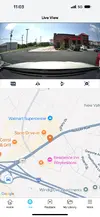
Here is the Home screen with a Live view. The Live view stacked with a Google map of the location the vehicle. Very nice and accurate. There are four icons between the Live view image and the map. The first is to switch between Front, Rear, and Interior cameras. The middle two that look like right triangles are used to invert and flip the image. I can invert and flip these images, spin the iPhone 180 degrees and the image will look normal. The far right icon will move the image into the Landscape mode.
.
.
IMG_1694.webp IMG_1695.webp IMG_1696.webp
 
Last edited:
These are random screen captures from my iPhone. Just a look and feel to what some of the HUB screens look like.
.
.
IMG_1697.webp IMG_1706.webp
.
.
In these two image below the Landscape mode is show. Notice on the second image the icon at the far right of the screen and next to the blue time line. That box of four 'L' shape lines is selected to exit Landscape mode and go back into Portrait mode.
.
.
IMG_1707.webp IMG_1708.webp
.
.
These are a few screen captures showing settings and the 'My Library'. The 'My Library' has an All, Video, and Image folder for easy file searching.
.
.
IMG_1710.webp IMG_1711.webp
.
.
As to be expected some settings are available depending on other options selected.
 
Last edited:
Not to hijack Lufa6977 post. But they are hoping to have a firmware update to anyone who is testing the units. A lot of that info will be made public when Vueroid says they are happy and when us testers stop pushing them for changes. Hopefully a lot of the testing can go public in a few weeks time
 
Not to hijack Lufa6977 post. But they are hoping to have a firmware update to anyone who is testing the units. A lot of that info will be made public when Vueroid says they are happy and when us testers stop pushing them for changes. Hopefully a lot of the testing can go public in a few weeks time

Not a problem, you are more than welcome to post here. 🙂
 
oh how many his bitrate
 
check u images
i find s1 can change the bitrate low mid high?
so how many high bitrate?
thx
 
check u images
i find s1 can change the bitrate low mid high?
so how many high bitrate?
thx
 
check u images
i find s1 can change the bitrate low mid high?
so how many high bitrate?
thx

It varies by the mode and scene change.

Front cam is 48Mbps
Rear cam is 22~24Mbps
Interior cam is 12~14Mbps
 
It varies by the mode and scene change.

Front cam is 48Mbps
Rear cam is 22~24Mbps
Interior cam is 12~14Mbps
thx it seem still lower than viofo
which video s1 4k save? mp4? avi?
 
s1 4k can use car charge typec?
 
Back
Top