Vantrue Nexus 5 FIRMWARE (Release time: 12/10/2025)

This is my second biggest complaint with Vantrue. @Jeff_Vantrue
I'm currently testing the Vantrue S1 Pro.
In the course of testing I've discovered there are 3 different Vantrue websites, and 2 different smartphone APPs.
Vanture.com
Vantrue.us
Vantrue.net

APPs;
Vantrue
Vantrue Cam

How is the average consumer supposed to know / figure out which APP to use, and which website has their firmware update?
Why so complicated?
The idiot inside me just wants one website, and one APP.
-Chuck
Totally get that it's listed as the old app for the older Vantrue cameras (on Android when you tap through to the description), but you're right it's absolutely confusing to new users.

Dunno what Vantrue are doing but seems like a mess at the moment. Even with the new firmware updates, there's broken features.
 
Your rear camera module has an update...

Ah, haven’t fitted my rear camera into the car yet - will plug it in over the weekend and update.

Funnily enough, looked again for updates this morning on both my Android phone and my Ipad.

Android:- no updates
Ipad:- offered update to VT-ECJ202


Also, is there any way that the Dashcam can remember it's settings?

Bloody annoying to have to put all the settings back in every time there's an update....
 
Ah, haven’t fitted my rear camera into the car yet - will plug it in over the weekend and update.

Funnily enough, looked again for updates this morning on both my Android phone and my Ipad.

Android:- no updates
Ipad:- offered update to VT-ECJ202


Also, is there any way that the Dashcam can remember it's settings?

Bloody annoying to have to put all the settings back in every time there's an update....
Doesn't appear to be a way for it to remember. Some manufacturers get it right, some don't. Appears in this case they don't.
 
I noticed today, with latest FW and APP, the ST/WT option only had America in it.
 
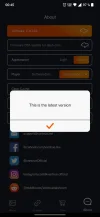
The Vantrue apps has been updated.
Version: V 1.0.35
Version: V 1.0.18
 
another note i must write, this is a MUST for next firmware update, a beeping sound constantly when there is no SD card in the camera.
i was driving around the last 2 days and went to pull out the SD card today for checking like i do every couple days, and it wasn't in there. it was still in my computer from couple days ago.
this is not really good enough, could have been an incident i needed footage for. luckily i have multiple cameras lined up on the window for such a thing.
No beep, no problem...
This dash cam would be very good for me I think is the power cpnsumption in parking mode would be better or starting up in energy saving would be faster. (Thinkware boot up in one second in energy saving mode.)
 
OTA update still doesn't show the update...
 

Attachments

  • Screenshot_2023-12-06-00-45-40-85_cafa11069ce93583350ad3f918829cce.webp
    Screenshot_2023-12-06-00-45-40-85_cafa11069ce93583350ad3f918829cce.webp
    39.3 KB · Views: 119
Update Log

N5_VT-ECK141 (New)
1. Fixed some bugs on GPS, audio recording and parking mode.
2. Correct an error on the daylight saving time entry/exit times.
3. Added a backup mechanism for voice activation.
 
Ok, still no OTA update for me.
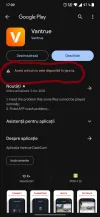
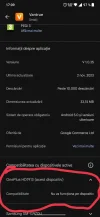
Another problem. I just noticed not only that I don't have the app updated also, but I can't update it.
In first picture it is saying that the app isn't available in my country and in the second picture that it won't work with my phone!!
Despite the fact that until now everything has worked, OTA update also.
I will update the cams by laptop but there must be some explanations.
@Jeff_Vantrue any thoughts?
 

Attachments

  • IMG_20231207_171514.webp
    IMG_20231207_171514.webp
    70.5 KB · Views: 124
  • IMG_20231207_171448.webp
    IMG_20231207_171448.webp
    69.8 KB · Views: 118
I updated F & R cameras today, i was not able to see this updates before i purged the buffer
 
I have tried also to clear cache memory, many times. No success.
You need the latest version of the app because it did fix issues with Ota updates and a few left things, hence why it isn't working for you at the present time

Hopefully an APK floating around somewhere for it .
 
Yes my APP did also updatre / yesterday, or should i saw suddenly there was a warning on my phone with a "big " download that needed to be finished, so had to turn on my wifi.

The APP is V 1.0.35
Firmware are now.

fwv.jpg
 
Guys, I need help. I'm new here. I updated to N5_VT-ECK141 and I lost my voice control. It's set to to Standard but I don't see the icon on the screen. It also doesn't work. Please help.
 
Guys, I need help. I'm new here. I updated to N5_VT-ECK141 and I lost my voice control. It's set to to Standard but I don't see the icon on the screen. It also doesn't work. Please help.
Welcome.
Try resetting the DVR to factory settings through the menu.
 
Welcome.
Try resetting the DVR to factory settings through the menu.

I already did. I tried contacting Vantrue's support. They said their engineers are aware of what happened and they will fix it on the next firmware update next month. I tried to ask for a previous version of the firmware but they said reverting to the previous firmware will not help the voice control. I told them that I find that hard to believe because it was the new firmware that disabled voice control so it should be the old firmware that can enable it.


Then they sent me below. So I'm not sure if I'm right to believe them because I have not heard from anyone who updated to the N5_VT-ECK141 that lost voice control.
1703523072838.webp
 
Back
Top