Vantrue Nexus 5 FIRMWARE (Release time: 12/10/2025)

another note i must write, this is a MUST for next firmware update, a beeping sound constantly when there is no SD card in the camera.
i was driving around the last 2 days and went to pull out the SD card today for checking like i do every couple days, and it wasn't in there. it was still in my computer from couple days ago.
this is not really good enough, could have been an incident i needed footage for. luckily i have multiple cameras lined up on the window for such a thing.
 
The Android Vantrue app then prompted me that new firmware was available for the N5.
I haven't seen this prompt on the Iphone version of the app.
Did you do something specific to prompt the app to check for any updates?

Thanks.
 
I haven't seen this prompt on the Iphone version of the app.
Did you do something specific to prompt the app to check for any updates?

Thanks.
I just pulled out of the box one of my two N5 pre-production units. I connected the rear camera to the front camera using the provided USB cable. All four channels were functional.

I connected to the N5 using the Vantrue app on my iPhone and there was no prompt to update any firmware yet.

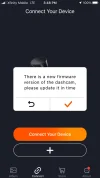
I exited the connection to the N5 and the Vantrue app then prompted me with this:

1693263309109.webp

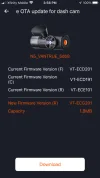
I clicked on the check button and it presented this info (which seems way off from the version info I expected to see available for update):

1693263482708.webp

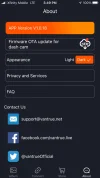
If I then exited to the main screen and clicked on "About" it presents this way of downloading the firmware updates:
1693263556127.webp

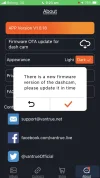
Clicking on the "New" button brings you to the same screen where youc an choose to download the file(s). It seems a connection to the dash camera is necessary to kickstart the version check within the app with the firmware versions available from Vantrue.
 
I just pulled out of the box one of my two N5 pre-production units. I connected the rear camera to the front camera using the provided USB cable. All four channels were functional.

I connected to the N5 using the Vantrue app on my iPhone and there was no prompt to update any firmware yet.

I exited the connection to the N5 and the Vantrue app then prompted me with this:

View attachment 67131

I clicked on the check button and it presented this info (which seems way off from the version info I expected to see available for update):

View attachment 67132

If I then exited to the main screen and clicked on "About" it presents this way of downloading the firmware updates:
View attachment 67133

Clicking on the "New" button brings you to the same screen where youc an choose to download the file(s). It seems a connection to the dash camera is necessary to kickstart the version check within the app with the firmware versions available from Vantrue.
Thanks for the reply and screen shots.

The problem is I'm using the other version of the app! @Jeff_Vantrue
Which doesn't offer updates.

IMG_3863.png


It's a devil trying to reply using my iPhone.

I've downloaded the other version.
IMG_3864.webp


Checking a little later i get the update prompt.

I'll add more in my next post
 

Attachments

  • IMG_3865.webp
    IMG_3865.webp
    43.7 KB · Views: 95
so what are the latest versions?? i have
Front: VT-ECH121
Cabin: VT-ECD191
Rear: VT-ECF141

whats the change log? 1 item??

Hi All,

Just bought a N5 Dashcam (after my NextBase 522GW packed up for the 4th time with a defective battery) - and after downloading the correct version* of the Android App (v1.0.32) which has finally managed to update me to the following:-

Front: VT-ECJ171
Cabin: VT-ECD191
Rear: VT-ECG201

Just wondering if i'm on the latest version as the app says there aren't anymore updates...

*Originally downloaded the latest version off the Google Store and it would connect to the DashCam ok, but would say there was a "file error" when trying to update the DashCam.
 
Just wondering if i'm on the latest version as the app says there aren't anymore updates...
This is my second biggest complaint with Vantrue. @Jeff_Vantrue
I'm currently testing the Vantrue S1 Pro.
In the course of testing I've discovered there are 3 different Vantrue websites, and 2 different smartphone APPs.
Vanture.com
Vantrue.us
Vantrue.net

APPs;
Vantrue
Vantrue Cam

How is the average consumer supposed to know / figure out which APP to use, and which website has their firmware update?
Why so complicated?
The idiot inside me just wants one website, and one APP.
-Chuck
 

Attachments

  • Dealer's Choice .webp
    Dealer's Choice .webp
    14.4 KB · Views: 109
Front: VT-ECJ171
Cabin: VT-ECD191
Rear: VT-ECG201

Just wondering if i'm on the latest version
Yes you are on latest FW, because ECJ171 is 17 of October (J mean 10th month)
 
Just wondering if i'm on the latest version as the app says there aren't anymore updates...
If you have a few minutes to waste, why don’t you contact Vantrue Tech Support / Customer Service, and ask them just to see what their response is.
Then update this post on how useful / helpful their efforts were.
This should give you a taste of how they will treat you during the service life of your camera.
Pick a card, any card;

1 .webp
 
Hi All,

Just bought a N5 Dashcam (after my NextBase 522GW packed up for the 4th time with a defective battery) - and after downloading the correct version* of the Android App (v1.0.32) which has finally managed to update me to the following:-

Front: VT-ECJ171
Cabin: VT-ECD191
Rear: VT-ECG201

Just wondering if i'm on the latest version as the app says there aren't anymore updates...

*Originally downloaded the latest version off the Google Store and it would connect to the DashCam ok, but would say there was a "file error" when trying to update the DashCam.
Lol so Vantrue don't even have the latest firmware version on their website :/. The front camera is listed as ECH-121 on the website...
 
Wish I had something to update. Despite being invited to trial the N4 pro some months ago, providing my postal details 3 times, still not a sweet wrapper. ‍♂️
 
Last edited:
nice. loook like i have some updating to do later.
 
Updated.

ST / WT in APP and time format 12 / 24 buttons dont seem to work
 
Back
Top