Vehicle Voltage Stamp, where is it supposed to show?

Retired Coal Miner

New Member
Joined
Jul 21, 2025
Messages
7
Reaction score
1
Location
East Coast US, north of the Western Middle Field!
Country
United States
Dash Cam
Viofo A229 Pro
Following a new firmware install on my 14+ month old A229 Pro, I see there is a configuration setting -- on the device, not on in the app -- for vehicle voltage stamp. The setting was default enabled after the new firmware install and reboot.

However, I do not see the voltage stamp anywhere in the recorded videos. What am I missing in this?
 
Be sure to use the new Viofo App as well. Viofo is the old app, Viofo DashCam is the new app.
 
Following a new firmware install on my 14+ month old A229 Pro, I see there is a configuration setting -- on the device, not on in the app -- for vehicle voltage stamp. The setting was default enabled after the new firmware install and reboot.

However, I do not see the voltage stamp anywhere in the recorded videos. What am I missing in this?
As it has been mentioned, to see the latest settings available for any VIOFO dash camera model, please make sure you're using the "VIOFO Dashcam" app and not the older "VIOFO" app.

As you stated, there is a setting in the menu system for the A229 Pro governing whether the vehicle voltage level is included in the status line text.

Video Settings > Stamp > Vehicle Voltage Level

The last remaining requirement is the A229 Pro must be powered by a VIOFO HK6 hardwire kit for this feature to work. Currently, the HK6 is the only VIOFO hardwire kit that transmits the vehicle voltage level to the dash camera via a Bluetooth message.

1782239857412.webp
 
As it has been mentioned, to see the latest settings available for any VIOFO dash camera model, please make sure you're using the "VIOFO Dashcam" app and not the older "VIOFO" app.

As you stated, there is a setting in the menu system for the A229 Pro governing whether the vehicle voltage level is included in the status line text.

Video Settings > Stamp > Vehicle Voltage Level

The last remaining requirement is the A229 Pro must be powered by a VIOFO HK6 hardwire kit for this feature to work. Currently, the HK6 is the only VIOFO hardwire kit that transmits the vehicle voltage level to the dash camera via a Bluetooth message.

View attachment 92054
I'm missing the HK6, I have an HK4.

I wish the requirement for an HK6 was clearly explained somewhere, I spent time fiddling around with no resolution and no insight whatsoever.
 
I'm missing the HK6, I have an HK4.

I wish the requirement for an HK6 was clearly explained somewhere, I spent time fiddling around with no resolution and no insight whatsoever.

For a little history, you say your system is 14+ months old. The HK6 was made available in August 2025,
only about 10 months ago. You could not have bought it when you bought your A229 PRO.
 
For a little history, you say your system is 14+ months old. The HK6 was made available in August 2025,
only about 10 months ago. You could not have bought it when you bought your A229 PRO.
Agreed and understood.

But that doesn't change the 'specifications' listed on the Viofo website, which show:
- HK6 works with A239 and no mention of A229.
- The one and only hardwire kit listed for the A229 series is the HK4.

And yet the new firmware lists a new config option in an A229 that only works with an HK6.
 
I agree it would be helpful if VIOFO maintained/updated the list of supported dash camera models for the HK6 on their website.

The A329S was the first VIOFO dash camera model with direct support for the Bluetooth voltage transmission feature of the HK6. The HK6 is a standard USB-C VIOFO hardwire kit in all other respects [USB-C pin mapping for power, ground, accessory power signal]. The HK6 can be used with any VIOFO dash camera model that has a USB-C power connection. There may be space/access limitations regarding the HK6 90-degree USB-C connector for models like the A139/A139 Pro where the HK3-C was was tailored to those installation situations. After the HK6 was released, VIOFO made revisions to the firmware of the A229 Pro [and some others] to support the Bluetooth voltage broadcast feature. The A329S series not only can display the voltage info in the status line of the video, it's also one of the inputs into the configuration/usage of the hybrid parking mode. Similarly, the current firmware for A119M Pro can show the HK6 voltage info in the video status line. VIOFO has stated the A119M Pro should be getting a firmware update to provide the hybrid / low power impact detection features like the A329S dash camera, but that hasn't been released yet.
 
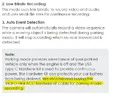
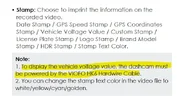
The A220 Pro manual V26.01.09 has two contradictory things to say about this. See attached images.

Page 28, image below, recommends an HK4.
Page 38, second image below, says you need an HK6 to display vehicle voltage.

So I'll take back some but not all of my frustration in this. Some credit is due for actually documenting this -- hardware requirements to make the new feature work.

But that credit is more that outweighed by hiding the small explanation deep inside the manual, by the manual contradicting itself, and (most importantly) by not mentioning the requirements in firmware release notes or anywhere else that I could find. The fact that I had to spend time (hours) tracking this down, then posting and asking about it on an internet blog after searching returned no answer more than proves how frustrating this has been. All for a seemingly small firmware update.


Page 28 - we recommend HK4 - Copy.webp

Page 38 - HK6 needed to display vehicle voltage - Copy.webp
 
Back
Top