Viofo A329T - 3 Channel - Telephoto - Retail - Unboxed & Sample Images and Review

Exactly. You can choose the cable length when ordering. This cable is not currently available in accessories.
 
Thanks - I hadn't noticed they list the options on the camera page.
They're not yet available as separate cables on their website.
That's great to know they've already pre-empted it and list the shorter cables options with the camera.
I'll contact Viofo directly about trying to get a shorter cable
 
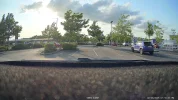
I've now done a quick image quality comparison between;
- BlackVue DR970X Plus (front camera)
- A329T (front camera)
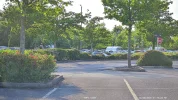
- A329T (telephoto camera)

The A329T and telephoto was placed on top of dashboard - not yet attached to windscreen (I need to go through stripping out the BlackVue and replacing with Viofo).

But the images are for a quick comparison.
The BlackVue time is slightly out of sync - but I've lined up the footage exactly to make sure it's an even test.

You can a pedestrian in the distance walking between 2 trees for point of reference.

*These are raw snapshots taken from the raw footage, so no image compression/resizing etc.

A329T - front camera (balanced on dashboard)
1000057846.webp


Viofo A329T - telephoto camera
1000057845.webp


BlackVue DR970X Plus
1000057844.webp


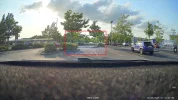
This is the view of the telephoto overlayed onto the main camera view
1000057871.webp
 
Last edited:
These are the same video snapshots, but on maximum zoomed in (zoom on picture) on the pedestrian that was approximately 50 meters / 55 yards / 165 feet away.

You can see the variation in image quality better in these samples.

A329T - front camera (zoomed in as far as possible)
1000057872.webp


A329T - telephoto camera (comparable subject size)
1000057875.webp


A329T - telephoto camera (zoomed in as far as possible)
1000057873.webp


BlackVue DR970X Plus (zoomed in as far as possible)
1000057874.webp
 
Last edited:
These are the same video snapshots, but on maximum zoomed in (zoom on picture) on the pedestrian that was approximately 50 meters / 55 yards / 165 feet away.

You can see the variation in image quality better in these samples.
Great examples and it puts the Black view to shame.
Front camera looks like it has some sharpening.
The telephoto is amazing.
 
Great examples and it puts the Black view to shame.
Front camera looks like it has some sharpening.
The telephoto is amazing.
100%
The BlackVue quality isn't great.
The colour balance is off. Whilst it looks quite picturesque at first glance, it makes it seem like they've focused on the sky colour balance rather than the road. The reds are oversaturated and in lower light/sun setting it can be over dark.

There is a lot of noise on their video quality which is more visible when zoomed in.
Which is not what you want when you're trying to obtain clear registration plates.

The Viofo on the other hand has a lot better colour balance and video quality in general.
The picture is sharper with less noise.
The telephoto is on another level because of it's 4X Zoom, and I highly recommend it for anyone wanting very clear registration plates recognition, but also better distance footage of events etc further along the road - as this could help your friends, neighbours or if you witness other incidents.
 
Here are more samples of the exact same snapshots from the above footage, but zoomed in to the maximum on the EXIT sign in the distance.


A329T front camera (zoomed in as far as possible)
1000057877.webp


A329T telephoto camera (comparable subject size)
1000057879.webp


A329T telephoto camera (zoomed in as far as possible)
1000057876.webp


BlackVue DR970X Plus (zoomed in as far as possible)
1000057878.webp
 
Last edited:
The telephoto is said to be a '4x zoom'. Does that mean it sees an area approximately 1/4 the width and 1/4 the height of the main camera?
 
The telephoto is said to be a '4x zoom'. Does that mean it sees an area approximately 1/4 the width and 1/4 the height of the main camera?
That would appear to be the case - when you compare the sample images I've added.
The cameras were next to each other on my dash, and there is no firmware setting to adjust zoom in or out, the camera zoom is fixed.

I've also done a rough overlay of the telephoto view over top of the main camera view.
Highlighted in the red box, is roughly 1/4 the width and 1/4 the hight of the main camera
 

Attachments

  • vlcsnap-2025-06-02-20h53m32s329.webp
    vlcsnap-2025-06-02-20h53m32s329.webp
    454.6 KB · Views: 125
  • vlcsnap-2025-06-02-20h54m04s514.webp
    vlcsnap-2025-06-02-20h54m04s514.webp
    735.4 KB · Views: 126
  • Overlay.webp
    Overlay.webp
    448.2 KB · Views: 127
Last edited:
The telephoto is said to be a '4x zoom'. Does that mean it sees an area approximately 1/4 the width and 1/4 the height of the main camera?
Yes, so each number plate has 16x the number of pixels, 16 times the detail.
 
Yes, so each number plate has 16x the number of pixels, 16 times the detail.
Which isn't really 4x in terms of the image size, because the front is 4K while the tele is 2K.
 
For anyone interested - if you're changing to Viofo from a previous dashcam that also uses coax cable for the rear camera (I had BlackVue installed), the coax cable from the BlackVue works with the Viofo and visa versa - so you don't need to fully rewire the vehicle, you can just swap the cameras out.

The Viofo cable is a lot better in my opinion, as the end connector is a lot smaller and doesn't have any branding on it.
The BlackVue cable is larger - presumably so they can fit their branding on it.
The actual end connector (metal part) is also longer and sticks out of the camera more - but the connection does work with both brands.

1000057821.webp

1000057825.webp

1000057819.webp

1000057820.webp

1000057835.webp

1000057837.webp


*I even swapped out the rear cameras, just for fun, between both dashcam brands and as expected, the opposite brand didn't recognise the other's rear camera.
 
Last edited:
For anyone interested - if you're changing to Viofo from a previous dashcam that also uses coax cable for the rear camera (I had BlackVue installed), the coax cable from the BlackVue works with the Viofo and visa versa - so you don't need to fully rewire the vehicle, you can just swap the cameras out.

The Viofo cable is a lot better in my opinion, as the end connector is a lot smaller and doesn't have any branding on it.
The BlackVue cable is larger - presumably so they can fit their branding on it.
The actual end connector (metal part) is also longer and sticks out of the camera more - but the connection does work with both brands.


*I even swapped out the rear cameras, just for fun, between both dashcam brands and as expected, the opposite brand didn't recognise the other's rear camera.
Does BlackVue have the same cables on all models or not?
Viofo A329 and A139 have non-interchangeable cables, even though they are coaxial...
 
Does BlackVue have the same cables on all models or not?
Viofo A329 and A139 have non-interchangeable cables, even though they are coaxial...
Yes, the rear coax is the same on most BlackVue dashcams.
Only the power cable to the main camera that had different variations between models.


They all use RG174 coax cable.
BlackVue and the A329S/T/WW etc all use MCX connectors, whereas the A139 used the smaller MMCX connector.
So same cable, but different end connector.

But yes, BlackVue stayed consistent throughout and now Viofo use the same connection.
1000064107.webp
 
Last edited:
@VIOFO-Support
Are you able to make a test firmware for the A329T with WiFi enabled all the time? (Or even have option to leave it on for a set time at start of parking mode; ie, 20 minutes, 30 minutes, 1 hour etc.) to give time to access before it goes to sleep in low power.

I can use the dashcam with a powerbank, but connected via cigarette lighter port rather than hardwire it to the powerbank, to give an extra 5 minutes or so before it goes into parking mode - but that isn't as reliable going into parking mode or coming out of parking mode again.

I want to test out Station Mode on my home WiFi when a vehicle returns, but obviously the WiFi disconnects when it goes into parking mode with the hardwire kit.

This will save having to be sat in the car enabling/disabling WiFi to download the footage, or to take out the memory card.

I'm open to testing out any potential remote access options too.
That's my goal - being able to view and download footage when away from the vehicle (lazy/convenience).
I don't want/need Cloud storage - just ability to connect remotely over WiFi (and hopefully LTE in future)
 
Last edited:
@VIOFO-Support
Are you able to make a test firmware for the A329T with WiFi enabled all the time? (Or even have option to leave it on for a set time at start of parking mode; ie, 20 minutes, 30 minutes, 1 hour etc.) to give time to access before it goes to sleep in low power.

I can use the dashcam with a powerbank, but connected via cigarette lighter port rather than hardwire it to the powerbank, to give an extra 5 minutes or so before it goes into parking mode - but that isn't as reliable going into parking mode or coming out of parking mode again.

I want to test out Station Mode on my home WiFi when a vehicle returns, but obviously the WiFi disconnects when it goes into parking mode with the hardwire kit.

This will save having to be sat in the car enabling/disabling WiFi to download the footage, or to take out the memory card.

I'm open to testing out any potential remote access options too.
That's my goal - being able to view and download footage when away from the vehicle (lazy/convenience).
I don't want/need Cloud storage - just ability to connect remotely over WiFi (and hopefully LTE in future)
It is OK.

Also we will implement a testing feature, if you build your own FTP server, the dashcam will support uploading files to the server automatically in station mode while the WiFi connected.
 
Hello @viofo please consider Home Assistant integration, that would open unlimited possibilities and a lot of great work will be done for free - yet for the benefit of the community - by the open source community. All you have to do is expose an API and release documentation so we don't have to reverse engineer it 😅
All this time wasted in reverse engineering and API can be used to develop amazing things in HA.

Also, please for the sake of security, make changing the default passwords mandatory so users don't leave the default in.

An other thing to consider is to use the WiFi as a normal connection to be able to reach HA via the customer's hot spot/car LTE so videos can be accessed,saved and or viewed even when the car is not parked at home.
 
@viofo @VIOFO-Support
Is there any way to adjust the colour balance of the front camera?

Please see these two examples;

FRONT CAMERA;
1000060936.webp


TELEPHOTO CAMERA;
1000060937.webp


The colours on the telephoto are excellent - they are very true to life.
The colours on the main front camera appear over saturated which makes the oranges/reds too vibrant and unnatural.

The car to the right is an orange/red in real life - which is perfectly depicted in the telephoto, but in the main camera image it appears bright red.

You can also tell the 'over redness' in other areas of the image, such as the road on the right has a red tint in the main camera image, as well as the grey car in front has a red tint too.


If you can get the main camera image to have the exact same colours as the telephoto lens that would be perfect


(HDR set to auto, so was turned on at 5pm, so is on in the footage which was at 5:49pm)
The colour issue isn't HDR related, as the same colour imbalance is also there with HDR off.


Another example is on a vehicle's rear red lights which are 'overblown' in the footage compared to real life;

FRONT CAMERA;
1000060944.webp


REAL LIFE;
1000060948.webp
 
Last edited:
Hybrid parking mode does work really well.
Here is screenshot of my BlackVue battery pack with 29% charge left, but still has an estimated 51 hours of use whilst in Hybrid Parking Mode 👍

1000060991.webp
 
Back
Top