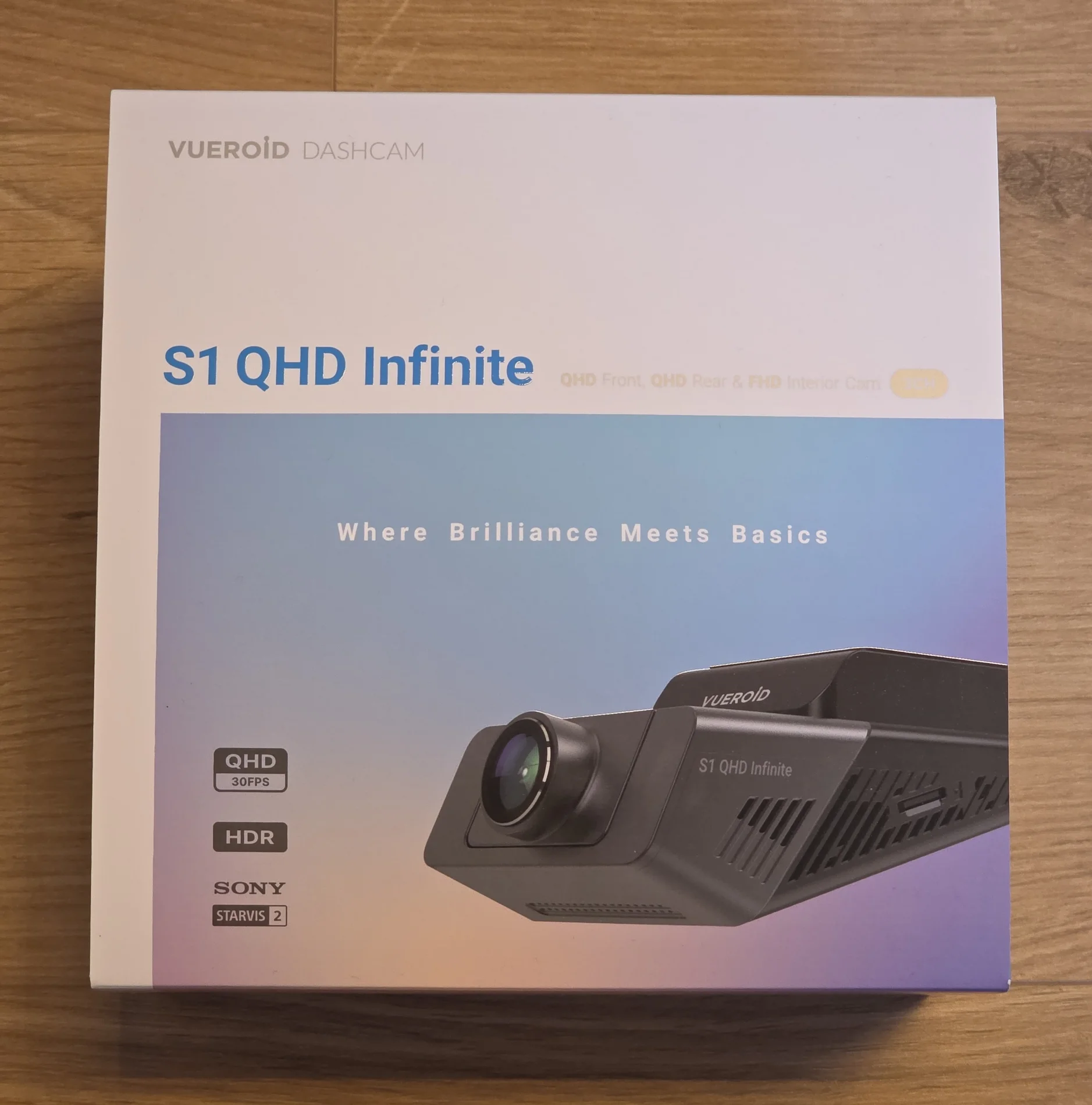
Vueroid S1-QHD Infinite 3CH - No Battery, No Supercapacitor, So How Does It Handle Heat? | Unboxing & Testing Europe

Julian23

Well-Known Member
Joined
Nov 16, 2016
Messages
1,341
Reaction score
1,966
Country
Germany
Dash Cam
Several brands :)
After testing the S1 4K Infinite, I was also in contact with Vueroid and was offered the opportunity to try the S1 QHD Infinite 3CH.

Like its 4K sibling, the S1 QHD Infinite does not use a battery or a supercapacitor.
Instead, Vueroid uses its TFF, or Three Free File, system. It is designed to safely manage recordings without requiring stored backup power to finish writing the final file. When power is disconnected, the camera shuts down immediately.
Another interesting feature is Durashift Parking Mode. If the camera reaches its temperature limit during parking mode, it can shut down and automatically resume recording once it has cooled down enough.

I have already been using the S1 QHD Infinite for the last few months, including parking mode and hot summer conditions. I will cover the results in the following posts.
For now, this post focuses on the specifications, package contents, hardware, and first impressions.


Specifications:

Resolutions:
  • Front Camera: QHD (2560 x 1440) @ 30fps
  • Rear Camera: QHD (2560 x 1440) @ 30fps
  • Interior Camera: FHD (1920 x 1080) @ 30fps
Image Sensor:
  • Front Camera: S SONY Starvis2 (IMX675)
  • Rear Camera: SONY Starvis2 (IMX675)
  • Interior Camera: STARVIS (IMX307)
FOV:
  • Front Camera: 160°
  • Rear Camera: 160°
  • Interior Camera: 170°
Image Modes and Features:
  • HDR on the front, rear, and interior cameras
  • Infinite Plate Capture Mode on the front camera
  • Premium Night Vision Mode on the front camera
  • AI License Plate Restoration
  • AI Privacy Protection
Connectivity and Data Transfer:
  • Built-in Wi-Fi
  • Built-in GPS
  • Vueroid HUB App
  • Vueroid PC Viewer
Display:
  • 2.3-inch LCD
Storage:
  • microSD cards up to 512GB
  • Vueroid recommends using 256GB or larger
  • TFF Three Free File System
Power:
  • DC 12V
  • DC 5V through USB-C
  • No battery
  • No supercapacitor
Parking Modes:
  • Extreme Low Power Mode
  • Impact and Motion Detection
  • Impact and Timelapse
  • Auto REC Off Zone Mode
  • Durashift Parking Mode
Battery Protection:
  • Adjustable battery cut-off voltage
  • Adjustable parking timer
Operating Temperature:
  • -20°C to 65°C
Mount Type:
  • Adhesive
Video Codec:
  • H.264

Unboxing


The box:

1.webp


Opening the box, the main camera and the additional components are securely stored inside foam.


2.webp


Everything included with the S1 QHD Infinite 3CH package:

3.webp


This is a very complete kit. Vueroid includes the main cameras, connecting cables, hardwire kit, CPL filter, fuse taps, mounting accessories, and installation tools.
There is no need to purchase the most important accessories separately.
The only thing that is required is the SD card. I would recommend at least 256GB to store enough data.

A closer look at the additional camera modules and their cables:
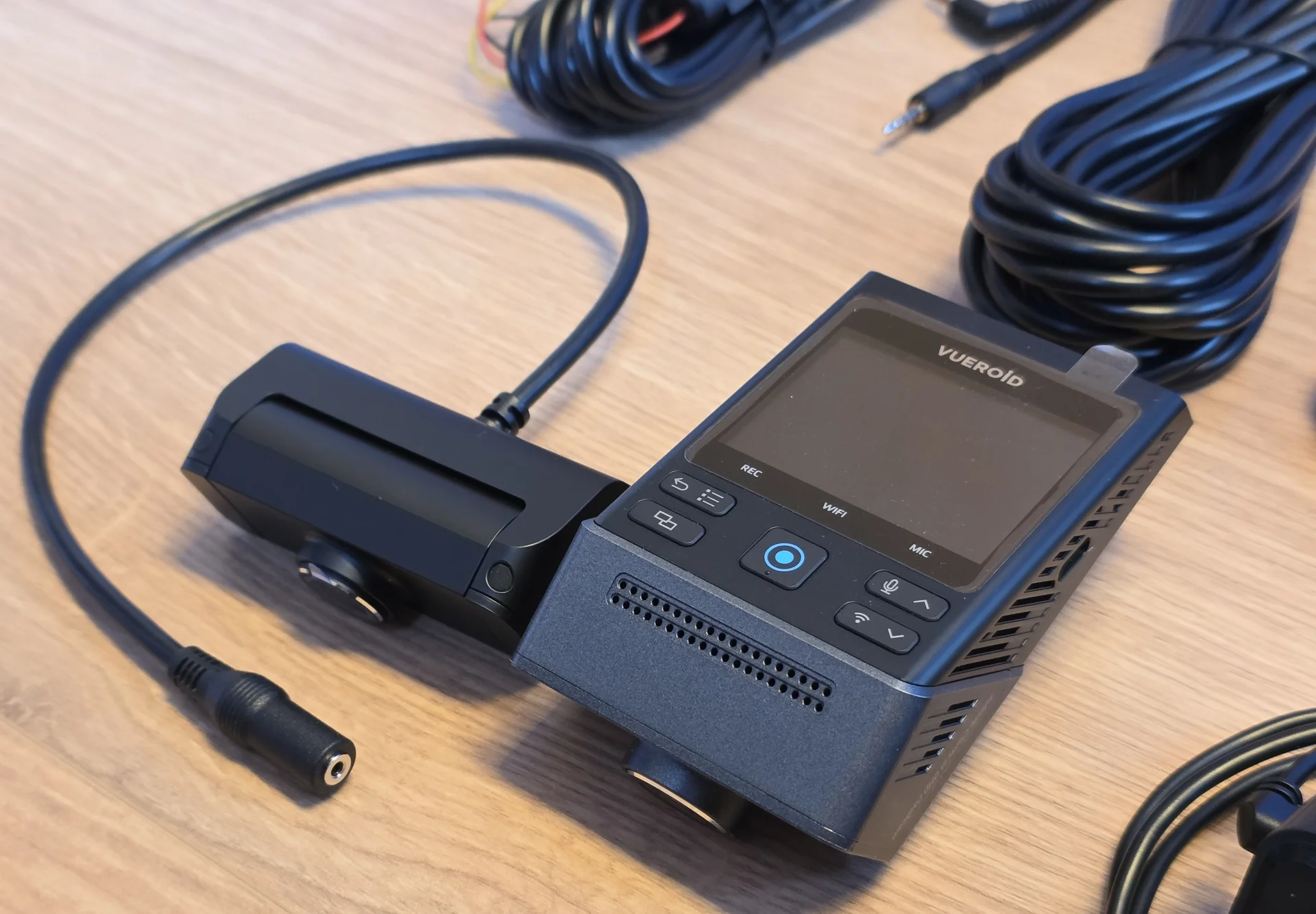
4.webp


The rear camera is the same unit used with the S1 4K Infinite.

It feels solid and well constructed. However, its adjustment range is mainly designed for installation on angled rear glass.

Mounting it on a completely horizontal surface could make it difficult to aim the lens far enough down. This is worth checking before choosing the mounting position.

The interior camera with IR LEDs:
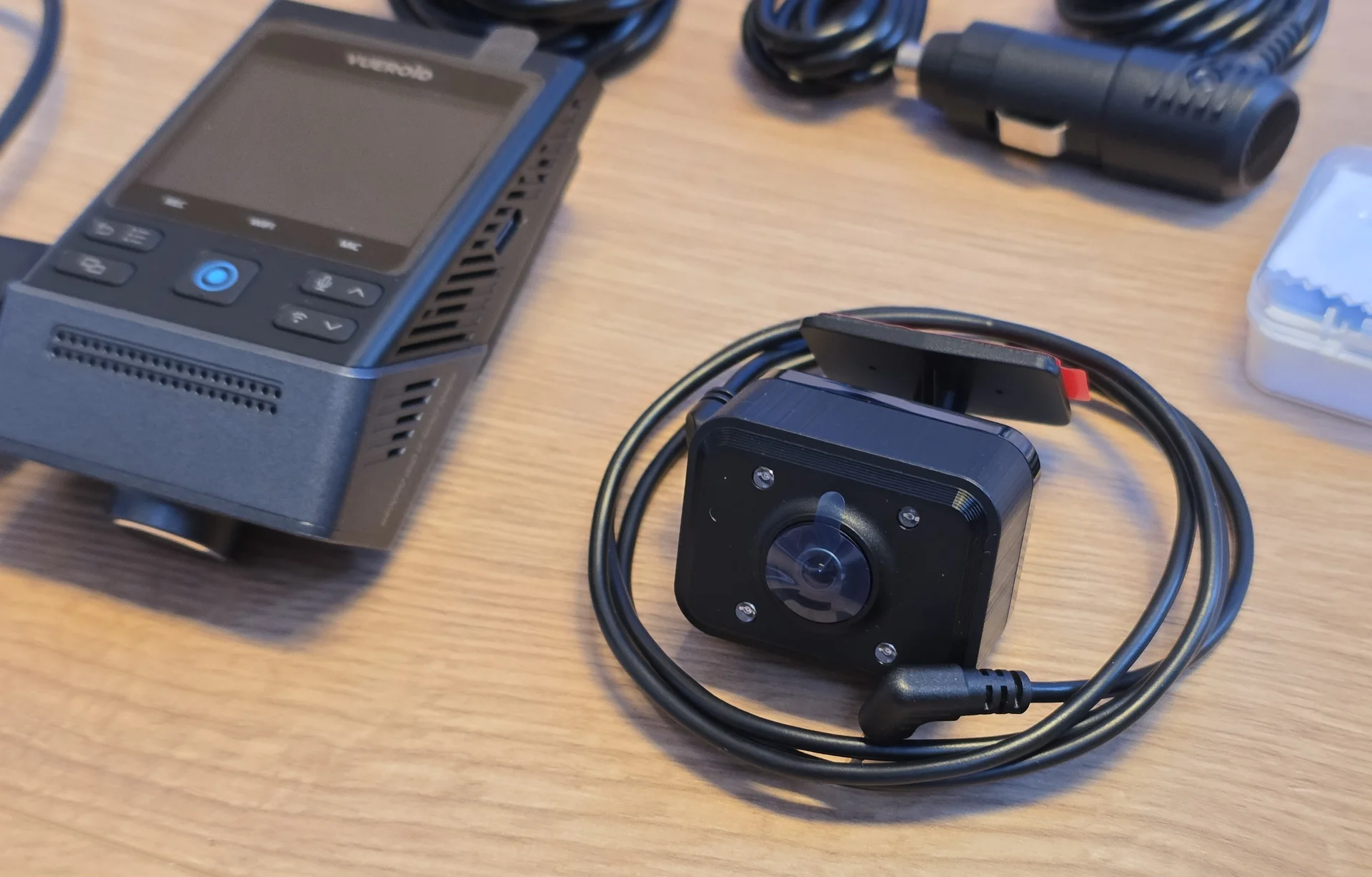
5.webp


The supplied cable set:

6.webp


The package includes the necessary cables for the rear and interior cameras, power supply, and permanent hardwire installation.
The cables feel well insulated and should be long enough for installation in larger vehicles.

The included hardwire kit, fuse taps in various sizes with 5A fuses installed, and installation accessories:
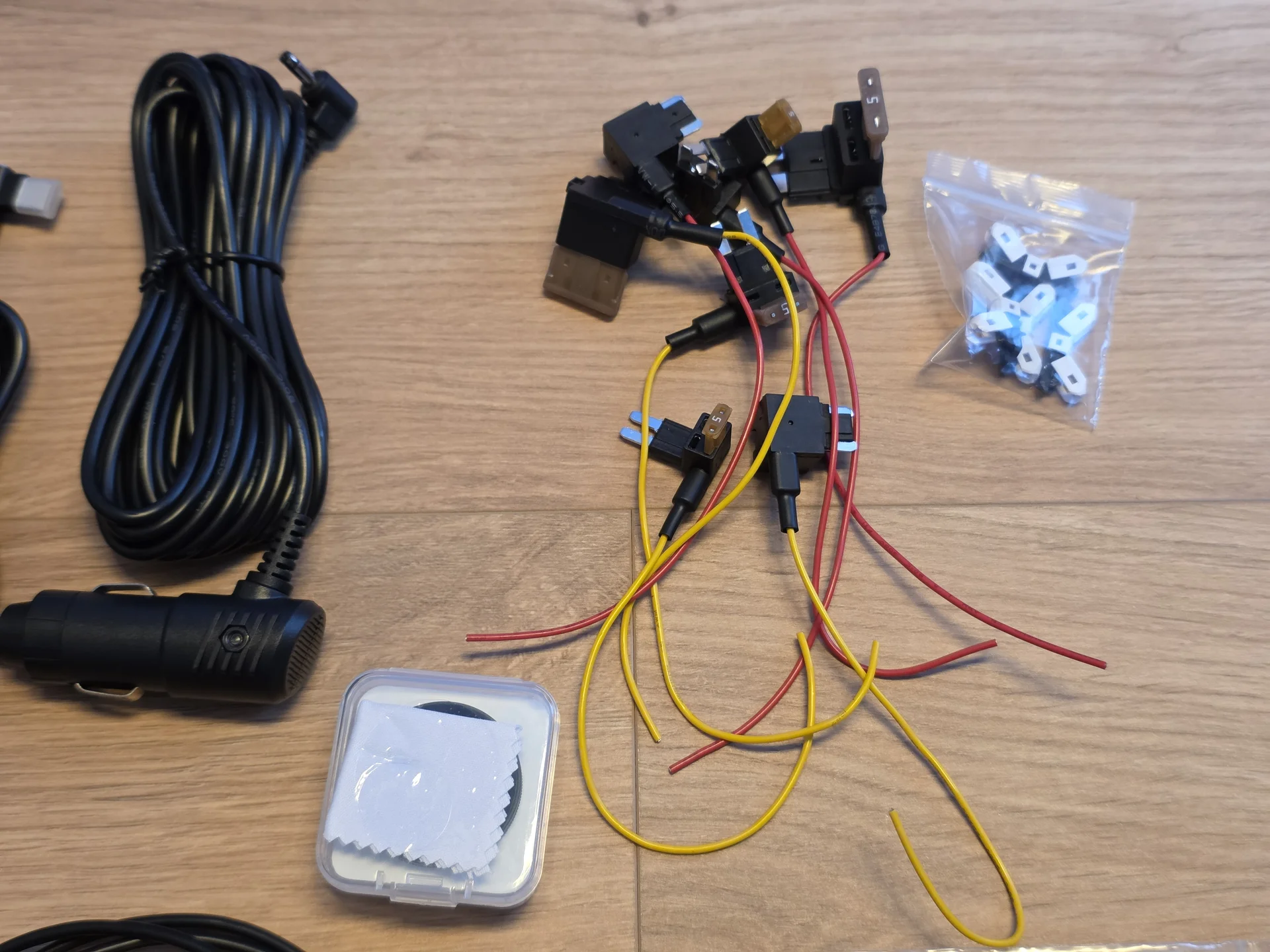
7.webp


Including the hardwire kit is a significant plus. Vueroid also supplies different fuse taps, which means most users should not have to purchase additional adapters before beginning the installation.
The hardwire kit provides the permanent battery and ignition connections required for the different parking modes.
Battery protection can be configured using both a cut-off voltage and a parking timer.

A CPL filter for the front camera is also included.
This is an important accessory for reducing dashboard reflections and glare from the windshield. Other manufacturers often sell the CPL separately, so it is good to see it included here.
Make sure to remove BOTH protective films before installing the CPL. I do not want to read another thread about blurry footage caused by the second film. 🤣


The S1 QHD Infinite main camera:
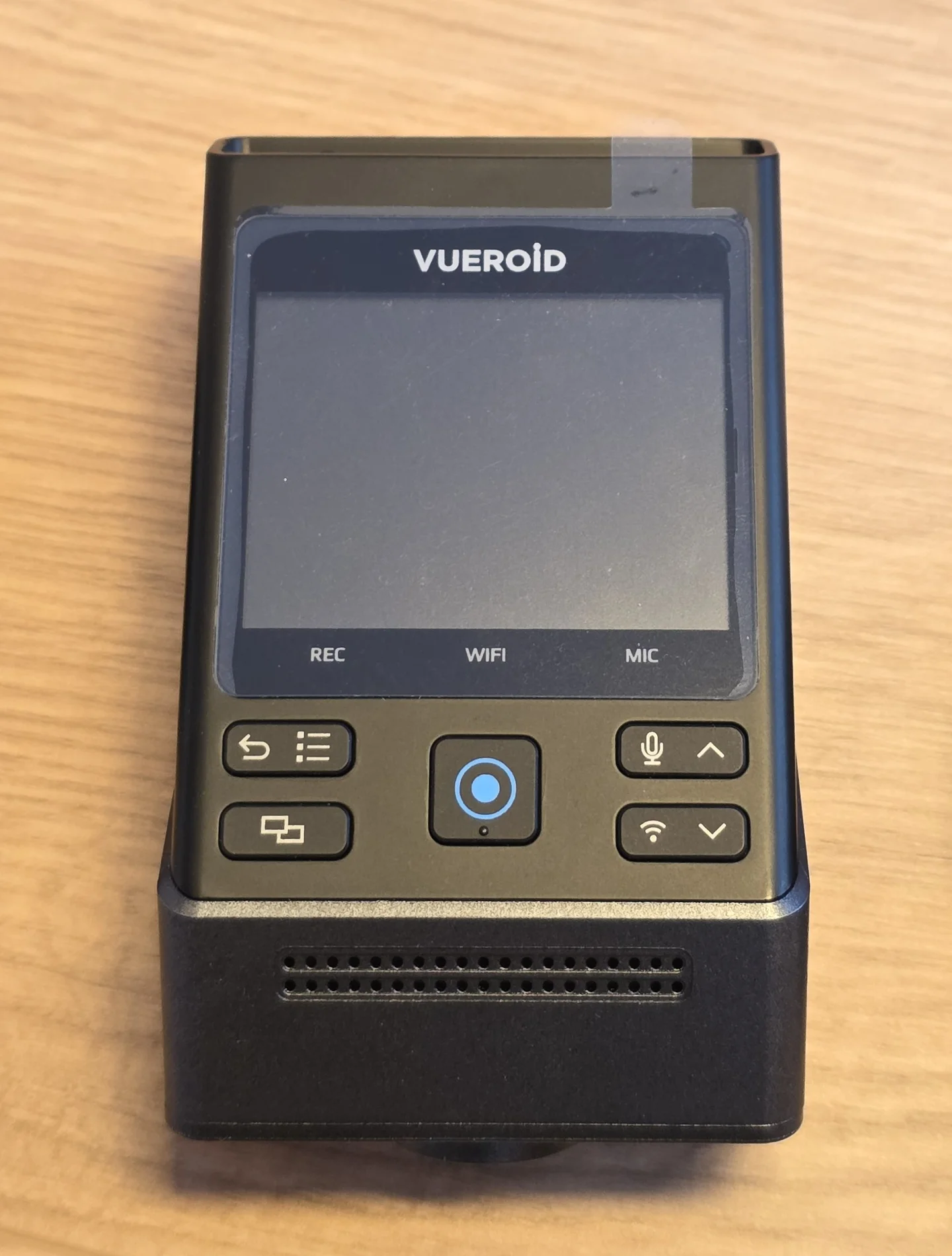
8.webp


The main unit follows the same general wedge-style design as the S1 4K Infinite.
Despite having a 2.3-inch LCD, it is still reasonably compact. The physical buttons allow the main settings to be changed directly on the camera without always having to open the app.

The windshield-facing side with the adjustable lens and adhesive mounting area:

9.webp


The lens can be adjusted after the camera has been attached to the windshield. This gives enough flexibility for different windshield angles and mounting positions.

Side view of the housing:

10.webp


There are large ventilation openings around the housing.
Heat management is particularly interesting with this camera because, like the S1 4K Infinite, it does not contain a battery or supercapacitor.
Removing these components eliminates two parts that are normally sensitive to high temperatures. However, the image sensor, chipset, and the rest of the electronics still have to deal with the heat.
When power is removed, the S1 QHD Infinite shuts down immediately. Vueroid's TFF file system is designed to handle this without requiring stored backup power to finish saving the final recording.


First Impressions

The main unit feels solid and well constructed. The housing does not feel cheap, the buttons are easy to reach, and the port labeling makes the installation straightforward.
The 2.3-inch display is useful for the initial setup, checking the camera angle, and changing settings directly on the device.
The package is also more complete than many competing kits. The CPL filter, hardwire kit, fuse taps, spare adhesive pads, and installation tools are already included.

The rear camera adjustment range may limit a few unusual mounting positions, but it should work without issues when installed on an angled rear window as intended.

The lack of a battery or supercapacitor is obviously one of the most interesting parts of the S1 QHD Infinite.
On paper, the TFF system and Durashift Parking Mode offer a different approach to file protection and heat management.

The important question is how well all of this works in real use.
In the next posts, I will cover:

  • Installation and initial setup
  • Daytime image quality
  • Nighttime image quality
  • Plate capture
  • Motion detection
  • Parking mode
  • Heat management
  • App reliability
  • Audio quality
  • Firmware support
  • Final pros and cons
More soon!
 
All of their products very alluring.
Back in the day there also was talk of me getting a system to try, but i assume they went elsewhere, which is also very much OK
But i did get a little amped up by the chance to test my first Korean system since the Lukas LK-7500 i had way back when 1080p was impressive, and 720p was more of the norm.

Some if it do seem a little " quirky " but that is probably just CUZ they do not walk the same path everyone else walk, and " quirky " or not, the products seem to be excellent so what different there is you just have to get used to.
 
Installation and Setup

After covering the unboxing, it is time to move on to the actual testing.
Although this is the first testing update in the thread, I have already been using the S1 QHD Infinite for the last few months. This gave me enough time to test the camera during normal driving, at night, in parking mode, and during hot summer conditions.

Installation is straightforward, especially since the hardwire kit and the necessary fuse taps are already included. I have been using my S1 QHD with a dashcam battery pack.
The S1 QHD allows you to set a very low cut-off voltage, which helps maximize the runtime when using a dashcam battery pack.
The 2.3-inch display is useful during installation. It allows you to check the camera angle and change the main settings without having to use the app every time.
The front lens has enough adjustment for different windshield angles. The rear camera is mainly designed for mounting on angled rear glass. Its adjustment range may be limited when installed on a completely horizontal surface.

Once installed, the camera has a fairly low profile and does not attract much attention from outside the vehicle. A windshield sunshade can still be used without interfering with the camera.

Vueroid HUB App

The Vueroid HUB app has continued to work well during my testing. It works a little differently from most other dashcam apps, but once you understand how it is structured, it is quick and easy to use.
Connecting to the camera is reliable, and I did not experience frequent connection failures or app crashes. While the settings menu is a bit hidden, all the options are clearly organized, and recordings can be viewed or transferred without much effort.
The app can also be used for features such as AI license plate restoration and privacy protection.
Vueroid regularly releases firmware and app updates. When something does not work as expected, they are also quick to respond and investigate the issue.
That level of support is worth mentioning. A dashcam is not only defined by the hardware it ships with. Firmware support can make a large difference over time.


Daytime Image Quality

For a QHD camera, the image quality is very good.
The front camera uses the Sony STARVIS 2 IMX675 sensor and records at 2560 x 1440. Fine details are captured surprisingly well, especially considering that this is not a 4K model.

Front daytime overview:

1.webp


The field of view is wider than on most dashcams. This allows the camera to cover more of the area close to the car.

3.webp


License plates can be captured well under normal daytime conditions.

2.webp


5.webp

The overall color tuning is fairly neutral, although it can look slightly pale in some scenes compared with cameras that produce more saturated or cinematic footage.
If you are looking for dramatic colors and cinema-style footage, this is probably not the camera for you.
However, that is not the main job of a dashcam.
The important details are present, and the image does not rely on excessive saturation to look impressive. 😉

Rear Camera Quality

The rear camera is the same unit used with the S1 4K Infinite.
It also uses the Sony STARVIS 2 IMX675 sensor and records in QHD at 30fps.
The rear camera provides a clear overview of what is happening behind the vehicle. Plates can be read when a vehicle is following at a reasonable distance.
Rear daytime overview:

10.webp


11.webp

8.webp

The 160° field of view provides wide coverage, although the usual trade-off of a wide lens applies. Objects further away will naturally appear smaller.


Nighttime Image Quality

HDR and Infinite Plate Capture

The S1 QHD Infinite offers several image modes that are intended to improve footage in difficult lighting conditions.​
HDR is available on both the front and rear cameras.​
During the day, HDR helps balance bright skies, shaded areas, and darker vehicle interiors. At night, it helps control strong headlights, streetlights, and illuminated license plates without making the rest of the image completely dark.​
The HDR tuning works well overall. Bright areas are usually kept under control, while useful details in darker parts of the image remain visible.​
The front camera also includes Infinite Plate Capture Mode.
This mode is designed to prioritize license plate visibility in situations where normal exposure could make plates appear too bright, too dark, or blurred by strong lighting.​
In my testing, plate capture was very good for a QHD camera. The IMX675 cannot provide the same raw detail as a 4K IMX678 sensor, but Vueroid gets a lot out of the available resolution.​
Plates are usually captured well during normal daytime driving. At night, the result still depends on speed, distance, weather, and the strength of the headlights.​
Infinite Plate Capture cannot make every plate readable, but it improves the chances in difficult lighting conditions.​

Premium Night Vision in Parking Mode
Premium Night Vision Mode is only used during parking mode. It is designed to improve visibility when the vehicle is parked in dark areas with little or no surrounding light. Instead of focusing mainly on license plates, Premium Night Vision helps make the complete scene more visible. This can make people, vehicles, and movement around the parked car easier to identify.​
The goal in parking mode is to capture useful activity around the vehicle, not to create perfectly clean footage. It is important not to confuse Premium Night Vision with the normal nighttime driving footage. During normal driving, HDR and Infinite Plate Capture are the more relevant features.​
Now for some examples:
At night, the S1 QHD Infinite continues to provide a useful amount of detail.

Front nighttime overview:

12.webp


The footage is not completely free from noise, but road markings, vehicles, and the general environment remain visible.

13.webp


Plate capture still depends on speed, distance, headlights, and the amount of available light. No dashcam can make every plate readable in every situation.
This is one example where the plate was captured well.
14.webp

The rear camera also performs well for a QHD unit. However, it cannot perform miracles. At night, rear plates are mainly readable in well-lit city traffic, where speeds are low and there is enough light from street lamps.

Overall, the S1 QHD Infinite delivers very good image quality for its resolution.
The colors may look slightly muted, but the amount of captured detail is impressive for a QHD system.

It has also been very reliable throughout the last few months. No missed recordings, random reboots, or corrupted files.

More in the next post.
 
Last edited:
Color accuracy have never been a big deal for me in dashcams, i would gladly take a Black and white only camera if it was superior in things like plate capture for instance.
 
Color accuracy have never been a big deal for me in dashcams, i would gladly take a Black and white only camera if it was superior in things like plate capture for instance.
I think it's important to note things like this. For some people it is important. Some prefer a more neutral look, while others prefer a more saturated look.
Black and white won't be able to capture the color of the car. A big downside.
 
Plate capture still depends on speed, distance, headlights, and the amount of available light. No dashcam can make every plate readable in every situation.
In image 13.webp I can almost make out the car brand and model which is as far as I'm concerned the ultimate goal for a Dashcam. It comes close in that photo.

Perhaps it's one of these. Lol. Ball joint problem!?
IMG_4885.webp


I was curious at what the speed was but i didn't see and speed information on the image. Can it overlay speed , gps etc ?
 
I was curious at what the speed was but i didn't see and speed information on the image. Can it overlay speed , gps etc ?
Yes all these things can be displayed. I cropped the image because I forgot to disable the coordinates. Speeds were 45km/h in my car while the other car was stationary.

Here is a full frame with both car driving around 100kmh each.

16.webp


Another one:

18.webp
 
Ja ja ja schnell fahren, und kein problem with the plate capture. 🙂
 
Ja ja ja schnell fahren, und kein problem with the plate capture. 🙂
That's how it's supposed to be with a good camera. 🙂
Roads like these are the hardest challenge for most of the dashcams.
A speed difference of 200km/h is difficult to capture.
On the Autobahn, you (normally) don't have any oncoming traffic.🤣
 
No.
I as i recall here in Denmark the fastest face 2 face driving you can get to do is some highways that in places will allow for 90 km/h speeds.
Motorways are 130 default and 110 in Zones, but then you have barriers in between you and the traffic going the other way.
 
@Julian23 Thanks for the added info.

I wonder how the unit is doing in Korea atm as i believe they are also experiencing a heat wave. @qusejr2

I'll be wizzing down the Autobarn in the coming weeks. I'll see if my eyes can even read number plates lol
 
We had up to 40°C in the past few weeks.
The S1 QHD handled it fine, just like the S1 4K did. Recording never stopped while I was driving. (I had other dashcams stop in these temperatures a few years ago)
After the car was parked in the sun for several hours, the focus near the sides did get a bit soft. However, it will return to the original sharp focal point after cooling down.
I have not formatted the SD card since I got the camera. No issues at all. Their file system seems sturdy.
 
@Julian23 Thanks for the added info.

I wonder how the unit is doing in Korea atm as i believe they are also experiencing a heat wave. @qusejr2

I'll be wizzing down the Autobarn in the coming weeks. I'll see if my eyes can even read number plates lol
All unit works well as we expect . All user in korea use parking mode . 99% percent of Car DVR has hardware kit inside. and All vueroid series has dura**** parking function .
Vueroid dashcam has internal temperature limit in parking mode. No matter how hot it gets outside, once it reaches that set threshold, it automatically switches to ELPM (Extremely Low Power Mode), so extreme heat isn't an issue.

We have determined its reliable operating temperature range through rigorous testing, and the unit operates strictly within this boundary. Therefore, regardless of how high the ambient temperature rises, it functions exactly as we expect. The only variable affected by temperature is how long it stays in normal parking mode
 
All unit works well as we expect . All user in korea use parking mode . 99% percent of Car DVR has hardware kit inside. and All vueroid series has dura**** parking function .
Vueroid dashcam has internal temperature limit in parking mode. No matter how hot it gets outside, once it reaches that set threshold, it automatically switches to ELPM (Extremely Low Power Mode), so extreme heat isn't an issue.

We have determined its reliable operating temperature range through rigorous testing, and the unit operates strictly within this boundary. Therefore, regardless of how high the ambient temperature rises, it functions exactly as we expect. The only variable affected by temperature is how long it stays in normal parking mode

While I don't have your unit/s I'm really not surprised it's working as you designed it.

As the world gets hotter a Dashcam like yours will be relied upon to survive the heat. Currently in the UK they are experiencing the hottest weather they have had on record. To me it feels like I'm in the Queensland Sunshine Coast the weather is so good.
 
Parking Mode Testing

Parking mode was one of the areas I was most interested in testing.
The S1 QHD Infinite offers several parking options:
  • Extreme Low Power Mode
  • Impact and Motion Detection
  • Impact and Timelapse
  • Auto REC Off Zone Mode
  • Durashift Parking Mode

Battery protection can be configured using both a cut-off voltage and a parking timer.
This allows the system to be adjusted depending on the vehicle, battery condition, or in my case, the capacity of the dashcam battery pack.
Since I use a dedicated dashcam battery pack, I'm not concerned about power usage. I simply use what I think gives me the best coverage.

Motion Detection

I have to admit that I was sceptical about how well the motion detection would work.
With motion-based parking modes, there is always the risk that the camera starts too late, stops too early, or completely misses activity between events.

To test this, I compared the Vueroid motion detection recordings with a continuously recording low-bitrate parking setup.
I did not find any noticeable gaps.
People and vehicles entering the relevant area were recorded reliably, and the camera did not constantly create useless recordings from every small movement either.
The number of false positives was surprisingly low.
Motion detection is only useful when you can actually trust it, and the S1 QHD performed better than I initially expected.
For most situations, I do not see a major disadvantage compared to continuous low-bitrate recording.

Continuous recording still has an advantage in extremely dark areas where the motion detection may have less information to work with. It can also be useful for very small events at the edge of the frame, such as someone lightly scratching the side of the car, where there may not be enough obvious movement to trigger a recording.
Apart from situations like these, the motion detection worked very reliably during my testing.

No Battery and No Supercapacitor

Like the S1 4K Infinite, the S1 QHD Infinite does not use a battery or a supercapacitor.
When power is disconnected, the camera shuts down immediately.
Vueroid's TFF file system is designed to protect the recordings without requiring stored energy to close the final file.
After several months of use, I did not experience corrupted files, missing recordings, or other stability problems related to the lack of a supercapacitor.

This was one of the things I was initially curious about, but the S1 4K already showed what it can do.
The system behaves differently from a conventional dashcam on the technical side, but the result are as they should be.

Heat Testing and Durashift Parking Mode

Heat handling was probably the most interesting part of this test the past few weeks.
The S1 QHD Infinite is rated for operating temperatures between -20°C and 65°C.

It also had to deal with the recent heat wave here in Europe, including long periods parked behind the windshield. We had temperatures up to 40°C.
The camera handled it without any major problems.
Of course, QHD recording also creates less processing load and heat than 4K recording, which gives the S1 QHD an advantage compared to higher-resolution models.

Vueroid also uses Durashift Parking Mode to manage high temperatures during parking mode.
If the internal camera temperature reaches a predefined level while using Impact & Motion or Impact + Time-Lapse, the camera switches into Extreme Low Power Mode (ELPM) to reduce heat.
It does not fully shut down and can still respond to impact events while in this mode.
Every 30 minutes, the camera checks the internal temperature again. Once it has cooled down sufficiently, it automatically returns to the previously selected parking mode.

I did notice a slight focus shift when the camera became very hot. This happens when direct sunlight hits the camera while driving or if the car was parked in the sun.
The image could become somewhat softer at high temperatures.
Once the camera cooled down, the focus returned to normal.


More in the next post.
 
Last edited:
Normal vs. Infinite Plate Capture During the Day

After spending some time comparing the normal recording mode with Infinite Plate Capture, I wanted to take a closer look at whether IPC is actually useful during the day.

For this test, all screenshots were taken on country roads with both vehicles travelling at around 80 to 100 km/h.

I used five examples from the normal recording mode and five comparable examples with Infinite Plate Capture enabled.

Normal Recording

During daytime driving, the normal recording mode gave me the better results overall.

1.webp


2.webp


3.webp


This one is hard to read. Not every capture can and will be perfect.
5.webp

Full image:
7.webp


The S1 QHD already has a very wide 160° field of view. Objects therefore move through the frame quickly, and license plates appear smaller than they would with a narrower lens.

Infinite Plate Capture

Infinite Plate Capture is primarily designed to improve plate visibility in difficult lighting conditions.

During the day, however, I found that IPC introduced more motion blur than the normal recording mode.


1.webp


2.webp


4.webp

Much blur on the plate.
6.webp


Full image:
5.webp


This does not mean that IPC cannot capture plates during the day. It still can.
However, when comparing the two modes under the same kind of daytime driving conditions, the normal mode gave me more consistent results.
For that reason, I would not recommend leaving Infinite Plate Capture enabled all day.

The better solution is to use the IPC timer.
I would run the camera in normal mode during daylight and automatically enable Infinite Plate Capture from sunset until sunrise.
That way, you get the sharper daytime footage from the normal mode while still benefiting from IPC when it becomes more useful at night.

Based on my testing:
  • Daytime: Normal mode
  • Nighttime: Infinite Plate Capture
  • Best overall setup: Use the IPC timer from sunset to sunrise

The next post will focus entirely on Infinite Plate Capture at night, including ten examples from country roads at around 80 to 100 km/h per vehicle.
 
Infinite Plate Capture at Night

Now for the more interesting part: Infinite Plate Capture at night.
All of the following examples were recorded on country roads, with both vehicles travelling at approximately 80 to 100 km/h.
That means the relative speed between the vehicles can be very high, which makes this a difficult test for any dashcam.
Under these conditions, IPC performs quite well.

8.webp


9.webp


10.webp


11.webp


12.webp


13.webp


Full image:
10.webp


13.webp


15.webp


Blur can and will happen to some cars:

8.webp


Infinite Plate Capture helps keep illuminated plates under control and gives the camera a better chance of retaining useful plate details when headlights become the dominant light source.
Not every plate will be readable. Speed, distance, headlights, plate reflections, road conditions, and the exact position of both vehicles still make a large difference.
However, IPC clearly makes more sense at night than it does during the day.


Wide FOV and QHD Resolution

The biggest limitation for plate capture is the combination of the very wide 160° FOV and QHD resolution.
The wide lens is great for city driving and parking because it captures a lot of the area close to the car.

The downside is that vehicles and plates appear smaller and move across the frame faster.
With 2560 x 1440 resolution, there are also fewer pixels available for zooming compared to 4K.

So the S1 QHD is very good for overall coverage, but a narrower lens and higher resolution would be better if maximum plate capture was the main priority.


My Preferred Settings

After comparing both modes, I would use the S1 QHD like this:
  • Normal recording during the day
  • Infinite Plate Capture at night
  • IPC timer set from sunset to sunrise
During the day, normal mode produces less motion blur.
At night, IPC becomes much more useful and improves the chances of capturing plates under headlights and other difficult lighting conditions.
Considering the QHD resolution, very wide field of view, and the speeds involved in these examples, the nighttime results are quite good.

You just have to keep the design of the camera in mind.
The S1 QHD prioritizes wide coverage over a narrow plate-focused view, and that comes with both advantages and disadvantages.
 
Vueroid also uses Durashift Parking Mode to manage high temperatures during parking mode.
If the camera becomes too hot, it can shut itself down to protect the hardware. Once the temperature drops far enough, the camera automatically starts recording again.
I believe there needs to be one very small correction to the Durashift Parking Mode statement. When the internal camera temperature reaches a predefined level while operating in "Impact & Motion" or "Impact + Time-Lapse" parking mode, the dash camera will switch to Extreme Low Power Mode [ELPM] which allows the camera to cool off. It does not fully shut itself down/off. It will still respond to impact events while in this Durashift initiated ELPM. Every 30-minutes while operating in this Durashift initiated ELPM, the dash camera will check the internal temperature again. If the internal temperature has cooled down sufficiently, the dash camera will resume the original "Impact & Motion" or "Impact + Time-Lapse" parking mode.
 
I believe there needs to be one very small correction to the Durashift Parking Mode statement. When the internal camera temperature reaches a predefined level while operating in "Impact & Motion" or "Impact + Time-Lapse" parking mode, the dash camera will switch to Extreme Low Power Mode [ELPM] which allows the camera to cool off. It does not fully shut itself down/off. It will still respond to impact events while in this Durashift initiated ELPM. Every 30-minutes while operating in this Durashift initiated ELPM, the dash camera will check the internal temperature again. If the internal temperature has cooled down sufficiently, the dash camera will resume the original "Impact & Motion" or "Impact + Time-Lapse" parking mode.
Thanks for pointing that out. I had simplified the Durashift explanation a bit too much in my post.
I have updated it now to make clear that the camera switches into ELPM rather than fully shutting down.
Appreciate the input.
 
Back
Top