Hello. It’s A500s and the only option to disable power up sound was telnet. We need this possibility back, or I need 1.7.45ww FW version to make a downgrade.Hi, which model did you encounter this problem with? You can message me privately so I can confirm if there's an option to toggle the sound on/off. Our older models didn't have this feature, but after receiving user feedback, we've added it to our newer products from last year, all of which should support the power-on sound setting.

You are using an out of date browser. It may not display this or other websites correctly.
You should upgrade or use an alternative browser.
You should upgrade or use an alternative browser.
We’re 70mai — Ask Us Anything About Our Dash Cams!
- Thread starter Oliver_70mai
- Start date

@Oliver_70mai : just got a brand new A810 in Norway (Firmware V1.5.93ww.07-24-2024) and noticed that when I navigate through the menus it often hangs for 5-10 seconds (buttons become unresponsive). Relevant for both icons menu (level 1) and textual menu (level 2). 100% hangs when I move through the menu fast - just stops and do not react on the buttons. Very annoying. Could it be defective item?
Hi We will PM you to confirm the reason@Oliver_70mai:我刚在挪威买了一台全新的A810(固件版本V1.5.93ww.07-24-2024),发现我在菜单里操作时经常会卡顿5-10秒(按键无响应)。无论是图标菜单(一级菜单)还是文字菜单(二级菜单)都会出现这种情况。快速浏览菜单时,卡顿现象百分之百发生——屏幕会完全停止,按键也没有任何反应。非常烦人。会不会是机器本身有问题?
Sareythun
New Member
Now I have A810 pro I want to change firmware to English. You can help me?Hi everyone,
We’re the official 70mai team, the maker of dash cams like the Omni, A810, T800, and more. Our goal has always been to make driving smarter, safer, and more enjoyable.
We’d love to hear from you — whether you’re curious about:
How our dash cams capture 4K HDR footage
The differences between our models
New features or future updates
Installation or app setup tips
Or even just your honest feedback and ideas
Drop your questions below 👇 — our product and engineering team will be here for a week (From now to 31th October) to answer as many as we can!
We’re excited to chat with the DashCamTalk community and learn what matters most to you. 🚗✨
flisia
New Member
Hi
My set (a510 +UP 04 + rear camera + powerbank energywell p6 ulutra to protect car baterry) operates a lottery. It cannot accidentally wake up the Dash cam. It works the same like yours. I use the USB c cable from the kit. According to the 70mai, the angled tip must be plugged into the module. I tried to rotate the USB terminals in the camera and the module. It didn't help. It often helps to turn the camera off by pressing the button and turn on again. Sometimes even that doesn't help. The problem is solved only by restoring dashcam to factory settings (There are days when even that doesn't help). Often, after starting the car and charging the power bank (after it has discharged), the camera does not see UP04. Sometimes helps to turn the camera off by pressing the button and turn on again, (but not always). I don't understand why the camera doesn't connect to the module immediately after regaining power. The strangest thing is that the parking mode works (dash cam informs you when it is turned on, tehn only battery protection is not visible in the settings).
The Polish support of 70mai does not respond to e-mails, on their YouTube channel they recommended e-mail contact (and still no response - a month!!!)
Official support recommended that I downgrade the UP04 firmware - but the instructions do not work (Incomplete manual how to do it)
My Firmware
A510 Dash Cam 1.6.74ww (There is no newer software by application)
4G Module (up 04) 1.3.64.ww (There is no newer software by application)
It doesn't seem like an isolated problem (I find one person with this problem on this forum). It seems to me that the problem itself lies in the A510 (software or hardware) or the USB cable.
Polish 70mai support ignored me, Official support send me to a repair service under warranty (because downgrade UP04 - when I wrote that the instructions were incomplete and did not work
- SIC!). And this will probably end with a refund of money and not a solution to the problem.
Currently, I am left with a set that is not suitable for parking protection, no support 70mai.
I need help (not refund).
New future for A510
My set (a510 +UP 04 + rear camera + powerbank energywell p6 ulutra to protect car baterry) operates a lottery. It cannot accidentally wake up the Dash cam. It works the same like yours. I use the USB c cable from the kit. According to the 70mai, the angled tip must be plugged into the module. I tried to rotate the USB terminals in the camera and the module. It didn't help. It often helps to turn the camera off by pressing the button and turn on again. Sometimes even that doesn't help. The problem is solved only by restoring dashcam to factory settings (There are days when even that doesn't help). Often, after starting the car and charging the power bank (after it has discharged), the camera does not see UP04. Sometimes helps to turn the camera off by pressing the button and turn on again, (but not always). I don't understand why the camera doesn't connect to the module immediately after regaining power. The strangest thing is that the parking mode works (dash cam informs you when it is turned on, tehn only battery protection is not visible in the settings).
The Polish support of 70mai does not respond to e-mails, on their YouTube channel they recommended e-mail contact (and still no response - a month!!!)
Official support recommended that I downgrade the UP04 firmware - but the instructions do not work (Incomplete manual how to do it)
My Firmware
A510 Dash Cam 1.6.74ww (There is no newer software by application)
4G Module (up 04) 1.3.64.ww (There is no newer software by application)
It doesn't seem like an isolated problem (I find one person with this problem on this forum). It seems to me that the problem itself lies in the A510 (software or hardware) or the USB cable.
Polish 70mai support ignored me, Official support send me to a repair service under warranty (because downgrade UP04 - when I wrote that the instructions were incomplete and did not work
- SIC!). And this will probably end with a refund of money and not a solution to the problem.
Currently, I am left with a set that is not suitable for parking protection, no support 70mai.
I need help (not refund).
New future for A510
- Add the ability to online download routes traveled - only GPS route
- Information about battery power as in higher models.
Hi @Oliver_70mai , it seems to me that, while A810 with NT98529 doesn't have a problem with memory card selection, the newer 4K dashcams with NT98529-E do have multiple issues with a lot of U3 SD cards. Is it something related to the "-E" chipset itself?The performance is basically the same, but NT98529-E is stronger in encoding capability than NT98529.
A810 Pro is the China market version of the global A810S.Now I have A810 pro I want to change firmware to English. You can help me?
It is impossible to convert a China local market dashcam into a global version dashcam or adding English support into that.
Hi, could you upload a device log and give me your screenshot of the ticket number so that we can target the issue quickly? Based on your description, we have two possible explanations. First, are you using a battery pack from a different brand to power the UP04? There might be compatibility issues that prevent the dashcam from waking up. Second, there might be a problem with the power supply from the cable itself.Hi
My set (a510 +UP 04 + rear camera + powerbank energywell p6 ulutra to protect car baterry) operates a lottery. It cannot accidentally wake up the Dash cam. It works the same like yours. I use the USB c cable from the kit. According to the 70mai, the angled tip must be plugged into the module. I tried to rotate the USB terminals in the camera and the module. It didn't help. It often helps to turn the camera off by pressing the button and turn on again. Sometimes even that doesn't help. The problem is solved only by restoring dashcam to factory settings (There are days when even that doesn't help). Often, after starting the car and charging the power bank (after it has discharged), the camera does not see UP04. Sometimes helps to turn the camera off by pressing the button and turn on again, (but not always). I don't understand why the camera doesn't connect to the module immediately after regaining power. The strangest thing is that the parking mode works (dash cam informs you when it is turned on, tehn only battery protection is not visible in the settings).
The Polish support of 70mai does not respond to e-mails, on their YouTube channel they recommended e-mail contact (and still no response - a month!!!)
Official support recommended that I downgrade the UP04 firmware - but the instructions do not work (Incomplete manual how to do it)
My Firmware
A510 Dash Cam 1.6.74ww (There is no newer software by application)
4G Module (up 04) 1.3.64.ww (There is no newer software by application)
It doesn't seem like an isolated problem (I find one person with this problem on this forum). It seems to me that the problem itself lies in the A510 (software or hardware) or the USB cable.
Polish 70mai support ignored me, Official support send me to a repair service under warranty (because downgrade UP04 - when I wrote that the instructions were incomplete and did not work
- SIC!). And this will probably end with a refund of money and not a solution to the problem.
Currently, I am left with a set that is not suitable for parking protection, no support 70mai.
I need help (not refund).
New future for A510
Best Regards
- Add the ability to online download routes traveled - only GPS route
- Information about battery power as in higher models.
flisia
New Member
Hello, only the ticket number found in the service evaluation survey. (Request #143802). I also have a recording of the phone screen of what it looks like before restarting the dashcam. The logs can only be downloaded by sending a report from the 70mai application - they cannot be copied to the forum. Yes, I use the Energywell P6 Ultra power bank:
Technical specifications
Cell capacity and voltage: 8000 mAh / 102.4 Wh / 12.8V.
Type of cells used: LiFePO4.
Charging time: approx. 75 minutes (connection to the electrical installation). When connected to a cigarette lighter socket, this time will be doubled.
Declared working time: up to approx. 24 hours (for two-channel video recorders).
Charging voltage: 12V/4~8A
Charging parameters with USB-C: MAX 45W
Output voltage: 12V/3A
External dimensions: 16cm x 16cm x 3.9cm.
Weight: 1.2kg.
Declared operating temperature: 0℃~45℃ when charging* and -10℃~60℃ when discharging.
Sleep timer: 1-24H, deactivable (only for cameras connected via a 3-wire cable, will not work for USB devices).
(shop link https://www.wideorejestratory24.pl/...rGGLhTIHM7mlVMuwdmw9LoMc0AksT6fHXSBa6FQiKIpuH )
The power supply for the power bank has a reserve of cable cross-section in relation to the length (does not exceed 1 m). The powerbank signals with a sound when it is charging after starting the engine and also when it switches to the parking power state. As for the UP04 power supply, original cables and 20-30 cm 1.5 m2 extended (soldered) cables. If there was an error in connecting the cables, the camera would not go into parking mode. (it's really nothing difficult).
I suspect that the problem is the software or the camera itself, which needs, a higher power supply than the 11.8V application provides, which is too little in my opinion. The UP04 consumes very little power compared to the two cameras.
I noticed when that the camera often goes into parking mode. The application has the record information turned on for a long time (red dot), after a few hours you can see a gray marker with a crossed out "rec" mark. But it records (time-lapse). The information is misleading
Best Regards
Technical specifications
Cell capacity and voltage: 8000 mAh / 102.4 Wh / 12.8V.
Type of cells used: LiFePO4.
Charging time: approx. 75 minutes (connection to the electrical installation). When connected to a cigarette lighter socket, this time will be doubled.
Declared working time: up to approx. 24 hours (for two-channel video recorders).
Charging voltage: 12V/4~8A
Charging parameters with USB-C: MAX 45W
Output voltage: 12V/3A
External dimensions: 16cm x 16cm x 3.9cm.
Weight: 1.2kg.
Declared operating temperature: 0℃~45℃ when charging* and -10℃~60℃ when discharging.
Sleep timer: 1-24H, deactivable (only for cameras connected via a 3-wire cable, will not work for USB devices).
(shop link https://www.wideorejestratory24.pl/...rGGLhTIHM7mlVMuwdmw9LoMc0AksT6fHXSBa6FQiKIpuH )
The power supply for the power bank has a reserve of cable cross-section in relation to the length (does not exceed 1 m). The powerbank signals with a sound when it is charging after starting the engine and also when it switches to the parking power state. As for the UP04 power supply, original cables and 20-30 cm 1.5 m2 extended (soldered) cables. If there was an error in connecting the cables, the camera would not go into parking mode. (it's really nothing difficult).
I suspect that the problem is the software or the camera itself, which needs, a higher power supply than the 11.8V application provides, which is too little in my opinion. The UP04 consumes very little power compared to the two cameras.
I noticed when that the camera often goes into parking mode. The application has the record information turned on for a long time (red dot), after a few hours you can see a gray marker with a crossed out "rec" mark. But it records (time-lapse). The information is misleading
Best Regards
oualid menisser
New Member
My dashcam M300 won't turn on after a firmware update. The light flashed for a minute, then turned solid blue. Now only the blue light stays on, but the device itself won't start—not even after unplugging and plugging it back in.
flisia
New Member
@Oliver_70mai did you found my ticket?
I found a workaround to the problem - but it's a so-called makeshift solution. I have to turn off the camera using the button on the camera for at least 40 seconds. Then I turn it on. After about a minute, remote access works. The procedure must be performed whenever the powerbank is discharged (offline camera). If I start the car and the power bank starts charging. The camera will turn on, but even after an hour of driving, when the power bank is charged to 100%. The camera will not connect to the module (there is an x in the application when trying to remotely connect) until I perform the above procedure. However, after a long time of use, the camera can still lose communication with the message module (in the photo) and here the above procedure helps again. (although once in about 50 starts it connected itself - a miracle)
If the problem reappears, a new report and ticket will be generated. Currently, everything points more to camera software or hradware, which hangs itself after some time. Recently, there have been no updates for this camera, the last software I have is 1.6.74ww
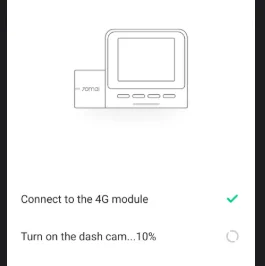
I found a workaround to the problem - but it's a so-called makeshift solution. I have to turn off the camera using the button on the camera for at least 40 seconds. Then I turn it on. After about a minute, remote access works. The procedure must be performed whenever the powerbank is discharged (offline camera). If I start the car and the power bank starts charging. The camera will turn on, but even after an hour of driving, when the power bank is charged to 100%. The camera will not connect to the module (there is an x in the application when trying to remotely connect) until I perform the above procedure. However, after a long time of use, the camera can still lose communication with the message module (in the photo) and here the above procedure helps again. (although once in about 50 starts it connected itself - a miracle)
If the problem reappears, a new report and ticket will be generated. Currently, everything points more to camera software or hradware, which hangs itself after some time. Recently, there have been no updates for this camera, the last software I have is 1.6.74ww

dateddDshcam
New Member
I have the T-800 in my 2023 Cadillac Lyriq. I also have the battery pack. When I connect it through the 12V supply and turn the pack on, it powers up the camera, then the camera powers down. The same thing happens with the USB-C connection. faulty pack or faulty camera?
Last edited:
T3chCha113ng3d
New Member
T800se that I am currently unable to use as mounting to windshield results in very poor video (blurry and ghosting). Does anyone have a non suction mount solution that is reliable. Tried to find a "universal" rear view mirror mount, none seem compatible.
T3chCha113ng3d
New Member
Was offered a refund on amazon, no refund given.

mentadent
Well-Known Member
- Joined
- Nov 14, 2020
- Messages
- 1,695
- Reaction score
- 881
- Location
- London, UK
- Country
- United Kingdom
- Dash Cam
- VIOFO A139, VIOFO A139 Pro, VIOFO A119 Mini 2, VIOFO A229...
Did you ask for the refund?
T3chCha113ng3d
New Member
Yes, was sent email, said reply "full refund", replied, was sent email, case closed. Already chalked it up to a learning experience before I got the email, then I was oh good, guess not, just venting here , should have stayed with viofo or something better according to this website. Learning experience.Did you ask for the refund?

lufa6977
Well-Known Member
- Joined
- Jul 22, 2024
- Messages
- 1,746
- Reaction score
- 2,041
- Location
- Virginia, Shenandoah Valley
- Country
- United States
- Dash Cam
- Vueroid S1-4K, Viofo A129 Pro Duo, A229 Pro, IR, Telephoto
Yes, was sent email, said reply "full refund", replied, was sent email, case closed. Already chalked it up to a learning experience before I got the email, then I was oh good, guess not, just venting here , should have stayed with viofo or something better according to this website. Learning experience.
Normally, refunds are not applied until the product has been returned. Have you returned the product? Did you receive instructions to return the product to a UPS or FedEX drop off point?
Just going by what you wrote, and knowing that Amazon is not always verbose in their emails, it looks like you received a full refund and the case is closed.
T3chCha113ng3d
New Member
I was well past the return date, which is why I was surprised to get the email. No refund. Why they sent an email offering a refund only to just close it, I have no idea. For the most part I just let it go, until I thought maybe somebody on here could help me with a mount I haven't discovered. Unfortunately, my new Subaru forester doesn't lend it self to easily mounting dash cams. My viofo mini was easily mounted in 2 different and separate cars. I made the mistake of thinking all would be so accommodating. Totally isn't the case. On the plus side it isn't a huge financial loss as it was on sale (black friday). So I now know to research heavily in all aspects of a dash cam to make sure I'm good to go. Learning the hard way.Normally, refunds are not applied until the product has been returned. Have you returned the product? Did you receive instructions to return the product to a UPS or FedEX drop off point?
Just going by what you wrote, and knowing that Amazon is not always verbose in their emails, it looks like you received a full refund and the case is closed.
lufa6977
Well-Known Member
- Joined
- Jul 22, 2024
- Messages
- 1,746
- Reaction score
- 2,041
- Location
- Virginia, Shenandoah Valley
- Country
- United States
- Dash Cam
- Vueroid S1-4K, Viofo A129 Pro Duo, A229 Pro, IR, Telephoto
I was well past the return date, which is why I was surprised to get the email. No refund. Why they sent an email offering a refund only to just close it, I have no idea. For the most part I just let it go, until I thought maybe somebody on here could help me with a mount I haven't discovered. Unfortunately, my new Subaru forester doesn't lend it self to easily mounting dash cams. My viofo mini was easily mounted in 2 different and separate cars. I made the mistake of thinking all would be so accommodating. Totally isn't the case. On the plus side it isn't a huge financial loss as it was on sale (black friday). So I now know to research heavily in all aspects of a dash cam to make sure I'm good to go. Learning the hard way.
OK, I see now. I have a 2013 Outback, and it's very easy to mount a dashcam on the windshield, as there is no Eyesight. You have the Eyesight stuff, and that is a real nuisance to work around; limited spots to stuff a dashcam. I took a look at the new 2026 Outback this year, and I did not like the new cloth dashboard covering. I would love another Outback, but not with a cloth dashboard.
You're in Texas, it's hot there, I know, my family is from Galveston, where I swear the humidity is around 110% every day. 🙂
I would suggest the Vueroid S1-4K, as it is very heat-tolerant, and you should have no issues in the heat. If you are not in a gut-bustin' hurry, Vueroid will have some new releases this year also.
T3chCha113ng3d
New Member
Thanks for the suggestion. Hot/Heat is obviously a big consideration. Mounting with electrostatic sheet would seem to be a problem anywhere. Okay for reg.tag/toll tag, not for anything heavier.OK, I see now. I have a 2013 Outback, and it's very easy to mount a dashcam on the windshield, as there is no Eyesight. You have the Eyesight stuff, and that is a real nuisance to work around; limited spots to stuff a dashcam. I took a look at the new 2026 Outback this year, and I did not like the new cloth dashboard covering. I would love another Outback, but not with a cloth dashboard.
You're in Texas, it's hot there, I know, my family is from Galveston, where I swear the humidity is around 110% every day. 🙂
I would suggest the Vueroid S1-4K, as it is very heat-tolerant, and you should have no issues in the heat. If you are not in a gut-bustin' hurry, Vueroid will have some new releases this year also.