HDR question for the VIOFO A329

Incorrect.
Viofo provides "unofficial" firmware to all users on a case by case basis.

As a paying customer you have a valid complaint.
The firmware should be finished / functional / acceptable before the hardware reaches the customer's hands.
The translator made a bad interpretation.

I meant that Viofo is only providing beta firmware to test users, not to customers who paid for the camera.

In the forum this is what I'm seeing, only the testers who received the camera before its official release or for free have the beta version.
This is the answer they gave me in the ticket I sent to Viofo.

I explained perfectly the problem and the existence of the test firmware.
They have basically ignored my request.
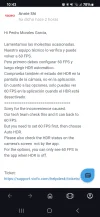
 

Attachments

  • Screenshot_20241125_104308_Opera.webp
    Screenshot_20241125_104308_Opera.webp
    94 KB · Views: 132
I meant that Viofo is only providing beta firmware to test users, not to customers who paid for the camera.
Incorrect.
Viofo provides "unofficial" firmware to all users on a case by case basis.
 
Incorrect.
Viofo provides "unofficial" firmware to all users on a case by case basis.
So why do only the users who received the camera for free and are the ones who carry out in-depth tests on the camera have unofficial firmware?

I have asked for the unofficial firmware and they have not provided it to me, nor is there anyone on the forum who has paid for the camera and has the unofficial firmware.
I have opened a ticket to viofo and they have ignored my request, claiming that I configured HDR again as if I were to blame for a bad configuration.

Also in another thread I cited viofo requesting unofficial firmware and I have not received a response.

The only thing I understand about them providing unofficial firmware on a case-by-case basis is only to users who received the camera for free to test and promote it, even if you do not obtain any financial benefit in exchange.
 
So why do only the users who received the camera for free and are the ones who carry out in-depth tests on the camera have unofficial firmware?
Because test firmware is intended for testers. If something goes wrong, it is easier for Viofo to solve everything with the tester
than with the user who bought the new model.
 
I have asked for the unofficial firmware and they have not provided it to me, nor is there anyone on the forum who has paid for the camera and has the unofficial firmware.
It will arrive, you just need a little patience. Quite likely they will make a pre-release version available on this forum before full release on their website, to check that there are no bugs left before it goes out to a million people and they receive a million complaints at Viofo Support. The people who download it from this forum will only send in a thousand complaints if there is a bug in it. Much easier to start with releasing it to just a few people!

(I don't think there are a million A329 sold yet, but there will be enough to create quite a lot of unnecessary work for Support if there was a bad mistake, these things do take time to get right.)
 
On that note, I wanted to add that I just looked into & tested it right now, and on my firmware V1.0_241009, the Auto HDR did not have the issue. I set it up, and it was saying 4K P30 while the HDR was on (set at the Auto HDR). I manually changed the time to when I had the Auto HDR to turn off, and saw that it had temporarily stopped recording and restarted with now 4K P60.
But that's not to say that what you said in THIS POST may not still be an issue -- maybe the switchover is only triggered when the unit is on and the time hits the change & it triggers the protocol to change it back to 4K P60. So if the unit is off, and finds after turning on and connecting to GPS or whatever to go directly to the time and not go over & hit that "trigger", I can see it remaining at 30FPS due to that oversight.
So, to update & report, in the end, I was not entirely correct in my above statement....

Realized on my commute this morning that even though HDR was indeed off/disabled, it was still saying 4K P30 -- so it does seem that on my just-purchased (purchased 11/22) unit's firmware (V1.0_241009), if the unit is off during the time the turnover takes place where Auto HDR schedules to turn on/off, when the dashcam does turn back on, HDR will be off but does not revert back to 60FPS.
I imagine it's probably a simple coding fix -- where as it seems it does check the time and checks it with the Auto HDR schedule, all it has to do is probably put a "if" statement (or something like that in whatever language A329 is written in) if/when HDR is off or Auto HDR schedule has it set to off, to revert it back to the highest resolution available or directly to 60FPS (or maybe even last setting it had been manually set to)....

So it seems I'm in the same boat as below
but I really don't want to be forced to go into the menu twice each day.
Worst case scenario, learn to love it. lol
and I'm fine turning it on and off manually each time I drive and the sunlight changes, but I don't think my wife is willing to do it ('>.<)
 
The only thing I understand about them providing unofficial firmware on a case-by-case basis is only to users who received the camera for free to test and promote it, even if you do not obtain any financial benefit in exchange.
 
Heh...aww I thought I was special when a support agent responded to my ticket and sent me a link to this file also this morning...

Installed it, and we'll see if it resolves the Auto HDR Timing issue (or I will be able to tomorrow when it's supposed to shift back to 60FPS in the morning)...
It's good to note (just found out since it was my first time) that updating firmware resets the dashcam back to factory state and the sd card will be erased & formatted after flashing it...
 
It's good to note (just found out since it was my first time) that updating firmware resets the dashcam back to factory state
During the next firmware update, the DVR settings will remain yours and will not be reset to factory settings.
and the sd card will be erased & formatted after flashing it...
You may not have formatted the memory card after the update. No one forced you.
You were prompted and you formatted the memory card.
 
During the next firmware update, the DVR settings will remain yours and will not be reset to factory settings.
That's not always true. I've found that some VIOFO firmware updates will leave the previous settings in place while other firmware updates will reset everything to factory defaults.

I just updated my A329 with the v1.0_241126 firmware. The settings were reset to the defaults requiring me to reselect everything again.
 
I just updated my A329 with the v1.0_241126 firmware. The settings were reset to the defaults requiring me to reselect everything again.
Try flashing the A329 with the same firmware again.
All your settings should remain intact.
Saving settings when flashing A329 was added in this firmware version.
 
Last edited:
Try flashing the A329 with the same firmware again.
All your settings should remain intact.
Reflashing the dash camera with same exact firmware version is not the typical use case. @simplepinoi177 was stating that updating firmware resulted in the firmware settings being reset.
 
Reflashing the dash camera with same exact firmware version is not the typical use case. @simplepinoi177 was stating that updating firmware resulted in the firmware settings being reset.
Saving settings when flashing A329 was added in this firmware version.
That's why I wrote:
During the next firmware update, the DVR settings will remain yours and will not be reset to factory settings.
 
It's good to note (just found out since it was my first time) that updating firmware resets the dashcam back to factory state and the sd card will be erased & formatted after flashing it...
Learn to love it. lol
Performing a default reset after updating the firmware is "always" a good idea to flush out any bad juju.
You may want to get in the habit of updating firmware with a separate "small" 16GB-32GB SD Card, (only use that card for updates).
That way you won't accidentally format your main / large capacity SD Card with recorded footage that you were meaning to save.
 
All your settings should remain intact.
Saving settings when flashing A329 was added in this firmware version.
What is the big deal with saving settings after updating firmware?
I enjoy putting all my settings back in to confirm & verify they are correct for the particular application.
It also familiarizes me with the user interface of the camera.
Am I weird?
 
What is the big deal with saving settings after updating firmware?
I enjoy putting all my settings back in to confirm & verify they are correct for the particular application.
It also familiarizes me with the user interface of the camera.
Am I weird?
I also always reset the settings to factory defaults after updating the firmware and set everything up again.
But many people are too lazy to do this and they ask the manufacturer to not change the settings during the update.

Everyone has different needs.
Some need cloud storage, some need sky-high bitrates, and some are too lazy to set up a DVR and want it to be factory-set.
 
But many people are too lazy to do this and they ask the manufacturer to not change the settings during the update.
This is like complaining scooping ice cream is too hard.
Yes it is, but you get to eat ice cream when you're done. LMAO!
 
Everyone always lacks something. And every year the demands only increase. However, they are not always real.
 
Reflashing the dash camera with same exact firmware version is not the typical use case. @simplepinoi177 was stating that updating firmware resulted in the firmware settings being reset.
We have noticed this, the new final version will keep settings after the update.
 
Okay, I must apologize. I noticed yesterday that the firmware version is V1.0_241126, but noticed that the firmware I flashed from the .bin file I was given from the support ticket yesterday was an older beta of V1.0_241118; I actually drafted a post questioning the naming convention of the .bin file and if they were different per firmware version, but noticed that they're both(all?) FWA329 and didn't bother. I should've and that might've been realized & pointed out and then curbed the confusion of what happened as shown/referenced in some of the quotes below.
In the end, that's the explanation of why when I had flashed it, it still had prompted me to format the card and not retain the settings. Sorry.
Saving settings when flashing A329 was added in this firmware version.
@simplepinoi177 was stating that updating firmware resulted in the firmware settings being reset.
Saving settings when flashing A329 was added in this firmware version.
That's why I wrote:
We have noticed this, the new final version will keep settings after the update.


During the next firmware update, the DVR settings will remain yours and will not be reset to factory settings.

You may not have formatted the memory card after the update. No one forced you.
You were prompted and you formatted the memory card.
After the flash was done, it had prompted me to input the Language, and location (GMT), and I recognized the sequence from when I set the unit up that I just assumed when it told me about formatting the memory card, it was a requirement. I can't recall exactly if it was optional or not as I was in a rush; but I don't believe it was.
But you could be right and I might not have looked at it fully. If anything, for the next firmware version, I'll be sure to take a look at the prompt more carefully; as it seems that my firmware version was older and still had that condition (unit falls back to factory state) & requirement.

What is the big deal with saving settings after updating firmware?
I enjoy putting all my settings back in to confirm & verify they are correct for the particular application.
It also familiarizes me with the user interface of the camera.
Am I weird?
I relate to this way of thinking... every time I update my smartphone and other electronics, I like to go through all the settings just to check if something more was added or changed; many times it's how I find out a feature was added. So I can understand that one might as well re-set the values/settings while going through them. But i also don't like the prospect of going through the trouble as I can get very finicky and it gets tedious (case-in-point; I synced my dashcam clock to an atomic one :wacky:)
 
Back
Top