ECOFLOW and Viofo

.......
I believe the cause of both of these issues may lie in how I bypassed the HK4 voltage regulator. I only bypassed the 'power' wire because the ACC line is still 12v. Here's a photo of how I rewired it, as well as a diagram of my wiring. If I did something completely asinine here, I would be obliged if someone pointed it out to me. Thanks again!

Good idea, but missing a small detail.
Bypassing the red 5V wire is fine.
But in order for the HK4 regulator to work (convert the yellow 12V to 5V), you need to make a jumper between the yellow 12V input (labeled on the board as ACC) and the input terminal that was for the red wire you bypassed (labeled on the board as B+)
 

Attachments

  • Capture.webp
    Capture.webp
    118.4 KB · Views: 171
Good idea, but missing a small detail.
Bypassing the red 5V wire is fine.
But in order for the HK4 regulator to work (convert the yellow 12V to 5V), you need to make a jumper between the yellow 12V input (labeled on the board as ACC) and the input terminal that was for the red wire you bypassed (labeled on the board as B+)
Ah, that makes sense--I'm not an engineer and might never have thought of doing that. I'll post an update after jumping those terminals. Thank you!
 
Hi everyone!
Sorry for my english as it's not my native language.
I'm new to dashcam's and powerstation's and getting courage to install a r3 with 129 mini 2, in my new car, as it seems the most budget friendly working setup without messing with the car electronics.
I've read this thread and watched linked videos and photos, but I'm still not sure exactly how to wire the setup.
Things that seem that I understood:
1. Power r3 from cig socket to xt60 cable, extracting derivation from that cable red wire (12v) to further connection with Acc hk4 viofo cable (yellow);
2. Power camera from usb-c R3 port with a tipeC/15v cable connecting to hk4 black and red accordinggly (joinned by the Acc in the yellow).
Questions:
What is the voltage in the R3 tipe C port?
What is the working voltage of the camera 12v or 5v?
In the described setup do I need bypass the hk4 voltage regulator?
Do I need any voltage conversion adapters in the circuits?
Do I need any fuse in the circuits?
How do I best avoid inadequate voltage from cable length's drop, and assure the correct electrical specs for the camera?
Sorry for my ignorance or any dumb question.
Just trying to apply your awesome job.
Thanks for your time and attention.
 
@GPak, I jumped those connections, and now parking mode is working. Thanks again!
Thanks for the feedback.
This is another good way to connect Viofo dashcam to River3 via USB-A 5V port by slightly modifying the voltage regulator of the HK4 kit.
 
Hi everyone!
Sorry for my english as it's not my native language.
I'm new to dashcam's and powerstation's and getting courage to install a r3 with 129 mini 2, in my new car, as it seems the most budget friendly working setup without messing with the car electronics.
I've read this thread and watched linked videos and photos, but I'm still not sure exactly how to wire the setup.
Things that seem that I understood:
1. Power r3 from cig socket to xt60 cable, extracting derivation from that cable red wire (12v) to further connection with Acc hk4 viofo cable (yellow);
2. Power camera from usb-c R3 port with a tipeC/15v cable connecting to hk4 black and red accordinggly (joinned by the Acc in the yellow).
Questions:
What is the voltage in the R3 tipe C port?
What is the working voltage of the camera 12v or 5v?
In the described setup do I need bypass the hk4 voltage regulator?
Do I need any voltage conversion adapters in the circuits?
Do I need any fuse in the circuits?
How do I best avoid inadequate voltage from cable length's drop, and assure the correct electrical specs for the camera?
Sorry for my ignorance or any dumb question.
Just trying to apply your awesome job.
Thanks for your time and attention.
Welcome to DCT, @Zoom
The answers to your questions are in blue

Things that seem that I understood:
1. Power r3 from cig socket to xt60 cable, extracting derivation from that cable red wire (12v) to further connection with Acc hk4 viofo cable (yellow);
Correct.
Make sure your car's cigarette lighter socket is ACC and is rated for 8A/100W output.

2. Power camera from usb-c R3 port with a tipeC/15v cable connecting to hk4 black and red accordinggly (joinned by the Acc in the yellow).
Correct.

Questions:
What is the voltage in the R3 tipe C port?
The USBC port is a "smart" port and can output 5V, 9V, 12V, 15V or 20V, depending on what is negotiated/requested by the device connected to it.
Without anything connected to it, there is no output. (some USBC ports output 5V without anything connected to it)
With a special Type-C/15V cable, the R3 USBC port outputs 15V (negotiated by this special cable).


What is the working voltage of the camera 12v or 5v?
The working voltage of the Viofo A119 Mini 2 camera is 5V.
The HK4 cable receives 12-14.5V from the car (yellow) and from the River 3 type-C/15V cable (black and red) and converts it to 5V required by the DVR.


In the described setup do I need bypass the hk4 voltage regulator?
No.
With type-C/15V cable you don't need to touch the HK4 kit - this is why it is one of the easiest DIY option.

(A bypass option is one of the available options to directly supply 5V to DVR via the R3 USB-A port. It is a bit more efficient and the timeout works in this case, but it is more of a DIY job, and voltage drop should be considered in this case)

Do I need any voltage conversion adapters in the circuits?
No.
The type-C/15V cable and the original HK4 kit do all the conversions needed.


Do I need any fuse in the circuits?
No.
The River 3 has internal re-settable overload/short circuit protection and the XT60 to cigarette lighter cable has a built-in fuse in the cigarette plug.


How do I best avoid inadequate voltage from cable length's drop, and assure the correct electrical specs for the camera?
With Type-C/15V setup, the camera is powered through the original Viofo HK4 kit with the actual output voltage being around 5.3V, so there is nothing to worry about.
 
Last edited:
Here is an XT60 splitter that can be used to connect the positive ACC wire from the River 3 Cigar-XT60 charging cable to the yellow wire on the HK4.
Simply remove one of the two female XT60 connector and use only the red wire to connect to the yellow wire on the HK4.
Tape and do not use the black wire.
Use the second XT60 female connector to charge River 3.

or
https://www.amazon.com/gp/B09L62W679
 
Hi everyone!
Sorry for my english as it's not my native language.
I'm new to dashcam's and powerstation's and getting courage to install a r3 with 129 mini 2, in my new car, as it seems the most budget friendly working setup without messing with the car electronics.
I've read this thread and watched linked videos and photos, but I'm still not sure exactly how to wire the setup.
Things that seem that I understood:
1. Power r3 from cig socket to xt60 cable, extracting derivation from that cable red wire (12v) to further connection with Acc hk4 viofo cable (yellow);
2. Power camera from usb-c R3 port with a tipeC/15v cable connecting to hk4 black and red accordinggly (joinned by the Acc in the yellow).
Questions:
What is the voltage in the R3 tipe C port?
What is the working voltage of the camera 12v or 5v?
In the described setup do I need bypass the hk4 voltage regulator?
Do I need any voltage conversion adapters in the circuits?
Do I need any fuse in the circuits?
How do I best avoid inadequate voltage from cable length's drop, and assure
the correct electrical specs for the camera?
Sorry for my ignorance or any dumb question.
Just trying to apply your awesome job.
Thanks for your time and attention.
Here is an XT60 splitter that can be used to connect the positive ACC wire from the River 3 Cigar-XT60 charging cable to the yellow wire on the HK4.
Simply remove one of the two female XT60 connector and use only the red wire to connect to the yellow wire on the HK4.
Tape and do not use the black wire.
Use the second XT60 female connector to charge River 3.

or
https://www.amazon.com/gp/B09L62W679
@GPak
Thanks for the detailed feedback and links.
It's greatly appreciated!

After some though, I'm now considering the viofo a229 plus 3ch, but not sure.

Can the R3 handle it?

I commute about 45 min a day, and using parking mode half a day in the job parking.
Also considering turning the cameras off at home and AC charge if necessary.

Is a SD 256Gb enough or should I get the 512Gb?
Thanks again for your time and attention.
 
For River 3:
The USB-A port is rated at 5V x 2.4A or 12W max per port.
The USB-C port is rated at 5V/9V/12V/15V x 3A max and 20V x 5A max.
So 15V x 3A is 45W max.

The Viofo A229 Plus 3ch uses about 7-8W at most, so there won't be any issues with either port.
However, for a 3-channel dash cam, I think a 12V system using USB-C is better to provide extra power headroom and avoid potential power shortages due to voltage drop on the USB-A output.

With a 45 minute drive and half a day of parking, you won't need AC charging at home.
I think 8A or even 6A charging in the car would be enough.

As for the microSD card size, I think 256GB will be enough but the bigger the better depending on your budget.
 
Last edited:
It's been 4 months since I installed the River 3 in my Jeep at the very beginning of the year.
I tested it in sub-zero temperatures, as well as long and short trips.
On work days, the Jeep is parked for a full day in direct sunlight with a pair of Mini2s in LBR parking mode.
So far, it works like a champ.

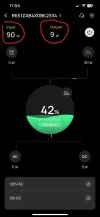
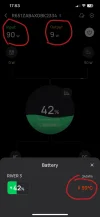
As it gets hotter outside, for the first time, the car's interior temperature and the River3 exceeded the upper temperature limit of 45 °C specified in the manual, and the R3 continued to work fine as I expected. (see screenshots)
I really want to push the R3 to its limits, so I use an 8A charging current, although I only need 6A.
So I will continue testing and report back next time the R3 reaches 50 °C.
 

Attachments

  • IMG_8187.webp
    IMG_8187.webp
    53.3 KB · Views: 123
  • IMG_8189.webp
    IMG_8189.webp
    36.9 KB · Views: 124
  • IMG_8190.webp
    IMG_8190.webp
    30.8 KB · Views: 115
Last edited:
Glad to see your Ecoflow is still in active use! Now that I'm done with testing, I've got mine stored in the garage as a backup battery in case we lose power during a storm.

Ecoflow in the garage.webp


It's connected to a smart plug that periodically turns on briefly to allow the battery to recharge and top off. For longevity though, I'm debating letting it run down to ~80% for long term storage and only topping it off manually when a storm is in the forecast.
 
So I recently watched a video from Vortex Radar and currently going through the 9 pages in this thread for more info but have a quick question on my setup... im adding a 3rd ch to my A139pro which is hardwired with the HK3 kit to a powercell8 and one celllink NEO.... can I get something like the river2 to hardwire to my current setup (piggyback) to add more parking time for 3 channels or is it best just to add another cell link neo extension?
 
So I recently watched a video from Vortex Radar and currently going through the 9 pages in this thread for more info but have a quick question on my setup... im adding a 3rd ch to my A139pro which is hardwired with the HK3 kit to a powercell8 and one celllink NEO.... can I get something like the river2 to hardwire to my current setup (piggyback) to add more parking time for 3 channels or is it best just to add another cell link neo extension?
Check out the linked post and follow posts where we discussed a similar setup.
River 2 doesn't have port memory like River3, so you'll have to keep it on all the time or manually turn on the DC port via the app.
I recommend River3.

In your case, the PowerCell 8 definitely has low voltage protection, but I'm not sure about the Cellink Extended battery you already have.
You can definitely try River2/3 as described in the linked post, but I think it's probably better to stick with another Cellink Extended battery. Just my opinion.

And welcome to DCT

 
Last edited:
... I'm debating letting it run down to ~80% for long term storage and only topping it off manually when a storm is in the forecast.
That's what I do with my power stations, I keep them around 60-80% and watch the weather forecast.
The River3 in my Jeep is set to 10-90% limits, but in everyday use it cycles around 50-80%, except when I go on long trips it goes up to 90% limit.
 
Check out the linked post and follow posts where we discussed a similar setup.
River 2 doesn't have port memory like River3, so you'll have to keep it on all the time or manually turn on the DC port via the app.
I recommend River3.

In your case, the PowerCell 8 definitely has low voltage protection, but I'm not sure about the Cellink Extended battery you already have.
You can definitely try River2/3 as described in the linked post, but I think it's probably better to stick with another Cellink Extended battery. Just my opinion.

And welcome to DCT

Thank you, I'll do some more reading and appreciate the prompt suggestions
 
As it gets hotter outside, for the first time, the car's interior temperature and the River3 exceeded the upper temperature limit of 45 °C specified in the manual, and the R3 continued to work fine as I expected
I wonder what engineering changes they made for heat management between the R2 and R3 models. I’m hoping it continues to work as the weather warms. I don’t have good data on what actual interior car temp pushed my R2 over the edge. All I can definitively say is that the R2 stopped working after 2-3 days of 95F outdoor temps with a dark blue car in full sun.
 
I wonder what engineering changes they made for heat management between the R2 and R3 models. I’m hoping it continues to work as the weather warms. I don’t have good data on what actual interior car temp pushed my R2 over the edge. All I can definitively say is that the R2 stopped working after 2-3 days of 95F outdoor temps with a dark blue car in full sun.
The River3 utilizes Gallium Nitride (GaN) technology, which is considerably more efficient than traditional silicon-based semiconductors, so it produces less heat.
I never heard the fans running, in fact the R3 is virtually silent.
This is likely the reason I got more parking time from the 245Wh rated R3 compared to the 256Wh rated R2, when tested with A229 Plus 2ch in a LBR parking.
The USB port controllers are also upgraded on the R3 compared to the R2, based on their behavior.
I'm hoping the 45°C temp range is over-protection on the part of the Ecoflow, more geared towards the max 300W charging and discharging operations using the inverter.

I currently have two Mini2s plugged into each USB-A port, but I plan to use a splitter to connect both to one port, and maybe plug in something else, I'd like to load the port up to 10W. I'm willing to push the R3 as hard as I can, see if I can get to overheat protection, I don't mind breaking it.
So far we have temperatures up to 86°F (30°C), hopefully the temperature will rise higher sometime soon, ideally up to 104°F (40°C).

Here is long but interesting video on GaN vs Silicon: (I wonder if dashcams are utilizing GaN?)

 
Thanks GPAK. I will need to find the USB cables for my Viofo A129 Duo. Right now I just have the cig-lighter plug cable. I plan to use the A129 Duo for another purpose as the A139 3-Channel Plus is my main use dashcam which was hooked up to a P8 battery.
For the heck of it I finally hooked up the Viofo A129 Duo 2-Ch to the River 2 (base model). The thing is going to run for a long time. I let it run for a few hours in runtime mode. It shows 55 hours run time and 95% capacity. I know, I will have to set it up so it can go into Parking mode.

I put the River 2 into the trunk because temps are cooler in the trunk than in the passenger cabin. I use those Weather Stations Indoor Outdoor Wireless Thermometers. I'm using the A129 Duo for the purpose of utilizing the Rear cam because my A139 3-Ch is down to one cam, the front one.

 
Last edited:
As promised, here's a new record!
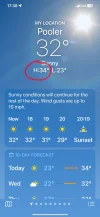
Today's high was 34°C (93°F)
Jeep was parked in direct sunlight for about 5 hours (12:30 to 17:30)
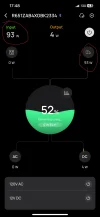
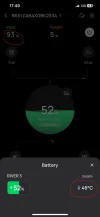
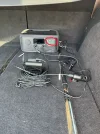
At the end, the cabin temperature was 51°C (124°F) and the River3 temperature in the back of my Jeep was 50°C (122°F), see attached images.
Driving back home for about 12 minutes, the R3 worked just fine, charging at 90-92W, and powering 3 dash cams.
A229 Plus (2ch) + Mini2 via one USB-A port (to simulate a 3ch setup) and another Mini2 via the second USB-A port.
Total power consumption is about 9-10W (or about 2.5W per channel).

Next I will post if/when R3 reaches 55°C (131°F) or the ‘Over Temperature Protection’ kicks in, whichever comes first.
 

Attachments

  • 1.webp
    1.webp
    71.7 KB · Views: 152
  • 2.webp
    2.webp
    600.3 KB · Views: 148
  • 3.webp
    3.webp
    37.6 KB · Views: 152
  • 4.webp
    4.webp
    35.3 KB · Views: 144
Looks like the thermal engineering has been improved over the R2! The R3 seems to be on the cusp of being unhappy with the red temp reading and accompanying exclamation mark. I’m curious to see how it behaves as you get into summer and temps climb even higher, it’s still only May…
 
Back
Top