VIOFO A329S - Testing/Review - RCG

I reckon that is due to the external SSD requiring more power than what the LPID is providing?
 
I reckon that is due to the external SSD requiring more power than what the LPID is providing?
I believe the main reason is the SSD boot/mount time is too slow to allow the camera to start recording in under two seconds.
 
I believe the main reason is the SSD boot/mount time is too slow to allow the camera to start recording in under two seconds.

Power may still be the reason though; the Samsung T7 requires 5v, 1.5a, thus, LPID would be too low of a power to to keep the T7 on a 'hot standby', so in effect it would likely be slow to power up. Not being argumentative, just thinking about the situation.

@viofo
 
Last edited:
Power may still be the reason though; the Samsung T7 requires 5v, 1.5a, thus, LPID would be too low of a power to to keep the T7 on a 'hot standby', so in effect it would likely be slow to power up. Not being argumentative, just thinking about the situation.
This. When it comes to having the same or similar NAND flash storage, oftentimes microSD is slower to access than SSD as with other electronic devices. As SSD runs magnitudes faster than microSD, with the microcontrollers and other components being far more power hungry, so that would be the reason as you surmise.
 
I believe the main reason is the SSD boot/mount time is too slow to allow the camera to start recording in under two seconds.
That doesn't explain why you can't use the SSD for the first part of the hybrid parking mode, and then use the microSD after waking up on impact.

The reason may be because you could remove and replace the SSD while the dashcam is asleep, and it wouldn't notice, then corrupt the drive after waking up. Does it notice if you replace the microSD while it is sleeping?

If you have the SSD plugged in, and select "MicroSD Card" option for the "Parking Files Storage", how much power does the SSD use when in parking mode? Does it power off and save power?

Does the number of files on the storage device affect the wake up and start recording time? Maybe SSDs can have too many files for a fast wake up.
 
This information is based on using a prototype A329S dash camera and a beta firmware.

One of the new parking modes for the A329S/A329T is the "Low Power Impact Detection" [LPID] parking mode. I blurred out the name of the other new parking mode since I don't have the correct [new] hardwire kit to test it yet.

My initial tests of this parking mode were using a 3-channel configuration [front, rear, interior]. There are no settings specifically for the LPID parking mode, so you only need to select it as the active parking mode. The operation of this parking mode is very simple. When the ignition [accessory] power is turned off to the VIOFO hardwire kit powering the A329S/A329T, it will enter this parking mode and the power consumption drops to 34 mA @ 12.6V or 0.43 Watts. When an impact event it detected, the A329S/A329T resumes recording in just under 3 seconds [my tests show from 2.75 to 3.00 seconds]. When the interior camera is disabled in parking mode, the LPID parking records start in 2.55 to 2.65 seconds. A 1-minute recording will be created by default. If motion or additional impacts are detected while it is recording, the dash camera can keep recording for up to 3-minutes.

When the vehicle is started and the dash camera exits LPID parking mode, it will announce that an impact event has taken place while in parking mode. It then beeps every few seconds for up to 1-minute when the alert on screen will go away and the beeping will stop. It's nice that it it now announces the fact that impact were detected, but it seems like a really long time to have it beeping.

The video files created by LPID parking mode are stored in the "Movie\RO" directory on the microSD card.

View attachment 79939

There is another parking mode related setting that determines where parking mode video files are stored [Parking Files Storage]. The LPID parking mode will only store impact event video files on the microSD card. If you use a SSD as the primary video file storage for the A329S/A329T, you must also use a microSD card to store the LPID parking mode video files.

View attachment 79942

Power Consumption Info - LPID / 3-Channel / IR LEDs On and Off / Multiplexing Off

I included the power consumption data with the dash camera recording videos after an impact event so you can see how much power it draws while recording. The most important power consumption data is the "Waiting for impact event" since that is how this dash camera should be operating 99.9% of the time.

View attachment 80064

The power consumption in LPID parking mode is less than 10% of most other parking modes in previous VIOFO dash camera models.

View attachment 80028

Another dash camera setting that will be of interest for any of the A329S parking modes is when to record video for the interior camera. You can turn the interior camera off, on, only record while driving, or only record while parked. If the "Interior Camera" setting is set to "Only On while Driving", it does reduce the delay between the impact event and the start of recording LPID videos from "2.75 to 3.00 seconds" to "2.55 to 2.65 seconds".

View attachment 79943
So if while in parking mode and it detects some kind of activity will I get a push notification to my phone to let me know immediately so I can take action if need be?
 
So if while in parking mode and it detects some kind of activity will I get a push notification to my phone to let me know immediately so I can take action if need be?
No. It's not a cloud-connected camera.
 
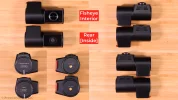
Anyone wanting to reuse their A329 rear camera with the A329S/A329T dash cameras can. One small thing to note for anyone installing the production A329S/A329T rear camera is that the orientation of the camera has been rotated 180 degrees when compared to the A329 rear camera. You can of course use the "Rear Image Rotate" firmware setting to rotate the image. If you want to get the right-side-up orientation for the A329S/A329T rear camera so the "Rear Image Rotate" setting is not needed, the rear camera cable connects to the right side when looking from the rear of the vehicle. The A329 rear camera has the cable on the left side to achieve the same default right-side-up orientation.

1748653022496.webp
 
The default rotation position for telephoto and rear camera was reported about two weeks ago. Seems that in the latest firmware, the telephoto default rotation is fixed, finally.
When installing the A329T, the telephoto camera I expect the connector to be on the right side and on the rear camera to be on the left side. Based on this to be set the default rotation.

Regarding HPM (hybrid parking mode):
- if you have HPM enabled, a SSD connected and forgetting the card at home, the parking mode will be switched from HPM to low bitrate recording. Even you will bring from home the card and inserting into the camera, the HPM will not be restored at your previous settings so you need to enable it again. So the good news is that you will have a parking mode even you don't have the card but it will be not HPM.
- lets hope Viofo will introduce a new voice saying Hybrid Parking Mode Started. In this way you will now which parking mode is used.
- if the HK6 will stay very long time in LPIM and if the car battery will go under 11.8V the camera will be automatically switched off, no matter if the cut-off time is set to Off.
- I hope the strategy of RO files resulted from the LPIM mode to be modified. Because the LPIM can bring many false alarms this can result in a full RO folder and the camera to stop recording in HPM. I consider it is better to delete some old RO file from parking mode even it is read only than to stop monitoring the car. My suggestion for the card used for HPM to be 256GB to not go full în just one or two nights.
Also because the HPM can not use SSD in any way, the SD card will be stressed because of heat until the LPIM will enter into the action.

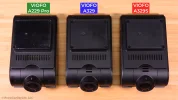
The CPL is modified on the secondary cameras of A329S series because of the fisheye lens which forced a case modification of the A329 Series.
In my opinion the fisheye lens of A329S is great and opening future opportunities.
 
Last edited:
Hello there! I'm following this product (A329) for a while now and I'm just wondering: Does the new version (A329S/T) still have the option to connect an external display (or even a cam link/capture card) via USB-C (to hdmi) or is this feature completely gone with the absence of an HDMI port now? Thanks for your help in advance!
 
Hello there! I'm following this product (A329) for a while now and I'm just wondering: Does the new version (A329S/T) still have the option to connect an external display (or even a cam link/capture card) via USB-C (to hdmi) or is this feature completely gone with the absence of an HDMI port now? Thanks for your help in advance!
Gone
 
Thanks! That's kinda sad in my opinion. But as far as what I've read on here, most people haven't really cared about that HDMI functionality anyways. So I guess it's understandable in a way, that they got rid of it.
You can still connect to the RTSP live stream, so any device with wifi and a decent video player can display the live video. The HDIMI is nice, but normally you don't need full 4K detail for a live display... low latency from HDMI is nice though.
 
You can still connect to the RTSP live stream, so any device with wifi and a decent video player can display the live video. The HDIMI is nice, but normally you don't need full 4K detail for a live display... low latency from HDMI is nice though.
The idea was to make the cams part of a live streaming setup, so basically connecting it via HDMI to a cam link device as one video source (of probably 2 or 3). An USB-C connection would have probably been fine too, but wifi seems a little bit more tricky or at least inconvenient for that purpose, since it has higher latency, it "blocks" the wifi connectivity of the receiving device and it is overall not as easy to run within this hypothetical setup. Sadly I was way more hyped about the upcoming A329S before I figured out that it'll lack the hdmi port. Now both products, the A329 as well as the A329S, feel like a compromise which I'm probably not willing to make.
 
For my other hobby ( shooting airguns ) i have just transitioned to another Chronograph to measure my shot speeds ASO
The old one was APP based and so needed a APP and BT link to device, the new one just have wifi and pretty much just act like a web page, and so i can connect multiple things to it, PC - Laptop - phones at the same time.

Mind you the new one do not have a build in battery so need a power source, like a phone or power bank, the wired connection are no problem for me as i sit at a bench and shoot.

I assume connecting to a camera with RTSP would be the same ( me absolutely not getting networking stuff, on computers or in what people would call a social group.
 
The idea was to make the cams part of a live streaming setup,...
RTSP is Real Time Streaming Protocol, it gives you the live stream without any work!

I'm not sure why the HDMI connected to something separate that streams the same thing would be better?

Maybe Viofo can improve the RTSP to meet requirements?

I assume connecting to a camera with RTSP would be the same
The A329 has a web server on its HTTP interface, so does exactly the same as your chronograph, although it is not a very exciting web site, just gives access to the recorded files. The RTSP interface is similar, but is a video stream, not a web page. You normally view it using a video player instead of a web browser, although web browsers may also play it.
 
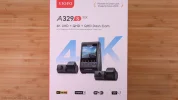
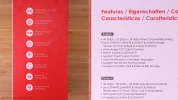
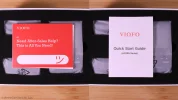
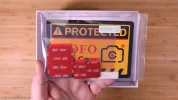
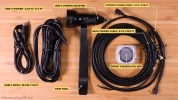
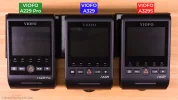
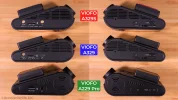
Here are some of the unboxing pics I have from the early production A329S 3-Channel I received this past week.

A329S_Unboxing_Pics_DCT00.webpA329S_Unboxing_Pics_DCT01.webpA329S_Unboxing_Pics_DCT03.webpA329S_Unboxing_Pics_DCT05.webp

A329S_Unboxing_Pics_DCT06.webpA329S_Unboxing_Pics_DCT12.webpA329S_Unboxing_Pics_DCT13.webpA329S_Unboxing_Pics_DCT14.webpA329S_Unboxing_Pics_DCT15.webpA329S_Unboxing_Pics_DCT16.webp
 
I'm not sure why the HDMI connected to something separate that streams the same thing would be better?
RTSP disadvantages: low resolution and bitrate, no audio stream, ~1sec lag between real view and wifi stream.

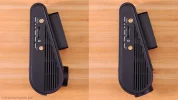
I'm really want to know who and why decided to change this body part? Does it gave any profit? Not too much drivers have a long nails to eject SD-card.
noname.webp
 
  • Like
Reactions: Mtz
RTSP disadvantages: low resolution and bitrate, no audio stream, ~1sec lag between real view and wifi stream.

I'm really want to know who and why decided to change this body part? Does it gave any profit? Not too much drivers have a long nails to eject SD-card.
View attachment 80661
Packaging constraints for the body perhaps? Better heat dissipation maybe. Doesn't bother me since I don't think most people are going to be taking out the microSD on a regular basis...
 
RTSP disadvantages: low resolution and bitrate, no audio stream, ~1sec lag between real view and wifi stream.

I'm really want to know who and why decided to change this body part? Does it gave any profit? Not too much drivers have a long nails to eject SD-card.
View attachment 80661

I take that you are speaking of the indentation above the SD slot? If so, then I have to agree, I have enough trouble as it is inserting or ejecting the card, and that is with the indentation. However, I think a part of the issue is the scallop being on one side and not both so that made it sometimes difficult to deal with the SD when the cam was attached to the window. Perhaps the absence of the scallop reduces the difficulty with the card?
 
Back
Top