VIOFO A329S - Testing/Review - RCG

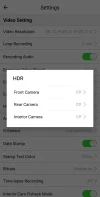
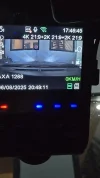
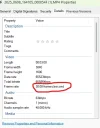
Hi Everyone. I think I have a dilemma. On single channel, the screen says it's recording on 4k at 60fps. However, on 3 channels, it only records at 30fps. HDR is turned off. Is this how it's supposed to be?
 

Attachments

  • 1749385829965.webp
    1749385829965.webp
    25.8 KB · Views: 118
  • 1749385849648.webp
    1749385849648.webp
    35.3 KB · Views: 109
  • 1749385868461.webp
    1749385868461.webp
    89.8 KB · Views: 106
Last edited:
Hi Everyone. I think I have a dilemma. On single channel, the screen says it's recording on 4k at 60fps. However, on 3 channels, it only it only records at 30fps. HDR is turned off. Is this how it's supposed to be?
When used in 3 channel recording mode, it's limited to 30fps on all cameras.
When used in 1ch it 2ch mode you can have 60fps on the front camera.

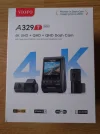
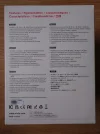
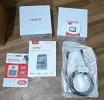
It can be misleading as the front of the retail box says 4K 60fps, but then the back of the box then details 4k 30fps, 2K 30fps, 2K 30fps when used in 3ch recording mode.


You can set it so that it only has the interior/telephoto camera turned on/off at specific times (when driving or when parking) so outside of those times it would act as 2ch and you'd get 60fps on the front camera
 

Attachments

  • 20250529_093846116.webp
    20250529_093846116.webp
    77.3 KB · Views: 104
  • 20250529_094034136.webp
    20250529_094034136.webp
    200.6 KB · Views: 108
A bit misleading / confusing for sure, not least for the new comer to dashcams, but us oldies know that in single or as is the case now fewer channel mode you can often get more FPS on the front / main camera.
But full channel count and you are often / always locked to 30 FPS.
For dashcam use, evidence collection 30 FPS is just fine, i would not use 60 FPS even if i could.
If we are talking scenic drive videos, well in that case more FPS is nice, but then the wide angle of a dashcam is not ideal CUZ you do not want A pillars or hood / dashboard in your nice drive video.
 
When used in 3 channel recording mode, it's limited to 30fps on all cameras.
When used in 1ch it 2ch mode you can have 60fps on the front camera.

It can be misleading as the front of the retail box says 4K 60fps, but then the back of the box then details 4k 30fps, 2K 30fps, 2K 30fps when used in 3ch recording mode.


You can set it so that it only has the interior/telephoto camera turned on/off at specific times (when driving or when parking) so outside of those times it would act as 2ch and you'd get 60fps on the front camera
Well, the box I have didn't say what your box says. Mine came as a single channel and the rear and cabin cameras have their own boxes as if I purchased all of them separately. So I really have no idea that 60fps will work on single and dual channel only.
 

Attachments

  • 1749388165741.webp
    1749388165741.webp
    172.4 KB · Views: 111
  • 1749388332869.webp
    1749388332869.webp
    128.2 KB · Views: 113
A bit misleading / confusing for sure, not least for the new comer to dashcams, but us oldies know that in single or as is the case now fewer channel mode you can often get more FPS on the front / main camera.
But full channel count and you are often / always locked to 30 FPS.
For dashcam use, evidence collection 30 FPS is just fine, i would not use 60 FPS even if i could.
If we are talking scenic drive videos, well in that case more FPS is nice, but then the wide angle of a dashcam is not ideal CUZ you do not want A pillars or hood / dashboard in your nice drive video.
I get that. But I was already using the A229 Pro 3 ch. The two reasons I have for upgrading to the A329s are:

1. SSD support
2. 60fps (without going less than 3 channels).

For the sake of newbies like me, it should've been clearly stated that it will only work on 2 channels. If it was clearly stated, I would've just kept the A229 Pro 3 ch and upgraded the micro sd card for more storage. Honestly, I feel deceived.
 
If it was clearly stated, I would've just kept the A229 Pro 3 ch and upgraded the micro sd card for more storage. Honestly, I feel deceived.

I know this isn't practical for everyone for several reasons (e.g. increased cost and complexity), but if it were me, I'd make a nice lemonade out of this unfortunate situation by using both the A229 Pro and the A329S.
  • A329S 2-channel mode (4K 60 fps front).
  • A229 Pro 1-channel mode (4K 30 fps) back.

That's what I'm going to do (though my second camera on the front will be the new telephoto, not interior).
There are a few advantages of running such a setup besides the resolution bump on the rear.
One that is relevant to your situation is that I'll be running a couple of VIOFO 512GB microSD cards for a total of 1TB system storage.
 
I know this isn't practical for everyone for several reasons (e.g. increased cost and complexity), but if it were me, I'd make a nice lemonade out of this unfortunate situation by using both the A229 Pro and the A329S.
  • A329S 2-channel mode (4K 60 fps front).
  • A229 Pro 1-channel mode (4K 30 fps) back.

That's what I'm going to do (though my second camera on the front will be the new telephoto, not interior).
There are a few advantages of running such a setup besides the resolution bump on the rear.
One that is relevant to your situation is that I'll be running a couple of VIOFO 512GB microSD cards for a total of 1TB system storage.
Thank you. That is actually what I did, or at least close to that.

A329s set up as is. Front, cabin and rear. 3-channels.
A229 Pro 2 channels only. Main camera for the rear and cabin camera on the rear too but aimed at the cabin. The rear camera went back to the box. I'm just waiting for a new hardwire kit.
 
When used in 3 channel recording mode, it's limited to 30fps on all cameras.
When used in 1ch it 2ch mode you can have 60fps on the front camera.

It can be misleading as the front of the retail box says 4K 60fps, but then the back of the box then details 4k 30fps, 2K 30fps, 2K 30fps when used in 3ch recording mode.


You can set it so that it only has the interior/telephoto camera turned on/off at specific times (when driving or when parking) so outside of those times it would act as 2ch and you'd get 60fps on the front camera
@SafeDriveSolutions Here's the answer to my question in the other A329s thread.
 
Very good dashcams setup for the tests.
I know it is not easy to make such comparisons but maybe in the future you will consider some footage inside the city with more traffic, to see incoming and outgoing cars.

Regarding these comparisons, the differences are small, sometimes the colors are more saturated for some setup but the best thing learned today is that HDR is good on interior camera at day, but not at night. It is good that Viofo is offering different HDR setup for each camera.
 
Is anyone having trouble with SSD's?

There are times when the dashcam turns on, it saves video files on the Micro SD card even if I've previously set it to save videos on the SSD. I'm using the optional SSD cable from Viofo and a Samsung Shield S7. I've also formatted the SSD using the dashcam when I installed it.
 
Very good dashcams setup for the tests.
I know it is not easy to make such comparisons but maybe in the future you will consider some footage inside the city with more traffic, to see incoming and outgoing cars.
I hear and understand your feedback. My local town is either gridlocked during most midday drives so there's no "daytime driving footage" [small town with too many cars]. Morning drives have limited cars on the road. As I mentioned in the video, during this time of year with the sunset time being so late, there's almost nobody on the road after sunset. My weekly drives out of town on Fridays do let me gather more daytime city driving footage, but I'm not setup to do dash camera combination tests during that grocery shopping trip. I'm trying to figure out a new route that I can drive that's not too far away, but still gets the footage I would like to capture for dash camera comparisons.
 
I had no problems with SSD on A329 and A329S. But I always used a coil rubber.
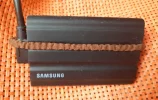
My advice for everyone using a SSD is to use some rubber around the SSD connector. The fastest way to find such a rubber at home is the one used by women on their long hair.
Here is my quick setup before looking for some more professional:

PSSD-rubber.webp

This rubber is the reason why the Viofo SSD cable connector is angled and not straight. The first samples of SSD cable were with straight connector but, finally, Viofo made it angled. There was a request for some coil rubber but was not aproved.

The reason for such an angled connector and a coil rubber was to not see people claiming that their camera is not always recording on SSD.

Another thing about recording on SSD on A329S is that the HPM is always recording on the card, but normal PM videos can be recorded on SSD.
 
I had no problems with SSD on A329 and A329S. But I always used a coil rubber.
My advice for everyone using a SSD is to use some rubber around the SSD connector. The fastest way to find such a rubber at home is the one used by women on their long hair.
Here is my quick setup before looking for some more professional:

View attachment 81093

This rubber is the reason why the Viofo SSD cable connector is angled and not straight. The first samples of SSD cable were with straight connector but, finally, Viofo made it angled. There was a request for some coil rubber but was not aproved.

The reason for such an angled connector and a coil rubber was to not see people claiming that their camera is not always recording on SSD.

Another thing about recording on SSD on A329S is that the HPM is always recording on the card, but normal PM videos can be recorded on SSD.
Oh I have that. I wrapped a rubber band that same way you did just to be sure that the cable is connected to the ssd even after a bump. I'm glad I'm not the only one who thought about it. But I don't think my problem is with a loose connection. It's more on a delay in detecting the SSD which is why the dashcam records on the Micro SD.
 
Is anyone having trouble with SSD's?

There are times when the dashcam turns on, it saves video files on the Micro SD card even if I've previously set it to save videos on the SSD. I'm using the optional SSD cable from Viofo and a Samsung Shield S7. I've also formatted the SSD using the dashcam when I installed it.
I've been using the SSD storage option with the A329S prototype unit I've been testing for the past couple of months. I've not had storage option revert back to the microSD once it was set to the SSD, except one time when I didn't have the SSD fully connected.
 
Is anyone having trouble with SSD's?

There are times when the dashcam turns on, it saves video files on the Micro SD card even if I've previously set it to save videos on the SSD. I'm using the optional SSD cable from Viofo and a Samsung Shield S7. I've also formatted the SSD using the dashcam when I installed it.
I have heard something similar with the original A329 after a firmware update. Defaulting the cameras settings fixed it. Might be worth a try.
 
Is anyone having trouble with SSD's?

There are times when the dashcam turns on, it saves video files on the Micro SD card even if I've previously set it to save videos on the SSD. I'm using the optional SSD cable from Viofo and a Samsung Shield S7. I've also formatted the SSD using the dashcam when I installed it.
You may update the firmware and reset the settings to have a try. If does not help, please send me a PM for further help.
 
Hi. Can you expound on "Defaulting the camera's settings"? What exactly does that mean?
Means update the firmware THEN factory reset everything.
Put everything back to default settings
 
Means update the firmware THEN factory reset everything.
Put everything back to default settings
Oh, okay. I thought there's a setting that will use the SSD as the dashcam's default storage. I didn't realize he meant resetting to factory settings. Thank you.
 
Back
Top