Purchased A329T - Firmware Bugs / Problems (Help) - Suggestions

let it enter parking mode, wait about 2-3 minutes, and hit the 3 line button to simulate waking up the camera. Do you get the "Yellow Triangle".
It is difficult to wake up the camera from parking mode by pressing a button without triggering the g-sensor
 
When you confirmed it happens by merely turning on Ignition (not starting the car) it proved there is a problem unrelated to G-Sensor trigger.
 
@jsmith

I have just tested my A329S (3-ch) with the latest firmware—FWA329S.bin, V2.0_260104, 89.4 MB.
Power was supplied via an HK4 cable connected to my dedicated LTO battery.

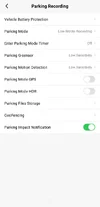
First of all there are (2) two G-sensor settings.
One is intended for normal recording mode while driving, and the other is for Parking recording mode.
The G-sensor for normal recording while driving can be completely disabled (set to "OFF"), however there is No OFF setting for Parking G-sensor, only "Low", "Medium" and "High".

Here is what I tested:

- If Parking G-sensor set to "High", it reacts to any—even the slightest—jolt (including pressing the three-line button, no matter how carefully I attempt to do so), which wakes the screen and a "Yellow Triangle" icon appears on it with a snapshot sound.

- If the Parking G-sensor set to "Low," it does not react to pressing the three-line button; in this case, the screen simply turns on, but without the "Yellow Triangle" icon appearing.

- If the Parking G-sensor set to "Medium", the reaction depends on how hard I press or shake the camera.

- Turning on the ignition (without starting the engine) never resulted in the appearance of the "Yellow Triangle" icon.


So, if you have set the Parking G-sensor to "Low" and the "Yellow Triangle" still appears, then either, your firmware may be installed with some error/glitch or your camera is defective.
If you haven't tried doing so yet, it might be worth resetting the camera to factory defaults and/or reinstalling the firmware.

I don't think the HK6 cable has anything to do with this problem.
 
@jsmith

I have just tested my A329S (3-ch) with the latest firmware—FWA329S.bin, V2.0_260104, 89.4 MB.
Power was supplied via an HK4 cable connected to my dedicated LTO battery.

First of all there are (2) two G-sensor settings.
One is intended for normal recording mode while driving, and the other is for Parking recording mode.
The G-sensor for normal recording while driving can be completely disabled (set to "OFF"), however there is No OFF setting for Parking G-sensor, only "Low", "Medium" and "High".

Here is what I tested:

- If Parking G-sensor set to "High", it reacts to any—even the slightest—jolt (including pressing the three-line button, no matter how carefully I attempt to do so), which wakes the screen and a "Yellow Triangle" icon appears on it with a snapshot sound.

- If the Parking G-sensor set to "Low," it does not react to pressing the three-line button; in this case, the screen simply turns on, but without the "Yellow Triangle" icon appearing.

- If the Parking G-sensor set to "Medium", the reaction depends on how hard I press or shake the camera.

- Turning on the ignition (without starting the engine) never resulted in the appearance of the "Yellow Triangle" icon.


So, if you have set the Parking G-sensor to "Low" and the "Yellow Triangle" still appears, then either, your firmware may be installed with some error/glitch or your camera is defective.
If you haven't tried doing so yet, it might be worth resetting the camera to factory defaults and/or reinstalling the firmware.

I don't think the HK6 cable has anything to do with this problem.

I'm starting to wonder if I have a faulty unit to be honest. The Trigger seems weird, as the A139 Pro I own doesn't trigger when my car starts. Maybe the low sensitivity is just too sensitive.

However, I came across another issue where the rear camera "flickers" at night in low bitrate recording. Records fine in normal light, daytime, etc. I thought it was the CPL filter, but removing didn't work. Also reflashed firmware and didn't change either issue.

I'll need to grab a video to post here of the flicker issue of rear camera. I did email Viofo with a follow up. Either this is another bug or my unit is simply problematic. Waiting to see what Viofo says.
 
So after a bit of testing, I don't think the rear camera is necessarily faulty. It records fine as far as I can tell in "Normal Light" and with enough Ambient lighting at night. However, I noticed in low light that I do get a flicker. Might be more of a firmware setting / image tweak. I sent this to Viofo.

Viofo did reply that they'll try to tweak the sensitivity to see if it helps the locking issue on a future firmware. Here's the "Flicker" I was talking about in low lighting. Watch on Youtube and set to Highest Resolution.

 
@jsmith
That is not normal.
1.) Do you get the same flicker in Normal / Driving Recording, or just Low Bitrate Parking Mode?
2.) Do you have HDR enabled, or disable in Parking Mode?
3.) Can you upload screenshots of all your APP settings?
4.) Do you have factory, or aftermarket tinted rear window?
5.) Do you have CPL Filter on the rear camera?
6.) When’s the last time you cleaned the inside of the rear window?
7.) Can you upload the same clip but, UNEDITED so we can see the text stamp to see if HDR is enabled, time, and other info?
If you want privacy you can disable GPS coordinates.
This flicker reminds me of “early” A139 Pro firmware before it got "finished".

 
@jsmith
That is not normal.
1.) Do you get the same flicker in Normal / Driving Recording, or just Low Bitrate Parking Mode?
2.) Do you have HDR enabled, or disable in Parking Mode?
3.) Can you upload screenshots of all your APP settings?
4.) Do you have factory, or aftermarket tinted rear window?
5.) Do you have CPL Filter on the rear camera?
6.) When’s the last time you cleaned the inside of the rear window?
7.) Can you upload the same clip but, UNEDITED so we can see the text stamp to see if HDR is enabled, time, and other info?
If you want privacy you can disable GPS coordinates.
This flicker reminds me of “early” A139 Pro firmware before it got "finished".


@Chuck McCoy

Video is unedited. I disabled all timestamps for privacy. I'll take screenshots of all settings and post later today, but in the mean time I'll answer your question.

1. No Flicker that I notice in Normal Driving / Recording Mode. Only Low Bitrate Parking Mode on Rear Camera.

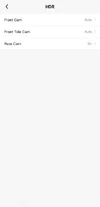
2. HDR is Disabled on Rear Camera (Front and Telescopic Only) Normal Driving from 20:00 to 07:00. HDR disabled in Parking Mode.

3. Yes - Later Today (App Settings).

4. Ceramic Tint. I tried WITH and WITHOUT the CPL filter. Didn't change the outcome. Car is stationary so there shouldn't be a flicker or light reflecting.. Doesn't happen except in certain lighting conditions (Darker image per above) in Low Bitrate Parking Mode (Rear Camera Only). Front Window is ALSO Ceramic tinted, but neither Telescopic nor Front flicker.

5. Tried with and without CPL. Same results.

6. Yesterday when I noticed the problem. Didn't change outcome.

7. Disabled Timestamps. Clip is unedited.

Will update later and edit post with screenshots. Cannot do right now.
 
Based on your answers it looks like the flickering is due to low ambient light levels, (light metering hunting).
I was going to say try to change EV on the rear camera, but that will also affect daytime performance so that won’t work.
At least it’s not as bad as this. Lol
Flicker starts at 0:20

 
So after a bit of testing, I don't think the rear camera is necessarily faulty. It records fine as far as I can tell in "Normal Light" and with enough Ambient lighting at night. However, I noticed in low light that I do get a flicker. Might be more of a firmware setting / image tweak. I sent this to Viofo.

Viofo did reply that they'll try to tweak the sensitivity to see if it helps the locking issue on a future firmware. Here's the "Flicker" I was talking about in low lighting. Watch on Youtube and set to Highest Resolution.
I've watched it 4 times and I can barely see the flicker. I would not be surprised if most dashcams vary the exposure a bit in those conditions.
 
@TonyM I'm watching on my 43" Samsung 4K Monitor, and my iPhone 13.
It looks like lightning from a thunder storm rolling in.
Are you watching in a well lit room?
Try watching in a room where your screen is the only light source.
 
I can see the flickering clear as day on my 4.5K Retinal iMac display. I'm viewing it full screen in a very bright room directly from @jsmith's post (not on Utube).
@TonyM are you viewing in Full Screen?
I'm guessing it would flicker if you dropped the bit rate down to LOW during Normal Driving, while parked.
 
Last edited:
@GPak @Hack_man @Chuck McCoy @TonyM

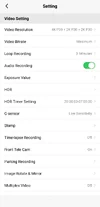
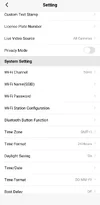
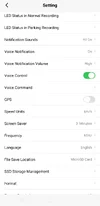
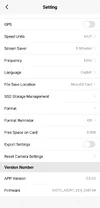
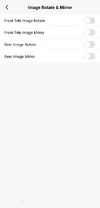
Here are the current settings on my A329T as requested. If I forgot something, let me know. Thanks.

1.webp2.webp3.webp4.webp5.webp6.webp7.webp8.webp
 
Last edited:
Based on your answers it looks like the flickering is due to low ambient light levels, (light metering hunting).
I was going to say try to change EV on the rear camera, but that will also affect daytime performance so that won’t work.
At least it’s not as bad as this. Lol
Flicker starts at 0:20


I haven't had a ton of time to check everything, but after I went away for Easter Weekend and had to Street Park, I checked the videos. I noticed the flickering in the Rear Parking Camera (Low Bitrate). After reinstalling Firmware and resetting camera, I tried again and was easily able to replicate the issue over and over. It appears the camera is trying to compensate for low light and is improperly doing so, causing the flickering. Viofo said they'd forward this on to their Engineers.

We shall see if anything comes of these two issues (Firmware I'm hoping). Flickering and Video Locking when I start my car (could be sensitivity issue even on low), although no other cameras (Vantrue, A139 Pro, etc) have ever had issues with locking video when car starts.

I'm ok with finding these bugs, if they get corrected, assuming these issues are not hardware related. I did this for Vantrue, and assisted with numerous bugs getting resolved. It's what I like to do. That's my usefulness to dashcam companies on Dashcamtalk.

I don't like driving around, editing video, comparing video, and reviewing. I prefer to help make products more stable. I've done it with a ton of stuff I've purchased in past and companies are often quite receptive and thankful.
 
Last edited:
@jsmith
Thank you for the screenshots, I think we are getting close.

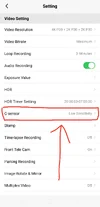
1.) DRIVING G-Sensor
In Post #44 @GPak said there are (2) “different” G-Sensors.
a.) One for driving / normal mode
b.) One for parking mode
You have DRIVING G-Sensor set to Low Sensitivity it "should" be set to “OFF”.
Can you set it to OFF, and see if that fixes your issue?

2.) Flickering
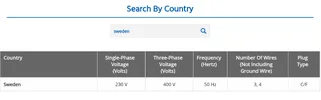
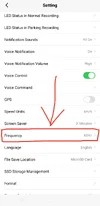
You have “Frequency” set to 60Hz, (Sweden 50Hz).
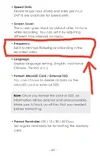
Page 64 of A329S User Manual says;
“Frequency: Set it to minimize flickering and banding in the recorded video”

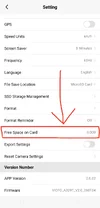
3.) Free Space On Card
I’ve never seen 0.00B
Can you format the SD Card to get it to say a “normal” capacity?
 

Attachments

  • Driving G-sensor .webp
    Driving G-sensor .webp
    184.7 KB · Views: 50
  • A329S User Manual Page 64 .webp
    A329S User Manual Page 64 .webp
    96.6 KB · Views: 43
  • Sweden 50Hz .webp
    Sweden 50Hz .webp
    27.9 KB · Views: 51
  • USA 60Hz .webp
    USA 60Hz .webp
    35.3 KB · Views: 50
  • Free Space On Card .webp
    Free Space On Card .webp
    198.9 KB · Views: 39
  • Frequency .webp
    Frequency .webp
    185.1 KB · Views: 52
Last edited:
@jsmith
Thank you for the screenshots, I think we are getting close.

1.) DRIVING G-Sensor
In Post #44 @GPak said there are (2) “different” G-Sensors.
a.) One for driving / normal mode
b.) One for parking mode
You have DRIVING G-Sensor set to Low Sensitivity it "should" be set to “OFF”.
Can you set it to OFF, and see if that fixes your issue?

2.) Flickering
You have “Frequency” set to 60Hz, (Sweden 50Hz).
Page 64 of A329S User Manual says;
“Frequency: Set it to minimize flickering and banding in the recorded video”

3.) Free Space On Card
I’ve never seen 0.00B
Can you format the SD Card to get it to say a “normal” capacity?

1. I tested G-Sensor "Off" and it didn't resolve the lock issue from Parking Mode ---> Normal Recording. That was part of my initial testing, and thus I set it back to low sensitivity.

2. I can test 50hz and see if it makes a difference, but the default was already 50hz before I switched to 60hz. I'll test again with 50hz to verify flicker doesn't go away.

3. Memory card ejected. It's in my computer to pull off videos. Ignore Zero Free Space.

I'll report back when I can grab a video at 50hz and let you know if I notice any difference in the same place I tested yesterday.
 
@jsmith said:
2. I can test 50hz and see if it makes a difference, but the default was already 50hz before I switched to 60hz. I'll test again with 50hz to verify flicker doesn't go away.

@Chuck McCoy said:
Why would you change Frequency to 60Hz in Sweden?
Are you in USA, and spoofing your location with VPN?
You have videos driving around Florida on your YouTube Channel.
What’s going on here?

@DashCamMan
Is it a violation of DCT Rule #3 to knowingly spoof / fake your location, (not talking about traveling)? DCT FORUM RULES

1 .webp
 

Attachments

  • Florida Highway .webp
    Florida Highway .webp
    133.2 KB · Views: 49
  • Teascone Blvd. .webp
    Teascone Blvd. .webp
    258 KB · Views: 47
@jsmith said:
2. I can test 50hz and see if it makes a difference, but the default was already 50hz before I switched to 60hz. I'll test again with 50hz to verify flicker doesn't go away.

@Chuck McCoy said:
Why would you change Frequency to 60Hz in Sweden?
Are you in USA, and spoofing your location with VPN?
You have videos driving around Florida on your YouTube Channel.
What’s going on here?

@DashCamMan
Is it a violation of DCT Rule #3 to knowingly spoof / fake your location, (not talking about traveling)? DCT FORUM RULES

View attachment 90741

1. I tested 50 hz and still had an issue. I reflashed the firmware, reset all settings, and tried 60 hz yesterday to see what would happen. Per my screenshots, the MicroSD card isn't in the camera. I haven't gone back out to my car to play with the camera again. I'll retest the 50hz setting again. It's called troubleshooting.

2. I traveled to Florida to go to Disneyworld and visit family. Per Vantrue, I took their camera with me to capture footage. Plenty of Europeans at Disney. Actually, almost everyone there during my visit were Europeans on holiday. Your point? People travel. Do you want photos from me in Italy, England, and other countries around the world?

3. @Chuck McCoy you've been down this alley already. @DashCamMan already told you that I'm not on a VPN.

Let's stick to troubleshooting my camera and avoid personal attacks and accusations PLEASE.
 
Last edited:
Asking questions trying to make sense, and fix your malfunction.
 
Asking questions trying to make sense, and fix your malfunction.

Here's a 50hz Video from a Different Location. Video is cropped because of privacy, but I wanted to include because it shows the camera has issue with metering at both 50hz (this video) and 60hz (other videos).


Same issue persists with 50hz in Same Location as 60hz. Unfortunately, the way I parked captured everything around me, so won't post that video. Anyway the first video illustrates my point. 50hz or 60hz doesn't change the issue with Metering.
 
Last edited:
Back
Top