70mai T800 3CH 4K Front / 4K Rear / 1080p Cabin Dash Camera - Testing / Review - RCG

Yes, I just used the 70mai app to remotely view the front, cabin and rear cameras.
Thank you.
I can add to this that the alternative I was looking at - DDPAI Z60 - cannot access all its three channels through 4G, only front and rear, but not the cabin camera.
 
@rcg530 can you please make available some full-resolution (4k) stills from the T800 front and rear cameras? Preferably with cars in view, so we can see how readable license plates are at various distances (or not).

A lossless format (.png, tiff, .png, etc.) would be best, to avoid compression artifacts.
 
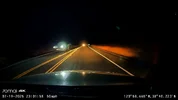
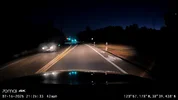
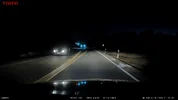
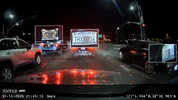
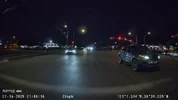
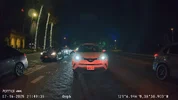
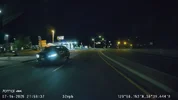
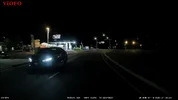
Here are a few frame grabs from the T800 front camera. The rural two lane road frame grabs are challenging for any dash camera [low light, 45 mph travel speed per vehicle, my vehicle's halogen headlights]. I have one A329S frame grab to show its "best" frame of the same plate. It's only a very tiny bit better than the T800 "best" frame. I have one nighttime frame grab from my upcoming review/introduction video for the T800 when I'm approaching a stoplight [semi well lit area at night].

70mai_t800_2lane_road_night_NO20250719-230157-001370F.MP4_snapshot_00.01.webp70mai_t800_2lane_road_night_NO20250719-230057-001369F.MP4_snapshot_00.38.webp70mai_t800_2lane_road_night_NO20250716-212602-001095F.MP4_snapshot_00.30.webpviofo_a329s_2lane_road_night_2025_0716_212557_004857F.MP4_snapshot_00.42.webp70mai_t800_3ch_review_july2025.mp4_snapshot_33.40_atstoplight.webp

4K rear cameras [in general] do very well during the day, but they tend to struggle a bit at night [low ambient light levels]. 4K image sensors have had more trouble capturing images when headlights from your own vehicle are lighting the area being recorded. A 4K camera in the rear will struggle even more since the light source will have to come from the other vehicle's headlights, your vehicle's tail/brake lights, etc. The T800 rear camera gets a bit grainy when the ambient light level is low [rural road / no real external lighting available]. With low to medium lighting, the T800 rear camera starts to capture items.

70mai_t800_folsom_night_rear_NO20250716-214802-001117R.MP4_snapshot_00.16.webp70mai_t800_folsom_night_rear_NO20250716-214902-001118R.MP4_snapshot_00.33.webp

Here's one example when the T800 4K rear seemed to a bit better than the A329S rear [HDR on for both]. There isn't much light shining on the other vehicle's front plate, but the T800 rear camera almost can "see it". The A329S rear 2K image is much darker [overall] and you really can't see much of anything on the right side of the A329S rear frame grab.

70mai_t800_cp_night_rear_NO20250716-215802-001127R.MP4_snapshot_00.37.webpviofo_a329s_cp_night_rear_2025_0716_215757_004955R.MP4_snapshot_00.48.webp

4K rear cameras sound like a good idea. They are good for capturing quality footage when the ambient light level is high [daytime, external light sources are present]. IMO, nighttime use of a 4K rear camera presents some additional challenges that will require very good HDR tuning to make it useful in those more challenging conditions.

The full size frame grabs are located here: https://drive.google.com/drive/folders/1ewFgnkyO5mEpzDfJSuw7QabWNpNjSEXi?usp=sharing
 
The UP05 LTE hardwire kit [United States] has a new firmware update available for it. Version 1.0.21.

IMG_8333.webp
 
Hello,

All three cameras of the T800 are live-viewable through 4G?

Thank you.
Hi can you tell me how reliable is the 4g connection and gereally overall how good the camera is? I didnt even think it was released yet !! Thanks
 
Hi can you tell me how reliable is the 4g connection and gereally overall how good the camera is? I didnt even think it was released yet !! Thanks
Hi, I cannot, because I do not have the camera. That was the reason for me asking, in order to decide if I should buy it or not.
What I have, is an older 2K 70mai dash cam, which served me well, but I think that remote live viewing would be useful, hence my search for such a camera.

From my research:
- Blackvue has the most reliable and responsive cloud. Can use your home or in-car Wi-Fi, or its own 4G. Image quality is lower than Viofo's or even Vantrue's or 70mai's I suspect. Pricey. No ADAS. Cloud might be sidetalking to Russia I mean China.
- 70mai has the panning camera, good image quality, good price. ADAS. Their 4G module is closed, though, so that's an extra 4G subscription. Also, the live view is lower quality, and is time-limited (but seems reasonable). If only they would make the modem a hotspot (the speed is probably low, so no cigar), or let the camera connect to the cloud to an external Wi-Fi hotspot. Chinese cloud.
- Vantrue has the hotspot 4G modem, that is the main point for me (I have an OVMS gadget installed in the car which needs Internet while parked). Image quality is somewhat below Viofo's, but still great. The S1 Pro Max has ADAS. No neck-turning to focus on the subject, though. Chinese cloud.
- VIOFO is the image quality king. Alas, pricey - they know what they have - and no cloud.
- DDPAI Z60 Pro has the same sensor, and 4G transfers are limited only by your 4G subscription. ADAS. From the reviews the image quality is pretty good, but you cannot access the cabin camera through 4G, only the other two channels. And, Chinese cloud.
 
Last edited:
hi. i have a question:
i know this camera has wifi and there is an app which makes possibile to manage the camera.
the question is: does this camera has a feature like the viofo a139pro? this feature is: you could connect the camera to a wifi hotspot (so the cam worked in station mode not ap mode) and by accessing the camera ip address from another device with any usual web browser you got access to the storage of the camera fottages stored on sd card, like an old style ftp.
 
hi. i have a question:
i know this camera has wifi and there is an app which makes possibile to manage the camera.
the question is: does this camera has a feature like the viofo a139pro? this feature is: you could connect the camera to a wifi hotspot (so the cam worked in station mode not ap mode) and by accessing the camera ip address from another device with any usual web browser you got access to the storage of the camera fottages stored on sd card, like an old style ftp.
No, the T800 does not have "station mode" like feature.
 
The UP05 4G LTE module for the United States has a firmware update available: v1.0.22

1755793797847.webp
 
70mai has released firmware version 1.2.136ww for the T800. This is an important update to get installed into your T800.

A couple of weeks ago, it was brought to my attention that the T800 could very infrequently create MP4 files with video stream content that was not playable [black screen video but audio would play]. The issue could occur in the front, rear, or cabin MP4 files. The MP4 files that I used during my review of the T800 did not have that problem.

I created a script that uses the ffprobe utility from the ffmpeg package to quickly scan the T800 MP4 files stored on my NAS drives. The ffprobe command was to simply display the video codec used in the file. This was enough of a check by the ffprobe utility to detect the MP4 files with the video stream issue. Of the several thousand T800 MP4 files on my NAS drives, the script found only small number of MP4 files that in fact did have this problem.

70mai provided some private firmware updates for me to test and gather device log info. Recently, the root cause of the issue was identified and 70mai produced a firmware for me to test with the "fix" in place. The latest test firmware [1.2.135zww] has produced MP4 files with correct/valid video streams. Thank you 70mai for working with me so quickly and diligently to resolve this issue.

I would recommend any T800 user to update their T800's firmware to 1.2.136ww to fix this issue.

IMG_8504.PNG
 
The line is too thick。。。。
 

Attachments

  • Screenshot_20250914_073027.webp
    Screenshot_20250914_073027.webp
    111.1 KB · Views: 177
My daily firmware check for the T800 found that version 1.2.137ww was now available for it. It does not state what is changed in the description of the firmware update.

1757952583275.webp
 
I checked with 70mai about the 1.2.137ww firmware update for the T800. It appears my T800's serial number is still on their list of T800 dash cameras that should receive internal development firmware versions. It was added to that list while we were testing various firmware versions to locate and fix the problem of the very infrequent corrupted video stream in the MP4 files.

The latest public firmware for the T800 is still 1.2.136ww.
 
I checked with 70mai about the 1.2.137ww firmware update for the T800. It appears my T800's serial number is still on their list of T800 dash cameras that should receive internal development firmware versions. It was added to that list while we were testing various firmware versions to locate and fix the problem of the very infrequent corrupted video stream in the MP4 files.

The latest public firmware for the T800 is still 1.2.136ww.
Nice, you can delete both posts by clicking the Edit button next to the Report button
 
Nice, you can delete both posts by clicking the Edit button next to the Report button
Or I can leave them there so anyone that read them already knows what went on and why.
 
I have my T800 3-channel installed in one of my cars. I'll start gathering some footage today.

I received confirmation that 70mai is changing the double-sided adhesive pad color from the light grey to black.

The T800 dash cameras sent to reviewers still had the grey adhesive pads, but the production units will have the black adhesive pads. The black adhesive pads will start showing up in future batches of the X800/M800.

View attachment 81618
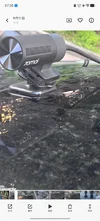
Hello @rcg530 and @Oliver_70mai, I thought that 70mai will now issue the black adhesive pads. I just received my T800 yesterday and I found that it is still has grey adhesive pads.
 
Back
Top