DDPAI Z60 Pro 3ch Set - 4K Sony Starvis 2 IMX678 - 4G Cloud - Unboxing & Testing & First Impressions

Thank you for your review post. I also recently bought Z60pro with 4g module. My issue is that after I have done all the installation well, everything is working fine including 4G LTE, parking mode. But I run into issue that when I choose the device mode to sleep in parking mode, I can't wake it up from 4G LTE remotely, and on the app, it shows "Failed to switch device mode: please try again later", but when I tried again, the device said offline, even 4G module light is on, and working. But the Z60pro woke up when I tested the car shaking and it records for collision movement. When I put z60 pro into time-lapse mode and normal recording in parking mode, I can remotely view the device. But I want sleep mode to be working because I don't want a 48 hrs limitation for time-lapse mode and normal recording mode. My 4G network test is normal, full signal strength, ddpai and z60pro latest version (global), but my Z60pro fails to wake up from sleep mode. I am thinking may be I can downgrade to previous firmware, but currently unable to find previous firmware. If you have any solution for that, really appreciated it.

Updated: After going through with customer service and self-testing, finally found out that DDPAI 4g module doesn't work with special sim card (in US, we can get AT&T or T-mobile data only sim AKA tablet sim without phone line). Customer service can't figure it out and they didn't reach me out again after I summited logs file, I found out by myself. Found out their included sim card with subscription works pretty fine except low data speed which makes the live view image low quality, but if you have your own sim card without any data throttling, the live view quality is awesome. Live view quality is better than 70mai live view but 70mai 4g module works with data-only sim. Unfortunately, I have to switch to 70mai because of I am not able to wake up and live view z60pro with my sim card.
 
Last edited:
Thank you for your review post. I also recently bought Z60pro with 4g module. My issue is that after I have done all the installation well, everything is working fine including 4G LTE, parking mode. But I run into issue that when I choose the device mode to sleep in parking mode, I can't wake it up from 4G LTE remotely, and on the app, it shows "Failed to switch device mode: please try again later", but when I tried again, the device said offline, even 4G module light is on, and working. But the Z60pro woke up when I tested the car shaking and it records for collision movement. When I put z60 pro into time-lapse mode and normal recording in parking mode, I can remotely view the device. But I want sleep mode to be working because I don't want a 48 hrs limitation for time-lapse mode and normal recording mode. My 4G network test is normal, full signal strength, ddpai and z60pro latest version (global), but my Z60pro fails to wake up from sleep mode. I am thinking may be I can downgrade to previous firmware, but currently unable to find previous firmware. If you have any solution for that, really appreciated it.
it probably goes into deep sleep when its set for collision only for parking monitoring and makes remote monitoring not feasible.

I got mine set to time lapse parking monitoring and can wake it up for live view remotely.

Maybe also check the battery voltage of the vehicle through the app maybe its below 12v, might be the culprit.
 
I checked a huge selection of night time footage.
While the Z60 Pro easily handles daytime footage, it is just not able to capture the plate like its competitors.

In most cases, the plates can not be identified. There isn't much missing to make out the plates.
It seems like the HDR needs some improvement.


View attachment 83789View attachment 83790

These two plates can actually be read.

View attachment 83791View attachment 83792

View attachment 83793View attachment 83794

View attachment 83795View attachment 83797

If DDPAI spent some time adjusting the firmware, I bet they could improve it to make most of the plates readable.
It is not that "the HDR needs some improvement" as such as probably it is impossible to set the HDR to a level that it can automatically(!!!) adjust itself to handle any and every lighting scenario. No, it needs a manual "exposure value" setting (example: Viofo-style) in the software! So a future firmware update and ddpai app. update can fix this painful shortcoming. I have already let DDPAI know about it and they unofficially acknowledged that the introduction of the "exposure value" setting would be extremely useful in a future software update but they have other priorities as well so this might not be top priority at their end. Until they fix this we have to live with top notch hardware without the matching software.
 
We, the end users, are guilty as well for the less than ideal night-time number plate-reading performance. Look at the reviews on the net! Even in case of the Viofo dashcams (with adjustable "exposure level") most of the time the the focus of the reviewers is on the "general picture" instead of the "ability to read number plates at night". Put it this way: I have two Viofo dashcams (A229 Plus with the RTC300 telephoto and hands-on experience with the A119 mini 2 dashcam as well) and two DDPAI Z60 Pro dashcams. If I leave the Viofo dashcams at the out of box factory setting (0,0 setting of the "exposure value") then I will have a very nice generic night picture but plenty miss with the number plates. If I adjust the "exposure value" to -1,0 the generic night picture would not be as nice as it was with the out of the box factory setting but the number plates will be readable for a change and as far as I know the main purpose of a dashcam is to read the number plates of the other cars as much as possible. Now, not every end user share this view therefor most of the manufacturers offer the best generic night pictures and simple ignore the night-time number plates-reading ability. You can't have a miracle setting for this (dashcam) price-range that provides the most beautiful generic picture at day and night and at the same time can read number plates perfectly at night-time with any light scenario! Impossible!
 
Thank you all for your feedbacks! We have taken note of every suggestion, and we truly appreciate your input.

Given the importance of product performance and image quality, we are conducting both internal image testing and real-world road tests at various resolutions. We have already started updating the software, adjusting parameters, and scheduling tests. We anticipate a preliminary beta version to be released over-the-air to all users for internal testing by early October. : )
 
Just installed the Z60 pro last weekend on two of my vehicles and am enjoying it right now. Remote view access has some hiccups, but closing and opening the app fixes the issue.

I used the rear camera as a cabin camera on both vehicles and am still deciding if I'll use the Mini2x as the rear camera or use a different brand for a two-system setup.

Looking forward to the firmware updates!
1000009284.webp

1000009283.webp

1000009292.webp

1000009293.webp
 
Thank you for your review post. I also recently bought Z60pro with 4g module. My issue is that after I have done all the installation well, everything is working fine including 4G LTE, parking mode. But I run into issue that when I choose the device mode to sleep in parking mode, I can't wake it up from 4G LTE remotely, and on the app, it shows "Failed to switch device mode: please try again later", but when I tried again, the device said offline, even 4G module light is on, and working. But the Z60pro woke up when I tested the car shaking and it records for collision movement. When I put z60 pro into time-lapse mode and normal recording in parking mode, I can remotely view the device. But I want sleep mode to be working because I don't want a 48 hrs limitation for time-lapse mode and normal recording mode. My 4G network test is normal, full signal strength, ddpai and z60pro latest version (global), but my Z60pro fails to wake up from sleep mode. I am thinking may be I can downgrade to previous firmware, but currently unable to find previous firmware. If you have any solution for that, really appreciated it.
Update:
after 2 weeks of figuring out the Z60pro, here is my findings, yes, 4g module unit requires sim cad with phone call + data to remotely wake up the dashcam. Data-only sim card can't wake up the device, unless device is in time-lapse mode or normal recording mode which means the device is not in sleep mode. Customer team is responsive but unable to pinpoint the issue, and only recommend to use included sim card which works fine (in my case, it's use T-mobile carrier which is the same as my data-only sim card).
 
Thank you for your suggestions and feedback on our products. I’m Linux, the Product Manager at DDPAI. My team and I sincerely appreciate your input. The firmware update has been tested and verified. Jimmy and I will notify you all shortly.
Given that exposure settings are too technical for most average users to understand, we plan to define a specialized mode for nighttime license plate enhancement, tentatively named: "License Plate Tracking Mode".
When enabled, this mode slightly reduces exposure brightness and increases noise, but significantly improves nighttime license plate clarity. This will be a new imaging style option alongside our current modes.
What do you think of this concept?
If you have any other suggestions while using our products — or feedback on other devices — please feel free to contact us anytime.Once again, thank you for your valuable advice!🤝🤝🤝
 
Hello from France ,
I just installed my new z60 pro with the rear camera and 4g module replacing my perfect ddpai mini5
Everything works perfectly except the parking mode which does not work on a power bank. In fact, on the mini 5 after 15 minutes if the vehicle did not move the dashcam automatically switched to parking mode.Only this option is not available on the z60 pro. An updated issue would be welcome

Has anyone ever measured the power consumption in parking mode?
1000018229.webp
1000018228.webp
1000018214.webp
 
Hello new firmware update this morning
I found the option to activate the mose parking after 15 minutes of inactivity of the vehicle directly in the camera options 👌
 
Hello new firmware update this morning
I found the option to activate the mose parking after 15 minutes of inactivity of the vehicle directly in the camera options 👌
"For connecting either the fuse box parking monitor cable or the OBD parking monitor cable, please refer to the installation instructions on our official website or seek assistance from a qualified professional.""Yes, you can configure the dashcam via the mobile app to automatically switch to Parking Surveillance Mode after 15 minutes of vehicle inactivity."
 
I rejoiced too quickly 🥴 The z60 pro option allows you to turn off the camera after 15 minutes witouth hardwiring. But no time lapse like with my previous ddpai Mini5. So when I'm on my power bank it can't be put into time laps recording after 15 mins after of parking

Z60 app Settings
Screenshot_20250821_111130_DDPAI.webp


Mini app settings
Screenshot_20250821_111252_DDPAI.webp
 
I rejoiced too quickly 🥴 The z60 pro option allows you to turn off the camera after 15 minutes witouth hardwiring. But no time lapse like with my previous ddpai Mini5. So when I'm on my power bank it can't be put into time laps recording after 15 mins after of parking

Z60 app Settings
View attachment 84148

Mini app settings
View attachment 84149
Sorry, the new firmware has removed the time-lapse recording function. I have a question: do you use the Z60 PRO connected to a power bank? Is the power bank used in the car, or...? Using a power bank in the car is unsafe, and we do not recommend using a power bank in the car. Have you purchased the corresponding fuse box connecting cable? If you want to use all full functions, we recommend connecting it to the car's fuse box.
 
My z60 is normally connected with the hardwire kit to the fuses. But during the working day I connect it to a power bank to last the whole day in parking mode. I've been working like this with my ddpai mini5 4k for 5 years.
 
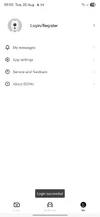
Hi @jimmyZC & @linuxliu looks like the DDPAI app isnt working, it logged me out and it wouldn't let me log back-in and can't remotely access my dashcams, is this a known downtime or any workarounds available? I've uninstalled and installed on my android and ios devices and used 3 different internet connections with no luck. Hope you can chime in with a possible fix. TIA
 
Hi @jimmyZC & @linuxliu looks like the DDPAI app isnt working, it logged me out and it wouldn't let me log back-in and can't remotely access my dashcams, is this a known downtime or any workarounds available? I've uninstalled and installed on my android and ios devices and used 3 different internet connections with no luck. Hope you can chime in with a possible fix. TIA
Is it the connection of a specific model + 4G Cloud Box that fails to support remote access?

First, could you please check if the indicator light of the Cloud Box is flashing rapidly to confirm if it is working properly? The dash cam will give a voice prompt once it successfully connects to 4G. After that, you need to authorize access via the mobile APP before you can click to view the remote connection.

I suspect the issue might be that you haven’t completed the WIFI connection authorization in the APP first, which is required before accessing the real-time remote view.

Would it be convenient for you to provide screenshots of your APP and more device information?
 
Is it the connection of a specific model + 4G Cloud Box that fails to support remote access?

First, could you please check if the indicator light of the Cloud Box is flashing rapidly to confirm if it is working properly? The dash cam will give a voice prompt once it successfully connects to 4G. After that, you need to authorize access via the mobile APP before you can click to view the remote connection.

I suspect the issue might be that you haven’t completed the WIFI connection authorization in the APP first, which is required before accessing the real-time remote view.

Would it be convenient for you to provide screenshots of your APP and more device information?
Same issue here. It was ok yesterday, now, I am not logged in despite pop up messsage shows Iogin succeeded. I tried to clear data and install the app in another phone yet the same issue.
 

Attachments

  • Screenshot_20250826_090000_DDPAI.webp
    Screenshot_20250826_090000_DDPAI.webp
    21.9 KB · Views: 148
Is it the connection of a specific model + 4G Cloud Box that fails to support remote access?

First, could you please check if the indicator light of the Cloud Box is flashing rapidly to confirm if it is working properly? The dash cam will give a voice prompt once it successfully connects to 4G. After that, you need to authorize access via the mobile APP before you can click to view the remote connection.

I suspect the issue might be that you haven’t completed the WIFI connection authorization in the APP first, which is required before accessing the real-time remote view.

Would it be convenient for you to provide screenshots of your APP and more device information?
No, I have completed the initial setup and wifi connection a few weeks ago already. This isn't a new install, the remote access was already working until today when I opened the app and it shows the app logged me out of my account and can't log back in despite the app saying login was successful.

Attaching the screen recording below.


Device - DDPAI Z60 PRO
APP VERSION - Version v8.1.17.0717
 
Back
Top