There are a several ways how the River2 can be wired, with 12V out or 5V out to DashCam.
My preferred method would be 12V out like shown in attached diagram below.
In this case original HK4 can be used as is.
Use included Cig adapter/XT60 cable to charge River2 from car’s ACC activated Cig socket. (Make sure it is rated for 10A (the fuse is usually 20A for these sockets).
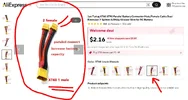
Splice yellow trigger wire (18-20AWG) with positive wire of the included Cig adapter/XT60 cable or use splitter like one in the link below, connect the included charging cable to one barrel and cut-off the other barrel and use positive 12V wire for the yellow trigger wire. (tape and do not use negative wire).
https://www.amazon.com/gp/B08CMT94CV
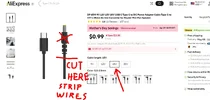
Get USB-C to 12V cable, similar to one in the link, and cut-off the barrel connector, to connect positive wire to Red and negative to Black wires of the HK4 to power DashCam. (15V cable provides better margin for 11.8V min setting of HK4 and may be better, but I am not sure without testing).
https://www.amazon.com/gp/B0CDFWRZB7
If you don’t have 10A rated ACC activated Cig socket you can similarly wire and charge form the fuse box (for the long wires 14 or better 12AWG wires would be needed) since River 2 charge rate using 12VDC is about 90-100W)
I think this should work unless I'm missing something.
EDIT: See post #57 for the video showing how this wiring works, and also for option to use USB-A to 12V converter cable, if USB-C cable requires unplugging and re-plugging to activate
GPak
EDIT 2: USB-C to 12V or 15V cable works well with River 2, it does not require unplugging/re-plugging routine and is more efficient option compere to USB-A to 12V converter cable.
GPak