
You are using an out of date browser. It may not display this or other websites correctly.
You should upgrade or use an alternative browser.
You should upgrade or use an alternative browser.
external power supply problem
- Thread starter Alfred
- Start date
Alfred
Member
- Joined
- Sep 7, 2014
- Messages
- 33
- Reaction score
- 6
- Location
- Medford, OR
- Country
- United States
- Dash Cam
- Mobius
Thank you, Hilts - will do!Keep me posted and God's speed!
GJHS
Well-Known Member
- Joined
- Nov 21, 2013
- Messages
- 2,108
- Reaction score
- 1,367
- Country
- United States
- Dash Cam
- Mobius A & C, SJ4000, M10, Mini 0806, Innovv C3,4, Xiaomi Yi
GJHS
Well-Known Member
- Joined
- Nov 21, 2013
- Messages
- 2,108
- Reaction score
- 1,367
- Country
- United States
- Dash Cam
- Mobius A & C, SJ4000, M10, Mini 0806, Innovv C3,4, Xiaomi Yi
You inspired me 😀
Hilts
Well-Known Member
- Joined
- Mar 24, 2014
- Messages
- 445
- Reaction score
- 353
- Location
- Wales
- Country
- United Kingdom
- Dash Cam
- A129 Pro Duo, A129, Duo & Mobius Maxi 4K (with capacitor)
What was the result of the h2wtest.exe on the microSD card?
I'm still thinking that the microSD card might be the problem (fake or compatibility issue) as there's nothing fundamentally wrong with the settings you have used.
I agree with @GJHS updating to FW 2.10 is a good idea. Can't remember if FW 1.17 had some card compatibility issues or not...
Is the 'SYSCFG.TXT ' file still visible on your card once you've finished updating your settings?
I'm still thinking that the microSD card might be the problem (fake or compatibility issue) as there's nothing fundamentally wrong with the settings you have used.
I agree with @GJHS updating to FW 2.10 is a good idea. Can't remember if FW 1.17 had some card compatibility issues or not...
Is the 'SYSCFG.TXT ' file still visible on your card once you've finished updating your settings?
Last edited:
Alfred
Member
- Joined
- Sep 7, 2014
- Messages
- 33
- Reaction score
- 6
- Location
- Medford, OR
- Country
- United States
- Dash Cam
- Mobius
As promised yesterday, here is the operation report:
I inserted a thin strip of clear tape into the center of the wider cable connector.
Plugged it and the transformer into the wall outlet, micro end into the camera, then turned on to record video.
Camera stopped recording after 1½ hours.
Result:
21.4 GB free of 29.7 GB
recorded 19 5 min. clips from 9:43 to 11:13 A.M.
Analysis: no improvement.
Because of possible misplacement of clear tape I shall try to redo this process.
I inserted a thin strip of clear tape into the center of the wider cable connector.
Plugged it and the transformer into the wall outlet, micro end into the camera, then turned on to record video.
Camera stopped recording after 1½ hours.
Result:
21.4 GB free of 29.7 GB
recorded 19 5 min. clips from 9:43 to 11:13 A.M.
Analysis: no improvement.
Because of possible misplacement of clear tape I shall try to redo this process.
Alfred
Member
- Joined
- Sep 7, 2014
- Messages
- 33
- Reaction score
- 6
- Location
- Medford, OR
- Country
- United States
- Dash Cam
- Mobius
h2wtest.exeWhat was the result of the h2wtest.exe on the microSD card?
I'm still thinking that the microSD card might be the problem (fake or compatibility issue) as there's nothing fundamentally wrong with the settings you have used.
I agree with @GJHS updating to FW 2.10 is a good idea. Can't remember if FW 1.17 had some card compatibility issues or not...
Is the 'SYSCFG.TXT ' file still visible on your card once you've finished updating your settings?
What was the result of the h2wtest.exe on the microSD card?
I'm still thinking that the microSD card might be the problem (fake or compatibility issue) as there's nothing fundamentally wrong with the settings you have used.
I agree with @GJHS updating to FW 2.10 is a good idea. Can't remember if FW 1.17 had some card compatibility issues or not...
Attachments

Alfred
Member
- Joined
- Sep 7, 2014
- Messages
- 33
- Reaction score
- 6
- Location
- Medford, OR
- Country
- United States
- Dash Cam
- Mobius
It is still 'veryfying'!What was the result of the h2wtest.exe on the microSD card?
I'm still thinking that the microSD card might be the problem (fake or compatibility issue) as there's nothing fundamentally wrong with the settings you have used.
How do I update to FW2.10? When I ask in the tools folder the to check on new firmware it simply says that no new FW is found online!I agree with @GJHS updating to FW 2.10 is a good idea. Can't remember if FW 1.17 had some card compatibility issues or not...
Where do I find this? After formatting the card is just empty.Is the 'SYSCFG.TXT ' file still visible on your card once you've finished updating your settings?
Alfred
Member
- Joined
- Sep 7, 2014
- Messages
- 33
- Reaction score
- 6
- Location
- Medford, OR
- Country
- United States
- Dash Cam
- Mobius
Here is the result:What was the result of the h2wtest.exe on the microSD card?
I'm still thinking that the microSD card might be the problem (fake or compatibility issue) as there's nothing fundamentally wrong with the settings you have used.
Attachments

GJHS
Well-Known Member
- Joined
- Nov 21, 2013
- Messages
- 2,108
- Reaction score
- 1,367
- Country
- United States
- Dash Cam
- Mobius A & C, SJ4000, M10, Mini 0806, Innovv C3,4, Xiaomi Yi
You're doing this check with the camera plugged in and selected?How do I update to FW2.10? When I ask in the tools folder the to check on new firmware it simply says that no new FW is found online!
Why did it only test part of the whole memory?Here is the result:
Sorry about my late response, I've been away all day
Alfred
Member
- Joined
- Sep 7, 2014
- Messages
- 33
- Reaction score
- 6
- Location
- Medford, OR
- Country
- United States
- Dash Cam
- Mobius
Yes.You're doing this check with the camera plugged in and selected?
I thought it may be because it only checked the used memory and not the free space?Why did it only test part of the whole memory?
Hell, inexcusable!!! 😛 Glad you are back!Sorry about my late response, I've been away all day
GJHS
Well-Known Member
- Joined
- Nov 21, 2013
- Messages
- 2,108
- Reaction score
- 1,367
- Country
- United States
- Dash Cam
- Mobius A & C, SJ4000, M10, Mini 0806, Innovv C3,4, Xiaomi Yi
Time to take it up a notch. @Isoprop what are we missing? I think it's that cable. Try running the camera on battery power and see if it goes the full hour+ until the battery runs out
@Alfred you did get the GUI here right?
http://www.mytempfiles.info/mobius/
@Alfred you did get the GUI here right?
http://www.mytempfiles.info/mobius/
Last edited:
Hilts
Well-Known Member
- Joined
- Mar 24, 2014
- Messages
- 445
- Reaction score
- 353
- Location
- Wales
- Country
- United Kingdom
- Dash Cam
- A129 Pro Duo, A129, Duo & Mobius Maxi 4K (with capacitor)
It is still 'veryfying'!
How do I update to FW2.10? When I ask in the tools folder the to check on new firmware it simply says that no new FW is found online!
Where do I find this? After formatting the card is just empty.
I was asking to make sure that that file wasn't still on your microSD card, i.e., your setting changes may not have been saved back to the Mobius. When you open up GUI with your Mobius attached are your previous settings there?
That h2wtest.exe result is a little odd. Please can you format the card and run the test again?
Your earlier screen shot shows a card with 7.27 GB in total. Is that the same card??
Last edited:
- Joined
- Oct 2, 2013
- Messages
- 740
- Reaction score
- 885
- Country
- United Kingdom
- Dash Cam
- Mobius
Just to avoid any misunderstanding, mSetup never connects to the Mobius' file system unless it's updating the firmware. Formatting the card and setting/reading the parameters is done entirely using USB communication.The SYSCFG.TXT file is written onto the microSD card to enable setting changes to be made and saved back to the Mobius once those setting have been altered. The GUI (msetup.exe) should be doing this for you. If you format the card each time there is no way of knowing if this process is happening correctly.
I was asking to make sure that that file wasn't still on your microSD card, i.e., your setting changes may not have been saved back to the Mobius. When you open up GUI with your Mobius attached are your previous settings there?
That h2wtest.exe result is a little odd. Please can you format the card and run the test again?
Your earlier screen shot shows a card with 7.27 GB in total. Is that the same card??
It's unimportant if a SYSCFG.TXT file is on the card or not, mSetup will always ignore it. When using Windows together with mSetup it is never necessary to create a SYSCFG.TXT file.
The SYSCFG.TXT file is useful for Mac and Linux users but can also be used by Windows users if they prefer doing things the hard (and error prone) way. The configuration file is a universal method for reading, setting and exchanging the Mobius' parameters. It works on all computer systems which support SD cards.
Alfred
Member
- Joined
- Sep 7, 2014
- Messages
- 33
- Reaction score
- 6
- Location
- Medford, OR
- Country
- United States
- Dash Cam
- Mobius
Yes, it goes for an hour plus on the battery.Time to take it up a notch. @Isoprop what are we missing? I think it's that cable. Try running the camera on battery power and see if it goes the full hour+ until the battery runs out
I think so. Just to be sure I downloaded it again to replace my file.
- Joined
- Oct 2, 2013
- Messages
- 740
- Reaction score
- 885
- Country
- United Kingdom
- Dash Cam
- Mobius
Since you've been following up on this issue I've lost track, I'm afraid. I've skimmed over the messages and also suspect the cable.Time to take it up a notch. @Isoprop what are we missing? I think it's that cable. Try running the camera on battery power and see if it goes the full hour+ until the battery runs out
@Alfred you did get the GUI here right?
http://www.mytempfiles.info/mobius/
The easiest way to check would be to remove the battery altogether and use USB power only. If recording stops after about an hour, then it's almost certainly a card problem. I say 'almost' because the problem may only occur when the battery is installed. In this case the Mobius will draw more power from the charger which could cause it to fail. As a side effect, using the camera without a battery installed will ensure the camera is turned on before recording is started.
Remember to stop your recording manually. The last clip will not be saved if power is cut.
h2testw should only be run when the card has been freshly formatted. A positive result does not guarantee the card will work properly in the Mobius. All it does is guarantee the card isn't a marked up fake. h2testw cannot test for card controller timing issues.
Alfred
Member
- Joined
- Sep 7, 2014
- Messages
- 33
- Reaction score
- 6
- Location
- Medford, OR
- Country
- United States
- Dash Cam
- Mobius
I think so, but will upload a screenshot to make you see it:The SYSCFG.TXT file is written onto the microSD card to enable setting changes to be made and saved back to the Mobius once those setting have been altered. The GUI (msetup.exe) should be doing this for you. If you format the card each time there is no way of knowing if this process is happening correctly.
I was asking to make sure that that file wasn't still on your microSD card, i.e., your setting changes may not have been saved back to the Mobius. When you open up GUI with your Mobius attached are your previous settings there?
I will do that now and report after lunch!That h2wtest.exe result is a little odd. Please can you format the card and run the test again?
That was with the original 8GB card inserted, while I was testing the 32 GB one separately.Your earlier screen shot shows a card with 7.27 GB in total. Is that the same card??
Attachments


- Joined
- Oct 2, 2013
- Messages
- 740
- Reaction score
- 885
- Country
- United Kingdom
- Dash Cam
- Mobius
version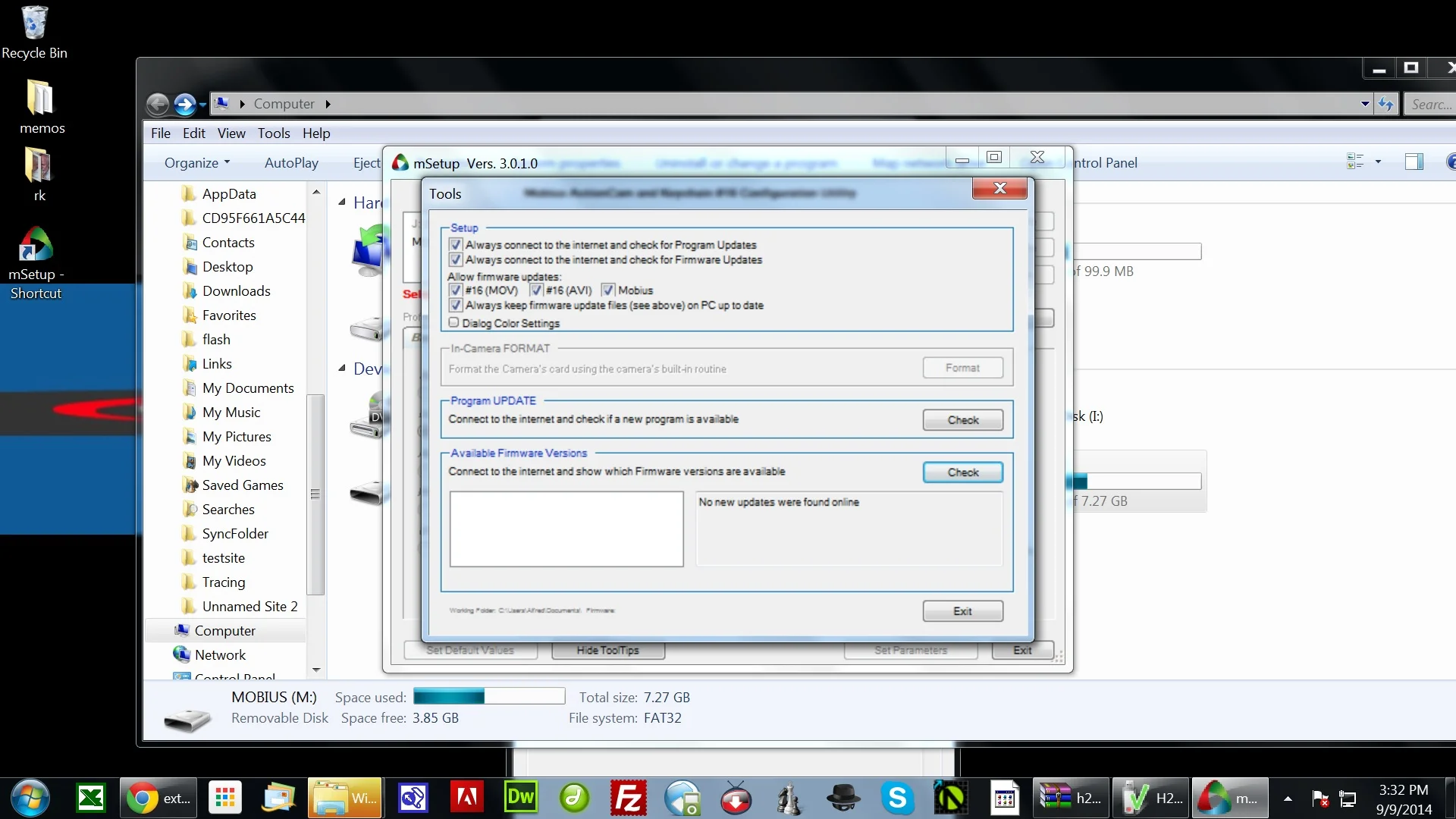
If the "Check" button is pressed in the "Tools" dialog then at least one firmware version should be found. If not, there is most likely an internet connection problem. Make sure your camera is selected before opening the "Tools" dialog. In your above screenshot you haven't done this.
Last edited by a moderator:
Alfred
Member
- Joined
- Sep 7, 2014
- Messages
- 33
- Reaction score
- 6
- Location
- Medford, OR
- Country
- United States
- Dash Cam
- Mobius
I did it right now to show you the screenshot:
If the "Check" button is pressed in the "Tools" dialog then at least one firmware version should be found. If not, there is most likely an internet connection problem. Make sure your camera is selected before opening the "Tools" dialog. In your above screenshot you haven't done this.
