Few issue with new Mini 2

ivanivanusic

New Member
Joined
Apr 23, 2024
Messages
7
Reaction score
7
Location
Split
Country
Croatia
Hey everyone,

Yesterday I got A119 Mini 2 which I connected via hardwire kit. Parking mode works fine, but I got 2 issues:
1. G sensor is not detectimg anything in parking mode, unless I “flick” camera. Slammimg doors won’t trigger it, even though it on highest sensitivity.
2. Low bitrate and Autodetection parking mode have cropped image. I agree with lower resolution for energy saving(1080p), but I woule like to have full image not cropped one

Is there a way to fix those issues?
Firmware: V2.1.20250409
 
Hey everyone,

Yesterday I got A119 Mini 2 which I connected via hardwire kit. Parking mode works fine, but I got 2 issues:
1. G sensor is not detectimg anything in parking mode, unless I “flick” camera. Slammimg doors won’t trigger it, even though it on highest sensitivity.
2. Low bitrate and Autodetection parking mode have cropped image. I agree with lower resolution for energy saving(1080p), but I woule like to have full image not cropped one

Is there a way to fix those issues?
Firmware: V2.1.20250409

1. Please make sure that Parking G-sensor has been set to High Sensitivity for testing.
2. Where do you check the videos? You may check on your PC with a VLC player for confirmation.
 
1. G sensor is not detectimg anything in parking mode, unless I “flick” camera. Slammimg doors won’t trigger it, even though it on highest sensitivity.
There are two G-Sensor settings.
1.) Driving / Normal Recording
2.) Parking Mode
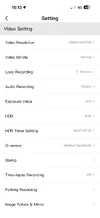
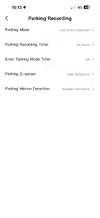
Can you post screenshots of all your APP settings?

Also which APP are you using, (new or old)?
1.) OLD: https://apps.apple.com/us/app/viofo/id1249235162
2.) NEW: https://apps.apple.com/us/app/viofo-dashcam/id6738685801
2. Low bitrate and Autodetection parking mode have cropped image. I agree with lower resolution for energy saving(1080p), but I woule like to have full image not cropped one
I'm not sure what you mean by this.
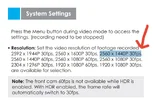
Can you post a screenshot of your resolution settings?
Can you try 2560 x 1440P 30fps to see if that fixes your issue?
-Chuck
 

Attachments

  • OLD APP .webp
    OLD APP .webp
    6.6 KB · Views: 8
  • NEW APP .webp
    NEW APP .webp
    8.4 KB · Views: 6
  • Resolution Setting .webp
    Resolution Setting .webp
    54.5 KB · Views: 9
I’m using new app, not old one
I know there are 2 setting park and drive for G sensor, but I was talking anout parking one.
I’m using 60hz day refreah and 30hz night + HDR (2560x1440p)
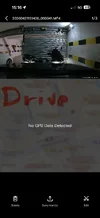
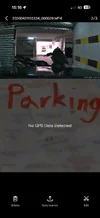
Check the hood or lines at the wall on provided images, parking video is cleary zoomed in tha driving video
 

Attachments

  • IMG_0723.webp
    IMG_0723.webp
    37.8 KB · Views: 14
  • IMG_0724.webp
    IMG_0724.webp
    26.6 KB · Views: 13
  • IMG_0726.webp
    IMG_0726.webp
    67.9 KB · Views: 13
  • IMG_0727.webp
    IMG_0727.webp
    65.4 KB · Views: 14
In normal recording mode, the A119 Mini 2 will create video at the selected resolution setting in the firmware settings. Parking mode video is created at 1920x1080 resolution.

1776786306596.webp
 
Resolution is not issue for me.
Just want to ask why is video zoomed instead of wide angle like when driving..
It's because of the resolution change there's a different in the field of view in the A119 Mini 2 footage.

Normal Recording 2560x1440 vs Low Bitrate 1920x1080
A119_Mini2_Normal_20260419153130_000507.MP4_snapshot_00.00.webp
A119_Mini2_LBR_20260419153402_000510.MP4_snapshot_00.00.webp
 
I’ve tried all settings regarding parking G sensor, I couldnnt even trigger it in low and medium, even when flicking camera hard..
 
Back
Top