You're overthinking it lol. I accidentally had it set as private so only I had access to it. Now it's public. No point for me to collect data here, pretty sure the stuff I would need are things you guys are already sharing...That's a google drive thing with downloads where you can set permissions to only let people you approve access to, download it.
I agree is a bit strange though cos it's just a file, it's not like 10,000 people are going to download the file and give their thoughts.
It's just hot and cold with this guy. Some points he seems like he's up for it and being open, then says something else further down the paragraph that just removes the confidence we just built in what he said.
Dunno but whatevs haha

You are using an out of date browser. It may not display this or other websites correctly.
You should upgrade or use an alternative browser.
You should upgrade or use an alternative browser.
Has anyone tried the Type S S403 dash cam (4k60FPS)?
- Thread starter Witch
- Start date

rcg530
Well-Known Member
- Joined
- Jan 23, 2021
- Messages
- 2,729
- Reaction score
- 4,574
- Location
- California
- Country
- United States
- Dash Cam
- 70mai, BlackVue, Thinkware, Vantrue, Vueroid, VIOFO
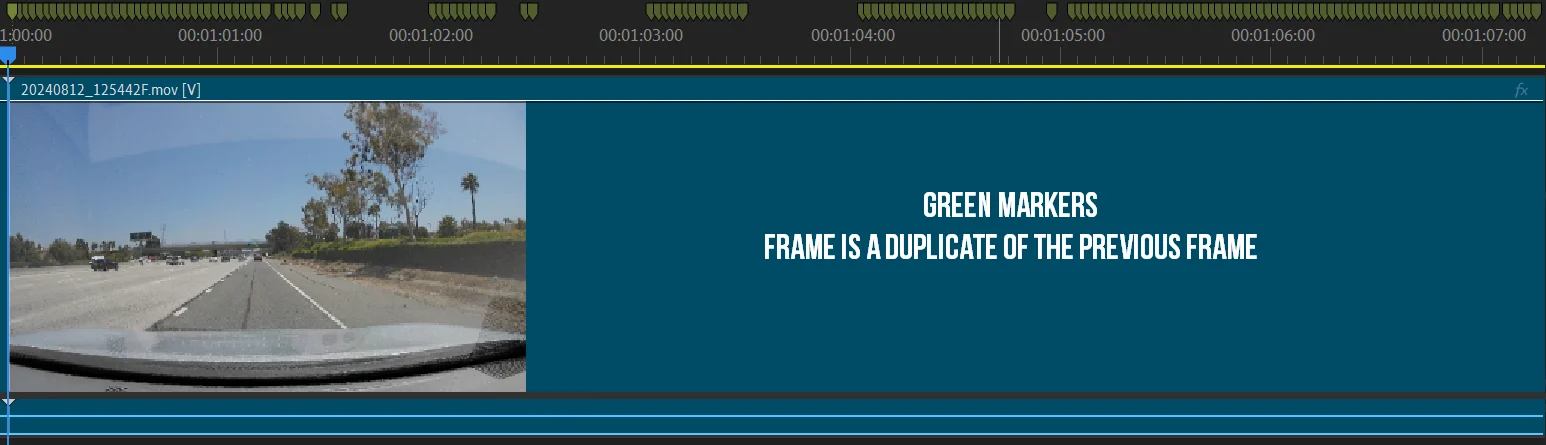
I downloaded the four (4) S403 MOV video files to step through frame-by-frame in the MPC-BE video player and Adobe Premiere Pro video editor.
Video file: 20240812_125341F.MOV:
The first three (3) of seconds has a mixture of unique video frames intermixed with some duplicates. Starting around the three (3) second mark, the duplicate frame issue ramps up to the level where every other frame is a duplicate. After reviewing seven (7) seconds of that video file, I stopped.

Video file: 20240812_125442F.MOV:
This video file starts off with a large number of duplicate video frames. At the 1.5 second mark, it starts to have unique video frames for just over 0.5 seconds. Then another batch of duplicate video frames occurs. That good/duplicate pattern continues until just after the five (5) second mark when virtually every other frame is a duplicate video frame. I stopped checking this video file at the seven (7) second time mark.
- File container type: MOV
- Resolution: 3840x2160 60fps
- Video Codec: H.264
- Video Bitrate: (as reported by ffprobe)
- 20240812_125341F.MOV 50.79 Mbps
- 20240812_125442F.MOV 51.67 Mbps
- 20240812_125542F.MOV 52.03 Mbps
- 20240812_125642F.MOV 44.37 Mbps
Video file: 20240812_125341F.MOV:
The first three (3) of seconds has a mixture of unique video frames intermixed with some duplicates. Starting around the three (3) second mark, the duplicate frame issue ramps up to the level where every other frame is a duplicate. After reviewing seven (7) seconds of that video file, I stopped.
Video file: 20240812_125442F.MOV:
This video file starts off with a large number of duplicate video frames. At the 1.5 second mark, it starts to have unique video frames for just over 0.5 seconds. Then another batch of duplicate video frames occurs. That good/duplicate pattern continues until just after the five (5) second mark when virtually every other frame is a duplicate video frame. I stopped checking this video file at the seven (7) second time mark.

Augustus
Well-Known Member
- Joined
- Aug 19, 2016
- Messages
- 4,221
- Reaction score
- 2,714
- Location
- Perth, Australia
- Country
- Australia
- Dash Cam
- Viofo, Vantrue, 70mai, Wolfbox
Lol!You're overthinking it lol. I accidentally had it set as private so only I had access to it. Now it's public. No point for me to collect data here, pretty sure the stuff I would need are things you guys are already sharing...
Augustus
Well-Known Member
- Joined
- Aug 19, 2016
- Messages
- 4,221
- Reaction score
- 2,714
- Location
- Perth, Australia
- Country
- Australia
- Dash Cam
- Viofo, Vantrue, 70mai, Wolfbox
As I suspected, thank you for the detailed analysis.I downloaded the four (4) S403 MOV video files to step through frame-by-frame in the MPC-BE video player and Adobe Premiere Pro video editor.
Just looking at the first seven (7) seconds of first two video files, I found that there are an extremely large number of duplicate video frames. In Adobe Premiere Pro v24.6.1, I used a green timeline marker [located at the very top of the timeline screenshots] to note where a duplicate video frame occurs.
- File container type: MOV
- Resolution: 3840x2160 60fps
- Video Codec: H.264
- Video Bitrate: (as reported by ffprobe)
- 20240812_125341F.MOV 50.79 Mbps
- 20240812_125442F.MOV 51.67 Mbps
- 20240812_125542F.MOV 52.03 Mbps
- 20240812_125642F.MOV 44.37 Mbps
Video file: 20240812_125341F.MOV:
The first three (3) of seconds has a mixture of unique video frames intermixed with some duplicates. Starting around the three (3) second mark, the duplicate frame issue ramps up to the level where every other frame is a duplicate. After reviewing seven (7) seconds of that video file, I stopped.
View attachment 75801
Video file: 20240812_125442F.MOV:
This video file starts off with a large number of duplicate video frames. At the 1.5 second mark, it starts to have unique video frames for just over 0.5 seconds. Then another batch of duplicate video frames occurs. That good/duplicate pattern continues until just after the five (5) second mark when virtually every other frame is a duplicate video frame. I stopped checking this video file at the seven (7) second time mark.
View attachment 75802
So it's not really 4k60 capable then is it

Chuck McCoy
Well-Known Member
- Joined
- Jun 9, 2022
- Messages
- 4,770
- Reaction score
- 4,737
- Location
- California
- Country
- United States
- Dash Cam
- 2026 Minimum Spec: STARVIS 2 & HDR & Low Power Parking Mode
You need to get one thing clear Mister.VIOFO, the brand you prefer and endorse
The brand I prefer, and endorse is whatever manufacturer has the best;
1.) Image Quality
2.) Reliability
3.) Durability
It just happens to be Viofo for the past 5 years since the release of the A129 Pro, (October 2019).
And I have nothing but contempt for manufacturers that actively engage in false & misleading specifications / advertising, and deception when marketing their products to the general public.
This includes fake / paid reviews.
So yes, I am a Viofo “fanboy” but it’s due to the fact they’re leading the industry year, after year in Image Quality, Reliability, Durability, Tech Support / After Sale Customer Service.
All with transparent business practices like providing all available specifications for verification from independent testers / users.
Vanture, and 70mai have a chance in 2025 with their new models to close the gap.
Also Vueroid with their S1 Infinite 4K 3-CH will make a good shootout / comparison with the A329.
As far as the Type-S & YADA brand is concerned, there’s no such thing as useless dash cam, they can always be used as a bad example.
By the way, I’m finished with you.
You have eaten away precious time I could have been using constructively with dash cams worth testing / reviewing.
However, I see you’re from Costa Mesa, CA.
I will be back in Vegas for CES January 9, 2025.
If your outfit will be exhibiting, or attending I would like to meet you eyeball to eyeball, and challenge you to an arm wrestling match.
If you can beat me, I’ll test an S403.
Chuck McCoy
Dixon, CA

LateralNW
Well-Known Member
- Joined
- Nov 7, 2016
- Messages
- 1,982
- Reaction score
- 1,236
- Country
- Australia
- Dash Cam
- VArious
@andlmky
Thanks for posting the original video and making it available.
Out of curiosity partly because of @rcg530 findings and just cos, i also did a little checking.
I checked the last 1min of the video and found over half the frames being a duplicate.
It equates to something like 14fps. Perhaps its original rate was 24/25 fps?
I'm just spit balling here.
I'm not an expert but the video doesn't seem to be what is claimed.
Thanks for posting the original video and making it available.
Out of curiosity partly because of @rcg530 findings and just cos, i also did a little checking.
I checked the last 1min of the video and found over half the frames being a duplicate.
It equates to something like 14fps. Perhaps its original rate was 24/25 fps?
I'm just spit balling here.
I'm not an expert but the video doesn't seem to be what is claimed.
Lol pretty sure you misunderstood what I was trying to say. What you said was exactly my point! I wasn’t doubting your choice of VIOFO—they’ve clearly earned their reputation. What I was trying to highlight is how certain retailers reward certain manufacturer behaviors, like offering lower prices, stacking listings, or inflating specs. These tactics often push more transparent or higher-quality brands out of the spotlight.You need to get one thing clear Mister.
The brand I prefer, and endorse is whatever manufacturer has the best;
1.) Image Quality
2.) Reliability
3.) Durability
It just happens to be Viofo for the past 5 years since the release of the A129 Pro, (October 2019).
And I have nothing but contempt for manufacturers that actively engage in false & misleading specifications / advertising, and deception when marketing their products to the general public.
This includes fake / paid reviews.
So yes, I am a Viofo “fanboy” but it’s due to the fact they’re leading the industry year, after year in Image Quality, Reliability, Durability, Tech Support / After Sale Customer Service.
All with transparent business practices like providing all available specifications for verification from independent testers / users.
Vanture, and 70mai have a chance in 2025 with their new models to close the gap.
Also Vueroid with their S1 Infinite 4K 3-CH will make a good shootout / comparison with the A329.
As far as the Type-S & YADA brand is concerned, there’s no such thing as useless dash cam, they can always be used as a bad example.
By the way, I’m finished with you.
You have eaten away precious time I could have been using constructively with dash cams worth testing / reviewing.
However, I see you’re from Costa Mesa, CA.
I will be back in Vegas for CES January 9, 2025.
If your outfit will be exhibiting, or attending I would like to meet you eyeball to eyeball, and challenge you to an arm wrestling match.
If you can beat me, I’ll test an S403.
Chuck McCoy
Dixon, CA
View attachment 75804
Take that 'brand' I mentioned earlier as an example. They now have 5–6 SKUs in Best Buy (you can see it for yourself if you get a chance, I'm not gonna say it here), and according to my data, they’ve outsold previous market leaders like Garmin and Cobra. That’s what I mean about the system rewarding brands that play the game, even if they aren’t as transparent or reliable. Retailers prioritize what’s cheaper and sells faster, which leaves brands that prioritize honesty—like VIOFO—fighting an uphill battle. Do you not think a non-lying brand deserves to be in Best Buy more so than that brand?
So, no, I’m not picking on your choice of VIOFO. If anything, I completely agree with you. The system is flawed, and it frustrates me too. I hope that clears things up!
Anyway, my point stands regarding popping open the products. I think it’s a good idea regardless of what you think of our brand and regardless of whether our products are in there or not. Transparency benefits everyone.
Last edited:
Thanks for taking a look. We sent you a sample + hardwire kit anyway. Should arrive in the next couple of days if you'd like to look more into it. Either way, feedback is always welcomed~I downloaded the four (4) S403 MOV video files to step through frame-by-frame in the MPC-BE video player and Adobe Premiere Pro video editor.
Just looking at the first seven (7) seconds of first two video files, I found that there are an extremely large number of duplicate video frames. In Adobe Premiere Pro v24.6.1, I used a green timeline marker [located at the very top of the timeline screenshots] to note where a duplicate video frame occurs.
- File container type: MOV
- Resolution: 3840x2160 60fps
- Video Codec: H.264
- Video Bitrate: (as reported by ffprobe)
- 20240812_125341F.MOV 50.79 Mbps
- 20240812_125442F.MOV 51.67 Mbps
- 20240812_125542F.MOV 52.03 Mbps
- 20240812_125642F.MOV 44.37 Mbps
Video file: 20240812_125341F.MOV:
The first three (3) of seconds has a mixture of unique video frames intermixed with some duplicates. Starting around the three (3) second mark, the duplicate frame issue ramps up to the level where every other frame is a duplicate. After reviewing seven (7) seconds of that video file, I stopped.
View attachment 75801
Video file: 20240812_125442F.MOV:
This video file starts off with a large number of duplicate video frames. At the 1.5 second mark, it starts to have unique video frames for just over 0.5 seconds. Then another batch of duplicate video frames occurs. That good/duplicate pattern continues until just after the five (5) second mark when virtually every other frame is a duplicate video frame. I stopped checking this video file at the seven (7) second time mark.
View attachment 75802

Nigel
Well-Known Member
- Joined
- Jul 7, 2014
- Messages
- 18,998
- Reaction score
- 10,017
- Location
- Wales
- Country
- United Kingdom
- Dash Cam
- Gitup F1+G3ꞈꞈꞈꞈꞈ Viofo A229ꞈꞈꞈꞈꞈ Blueskysea B4K
The image sensor is working at 60fps, but the processor can't keep up, so most of the 60fps are being lost. The file does have 60fps, but most are duplicates, because the correct frame got lost.@andlmky
Thanks for posting the original video and making it available.
Out of curiosity partly because of @rcg530 findings and just cos, i also did a little checking.
I checked the last 1min of the video and found over half the frames being a duplicate.
It equates to something like 14fps. Perhaps its original rate was 24/25 fps?
I'm just spit balling here.
I'm not an expert but the video doesn't seem to be what is claimed.
Based on the example video, it appears that this is a cheap dashcam, with a cheap sensor and cheap processor, that is trying to do more than it is capable of, and being sold at the price of a premium dashcam with specifications in excess of a premium dashcam!
But maybe when rcg530 tests out a real production version of the camera, all the problems will have been sorted, and we will see a genuine 60fps... wait and see.
If it is actually an IMX415, it is not going to be much good for reading license plates in the dark though, so not a premium quality dashcam.
Augustus
Well-Known Member
- Joined
- Aug 19, 2016
- Messages
- 4,221
- Reaction score
- 2,714
- Location
- Perth, Australia
- Country
- Australia
- Dash Cam
- Viofo, Vantrue, 70mai, Wolfbox
That's right, IMX415 is old news now and it's no good for nowThe image sensor is working at 60fps, but the processor can't keep up, so most of the 60fps are being lost. The file does have 60fps, but most are duplicates, because the correct frame got lost.
Based on the example video, it appears that this is a cheap dashcam, with a cheap sensor and cheap processor, that is trying to do more than it is capable of, and being sold at the price of a premium dashcam with specifications in excess of a premium dashcam!
But maybe when rcg530 tests out a real production version of the camera, all the problems will have been sorted, and we will see a genuine 60fps... wait and see.
If it is actually an IMX415, it is not going to be much good for reading license plates in the dark though.
S403 was launched ~2 years ago—close to 3 if you include development time. So yeah, I won’t disagree with that.That's right, IMX415 is old news now and it's no good for now
Augustus
Well-Known Member
- Joined
- Aug 19, 2016
- Messages
- 4,221
- Reaction score
- 2,714
- Location
- Perth, Australia
- Country
- Australia
- Dash Cam
- Viofo, Vantrue, 70mai, Wolfbox
Starvis 2 models incoming ? and we may change our tact if you can implement some good stuff at a decent price point ...S403 was launched ~2 years ago—close to 3 if you include development time. So yeah, I won’t disagree with that.
rcg530
Well-Known Member
- Joined
- Jan 23, 2021
- Messages
- 2,729
- Reaction score
- 4,574
- Location
- California
- Country
- United States
- Dash Cam
- 70mai, BlackVue, Thinkware, Vantrue, Vueroid, VIOFO
@andlmky sent me a Type S Auto S403 1-channel dash camera and its hardwire kit. This morning, I installed the S403 in one of my cars replacing a Thinkware F200 Pro.
I installed the "Type S Auto" app on my Android 10 device to walk through some of the settings. The app prompted me to update the firmware OTA from 2023-05-06 to 2023-05-19.
I uploaded two minutes worth of the 4K 60fps video from the S403 front dash camera to my YouTube channel:
I installed the "Type S Auto" app on my Android 10 device to walk through some of the settings. The app prompted me to update the firmware OTA from 2023-05-06 to 2023-05-19.
- Type S Auto - S403 1-Channel
- FW: 2023-05-19
- Resolution: 3840x2160 60fps
- File container type: MOV
- Video Codec: H.264
- Video Bitrate: (as reported by ffprobe)
- 20241218_095819F.MOV 45.86 Mbps
- 20241218_095919F.MOV 42.93 Mbps
- Front camera mount
- I mounted the S403 windshield mount directly to the vehicle's windshield [no static sticker]
- The front camera mounts to the windshield mount via a magnetic mount [one magnet on each side with electrical connectors in the middle]
- The adjustable portion of the windshield mount seems to allow a small amount of movement / bouncing to take place while driving
- The bouncing can be observed in the lower section of the sample video by watching the rear edge of the vehicle's hood
- The Thinkware F200 Pro that was mounted in this location on the windshield did not have any shaky video footage
- The front camera focus is a bit "soft" resulting in a slightly blurry video image.
- Yes, the front lens protective film had been removed and the lens was clean
- Yes, the windshield glass was clean [inside and outside]
- Examining the video footage on a frame-by-frame basis shows there are numerous duplicated video frames present
- Raw video files can be downloaded from this Google Drive folder: https://drive.google.com/drive/folders/1cuBHlRTEvt6CJVKnnUcEuvegyY-t4Ing?usp=sharing
I uploaded two minutes worth of the 4K 60fps video from the S403 front dash camera to my YouTube channel:
LateralNW
Well-Known Member
- Joined
- Nov 7, 2016
- Messages
- 1,982
- Reaction score
- 1,236
- Country
- Australia
- Dash Cam
- VArious
Thanks for the breakdown information on this dashcam.@andlmky sent me a Type S Auto S403 1-channel dash camera and its hardwire kit. This morning, I installed the S403 in one of my cars replacing a Thinkware F200 Pro.
I installed the "Type S Auto" app on my Android 10 device to walk through some of the settings. The app prompted me to update the firmware OTA from 2023-05-06 to 2023-05-19.
I gathered some footage on a drive into town. There's been some rain recently which results in foggy conditions during the morning hours.
- Type S Auto - S403 1-Channel
- FW: 2023-05-19
- Resolution: 3840x2160 60fps
- File container type: MOV
- Video Codec: H.264
- Video Bitrate: (as reported by ffprobe)
- 20241218_095819F.MOV 45.86 Mbps
- 20241218_095919F.MOV 42.93 Mbps
Based on this initial footage, the 60fps aspect of the the product is not consistently being achieved most of the time. There are short periods of time that there are unique frames, but the majority of the time there are long sequences of duplicated video frames. For the price point, I would expect the focus quality to be better, the front mount not to allow the front camera to shake and the 60fps footage should truly have unique video frames for each frame in the 60fps videos.
- Front camera mount
- I mounted the S403 windshield mount directly to the vehicle's windshield [no static sticker]
- The front camera mounts to the windshield mount via a magnetic mount [one magnet on each side with electrical connectors in the middle]
- The adjustable portion of the windshield mount seems to allow a small amount of movement / bouncing to take place while driving
- The bouncing can be observed in the lower section of the sample video by watching the rear edge of the vehicle's hood
- The Thinkware F200 Pro that was mounted in this location on the windshield did not have any shaky video footage
- The front camera focus is a bit "soft" resulting in a slightly blurry video image.
- Yes, the front lens protective film had been removed and the lens was clean
- Yes, the windshield glass was clean [inside and outside]
- Examining the video footage on a frame-by-frame basis shows there are numerous duplicated video frames present
- Raw video files can be downloaded from this Google Drive folder: https://drive.google.com/drive/folders/1cuBHlRTEvt6CJVKnnUcEuvegyY-t4Ing?usp=sharing
I uploaded two minutes worth of the 4K 60fps video from the S403 front dash camera to my YouTube channel:
When i was testing the 70mai 810 i found it struggled more when the scenery was a tight road with trees and bushes along it.
An example
Do you have somewhere near you that it's similar to see if the frame rate playback becomes choppy/stutters?
Cheers.
rcg530
Well-Known Member
- Joined
- Jan 23, 2021
- Messages
- 2,729
- Reaction score
- 4,574
- Location
- California
- Country
- United States
- Dash Cam
- 70mai, BlackVue, Thinkware, Vantrue, Vueroid, VIOFO
There is a section of road that has some taller shrubs/trees at the edges of the road. I found that as I follow a right hand curve with the trees/shrubs on the edges of the road there are sections of the video where the same video frame content occurs for several video frames. That makes the image "jump" since there were multiple frames also lost at that point.Do you have somewhere near you that it's similar to see if the frame rate playback becomes choppy/stutters?
Around the 42 second mark in this sample video is where the "jumps" are noticeable.
LateralNW
Well-Known Member
- Joined
- Nov 7, 2016
- Messages
- 1,982
- Reaction score
- 1,236
- Country
- Australia
- Dash Cam
- VArious
There is a section of road that has some taller shrubs/trees at the edges of the road. I found that as I follow a right hand curve with the trees/shrubs on the edges of the road there are sections of the video where the same video frame content occurs for several video frames. That makes the image "jump" since there were multiple frames also lost at that point.
Around the 42 second mark in this sample video is where the "jumps" are noticeable.
Thanks for doing this
I am struggling to see any up side to this dashcam. The Viofo A119V3 wipes the floor with this unit and it is only 2K (2560 pixels x 1 440 pixel) and that it is also older than this unit.
I even downloaded the video (twice) in an attempt to make sure I wasn't biasing the result. Also used 2 different download programs!
If I spent money on this dashcam I would very disappointed in it.
@Panzer Platform I saw your comment on Youtube, I think it might be filled with saw dust lol. Or is that Bull Dust lol.

- Joined
- Jun 2, 2023
- Messages
- 1,286
- Reaction score
- 1,939
- Location
- Mission
- Country
- Canada
- Dash Cam
- Viofo A329S, Vueroid S1, U3000 Pro & more....
I went by and talked to the Type S booth. I was not overly impressed with the people I spoke to at SEMA. They really did not know their product.
rcg530
Well-Known Member
- Joined
- Jan 23, 2021
- Messages
- 2,729
- Reaction score
- 4,574
- Location
- California
- Country
- United States
- Dash Cam
- 70mai, BlackVue, Thinkware, Vantrue, Vueroid, VIOFO
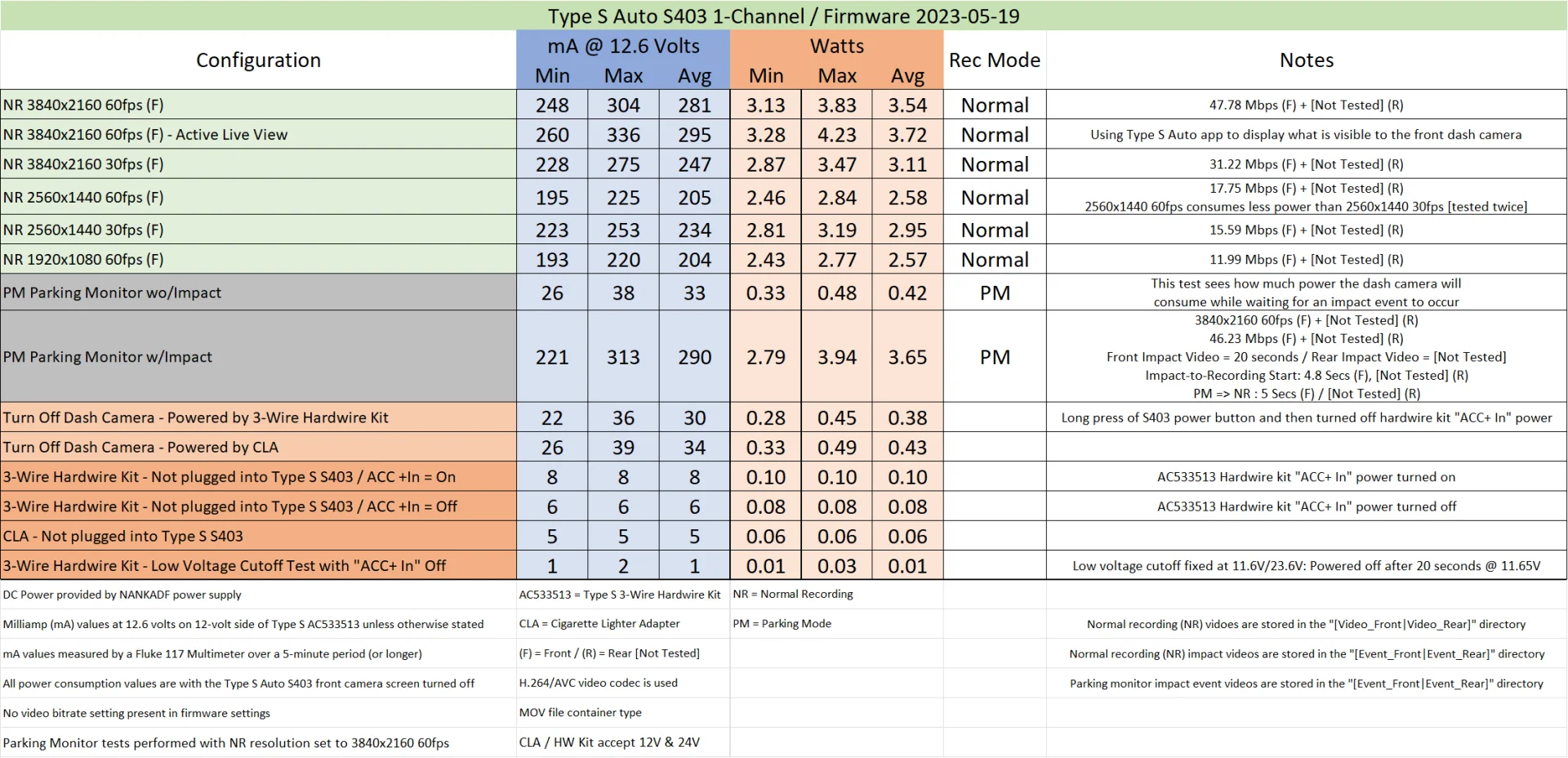
I ran my standard power consumption test suite using the S403 1-channel dash camera and the AC533413 3-wire hardwire kit that were sent to me.
The "Parking Monitor" parking mode is a "low" power consumption parking mode which waits for an impact event to start recording. After the impact event, the front camera starts recording in just under 5 seconds (4.8 seconds on average). That's quicker than the Vantrue "Collision Detection" parking mode with the "Quick Start" setting selected. The Vantrue dash cameras typically take 5 to 6 seconds to start recording with the "Quick Start" setting selected, but with very high power consumption. The S403 is not as quick as the Thinkware U3000 or Vueroid D21 4K to resume recording within 1 to 2 seconds, but it's better than most other dash cameras with a low power impact detection parking mode.
Unfortunately, the 4K 60fps video contains numerous duplicated video frames making the 60fps feature almost equal to 30fps. With a $300 USD list price for the 1-channel dash camera, it just doesn't deliver on the promise of 4K 60fps video. You can purchase the S403 on the Amazon US site for $207.39 USD, but even at that price it's far too expensive due to its failure to deliver on the 4K 60fps video feature.
If Type S Auto creates a firmware update for the S403 that corrects the duplicated video frame problem, I'd be happy to retest the dash camera.

The "Parking Monitor" parking mode is a "low" power consumption parking mode which waits for an impact event to start recording. After the impact event, the front camera starts recording in just under 5 seconds (4.8 seconds on average). That's quicker than the Vantrue "Collision Detection" parking mode with the "Quick Start" setting selected. The Vantrue dash cameras typically take 5 to 6 seconds to start recording with the "Quick Start" setting selected, but with very high power consumption. The S403 is not as quick as the Thinkware U3000 or Vueroid D21 4K to resume recording within 1 to 2 seconds, but it's better than most other dash cameras with a low power impact detection parking mode.
Unfortunately, the 4K 60fps video contains numerous duplicated video frames making the 60fps feature almost equal to 30fps. With a $300 USD list price for the 1-channel dash camera, it just doesn't deliver on the promise of 4K 60fps video. You can purchase the S403 on the Amazon US site for $207.39 USD, but even at that price it's far too expensive due to its failure to deliver on the 4K 60fps video feature.
If Type S Auto creates a firmware update for the S403 that corrects the duplicated video frame problem, I'd be happy to retest the dash camera.
Last edited:
Augustus
Well-Known Member
- Joined
- Aug 19, 2016
- Messages
- 4,221
- Reaction score
- 2,714
- Location
- Perth, Australia
- Country
- Australia
- Dash Cam
- Viofo, Vantrue, 70mai, Wolfbox
Do you think the processing hardware just isn't capable of rendering the video at 4k60? Not sure a firmware update will fix this ...I ran my standard power consumption test suite using the S403 1-channel dash camera and the AC533413 3-wire hardwire kit that were sent to me.
The "Parking Monitor" parking mode is a "low" power consumption parking mode which waits for an impact event to start recording. After the impact event, the front camera starts recording in just under 5 seconds (4.8 seconds on average). That's quicker than the Vantrue "Collision Detection" parking mode with the "Quick Start" setting selected. The Vantrue dash cameras typically take 5 to 6 seconds to start recording with the "Quick Start" setting selected, but with very high power consumption. The S403 is not as quick as the Thinkware U3000 or Vueroid D21 4K to resume recording within 1 to 2 seconds, but it's better than most other dash cameras with a low power impact detection parking mode.
Unfortunately, the 4K 60fps video contains numerous duplicated video frames making the 60fps feature almost equal to 30fps. With a $300 USD list price for the 1-channel dash camera, it just doesn't deliver on the promise of 4K 60fps video. You can purchase the S403 on the Amazon US site for $207.39 USD, but even at that price it's far too expensive due to its failure to deliver on the 4K 60fps video feature.
If Type S Auto creates a firmware update for the S403 that corrects the duplicated video frame problem, I'd be happy to retest the dash camera.
View attachment 76193
View attachment 76192
rcg530
Well-Known Member
- Joined
- Jan 23, 2021
- Messages
- 2,729
- Reaction score
- 4,574
- Location
- California
- Country
- United States
- Dash Cam
- 70mai, BlackVue, Thinkware, Vantrue, Vueroid, VIOFO
I'm not sure the SoC can handle the workload necessary to produce proper 4K 60fps video. If the firmware is attempting to do more than it needs to or inefficiently handling the workload, there could be tweaks to the firmware that could help. For instance, the status LED on the rear definitely blinks too quickly/much while recording. There might be small tweaks that could be made to free up processing capacity for the video workload. If Type S can produce a firmware update to resolve the problem, I'll be happy to test it out.Do you think the processing hardware just isn't capable of rendering the video at 4k60? Not sure a firmware update will fix this ...