N4 Pro S Review

Hack_man

Well-Known Member
Joined
Jun 13, 2024
Messages
891
Reaction score
392
Location
MA
Country
United States
Vantrue has invited me to review their new N4 Pro S Dashcam.
This Dashcam is interesting because not only does it include an interior camera but the rear one is 2.5K, while using STARVIS 2 sensors for all three channels.
I have appreciated the interior camera on other dashcams, since it offers beneficial recorded footage out the side windows as well as for the interior.

Highlights:

4K+1080P+1440P (Front + Interior + Rear STARVIS 2 IMX678 + IMX662 + IMX675)
PlatePix technology (improves license plate readability in challenging light environments)
Waterproof rear camera
LTE Compatible for Remote Notifications and Real Time Communication
5 GHZ Wifi

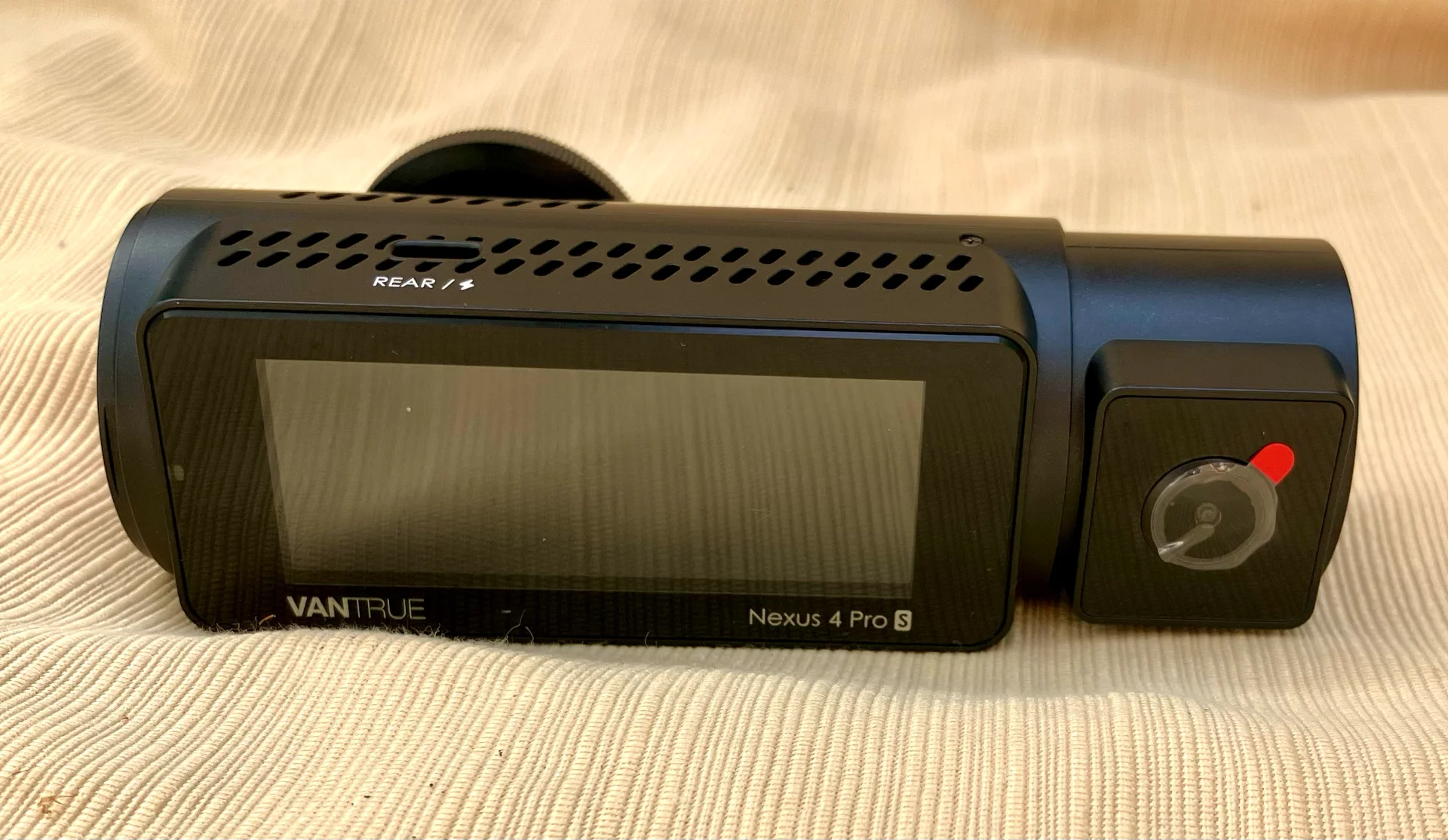
My first impression was that the camera is very wide, measuring 5 1/4" (13.3 cm)
The display screen takes advantage of the camera's size and measures 2-5/8" x 1.0 " (6.7 cm x 2.54 cm)
tempImagesJDGLX.webp


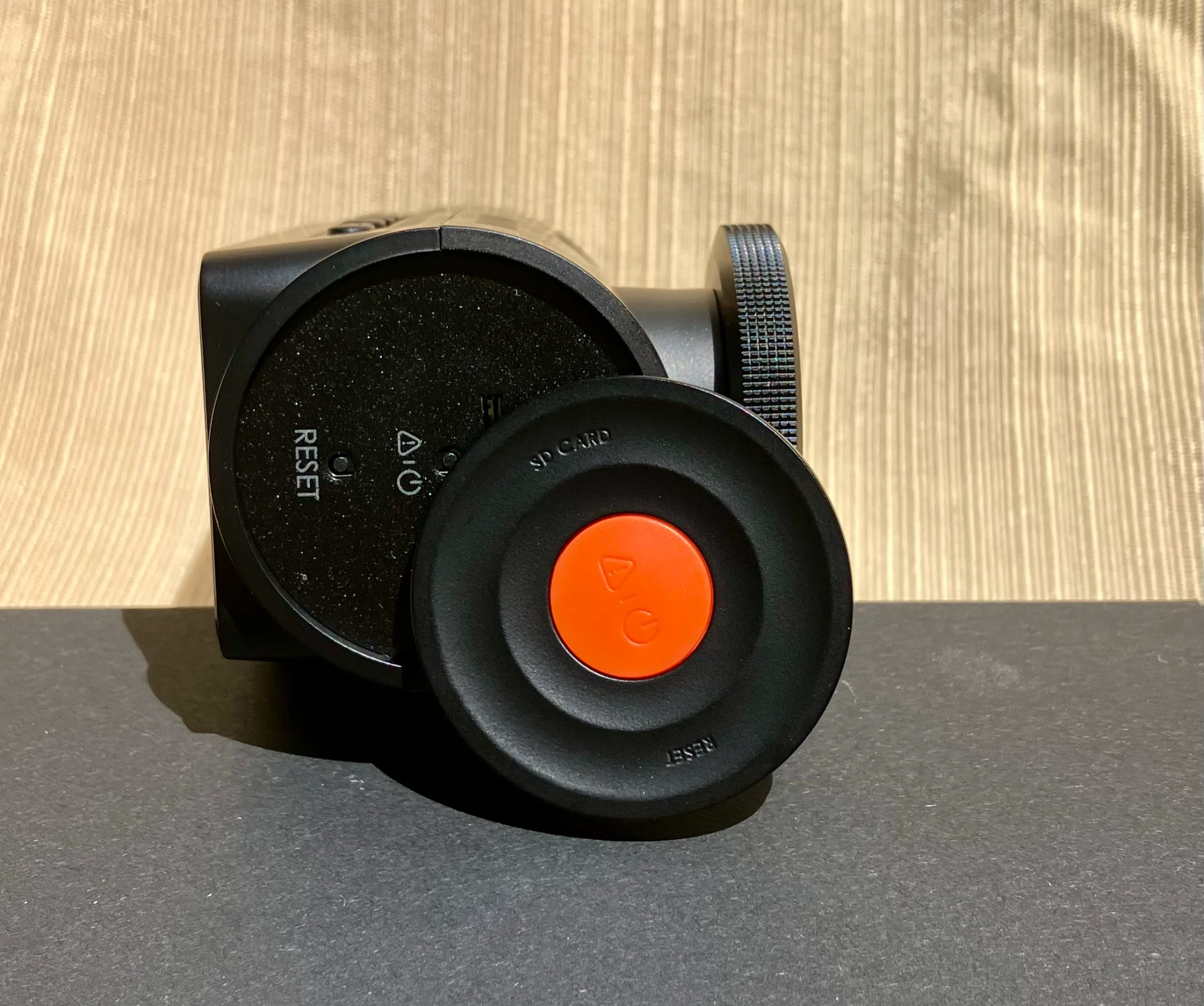
The location of the SD card slot baffled me for a minute, it's hidden behind the end plate containing the power/video-lock button.
For those who want to be able to easily access the SD card often, the cover might get annoying.
I'd be tempted to remove the door since I don't use the power button anyway. I prefer a bluetooth remote for Power and the video can be locked with voice command.
tempImagecwZh0K.webp


The plate is easy to release and is magnetically latched to the camera. There is a short cord which retains the plate.
tempImageNpdpud.webp


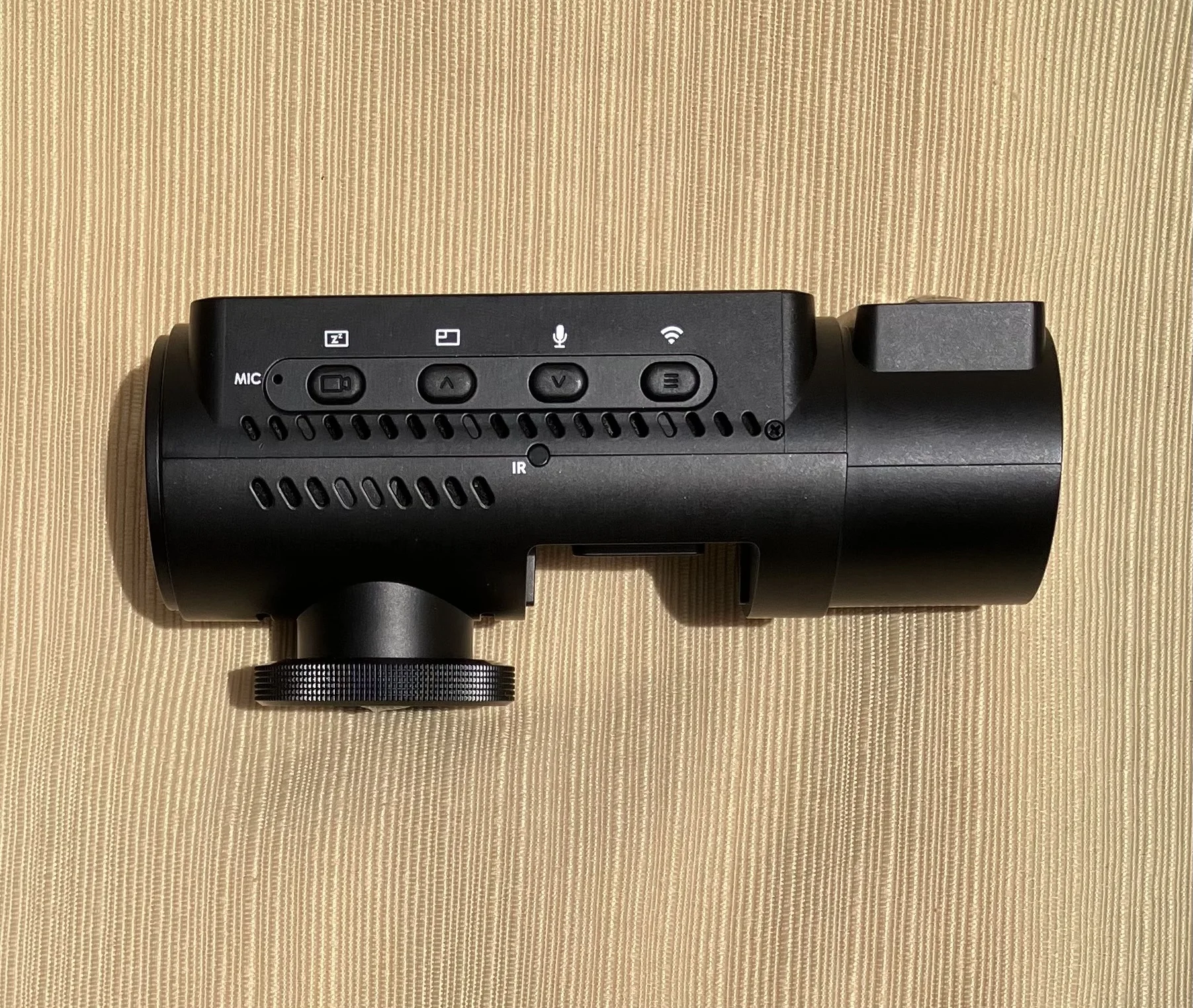
Bottom of camera with buttons
IMG_013808.webp


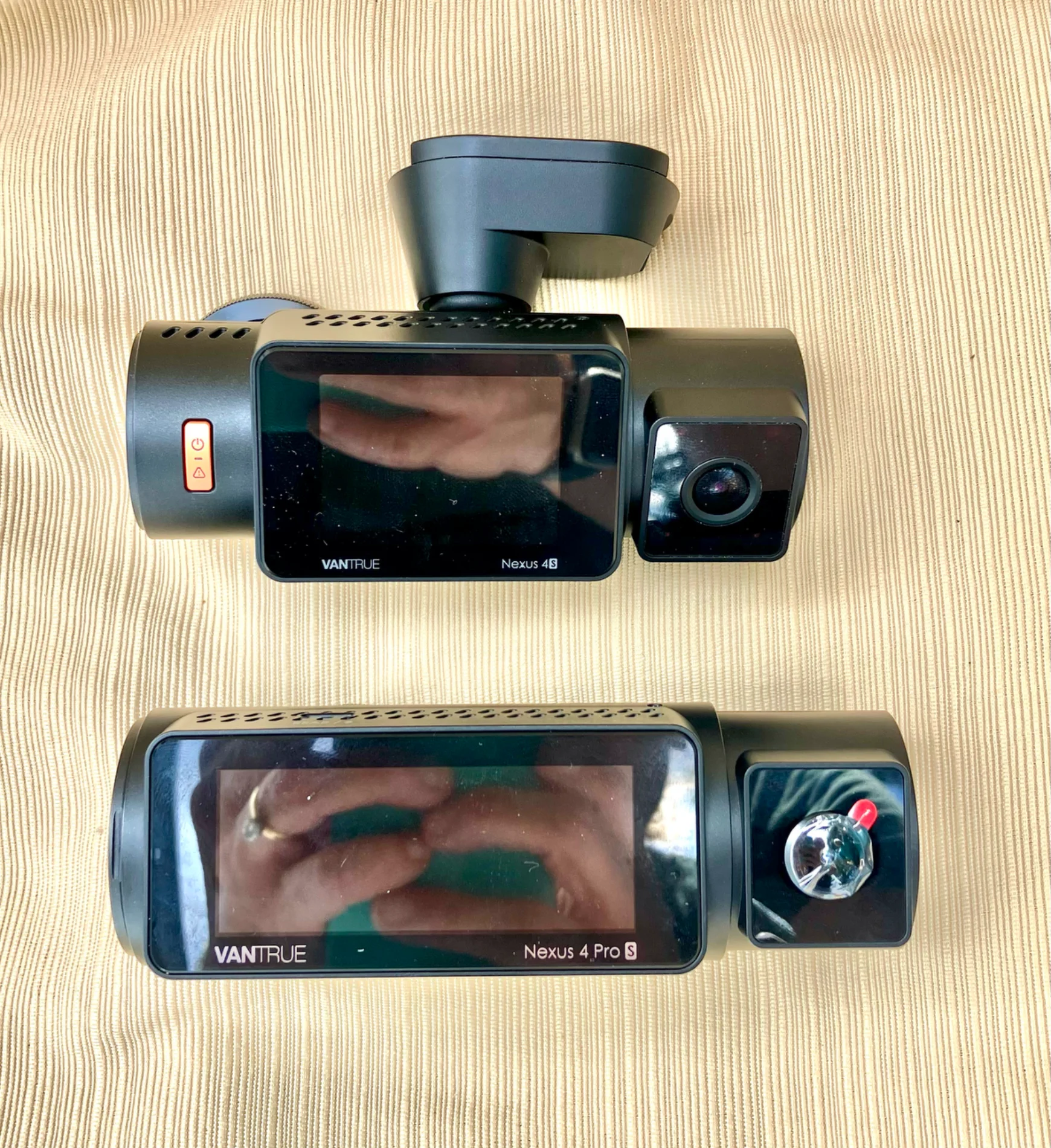
Comparing size of N4S to N4 Pro S. The N4 Pro S uses the same mounting plate as the N4S which is nice.
tempImageOk95fK.webp


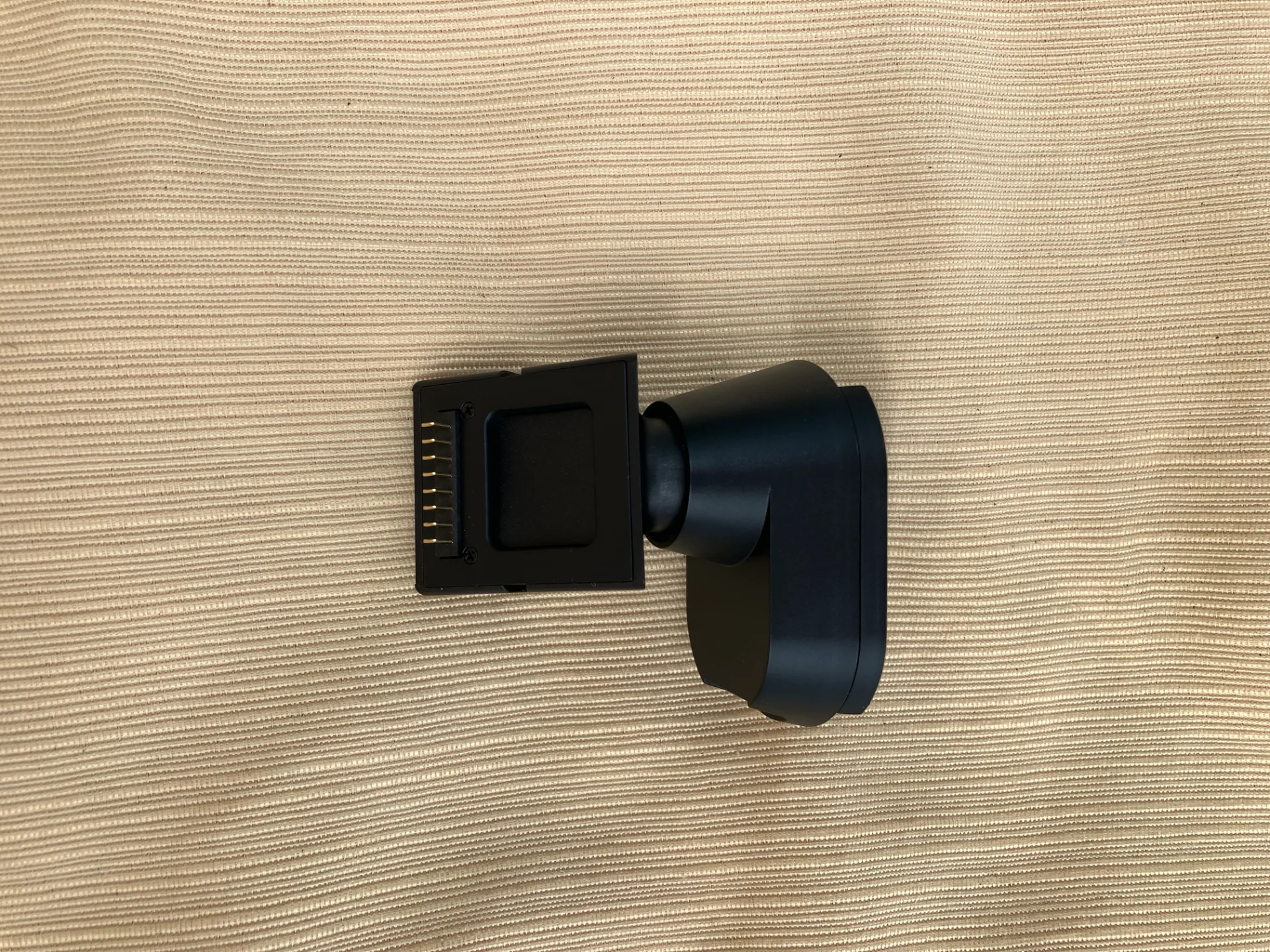
The GPS Mount releases easily from the camera and uses a magnetic grip.
tempImageHWCOcg.webp


Car Charger
tempImage9fG5LJ.webp


Rear Camera
tempImagehmtKOr.webp


Video footage to follow!
 
Last edited:
I measured the hottest temperature (using an IR gun) directly below the interior cabin lens at 130.1°F (54.5°C) while recording in 2 channel mode with full resolution.
The ambient temperature was 77.0°F (25°C) for a temperature rise of 53.1°F (29.5°C).,
This area below the interior camera did feel rather warm to the touch.


screenshot_717.webp

The camera was powered for > 30 minutes and the interior camera's protective film was removed.
 
Last edited:
May I ask if the rear camera of the n4s and n4ProS are compatible?
 
Vantrue has invited me to review their new N4 Pro S Dashcam.
This Dashcam is interesting because not only does it include an interior camera but the rear one is 2.5K, while using STARVIS 2 sensors for all three channels.
I have appreciated the interior camera on other dashcams, since it offers beneficial recorded footage out the side windows as well as for the interior.

Highlights:

4K+1080P+1440P (Front + Interior + Rear STARVIS 2 IMX678 + IMX662 + IMX675)
PlatePix technology (improves license plate readability in challenging light environments)
Waterproof rear camera
LTE Compatible for Remote Notifications and Real Time Communication
5 GHZ Wifi

My first impression was that the camera is very wide, measuring 5 1/4" (13.3 cm)
The display screen takes advantage of the camera's size and measures 2-5/8" x 1.0 " (6.7 cm x 2.54 cm)
View attachment 82821

The location of the SD card slot baffled me for a minute, it's hidden behind the end plate containing the power/video-lock button.
For those who want to be able to easily access the SD card often, the cover might get annoying.
I'd be tempted to remove the door since I don't use the power button anyway. I prefer a bluetooth remote for Power and the video can be locked with voice command.
View attachment 82822


The plate is easy to release and is magnetically attached to the camera with a short cord.
View attachment 82823


Bottom of camera with buttons
View attachment 82824

Comparing size of N4S to N4 Pro S. The N4 Pro S uses the same mounting plate as the N4S which is nice.
View attachment 82825


The GPS Mount releases easily from the camera and uses a magnetic grip.
View attachment 82830

Car Charger
View attachment 82826

Rear Camera
View attachment 82827

Video footage to follow!

@Hack_man

I removed the N2X from my vehicle and tossed in the front N 4 S Pro camera. I've not installed the rear yet. I was just so excited to test out the N4 S Pro!

I did notice one possible concern. The SD card slot is is behind the magnetic "wheel". There is an orange emergency button on the side..... Question: I think, but please confirm, that "short cord" connect the emergency button to the camera itself. I wonder if opening and closing the "wheel" to access the SD slot or reset camera could end up causing that cable to flex and short over time?

Otherwise, that front camera is AMAZING from my brief interaction. I'm going to get that rear camera setup today I hope.

You're right, I was shocked by the size of this camera compared to the N2X and N4S! It's got a huge footprint but that interior camera has a much better viewing angle, too.
 
@Hack_man
I did notice one possible concern. The SD card slot is is behind the magnetic "wheel". There is an orange emergency button on the side..... Question: I think, but please confirm, that "short cord" connect the emergency button to the camera itself. I wonder if opening and closing the "wheel" to access the SD slot or reset camera could end up causing that cable to flex and short over time?
From what I can tell, the short cord between the round door and the camera body (covering the SD slot) is just a rubber string to retain the door. The emergency button/power switch works by activating a microswitch. A tiny protrusion on the back side of the orange switch presses into a tiny hole which activates the switch. I have not done this yet and would check with @Jeff_Vantrue first, but I am pretty certain you could cut the cord and it would not electrically impact the camera so constantly opening/closing the door should not be a problem.
 
Last edited:
@Hack_man & @jsmith : Are your rear cameras F1.8 or F1.6 apertures? The manual says F1.8, but my camera is stamped F1.6.
 
@Hack_man & @jsmith : Are your rear cameras F1.8 or F1.6 apertures? The manual says F1.8, but my camera is stamped F1.6.

The front camera is installed in my vehicle and not wanting to take down. Where is the aperture stamp located? If on the front lens, I can't see due to tint.

Right now only got front camera going, not rear. I really wish Vantrue would have used a skinnier cord like Viofo. I have 2 cords on passengers side (with one being a really thick cord A129 Duo that's on list to replace), so not much room for anything on that side with 2 cameras.

Went to install the rear camera yesterday and botched it. I tried to feed cord through B pillar lazily without removing seatbelt trim thinking it would fit. The thick cord got stuck up in headliner and I mangled it trying to get the damn thing unstuck for a few hours. Went in at a horrible angle. Works, but rather not wiring things up if the cable has an issue in future. Yes, my fault where a 10 minute laziness ended up with headaches. Anyway, I've asked Vantrue to send another.

So front camera in action on my end, rear is not.... Won't make that mistake again, but had it been a skinny cord, wouldn't have been an issue.
 
The front camera is installed in my vehicle and not wanting to take down. Where is the aperture stamp located? If on the front lens, I can't see due to tint.

Right now only got front camera going, not rear. I really wish Vantrue would have used a skinnier cord like Viofo. I have 2 cords on passengers side (with one being a really thick cord A129 Duo that's on list to replace), so not much room for anything on that side with 2 cameras.

Went to install the rear camera yesterday and botched it. I tried to feed cord through B pillar lazily without removing seatbelt trim thinking it would fit. The thick cord got stuck up in headliner and I mangled it trying to get the damn thing unstuck for a few hours. Went in at a horrible angle. Works, but rather not wiring things up if the cable has an issue in future. Yes, my fault where a 10 minute laziness ended up with headaches. Anyway, I've asked Vantrue to send another.

So front camera in action on my end, rear is not.... Won't make that mistake again, but had it been a skinny cord, wouldn't have been an issue.
@EricSan is referring to the rear camera which is stamped as shown
That does sound frustrating trying to run the rear cable, it takes lots of patience.
tempImageGBGKTW.webp
 
@jsmith Bummer that cables got tangled and mangled! For now, I'm just tying cables up to the handles that run over the side windows to keep them out of the way as people get in and out of the car. I've been thinking it's probably time to run another set of cables above the headliner for a better overall install. The fat USB-C connector will take some additional effort for sure.
 
@EricSan is referring to the rear camera which is stamped as shown
That does sound frustrating trying to run the rear cable, it takes lots of patience.
View attachment 82885

I should have taken off the B-Pillar and just figured the cable would fit. It got snagged and the rest has been stated. My fault, but I do wish Vantrue used thinner cables for less footprint. Viofo's cable of choice is much easier to feed without the need to remove trim. The old A129 Duo did require removing trim. Again, I misjudged situation and tried doing it lazy way.

1753062013889.webp
 
@jsmith Bummer that cables got tangled and mangled! For now, I'm just tying cables up to the handles that run over the side windows to keep them out of the way as people get in and out of the car. I've been thinking it's probably time to run another set of cables above the headliner for a better overall install. The fat USB-C connector will take some additional effort for sure.

I'm properly installing these cameras. I had the N2X in my vehicle, but the N4 Pro S won me over and I swapped it out. That 4K front is a keeper in my mind. I do wish Vantrue could / would enable 30 FPS parking mode vs 15 FPS. Going to ask if this is possible. @Jeff_Vantrue could you firmware update and add low bitrate parking options of 1080P 15FPS and 1080P 30 FPS?

I got lazy and misjudged cable. Per above all my fault bar none. I've run thicker cables but I thought that one could fit and it snagged on the metal along weatherstripping where airbag sits. I couldn't get the plug out and turned into a nightmare It was jammed in there. Eventually got in at the right angle but damaged it in process. It happens LOL. Asked for a replacement cable

I prefer to do these installs cleanly on cameras I intend to keep. I placed the S1 Pro Max into a family member's vehicle as their camera that I installed was outdated. Proper install. Using their vehicle footage and test drives for testing purposes. I've got 3 cameras in my car LOL so only so much front windshield real estate. I do intend to swap out the A129 Duo with a A329T after the camera has been out a bit. For that kind of money (asked but wasn't included in Viofo's product testing), I want any bugs worked out first.

I plan to also keep the N4 Pro S in my vehicle. Video is amazing.
 
I'm properly installing these cameras. I had the N2X in my vehicle, but the N4 Pro S won me over and I swapped it out. That 4K front is a keeper in my mind. I do wish Vantrue could / would enable 30 FPS parking mode vs 15 FPS. Going to ask if this is possible. @Jeff_Vantrue could you firmware update and add low bitrate parking options of 1080P 15FPS and 1080P 30 FPS?

I got lazy and misjudged cable. Per above all my fault bar none. I've run thicker cables but I thought that one could fit and it snagged on the metal along weatherstripping where airbag sits. I couldn't get the plug out and turned into a nightmare It was jammed in there. Eventually got in at the right angle but damaged it in process. It happens LOL. Asked for a replacement cable

I prefer to do these installs cleanly on cameras I intend to keep. I placed the S1 Pro Max into a family member's vehicle as their camera that I installed was outdated. Proper install. Using their vehicle footage and test drives for testing purposes. I've got 3 cameras in my car LOL so only so much front windshield real estate. I do intend to swap out the A129 Duo with a A329T after the camera has been out a bit. For that kind of money (asked but wasn't included in Viofo's product testing), I want any bugs worked out first.

I plan to also keep the N4 Pro S in my vehicle. Video is amazing.
Thank you! We will take your suggestion into consideration as we continue evaluating future firmware updates.
 
@Hack_man & @jsmith : Are your rear cameras F1.8 or F1.6 apertures? The manual says F1.8, but my camera is stamped F1.6.
@EricSan @Hack_man @jsmith I just confirmed with our team. During the trial production stage, some early units were mistakenly stamped with F1.6, but the actual aperture is F1.8, as correctly stated in the manual. Sorry for the confusion.
 
@EricSan @Hack_man

Is anyone else having issue with the N4 Pro S triggering G-Sensor easily? I have lowered G-Sensor to from 3 to 1 now. It seems the G-Sensor like to go off far easier than other models in my opinion?
 
Last edited:
It should be awesome cam as N4 Pro was before. @Jeff_Vantrue ping me please if/when N4 Pro S will be support 4K rear cam.
May be at some day after some FW updates a rear cam from S1 Pro Max will be work with N4 Pro S.
 
It should be awesome cam as N4 Pro was before. @Jeff_Vantrue ping me please if/when N4 Pro S will be support 4K rear cam.
May be at some day after some FW updates a rear cam from S1 Pro Max will be work with N4 Pro S.

I would say very unlikely given 3 channel support. The issue is the amount of data being carried to over the cables, processor (SoC), etc and the ability to be able to handle that data. I am sure if the bitrate was sacrificed significantly, it may be possible, but the image would look terrible for "4k".

I'd say wait on future hardware development and I am sure in due time a 4K front + 4K rear + 2K interior or something along those lines will be on the market.
 
S1 Pro Max use same processor as N4 Pro S - NT96580. Rear cameras (4K and 2.5K) uses own processors for both of this devices.
So if S1 Pro Max can handle imx678 + data from rear independent camera may be it has enough power to handle internal channel too.

Sad that it is not use NTK98530 that is more powerful and can support up to 5 sensors.
 
Last edited:
Back
Top