OP
OP

rcg530
Well-Known Member
- Joined
- Jan 23, 2021
- Messages
- 2,704
- Reaction score
- 4,538
- Location
- California
- Country
- United States
- Dash Cam
- 70mai, BlackVue, Thinkware, Vantrue, Vueroid, VIOFO
Late last week, Redtiger reported back to me that they have reproduced the file corruption issue when copying video files from the F77's eMMC drive over the USB-C connection to a computer using my script(s) that use xcopy to copy the files.
They reported that they used Windows File Explorer using a select / copy / paste approach to copy the video files to a computer and that it did not result in any file corruption. Redtiger labeled this approach as "test method 1". Using xcopy [using my scripts] did result in random file corruption and Redtiger labeled this method as "test method 2".
This morning, I wanted to see if the select / copy / paste approach resulted in valid files or randomly corrupted files on my Windows 11 computer. The results were that the select / copy / paste approach in the Windows 11 File Explorer on my computer still resulted in randomly corrupted video files. I reported the following info to Redtiger:
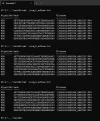
Just looking at the MD5 checksum hash values for the three copies of the 20250124095340_000224F.MP4 video file, you can see each copy of that video file has a different MD5 cecksum hash value.
[click on thumbnail to see full size image]
They reported that they used Windows File Explorer using a select / copy / paste approach to copy the video files to a computer and that it did not result in any file corruption. Redtiger labeled this approach as "test method 1". Using xcopy [using my scripts] did result in random file corruption and Redtiger labeled this method as "test method 2".
This morning, I wanted to see if the select / copy / paste approach resulted in valid files or randomly corrupted files on my Windows 11 computer. The results were that the select / copy / paste approach in the Windows 11 File Explorer on my computer still resulted in randomly corrupted video files. I reported the following info to Redtiger:
- F77 File Copies Via Copy / Paste In Windows File Explorer
- Mounted F77 eMMC drive on my Window 11 computer as drive H:
- Using the Windows 11 “File Explorer”, I created “copy1”, “copy2”, and “copy3” directories on my Windows 11 computer’s local disk drive E:
- I had four tabs open in the Windows 11 “File Explorer”
- Tab 1: H:\CARDV\Movie\Front
- Tab 2: E:\test\redtiger\20250124\file_explorer\test01\copy1
- Tab 3: E:\test\redtiger\20250124\file_explorer\test01\copy2
- Tab 4: E:\test\redtiger\20250124\file_explorer\test01\copy3
- Copy1
- I selected eight (8) front camera video files from the F77 eMMC drive in “Tab 1”
- I executed a “Copy” [ctrl-c] of the eight selected files
- I switched to “Tab 2” and pasted [ctrl-v] the eight selected files
- Copy2
- I again went to “Tab 1” deselected and then reselected the same eight (8) front camera video files from the F77 eMMC drive in “Tab 1”
- I executed a “Copy” [ctrl-c] of the eight selected files
- I switched to “Tab 3” and pasted [ctrl-v] the eight selected files
- Copy3
- I again went to “Tab 1” deselected and then reselected the same eight (8) front camera video files from the F77 eMMC drive in “Tab 1”
- I executed a “Copy” [ctrl-c] of the eight selected files
- I switched to “Tab 4” and pasted [ctrl-v] the eight selected files
- In a Powershell window
- I used my md5sum.ps1 script to calculate the MD5 checksum hash values for the files in each of the three destination directories [copy1, copy2, copy3]
- Looking at the MD5 checksum hash values, it is apparent that the file corruption issue was still occurring with the “Copy / Paste” file copy method [test method 1]
Just looking at the MD5 checksum hash values for the three copies of the 20250124095340_000224F.MP4 video file, you can see each copy of that video file has a different MD5 cecksum hash value.
[click on thumbnail to see full size image]