Redtiger F77 - 2-Channel - 4K Front + 4K Rear - Testing / Review - RCG

Late last week, Redtiger reported back to me that they have reproduced the file corruption issue when copying video files from the F77's eMMC drive over the USB-C connection to a computer using my script(s) that use xcopy to copy the files.

They reported that they used Windows File Explorer using a select / copy / paste approach to copy the video files to a computer and that it did not result in any file corruption. Redtiger labeled this approach as "test method 1". Using xcopy [using my scripts] did result in random file corruption and Redtiger labeled this method as "test method 2".

This morning, I wanted to see if the select / copy / paste approach resulted in valid files or randomly corrupted files on my Windows 11 computer. The results were that the select / copy / paste approach in the Windows 11 File Explorer on my computer still resulted in randomly corrupted video files. I reported the following info to Redtiger:
  • F77 File Copies Via Copy / Paste In Windows File Explorer
    • Mounted F77 eMMC drive on my Window 11 computer as drive H:
    • Using the Windows 11 “File Explorer”, I created “copy1”, “copy2”, and “copy3” directories on my Windows 11 computer’s local disk drive E:
    • I had four tabs open in the Windows 11 “File Explorer”
      • Tab 1: H:\CARDV\Movie\Front
      • Tab 2: E:\test\redtiger\20250124\file_explorer\test01\copy1
      • Tab 3: E:\test\redtiger\20250124\file_explorer\test01\copy2
      • Tab 4: E:\test\redtiger\20250124\file_explorer\test01\copy3
    • Copy1
      • I selected eight (8) front camera video files from the F77 eMMC drive in “Tab 1”
      • I executed a “Copy” [ctrl-c] of the eight selected files
      • I switched to “Tab 2” and pasted [ctrl-v] the eight selected files
    • Copy2
      • I again went to “Tab 1” deselected and then reselected the same eight (8) front camera video files from the F77 eMMC drive in “Tab 1”
      • I executed a “Copy” [ctrl-c] of the eight selected files
      • I switched to “Tab 3” and pasted [ctrl-v] the eight selected files
    • Copy3
      • I again went to “Tab 1” deselected and then reselected the same eight (8) front camera video files from the F77 eMMC drive in “Tab 1”
      • I executed a “Copy” [ctrl-c] of the eight selected files
      • I switched to “Tab 4” and pasted [ctrl-v] the eight selected files
    • In a Powershell window
      • I used my md5sum.ps1 script to calculate the MD5 checksum hash values for the files in each of the three destination directories [copy1, copy2, copy3]
      • Looking at the MD5 checksum hash values, it is apparent that the file corruption issue was still occurring with the “Copy / Paste” file copy method [test method 1]
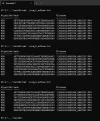
I’ve included a screen capture of the PowerShell window showing the contents of the three MD5 checksum hash files. This means that no matter how I try to copy the video files from the F77 eMMC drive, file corruption is occurring [copy/paste, xcopy, robocopy, rsync] on my Windows computers.

Just looking at the MD5 checksum hash values for the three copies of the 20250124095340_000224F.MP4 video file, you can see each copy of that video file has a different MD5 cecksum hash value.

[click on thumbnail to see full size image]
1744149064103.webp
 
I have seen similar before and it was related to the block size on the receiving drive. You could try closing Tab 2 after the copy, and then copy to Tab 3, close Tab 3 and then copy to Tab 4.

A hash should never change if it does then it may be hardware, could be meta-data info is not always copied (depending on how the copy was done), copy the file from Tab 2 to Tab 3 could cause it also...so many things can cause it.

Of course it might just be a buffer and timing issue between the RT and your PC/drive. Have you tried on a Mac or Linux PC?
 
I have seen similar before and it was related to the block size on the receiving drive. You could try closing Tab 2 after the copy, and then copy to Tab 3, close Tab 3 and then copy to Tab 4.

A hash should never change if it does then it may be hardware, could be meta-data info is not always copied (depending on how the copy was done), copy the file from Tab 2 to Tab 3 could cause it also...so many things can cause it.

Of course it might just be a buffer and timing issue between the RT and your PC/drive. Have you tried on a Mac or Linux PC?
Redtiger has acknowledged the problem is on the F77 end of the USB-C connection. They are researching a solution. The data bytes within the MP4 files are getting changed. I’ve reproduced the problem with five different Windows laptops. Redtiger has reproduced it with at least one Windows computer [if not more].
 
That is kind of gnarly the bytes getting changed between points, just curious are they using a proprietary cable? I have been watching RT since the SEMA video, that I think it was Ben did. Been holding off just to see how they work through the suggestions that were made.
 
That is kind of gnarly the bytes getting changed between points, just curious are they using a proprietary cable? I have been watching RT since the SEMA video, that I think it was Ben did. Been holding off just to see how they work through the suggestions that were made.
I’ve used the data cable provided with the F77 and several other USB-A to USB-C data cables with the same result. I’ve also reproduced the problem with two different F77 dash cameras. The data transfer speed when copying files over the USB-C connection is only 17.5 to 18.3 MB/sec.
 
A quick update on the file corruption issue when copying video files from the F77's internal eMMC drive to a Windows computer over the USB-C data connection.

Redtiger stated they are still investigating the issue since the most recent test firmware did not resolve the issue based on my testing.

I was performing some additional tests and I found that I could get files copied successfully to my Windows computer from the F77's eMMC drive when the F77's microSD card slot has a formatted microSD card in it. The microSD card is not the data source for the file copy operation from the F77 to the Windows computer [although it can be]. With the F77 having a formatted microSD card in it, I ran my testing scripts 30 times. Each script run copies the files 3 times into 3 different local computer directories. With 90 file sets copied to my Windows computer, none of them had been corrupted [MD5 checksum hash values of the copied files match the expected MD5 checksum hash values for those files].

When I run the same tests but without a formatted microSD card in the F77 microSD card slot, the files copied from the F77's internal eMMC drive to my Windows computer are randomly corrupted. I've tested the "with microSD card present" and "no microSD card present" test configurations numerous times and the test runs with the microSD present always succeed [no file corruption]. I've reported this additional info to Redtiger right as they went on their week long labor day break.
 
Very time consuming task! Hope they figure it out and solve it.
Does this only happen to your 128gb version or did you test the 256gb version as well?
 
Does this only happen to your 128gb version or did you test the 256gb version as well?
I identified there was a problem with my first F77 128 GB dash camera. Redtiger wanted that unit back. I was sent a second F77 128 GB unit and it had the same problem. I don't know if this problem occurs with the 256 GB units.
 
A quick update on the file corruption issue when copying video files from the F77's internal eMMC drive to a Windows computer over the USB-C data connection.

Redtiger stated they are still investigating the issue since the most recent test firmware did not resolve the issue based on my testing.

I was performing some additional tests and I found that I could get files copied successfully to my Windows computer from the F77's eMMC drive when the F77's microSD card slot has a formatted microSD card in it. The microSD card is not the data source for the file copy operation from the F77 to the Windows computer [although it can be]. With the F77 having a formatted microSD card in it, I ran my testing scripts 30 times. Each script run copies the files 3 times into 3 different local computer directories. With 90 file sets copied to my Windows computer, none of them had been corrupted [MD5 checksum hash values of the copied files match the expected MD5 checksum hash values for those files].

When I run the same tests but without a formatted microSD card in the F77 microSD card slot, the files copied from the F77's internal eMMC drive to my Windows computer are randomly corrupted. I've tested the "with microSD card present" and "no microSD card present" test configurations numerous times and the test runs with the microSD present always succeed [no file corruption]. I've reported this additional info to Redtiger right as they went on their week long labor day break.

Well, that is buggy as all get out. 🙂 Almost as if the copy process makes a brief attempt at the microSD card, then, when the card is not found, it goes to the Windows box? If that were the case, I would wonder if it is diverting to the microSD mid-copy or at the beginning?
 
F77 Video File Copy Pathways Tested – F77 128 GB
  • F77 eMMC => F77 microSD
    • Use F77 “Playback Mode” feature to select multiple video files on the eMMC drive and then copy those files to the microSD card in the microSD card slot
    • Copied files have correct MD5 checksum hash values
  • microSD => Windows
    • Use the microSD card created using the “Playback Mode” backup feature
    • Copied files have correct MD5 checksum hash values
  • F77 microSD => USB-C => Windows
    • During F77 power up when USB-C data cable is plugged into the F77 USB-C “Power” port, select the microSD card in the F77 microSD card slot to be mounted on Windows computer
    • Copied files have correct MD5 checksum hash values
  • F77 eMMC => USB-C => Windows
    • During F77 power up when USB-C data cable is plugged into the F77 USB-C “Power” port, select the F77 eMMC drive to be mounted on Windows computer
    • F77 microSD card slot empty
      • Copied files will contain random data corruption
    • F77 microSD card slot contains formatted microSD card
      • Copied files have correct MD5 checksum hash values
 
I identified there was a problem with my first F77 128 GB dash camera. Redtiger wanted that unit back. I was sent a second F77 128 GB unit and it had the same problem. I don't know if this problem occurs with the 256 GB units.
Thanks for the clarification.
I guess that it is unlikely that the 256gb unit will behave much different.
 
F77 Video File Copy Pathways Tested – F77 128 GB
  • F77 eMMC => F77 microSD
    • Use F77 “Playback Mode” feature to select multiple video files on the eMMC drive and then copy those files to the microSD card in the microSD card slot
    • Copied files have correct MD5 checksum hash values
  • microSD => Windows
    • Use the microSD card created using the “Playback Mode” backup feature
    • Copied files have correct MD5 checksum hash values
  • F77 microSD => USB-C => Windows
    • During F77 power up when USB-C data cable is plugged into the F77 USB-C “Power” port, select the microSD card in the F77 microSD card slot to be mounted on Windows computer
    • Copied files have correct MD5 checksum hash values
  • F77 eMMC => USB-C => Windows
    • During F77 power up when USB-C data cable is plugged into the F77 USB-C “Power” port, select the F77 eMMC drive to be mounted on Windows computer
    • F77 microSD card slot empty
      • Copied files will contain random data corruption
    • F77 microSD card slot contains formatted microSD card
      • Copied files have correct MD5 checksum hash values
I'm predicting the issue won't be fixed even by the end of 2025. Will the ADHD and OCD be fixed by the end of the calendar year? Who knows.
 
Just curious, since you are using bash, have you tried a sleep command between each file transfer?
 
Just curious, since you are using bash, have you tried a sleep command between each file transfer?
The bash [zsh on my Mac] shell scripts I use invoke the rsync command with a wildcard specification for the files to be copied. I've not tested a script with multiple rsync commands with each rsync command copying one file. The file copy tests run on my Mac Mini M2 using rsync have never resulted in any data corruption. I can try adding a sleep command between rsync comands, but I'll wait to see if that is necessary. Redtiger's development team is still looking into the issue and I'll get another update from them after they return from their labor day holiday break. Hopefully, the new piece of info about having a microSD card in the F77 microSD card slot makes the file copies to a Windows computer work will be beneficial in figuring out the root cause.
 
Last month, I found that having a microSD card in the F77's microSD card slot while copying the files over the USB-C connection somehow stabilized/prevented the file corruption from occurring. Running the same file copy test with the F77's microSD card slot empty [most typical mode of operations for this dash camera] would allow/cause the file corruption over the USB-C connection to occur.

A few days ago, Redtiger provided a 20250529 test firmware for the 128 GB F77 dash camera to address the file copy problem over a USB-C connection to a computer [F77 eMMC drive => USB-C => Computer]. All of my file copy tests completed successfully! Finally! The "fix" was to install the new firmware and format the F77's eMMC drive.

I'm waiting on Redtiger's response on when this firmware update will be publicly available.
 
The latest update from Redtiger. The F77 128GB firmware update that fixes the USB-C file copy problem should be made public next Tuesday [17-June-2025]. I stopped all other F77 review activities until the USB-C file copy problem was resolved. I don't know the status of this issue with the F77 V2 [256GB eMMC] dash camera. I've been asking about it, but I haven't received a statement from Redtiger on that question.

I've been using the F77 to gather more footage to further test the USB-C file copy fix and to start reviewing the video quality [again]. Each day's file copy tests have continued to be error free since the 20250529 test firmware was installed. The front camera 4K footage still seems to have some occasional dropped frames. The rear camera 4K footage does not seem to have any notable dropped/duplicated frames.
 
Here's a few frame grabs from the Redtiger F77 with the 20250529 test firmware and a VIOFO A329S 2CH [Front+Rear] prototype dash camera with the v1.0_250527 production firmware.

Redtiger does not yet offer a CPL filter for the F77 front camera. There is an aftermarket CPL filter for the F77, but I usually only test the dash camera manufacturer accessories. The A329S front camera does have a CPL filter.

Yesterday, I rearranged the rear cameras in this car. It appears I need to tilt down the A329S rear camera a bit to get a better 50/50 horizon view split.

There is no F77 firmware setting for its HDR feature, so HDR is enabled all of the time.

Redtiger F77 4K Front HDR:On CPL:No vs VIOFO A329S 4K Front HDR:On CPL:Yes
rt_f77_hdron_nocpl_20250612085635_000475F.MP4_snapshot_00.33.webpviofo_a329s_hdron_cplon_2025_0612_085625_000700F.MP4_snapshot_00.43.webprt_f77_hdron_nocpl_20250612085635_000475R.MP4_snapshot_00.33.webpviofo_a329s_hdron_nocpl_2025_0612_085625_000701R.MP4_snapshot_00.43.webp

Redtiger F77 4K Rear HDR:On CPL:No vs VIOFO A329S 2K Rear HDR:On CPL:No
rt_f77_hdron_nocpl_20250612090235_000481F.MP4_snapshot_00.51.webpviofo_a329s_hdron_cplon_2025_0612_090325_000714F.MP4_snapshot_00.01.webprt_f77_hdron_nocpl_20250612090235_000481R.MP4_snapshot_00.51.webpviofo_a329s_hdron_nocpl_2025_0612_090325_000715R.MP4_snapshot_00.01.webp
 
Thanks for the F77 testing. Had mine for over a month and it's great. Really like the performance and having an IMX678 in the rear cam is a big plus. Here is a screenshot of the IMX678 handling the morning sun.
vlcsnap-2025-06-09-11h01m56s244.webp
 
Today, Redtiger did make a firmware update available for the F77 128GB dash camera as promised. Unfortunately, this firmware is not what I tested. The version string is the same minus a "T" at the end [REDTIGER-F77 20250529.V14.4], but I could tell they modified the boot/power off to contain short sound clips to "animate" those events. The public update was made available via a 'rar' file rather than a 'zip' file like their previous updates.

1750175717733.webp


My problem with the REDTIGER-F77 20250529.V14.4 public update is that the already very slow file transfer rate of 18 MB/sec [eMMC-USBC-Computer] was reduced to a horrible 6.24 MB/sec. I downgraded the firmware to the "Test" version I had before this public version and the transfer rate was restored to 18 MB/sec. I upgraded the F77 again to the public version and the transfer rate dropped to 6.24 MB/sec again.

I would avoid this public update [for now]. I've reported my findings to Redtiger.
 
Thanks, I checked for that update OTA through the app, but it never showed. Since it's working great I did not update through the SD card. I only use the WiFi and the app via 5G for downloading. Around 1 minute for a 5 minute (1.1 GB) file is ok for me.
 
Back
Top