
You are using an out of date browser. It may not display this or other websites correctly.
You should upgrade or use an alternative browser.
You should upgrade or use an alternative browser.
Thinkware 750 Development
- Thread starter Dee_82
- Start date
Neng
New Member
- Joined
- Aug 19, 2016
- Messages
- 16
- Reaction score
- 3
- Country
- United States
- Dash Cam
- Thinkware F750 and mini 0806
Yep
Do you best to bring something out of itcheers buddy!
probably a silly question to this that know about computer tech .I would like to ask if you are going to upgrade to the f770 firmware and camera updates to your f750 do you also have to change the pc viewer or is it the same ?
Neng
New Member
- Joined
- Aug 19, 2016
- Messages
- 16
- Reaction score
- 3
- Country
- United States
- Dash Cam
- Thinkware F750 and mini 0806
You can still use your F750 viewer for me no problem.probably a silly question to this that know about computer tech .I would like to ask if you are going to upgrade to the f770 firmware and camera updates to your f750 do you also have to change the pc viewer or is it the same ?
You can still use your F750 viewer for me no problem.
Thanks just that i,m not that convident in messing around with up dates etc ! to be honest i wish it was like updating my tom tom .In my option much more user friendly than dumping files and unzipping files. lol
Neng
New Member
- Joined
- Aug 19, 2016
- Messages
- 16
- Reaction score
- 3
- Country
- United States
- Dash Cam
- Thinkware F750 and mini 0806
If you want to update the F770 firmware to F750 it is as easy as peel a banana and if you want to change back to F750 firmware just do it again sample and no problem.Thanks just that i,m not that convident in messing around with up dates etc ! to be honest i wish it was like updating my tom tom .In my option much more user friendly than dumping files and unzipping files. lol
If you want to update the F770 firmware to F750 it is as easy as peel a banana and if you want to change back to F750 firmware just do it again sample and no problem.
lol that may be the case, The part i don't understand is when you extract the f770 file you then copy it to you sd card but then rename the file to f750 ? Where is it you do that . please can you explain this part for me
Thanks in advance

- Joined
- Jan 27, 2013
- Messages
- 52,421
- Reaction score
- 30,330
- Location
- Sydney, Australia ~ Shenzhen, China
- Country
- Australia
- Dash Cam
- Too many ¯\_(ツ)_/¯
lol that may be the case, The part i don't understand is when you extract the f770 file you then copy it to you sd card but then rename the file to f750 ? Where is it you do that . please can you explain this part for me
Thanks in advance
you're just renaming the file to what the camera expects an update to be named for it to be able to load it
Sutton
Active Member
- Joined
- Aug 31, 2016
- Messages
- 712
- Reaction score
- 229
- Country
- Canada
- Dash Cam
- One SG9665gc.. Two Viofo A119.. Three A119S
Off Topic: Curious about the Thinkware x330 & x350. I think the only difference between the 2 models is that the x350 has wifi and the x330 does not. So because Thinkware uses a different power cord connector to the DVR (round connector instead of the widely used mini) my question is... If I wanted to connect it to my laptop would u know if the model x330 supplies a small usb to connect . I have tried contacting Thinkware 2 times with no reply. I would not like to have that as an added expense because any Thinkware cable is $30. If I bought the x350 model no problem because it has wifi to hook up to laptop. And I really do not want to buy it just to find out its not supplied and then return itit is possible to support different hardware with a single firmware version if it's written to suit
Dee_82
Active Member
- Joined
- Sep 7, 2014
- Messages
- 361
- Reaction score
- 135
- Country
- United Kingdom
- Dash Cam
- Thinkware F750
When flashing the F750 to the F770 You only need to rename the F770 firmware the first time you flash it, once you have flashed that 770 firmware then the camera is in all ways bar looks, identical to the F770, you will no longer need to rename any files.
When flashing the F750 to the F770 You only need to rename the F770 firmware the first time you flash it, once you have flashed that 770 firmware then the camera is in all ways bar looks, identical to the F770, you will no longer need to rename any files.
Sorry for going on but at what stage do you do this .Like i said when it comes down to doing this sort of thing it looses me ! (Flashing ?)From reading on here it says you copy the f770 file onto your sd card then rename it ? From my understanding shouldn,t you rename it before you copy onto the sd card
Dee_82
Active Member
- Joined
- Sep 7, 2014
- Messages
- 361
- Reaction score
- 135
- Country
- United Kingdom
- Dash Cam
- Thinkware F750
Sorry for going on but at what stage do you do this .Like i said when it comes down to doing this sort of thing it looses me ! (Flashing ?)From reading on here it says you copy the f770 file onto your sd card then rename it ? From my understanding shouldn,t you rename it before you copy onto the sd card
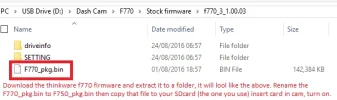
makes no difference, you can rename it then copy it to the card or copy it to the card then rename it.
The thinkware F750 camera will only install firmware updates with the filename F750_pkg.bin
All you are doing is renaming the F770 firmware to F750, the camera will then install the update.
Once its updated the camera thinks its a F770 so will then look for F770_pkg.bin firmware updates.
Dee_82
Active Member
- Joined
- Sep 7, 2014
- Messages
- 361
- Reaction score
- 135
- Country
- United Kingdom
- Dash Cam
- Thinkware F750
oh, flash is a term we use when modifying the ROM (read only memory) on a device, typically you cant just copy the files over, you have to copy an image / BIN file over as a whole and normally whilst the device is in a special mode.
Back in the day it was much harder to "flash" a device but with most cameras now you just have to pop the image on to an SD card, the camera will recognise the update by the file name (hence why we need to change the file name) then automatically put the camera in to a mode that will allow the flash to take place, it overwrites itself then reboots.
The actual term "Flash" comes from the original name for that special kind of memory that doesn't get wiped when power is lost, Flash Memory,
Back in the day a PDA / mobile would have ROM (read only memory) and RAM (Random access memory) when the power was lost due to a flat battery the RAM was wiped clean leaving the ROM intact, once power was restored the ROM image would load itself back in to the much faster RAM but everything you had on the phone would be lost.
Way back yonder we used EPROM (erasable programmable read-only memory) Later on they developed a much faster ROM called NAND which was called "flash Memory" so to change the image on the Flash memory, you would have to "Flash it"
I think the reason it was called flash was something to do with a camera flash, ie, its either all there or none of it is, a perfect picture of how it should look.... or something like that 🙂
🙂
Back in the day it was much harder to "flash" a device but with most cameras now you just have to pop the image on to an SD card, the camera will recognise the update by the file name (hence why we need to change the file name) then automatically put the camera in to a mode that will allow the flash to take place, it overwrites itself then reboots.
The actual term "Flash" comes from the original name for that special kind of memory that doesn't get wiped when power is lost, Flash Memory,
Back in the day a PDA / mobile would have ROM (read only memory) and RAM (Random access memory) when the power was lost due to a flat battery the RAM was wiped clean leaving the ROM intact, once power was restored the ROM image would load itself back in to the much faster RAM but everything you had on the phone would be lost.
Way back yonder we used EPROM (erasable programmable read-only memory) Later on they developed a much faster ROM called NAND which was called "flash Memory" so to change the image on the Flash memory, you would have to "Flash it"
I think the reason it was called flash was something to do with a camera flash, ie, its either all there or none of it is, a perfect picture of how it should look.... or something like that 🙂
🙂
Last edited:
Its really straight forward here is a picture.....
Thank you dee_82 for being patient with me . Ill give it a go the wk end when i have time .Thanks again for explaining 😀 Oh is there anything you have to do when downloading the speed camera info ?
Last edited:
Dee_82
Active Member
- Joined
- Sep 7, 2014
- Messages
- 361
- Reaction score
- 135
- Country
- United Kingdom
- Dash Cam
- Thinkware F750
Thank you dee_82 for being patient with me . Ill give it a go the wk end when i have time .Thanks again for explaining 😀 Oh is there anything you have to do when downloading the speed camera info ?
nope, not at all, I would suggest you don't do that first until the camera is turned in to a F770, once the camera is updated, download the smartguidepoint.dx2 file and place it in the DriveInfo folder on the SD card, then pop the card in and it will update.
i finally upgrade my 750 to 770 in one step, no side effectsI would suggest you don't do that first until the camera is turned in to a F770, once the camera is updated, download the smartguidepoint.dx2 file and place it in the DriveInfo folder on the SD card, then pop the card in and it will update
thank You Dee_82 for this guide
Wytwolf
Member
- Joined
- Apr 8, 2015
- Messages
- 48
- Reaction score
- 17
- Country
- Canada
- Dash Cam
- Thinkware F750 w/ F770 firmware
Are there an negatives/positives of the time lapse over the motion detection (other then recording space)? How is battery life effected due to the voltage cut off?
The camera may draw less power with time lapse if parked in a busy area but will time lapse draw more power if parked in a secluded area?
I'm thinking time lapse may help me with the voltage cut off as my drive to work is short so parking mode generally only lasts 5 hrs after being on most of the previous night. This will probably help once winter comes as the snow/rain will trigger the motion sensor (even on it's lowest setting).
The camera may draw less power with time lapse if parked in a busy area but will time lapse draw more power if parked in a secluded area?
I'm thinking time lapse may help me with the voltage cut off as my drive to work is short so parking mode generally only lasts 5 hrs after being on most of the previous night. This will probably help once winter comes as the snow/rain will trigger the motion sensor (even on it's lowest setting).