Vantrue E1 Pro (unboxing & first impressions) (Sony Starvis 2 IMX678, Novatek NT98528BG, Wi-Fi 5/GPS, 4K30, HDR)

Is there a down side to having both HDR and platepix on, i had for a short drive last night, and i had to drive pretty slow to capture plates on stationary cars ( no CPL )
I can not test again today as i have to go to bed very early in the hope to maybe get 1 hour of sleep before the alarm clock ring at 7 tomorrow morning.
 
Is there a down side to having both HDR and platepix on, i had for a short drive last night, and i had to drive pretty slow to capture plates on stationary cars ( no CPL )
I can not test again today as i have to go to bed very early in the hope to maybe get 1 hour of sleep before the alarm clock ring at 7 tomorrow morning.
The image will get darker, but at night it improves the plate capture.
My testing showed that PlatePix should always be enabled, while HDR should be enabled with the timer from sunset to sunrise
Here is a comparison, HDR + PP got the best results.
 
I have set both HDR and PP to come on at 20:00 and off again at 06:00.

Today i have tried just PP but only driven in the daytime, go to bed soon so i might sleep a hour or two before i get up at 7 tomorrow morning, a time where usually i fall asleep even if i have been in bed for 7 hours already.

I assume PP force a even higher minimum exposure time, hence why the are darker in general, which i am totally Ok with in a dashcam.
 
Vantrue E1 Pro Firmware Update
  • Release time: 2025-05-08 11:23:37
  • Version: E1Pro_VT-EED161
  • File size: 47.5M


Changelog:


Important Updates:
  • Optimised image quality (IQ) in PlatePix mode
  • Improved sensitivity in parking mode. Note: the sensitivity of parking mode is determined by the Collision Detection settings. Adjusting this setting will affect the overall behaviour of Parking Monitoring

Other Updates:
  • Optimised system handling for large-capacity SD cards in USB mode to fix occasional recognition failures and freezing issues that caused automatic restarts
  • Fixed an issue where upon inserting a faulty SD card, the recording interface briefly displayed in Chinese at startup
  • Updated the Wi-Fi icon to include frequency units (Hz)
  • Resolved a problem where HDR would remain enabled if the device was shut down during a scheduled HDR timer period and restarted after the timer had expired
  • Fixed an occasional frame duplication issue

 
The OTA update for @Jeff_Vantrue Vantrue dashcams is seamless as always.

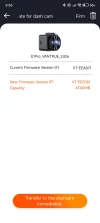
Upon entering the app, I was prompted that there was a firmware update available for the E1 Pro, proceeded to follow the prompts and within a few minutes the dashcam was updated and ready to go.

Screenshot_2025-05-09-06-56-34-236_com.sanjiang.vantrue.webp

Screenshot_2025-05-09-06-56-50-334_com.sanjiang.vantrue.webp
 
i can not see any different with new firmware
 
There has been some more updates to the Vantrue APP in the Google Play Store:


The latest version is now 2.1.01 and brings the following improvements:

- Modify known bugs
- Optimise the process of activating devices
- Add new APP functions


As you can see in the screenshots below, there is a new Community tab which doesn't have much at the moment but there is a direct Service tab. Also apparent in the app is the new activation process for Vantrue Intelligence, which will be making its debut in the older S1 Pro and the upcoming S1 Pro Max.

IMG_20250517_043403.webp


IMG_20250517_043423.webp
 
Vantrue E1 Pro Firmware Update
  • Release time: 2025-08-14 11:26:04
  • Version: E1Pro_VT-EEH111
  • File size: 47.5M


Changelog:


Important Updates:
  • Added a Entry/Exit Mode in Parking settings with three settings: Auto, ACC, and G-Sensor. (Note: If the ACC wire was previously connected incorrectly, please select the G-Sensor option; otherwise, Parking Mode will not function properly.)
  • Added Turkish and Czech language options to the main unit.
  • The screen-off protection temperature has been adjusted from 65°C to 55°C, and the detection time has been reduced from 10 minutes to 5 minutes, providing earlier protection for the display screen.

Other Updates:
  • Fixed the translation for 'Privacy Mode' in Russian.
  • All 3840×2160P resolutions have been updated to display as 4K.
  • In Parking Mode, all collision event videos are now moved to the Event folder.
  • Blocked certain 5G Wi-Fi frequency bands to comply with regulations in specific regions.
  • Optimized the logic linking the PlatePix and HDR timers, and added related prompt messages.
  • Added a prompt message when enabling Privacy Mode.

 
Thanks for the heads up on new firmware, have to install this one next. 👍
 
Six-Month Follow-up of the Vantrue E1 Pro Dash Camera

Just sharing my thoughts here after spending six months with the Vantrue E1 Pro. Despite a number of models also available to me by the same and other brands, the E1 Pro has remained my main daily driver in the rear of my vehicle (although I've had to use a female USB-C to USB-C coupler to get it to the back of my car!).

The fact that this has the powerhouse Starvis 2 IMX678 in a tiny cube form factor, makes it the perfect choice for the unassuming dashcam surveillance device. I thought I would miss the presence of a touchscreen, but since I'm not interacting it with 95% of the time, this hasn't been a concern, and WiFi is on board to connect when I need to. I do wish it had WiFi 6 though to enable faster extraction of video footage when I require it to.

Vantrue has also supported this model with a couple of firmware updates since it's launch, adding PlatePix timer improvements, and also revised shut-off logic in hotter climates. The Vantrue E1 Pro has suited my needs perfectly in this time without fuss, and performed exceptionally well.
 
Vantrue E1 Pro Firmware Update
  • Release time: 2025-09-29 11:26:04
  • Version: E1Pro_VT-EEI231
  • File size: 97.5M


Changelog:


Important Updates:
  • Improved the LTE module activation process and enhanced connection stability.
  • Removed the creation date setting to fix mismatches between time zones and video timestamps.

Other Updates:
  • Corrected the Japanese translation for Parking Mode enter/exit options.
  • Added support for exFAT format memory cards.
  • Adjusted certain 5G Wi-Fi frequency bands to resolve regional conflicts.
  • Optimized Parking Mode functionality.
  • Improved LTE file upload performance.

 
Vantrue E1 Pro Firmware Update
  • Release time: 2025-10-21 11:26:04
  • Version: E1Pro_VT-EEJ151
  • File size: 47.5M


Changelog:

  • Optimised the vehicle tracking feature to improve GPS location and time updates.
  • Fixed an issue where GPS time was incorrect upon startup.
  • Improved playback smoothness on the device.
  • Optimised GPS data archiving on the memory card to fix incorrect date entries (next-day data appearing under the previous date).
  • Fixed mosaic or screen distortion issues during playback of some 1920x1080 videos.

 
Vantrue E1 Pro Firmware Update
  • Release time: 2025-12-01 11:26:04
  • Version: E1Pro_VT-EEK211
  • File size: 47.8M


Changelog:

  • Fixed the issue where Parking Mode Quick Start showed as enabled in settings but no icon appeared on the device
  • Corrected some Spanish translations
  • Improved formatting speed for 1TB SD cards
  • Optimised real-time preview loading in the app
  • Fixed incorrect video names in the message centre uploads
  • Fixed an error that occurred when formatting a 256GB SD card on a computer in NTFS format and then attempting to format it again on the device

 
Vantrue E1 Pro Firmware Update
  • Release time: 2026-04-02 11:26:04
  • Version: E1Pro_VT-EFB271
  • File size: 47.8M


Changelog:

  • Resolved a problem where the G-sensor sensitivity decreased after exiting the collision quick-start mode
  • Added file pagination feature in the app
  • Updated the memory card file system to optimise startup time when using high-capacity storage cards
  • Added system time recovery after abnormal RTC battery power interruptions
  • Added menu settings saving function (effective after upgrading to this version and will take effect from the next update)
  • Optimised parking monitoring and added automatic exit from parking mode based on vehicle speed
  • Locked files in parking mode are now saved in the 'Parking' folder
  • In collision detection mode the screen will now remain off during recording
  • Updated the default system time to January 1, 2026

 
Back
Top