rcg530
Well-Known Member
- Joined
- Jan 23, 2021
- Messages
- 2,676
- Reaction score
- 4,507
- Location
- California
- Country
- United States
- Dash Cam
- 70mai, BlackVue, Thinkware, Vantrue, Vueroid, VIOFO


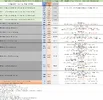
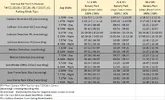
This extremely odd behavior could not be replicated by Vantrue support engineers. Vantrue recorded a video showing it working correctly. If I didn't have the video showing it wasn't working before using the app to change it, nobody would believe me that it even happened. The "Image Quality" setting would remain at whatever I selected it to be if I didn't power cycle the dash camera. At Vantrue's request, I created a screen capture using the Vantrue app to list all of the settings in the N4 Pro S to see if any other setting might be impacting this issue.I was going to get a frame grab from a video from today's drive with PlatePix turned off. This morning, I switched the N4 Pro S "Image Quality" setting to "Standard", exited the settings menus and let it start recording. I then powered down the N4 Pro S. About 50-minutes later, I powered up all of the dash cameras in this car as I started my weekly drive. When I pulled the footage from the N4 Pro S, I found the footage was once again recorded with PlatePix enabled. I confirmed that the "HDR Timer" and "PlatePix Timer" were both turned off. I ran a test and found that PlatePix is getting restored as the "Image Quality" setting across power downs of the dash camera. Front camera firmware EEK141.
View attachment 88855
I'm reporting this behavior to Vantrue now....
Vantrue has stated they've reproduced my issue with the "Image Quality" setting not staying in place across power cycles of the dash camera. They're working on a fix now.I just tried this again with the "Image Quality" set to "Standard" by the app and then use the menus to change it to "PlatePix". The "Image Quality" setting remained "PlatePix" as long as the dash camera remained powered up. When I power cycled the dash camera [long press of the side power button to turn it off, wait about 10 seconds, and the a press of the side power button to power it up], the "Image Quality" setting went back to "Standard". The problem seems to be that the on screen/menus cannot store the "Image Quality" setting in whatever location the N4 Pro S pulls the setting value from during a power up event. Using the Vantrue app does seem to be able to change the setting and have it survive a power cycling of the dash camera. I have video evidence of this behavior that I'll send to Vantrue. For now, I will have to set the Image Quality setting via the app only.


I received a test firmware [EEL241] to resolve the "Image Quality" setting not staying as set across a power cycling of the dash camera. I ran a series of tests with EEL241 installed and the "Image Quality" setting remains in place as it should across power cycling of the dash camera.Vantrue has stated they've reproduced my issue with the "Image Quality" setting not staying in place across power cycles of the dash camera. They're working on a fix now.