Vantrue Nexus 5 FIRMWARE (Release time: 12/10/2025)

Yeah i saw that, will go for a short ride soon, and then upgrade when i get home.
There seem to be a on PC upgrade procedure published 06-29 i assume this is for the 06-26 released firmware
 
Firmware mod based on N5_VT-ECD201

Changelog:
1) Added once per minute monitoring of the chipset temperature to the file on the memory card T.txt. Create a file with this name in the root of the SD-card to start monitoring or delete this file if monitoring is not needed. Thermal monitoring use /sys/class/thermal/thermal_zone0/temp as source of values in thermal zone (internal CPU sensor).
2) Increased bitrate for 2592x1944 30 fps and 2560x1440 30 fps - increased to 31200 Kbit/sec

Resolutions - bitrates table:
2592x1944 30fps - default value 15600 Kbit/sec increased to 31200 Kbit/sec
2560x1440 30 fps - default value 14000 Kbit/sec increased to 31200 Kbit/sec
1920x1080 30fps - default value 9600 Kbit/sec
1280x720 30fps - default value 3600 Kbit/sec

Download link
 
Last edited:
Ok, I have installed new mod firmware and at properties it says 12 000 Kbit. Something is wrong!
Second issue... Cabin camera it's purple l. I didn't have this problem with the latest official firmware.
 
Second issue... Cabin camera it's purple l. I didn't have this problem with the latest official firmware.
This is the firmware version for pre-production models.
Therefore, for those who have a serial number, it is not suitable, due to problems with the cabin camera. At the time of the release of the MOD firmware, this was unknown.
 
As @Karagandinez states official N5_VT-ECD201 firmware works with inverse connected IR filter - as it is was in preproduction units. So Mod FW was build for preproduction units. You may use it for production units but cabin camera will be purple.
About 12000 kbit/sec bitrate for front camera - it is not normal, could you please show bitrate info screen?
 
  • Like
Reactions: gse
As @Karagandinez states official N5_VT-ECD201 firmware works with inverse connected IR filter - as it is was in preproduction units. So Mod FW was build for preproduction units. You may use it for production units but cabin camera will be purple.
About 12000 kbit/sec bitrate for front camera - it is not normal, could you please show bitrate info screen?
Ok, I don't have any registration number under the cam, so I i am a little bit confused.
I would reload the mod firmware and take a picture. After I saw that purple image I have switched to original one immediately.
 
Ok, I don't have any registration number under the cam, so I i am a little bit confused.
I would reload the mod firmware and take a picture. After I saw that purple image I have switched to original one immediately.
where can we find the originl FW ?
 
i'm a bit lost . is that the FW for the cams without serial number ? (which i have)
 
as vantrue asked me to test the camera, i prefer to stick with their official FW (at least for now)


right now i'm on the below version

issues are:
- purple interior
- constant card errors
- camera not making a sound when card error occurs (though this setting is on)
- no time stamp on the rear exterior camera


20230810_143214000_iOS.webp
 

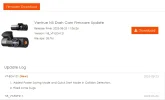
Vantrue N5 Dash Cam Firmware Update​

  • Release time: 2023-08-21 17:08:25
  • Version: N5_VT-ECH121
Despite what the Vantrue website says the version number is for the "new" N5 firmware, the file downloaded is still the ECF211 firmware. I downloaded the file to my computer, copied it to the microSD card for my production N5 dash camera and installed the "update".

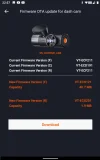
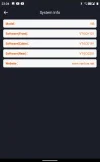
After the firmware installation, the firmware versions were displayed as:

1692685790062.webp

I downloaded the "updated" firmware file again and checked the md5 checksum of the files and the file length. The md5 checksum of the ECF211 firmware file and the ECH121 firmware file matched.

1692685645029.png

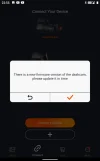
The Android Vantrue app then prompted me that new firmware was available for the N5.

1692685464839.png 1692685567162.png

I allowed the Vantrue app to download the updated firmware files to my Android device and I then allowed the Vantrue app to transfer those files to the N5. After the front/rear firmware files were installed, the version info looked like this:

1692685548662.png
 
I did the same, but on my N5, the firmware version of the rear camera has not changed.

Before firmware
View attachment 67011

After firmware
View attachment 67012
Strange that the Vantrue app didn't notice the rear camera firmware being out of date. The current method used by Vantrue to post firmware updates seems a bit problematic. I've reported my most recent N5 firmware update experience to my Vantrue contact by providing a link to my post in this thread.
 
My N5 firmware has just been updated, it's okay
 
The change log for the ECH121 front camera firmware has been posted on the website. Unfortunately, the downloaded file is still the older ECF211 front camera firmware file.

1692897171524.webp

I've asked Vantrue, why there are no options to download the cabin or rear camera firmware files. There are updates to the rear firmware, but there's no way to download it from the website. You have to use the Vantrue app to update the other cameras' firmware.
 
I have been informed that the rear camera firmware/software updates for the N5 are posted in a different location on the Vantrue website. The N5 includes the RC-06 rear camera and the firmware/software updates for that camera are posted here:

https://vantrue.net/Support/flleDlist/p_id/260.html

1692978388608.webp


I've sent a request to Vantrue to include a link to the rear camera firmware/software updates in the N5's page for firmware/software updates. A dash camera owner may not be aware (as I was not aware) that Vantrue posted the firmware/software updates for all of the modules involved in a dash camera product in separate locations.
 
so what are the latest versions?? i have
Front: VT-ECH121
Cabin: VT-ECD191
Rear: VT-ECF141

whats the change log? 1 item??
 
Back
Top