Viofo A139 Pro Won’t Enter Parking Mode w/PWC8

_DashCamGuy_

New Member
Joined
Apr 7, 2024
Messages
26
Reaction score
24
Location
Costa Mesa, Ca
Country
United States
Hey everyone. So I finally opted to grab a BBMC PowerCell8 Battery Pack for my Viofo A139 Pro 2ch. I got it with the spliced power harness to my Viofo, along with using the add-a-fuse for power directly to an ACC spot in my fuse box. Everything works great, and the PWC8 connects to my phone via the app.

The only thing that doesn’t seem to be working correctly is, when I shut off my car the dashcam does not enter parking mode like it did before (when I had it hardwired directly to my fuse box). It just stays on recording as if I’m still driving. I checked everything I could think of including my settings (which are set to: Parking Mode - Auto Event Detection, Parking Recording Timer - OFF, and Enter Parking Mode Timer - OFF). I even emailed and called into BBMC for support, and they told me to update my cameras firmware which it already was, and try a different or new SD card, which I did and got the same results.

Am I completely missing something here? Or is something wrong? Thanks for any advice and help!
 
Welcome to the club.

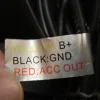
PC8 Output Cable 3-Wire (RED + YELLOW + BLACK)
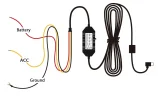
Viofo Hardwire Cable 3-Wire (RED + YELLOW + BLACK)
If you have;
Red to Red
Yellow to Yellow
Black to Black
Swap the Red & Yellow wires.
-Chuck
 

Attachments

  • 2 .webp
    2 .webp
    498.4 KB · Views: 89
  • 1 .webp
    1 .webp
    239.8 KB · Views: 86
  • HK4 .webp
    HK4 .webp
    170.1 KB · Views: 111
Last edited:
Welcome to the club.

PC8 Output Cable 3-Wire (RED + YELLOW + BLACK)
Viofo Hardwire Cable 3-Wire (RED + YELLOW + BLACK)
If you have;
Red to Red
Yellow to Yellow
Black to Black
Swap the Red & Yellow wires.
-Chuck


View attachment 75506
When I ordered my PC8, I got the included "Power Output Cable w/spliced VIOFO Type-C HK" cable. So I'm not sure if I can swap those wires?
 
Photos to confirm & verify please.
 
You may also want to try resetting the camera to default settings, then putting all your settings back in.

 
Thank you for the clear photos.
But, we need to confirm & verify the connection where the Viofo Hardwire Kit is connected to the PC8 Output Cable.
It's probably wrapped up under in electrical tape.
 
Thank you for the clear photos.
But, we need to confirm & verify the connection where the Viofo Hardwire Kit is connected to the PC8 Output Cable.
It's probably wrapped up under in electrical tape.
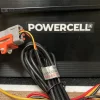
That's the thing, there is no connection like that, since BBMC provided that in this 1 single cable. Maybe here? After that, it goes straight to the USB-C end where it plugs into the dash camera power input.
IMG_2154.webp
 
This video shows how BBMC makes their “one piece” PC8 + Viofo Hardwire cable.
See the part at 2:45

We need to confirm & verify correct Red + Yellow wire orientation.
Grab hold of the output cable at the PC8 and follow it all the way back to the dash cam.
About halfway to the dash cam you will find this connection.
 
The PC8 dashcam output power cable has the yellow wire for constant power, the red wire for accessory/switched power and black for ground. The VIOFO hardwire kit has a red wire for constant power, a yellow wire for accessory/switched power and a black wire for ground. If it's a cable obtained from BBMC, then it likely is connected correctly. I assume it's possible to have been spliced together incorrectly. I've heard before that it's hard to detect where the BBMC pre-spliced cable is spliced together. If the red/yellow wire connections were mixed up at the splice location, the dash camera would be turning off when the vehicle's charging power to the PC8 was turned off. The "large object" in your picture is a magnet used to reduce radio frequency interference (RFI).
 
Thanks guys. I too thought that since I got the BBMC pre-sliced power cable that maybe my issue is with the Dashcam or elsewhere, but I guess anything is possible. @Panzer Platform I'll have more time this Thursday to go back and trace my cable to the spliced connection and report back. Ugh annoying I'm having this issue when the cable should have came correctly spliced from BBMC :/ (whole reason I got it so I didn't have to splice my own)
 
Thanks guys. I too thought that since I got the BBMC pre-sliced power cable that maybe my issue is with the Dashcam or elsewhere, but I guess anything is possible. @Panzer Platform I'll have more time this Thursday to go back and trace my cable to the spliced connection and report back. Ugh annoying I'm having this issue when the cable should have came correctly spliced from BBMC :/ (whole reason I got it so I didn't have to splice my own)
Did you try resetting the camera back to default settings yet?
 
I did, and didn’t seem to work :/
Do you still have the original hardwire kit still hooked up to the fuse box?
Can you hook it back up to see if parking mode works correctly?
 
the dash camera would be turning off when the vehicle's charging power to the PC8 was turned off.
Could I test this by simply unplugging the fuse tap going to my ACC fuse location that I have installed for the PC8 while the car is running? Or did I understand that incorrectly.
 
Do you still have the original hardwire kit still hooked up to the fuse box?
Can you hook it back up to see if parking mode works correctly?
I don’t, but I still have it available. Would just need to re-attach some add-a-fuses to it. I could do that this Thursday. But when I had it hardwired to the fuse box, parking mode was working correctly.
 
when I had it hardwired to the fuse box, parking mode was working correctly.
This is the biggest clue.
If parking mode was working before you installed the PC8, and now it’s not, my first guess is to suspect the red & yellow wires are reversed on the “one piece” spliced Output Cable & Viofo Hardwire Cable.

If you had a spare PC8 Output Cable, you could connect it to your previous Viofo Hardwire Cable, and test if parking mode works.
 
This is the biggest clue.
If parking mode was working before you installed the PC8, and now it’s not, my first guess is to suspect the red & yellow wires are reversed on the “one piece” spliced Output Cable & Viofo Hardwire Cable.

If you had a spare PC8 Output Cable, you could connect it to your previous Viofo Hardwire Cable, and test if parking mode works.
I was going to email back BBMC. Should I ask them to send me another spliced, or unspliced cable? Or both?
 
I was going to email back BBMC. Should I ask them to send me another spliced, or unspliced cable? Or both?
We need to correctly diagnose the malfunction before ordering parts / attempting a repair.
But that's just me.
 
We need to correctly diagnose the malfunction before ordering parts / attempting a repair.
But that's just me.
I won’t have time/daylight to diagnose until Thursday, so was thinking if BBMC could send me an extra cable in the mean time (for free), that could save me on shipping times later. But yes I agree I need to diagnose my current cable before I know for certain what the issue is.
 
Back
Top