
You are using an out of date browser. It may not display this or other websites correctly.
You should upgrade or use an alternative browser.
You should upgrade or use an alternative browser.
VIOFO A229 Pro FIRMWARE
- Thread starter Karagandinez
- Start date

DashcamDriversGermany
Active Member
- Joined
- Jan 23, 2024
- Messages
- 62
- Reaction score
- 126
- Location
- Germany
- Country
- Germany
- Dash Cam
- more than 40 different models from 6 brands
Yea Privacy Mode and Super Night version are intriguing, some more info on these would be good.
Regarding Privacy Mode
By the european dsgvo you are not allowed to record with almost unlimited prerecord (depending on sd-card-size) if you really take the law word by word.
In standart-mode every dashcam for sure overwrites the oldest video files with the newest files but depending on sd-card-size you might have hours of videos on the sd-card and this can be against data protection laws here in europe because you are only allowed to save the videos if there is a proper reason.
The dsgvo is an european guideline and the countries in europe are making their laws based on that guideline. So it's a bit different in every country.
It's not very common to get any problems.
But from time to time there are cases, especially if the sd-card gets confiscated in a traffic stop or in an accident and for example in germany the fines can be quite high aprox. 500-1000€/$
I don't know anybody in person that got problems, but the customers often ask for that for example here in germany and they will only use a dashcam if there is such mode.
If you activate the privacy mode, it is reducing the prerecord that is permanently stored on the sd-card.
If you set the dashcam to privacy-mode the loop files are limited to 1min and the dashcam asks to format sd-card.
After that the dashcam is only saving a maximum of two loop files per perspective on the sd-card (so max. 2min prerecord) except for emergency records. They are saved permanently without limitation.
2min prerecord is most of the time considered "acceptable" by the data protection offices here because some kind of prerecord is necessary because otherwise a dashcam can not be used in the usecase it is intended to use for.
(I think there are file limitations for parking mode as well, but I`m not 100% sure what kind of)
Viofo already had some kind of special firmware for this use-cases since at least 2023 if you asked their support for that.
But we and I also believe others asked in the beginning of august that this kind of mode should be implemented in the standart-firmware for the future with default = off so that the users that need this mode can use it out of the box.
I don't know if they implemented this in the firmware because of all the demands or our demands or if this was planned anyway. But we are happy, that viofo did this mode to match a safe usecase here in europe. 🙂
Others popular models should/seem to follow with further firmware-updates like A119V3/VS1/A139Pro in the next weeks
Other popular models like A229Plus/Pro/Mini2 already have it with the last firmwareupdates and the A329 has it since release.
For Users in Australia or the US this mode might be irrelevant. But for european customers this is important for users that will go sure to use their dashcam as good as possible in compliance with the laws we have here.
If this laws are good might be a whole other kind of question. But unfortunately we have to deal with this kind of stuff here.
Last edited:
User_
New Member
If I use the data protection mode, would it make sense to use a small micro SD as only 2 files are saved and overwritten again and again.
In the app 3.2 18 i dont see the data protection mode?
In the app 3.2 18 i dont see the data protection mode?
User_
New Member
I found it, it is not displayed in the app, only in the camera menu

lufa6977
Well-Known Member
- Joined
- Jul 22, 2024
- Messages
- 1,725
- Reaction score
- 2,025
- Location
- Virginia, Shenandoah Valley
- Country
- United States
- Dash Cam
- Vueroid S1-4K, Viofo A129 Pro Duo, A229 Pro, IR, Telephoto
I feel like the iPhone app v4.2.5 does not match the new FW…
What options are different between the app and what is shown when looking at the dash cam screen?
OP
OP

Karagandinez
Well-Known Member
- Joined
- Nov 27, 2020
- Messages
- 3,031
- Reaction score
- 4,050
- Location
- Deutschland
- Country
- Germany
- Dash Cam
- At the moment Viofo, Vueroid and Vantrue

Aktualisiert am 12.12.2024
1. Add Bluetooth Button Function for A129 Pro/A129 Duo/A129 Plus/A229 Duo.
2. Add Privacy Mode for A229 Pro/A229 Plus/A329/VS1.
3. Add Timelapse 1 fps (Night Vision), Stamp Text Color options for A229 Pro/A229 Plus.
4. Add Parking Mode option for Bluetooth for A229 Pro/A229 Plus.
5.Fix known bugs.

VIOFO App - App Store
Download VIOFO by Shenzhen Viofo Technology Co., Ltd on the App Store. See screenshots, ratings and reviews, user tips, and more apps like VIOFO.
 apps.apple.com
Version 4.2.6
1. Add Bluetooth Button Function for A129 Pro/A129 Duo/A129 Plus/A229 Duo.
2. Add Privacy Mode for A229 Pro/A229 Plus/A329/VS1.
3. Add Timelapse 1 fps (Night Vision), Stamp Text Color options for A229 Pro/A229 Plus.
4. Add Parking Mode option for Bluetooth for A229 Pro/A229 Plus.
5.Fix known bugs.
Last edited:
lufa6977
Well-Known Member
- Joined
- Jul 22, 2024
- Messages
- 1,725
- Reaction score
- 2,025
- Location
- Virginia, Shenandoah Valley
- Country
- United States
- Dash Cam
- Vueroid S1-4K, Viofo A129 Pro Duo, A229 Pro, IR, Telephoto
@VIOFO-Support
I think this latest app update for IOS may be a touch broken, going to have to experiment with it. IOS 15.8.3, iPhone 7+, A229 Pro FW ...241206.
When connected via WiFi and app live view initially worked. While connected I changed the Auto HDR to a time to enable a few minutes in the future. Went back to live view, still connected, flashing red ball of glory, can see traffic pass in front of me, HDR enables and I get the two channel started announcement, and live view freezes but the red ball of glory is still flashing but no live action on a frozen video screen. The switch camera icon is inactive, but the Snapshot icon works.
I go back to the Gear menu and repeat the above process and on HDR starting the live view screen goes black but the red ball of glory is still flashing like it is recording, which it is. Deleted the app and reinstall, restarted the car, power cycle the dash cam, added removed the interior camera. So far I have been unable to go from a live view black screen to a live view screen that shows passing cars.
I did notice that on Gear Menu, the option for selecting camera view was set for Rear Overlaid ( I have a telephoto and IR ), when setting to Front only, it would always go back to Rear Overlaid. I have an iPad with the 4.2.5 app and will next see if it works with the camera without issue.
edit::
Works fine in app 4.2.5 ... think I will re-flash the FW and see what happens.
edit:: crisis averted. 🙂 I did a re-flash of the 241206 FW and that cleared the problem. Might could have done a reset but a re-flash is a better option.
I think this latest app update for IOS may be a touch broken, going to have to experiment with it. IOS 15.8.3, iPhone 7+, A229 Pro FW ...241206.
When connected via WiFi and app live view initially worked. While connected I changed the Auto HDR to a time to enable a few minutes in the future. Went back to live view, still connected, flashing red ball of glory, can see traffic pass in front of me, HDR enables and I get the two channel started announcement, and live view freezes but the red ball of glory is still flashing but no live action on a frozen video screen. The switch camera icon is inactive, but the Snapshot icon works.
I go back to the Gear menu and repeat the above process and on HDR starting the live view screen goes black but the red ball of glory is still flashing like it is recording, which it is. Deleted the app and reinstall, restarted the car, power cycle the dash cam, added removed the interior camera. So far I have been unable to go from a live view black screen to a live view screen that shows passing cars.
I did notice that on Gear Menu, the option for selecting camera view was set for Rear Overlaid ( I have a telephoto and IR ), when setting to Front only, it would always go back to Rear Overlaid. I have an iPad with the 4.2.5 app and will next see if it works with the camera without issue.
edit::
Works fine in app 4.2.5 ... think I will re-flash the FW and see what happens.
edit:: crisis averted. 🙂 I did a re-flash of the 241206 FW and that cleared the problem. Might could have done a reset but a re-flash is a better option.
Last edited:

markus
Active Member
- Joined
- May 18, 2021
- Messages
- 131
- Reaction score
- 71
- Location
- Toronto, Ontario
- Country
- Canada
- Dash Cam
- VIOFO A229 Pro 2ch
I've downloaded the latest iOS app (v4.2.6 - 13th December 2024) and I still see the issue whereby when opening the menu (tap the three horizontal line icon in the top left of the app when on the main screen) and tapping the "FIRMWARE" option returns an error. I'm not sure what the option is meant to so, one presumes download new firmware so you can update the camera via the app rather than updating the firmware on the SD card and doing it that way.
Anyway, I did a little more digging into things, and I think I know what the underlying problem is.
As we know, it's trying to load this url which fails:
I thought I'd pop that url, without the last part (the xml file) into a browser, that gives a page not found.
I then thought to grab the latest firmware file from the website and take a look at what URL that is downloaded from
For the front cam it is:
For the rear cam it is:
It then occurred to me that the different between the two urls is the host and the file.
So I crafted a URL of:
If I load that into a browser it is successful and I get this response:
Using a proxy rewrite rule, I had the host on the url rewritten. I see the same data coming back to the app, and it displays a dialog stating:
"Current firmware is up to date"
Either that is just because I'm poking around, or that the very latest firmware isn't available for the app just yet.
Regardless of that, maybe the problem simply is that the app isn't accessing the URL it should be.
Anyway, I did a little more digging into things, and I think I know what the underlying problem is.
As we know, it's trying to load this url which fails:
Code:
https://viofo.com/download/firmware/A229Pro/filedesc.xmlI thought I'd pop that url, without the last part (the xml file) into a browser, that gives a page not found.
I then thought to grab the latest firmware file from the website and take a look at what URL that is downloaded from
For the front cam it is:
Code:
https://viofotech.com/download/firmware/A229Pro/FWA229P.binFor the rear cam it is:
Code:
https://viofotech.com/download/firmware/A229Pro/EthcamTxFW.binIt then occurred to me that the different between the two urls is the host and the file.
So I crafted a URL of:
Code:
https://viofotech.com/download/firmware/A229Pro/filedesc.xmlIf I load that into a browser it is successful and I get this response:
Code:
<DownloadDesc>
    <FilePath>http://www.viofo.com/download/firmware/A229Pro/FWA229P.bin</FilePath>
    <Version>V1.1</Version>
    <CheckMethord>none</CheckMethord>
    <CheckValue>74afa1b113dfed35405c845f82b39318</CheckValue>
</DownloadDesc>
Using a proxy rewrite rule, I had the host on the url rewritten. I see the same data coming back to the app, and it displays a dialog stating:
"Current firmware is up to date"
Either that is just because I'm poking around, or that the very latest firmware isn't available for the app just yet.
Regardless of that, maybe the problem simply is that the app isn't accessing the URL it should be.
OP
OP
Karagandinez
Well-Known Member
- Joined
- Nov 27, 2020
- Messages
- 3,031
- Reaction score
- 4,050
- Location
- Deutschland
- Country
- Germany
- Dash Cam
- At the moment Viofo, Vueroid and Vantrue

firmware
Download the latest VIOFO firmware updates for every dash cam model. Step-by-step instructions, version notes, and SD card requirements.
 www.viofo.com
FWA229P.bin V1.3.1_241206
Change Log
1. Added: Turn on/off the parking mode by BTR200 remote
2. Fixed: Other bugs
EthamTxFw.bin V1.3_241204
Change Log
1. Fixed: Other bugs
Why VIOFO does not fix this bug?I've downloaded the latest iOS app (v4.2.6 - 13th December 2024) and I still see the issue whereby when opening the menu (tap the three horizontal line icon in the top left of the app when on the main screen) and tapping the "FIRMWARE" option returns an error. I'm not sure what the option is meant to so, one presumes download new firmware so you can update the camera via the app rather than updating the firmware on the SD card and doing it that way.
Anyway, I did a little more digging into things, and I think I know what the underlying problem is.
As we know, it's trying to load this url which fails:
Code:https://viofo.com/download/firmware/A229Pro/filedesc.xml
I thought I'd pop that url, without the last part (the xml file) into a browser, that gives a page not found.
I then thought to grab the latest firmware file from the website and take a look at what URL that is downloaded from
For the front cam it is:
Code:https://viofotech.com/download/firmware/A229Pro/FWA229P.bin
For the rear cam it is:
Code:https://viofotech.com/download/firmware/A229Pro/EthcamTxFW.bin
It then occurred to me that the different between the two urls is the host and the file.
So I crafted a URL of:
Code:https://viofotech.com/download/firmware/A229Pro/filedesc.xml
If I load that into a browser it is successful and I get this response:
Code:<DownloadDesc> <FilePath>http://www.viofo.com/download/firmware/A229Pro/FWA229P.bin</FilePath> <Version>V1.1</Version> <CheckMethord>none</CheckMethord> <CheckValue>74afa1b113dfed35405c845f82b39318</CheckValue> </DownloadDesc>
Using a proxy rewrite rule, I had the host on the url rewritten. I see the same data coming back to the app, and it displays a dialog stating:
"Current firmware is up to date"
Either that is just because I'm poking around, or that the very latest firmware isn't available for the app just yet.
Regardless of that, maybe the problem simply is that the app isn't accessing the URL it should be.
DaveX81
New Member
They put it down intentionally. Problem is that viofo was never good in communications. Parking mode based on GPS was a promised feature in one of my previous viofo models which never really worked and they don‘t even mention it anymore in newer models. It was one of the features i even made my decision to buy viofo. Now with the latest firmware we can at least turn it on or off with the button manually.Why VIOFO does not fix this bug?
OTA Updates was working fine with my 622GW. Unfortunately i don‘t think it will every really work with viofo.
lufa6977
Well-Known Member
- Joined
- Jul 22, 2024
- Messages
- 1,725
- Reaction score
- 2,025
- Location
- Virginia, Shenandoah Valley
- Country
- United States
- Dash Cam
- Vueroid S1-4K, Viofo A129 Pro Duo, A229 Pro, IR, Telephoto
@VIOFO-Support
I had a failure of Live View again yesterday. Connect via WiFi and Live View is blank, cam is recording, I can take a snap shot via the app but, can not switch camera views. Fiddle-farted with it for about 20 minutes and on one of the power reboots, app shut down, and WiFi restart, the Live View began working again. I had the Interior Camera set to ON, but did not have it plugged in initially, so I do wonder if the app fails to display when it finds an active channel but has no signal input? This started with the 4.2.6 app version, never was an issue on 4.2.5,
I had a failure of Live View again yesterday. Connect via WiFi and Live View is blank, cam is recording, I can take a snap shot via the app but, can not switch camera views. Fiddle-farted with it for about 20 minutes and on one of the power reboots, app shut down, and WiFi restart, the Live View began working again. I had the Interior Camera set to ON, but did not have it plugged in initially, so I do wonder if the app fails to display when it finds an active channel but has no signal input? This started with the 4.2.6 app version, never was an issue on 4.2.5,
Last edited:
lufa6977
Well-Known Member
- Joined
- Jul 22, 2024
- Messages
- 1,725
- Reaction score
- 2,025
- Location
- Virginia, Shenandoah Valley
- Country
- United States
- Dash Cam
- Vueroid S1-4K, Viofo A129 Pro Duo, A229 Pro, IR, Telephoto
@VIOFO-Support
Criminy!! Acting up again, and it may have to do with the Interior Camera being set to on, but not attached. Not sure.
This time, in car, engine running, WiFi into A229 Pro and Live View is there, thankfully. Telephoto is attached and Interior is not, but Interior Cam is set to on. I press the switch view/cam/whatever and the view moves from the main lens to the telephoto. The telephoto image then begins to flash on and off, hit switch view again and I have the telephoto in the left box and regular view for the remainder of the screen. Now both images are flashing on and off. Switch to main lens and image becomes steady. Plug in the interior cam and can repeat the above except now it includes the interior camera flashing on and all also. Leave interior cam in, turn on and off the feature and the above continues. Leave interior cam plugged in and set to on, exit app, restart app and now can switch screens without any issues. None of the above occurs with the previous app release.
I have also noticed the camera is a little slower at responding to voice commands, but has so far not responded to the radio playing, so maybe some improvements there. Dash cam is a little slower to acknowledge 2 or 3 cam recording when adding or removing a camera. I presume this is due to closing down a file and starting a new file.
IOS 15.8.3, iPhone 7+, A229 Pro FW ...241206
Criminy!! Acting up again, and it may have to do with the Interior Camera being set to on, but not attached. Not sure.
This time, in car, engine running, WiFi into A229 Pro and Live View is there, thankfully. Telephoto is attached and Interior is not, but Interior Cam is set to on. I press the switch view/cam/whatever and the view moves from the main lens to the telephoto. The telephoto image then begins to flash on and off, hit switch view again and I have the telephoto in the left box and regular view for the remainder of the screen. Now both images are flashing on and off. Switch to main lens and image becomes steady. Plug in the interior cam and can repeat the above except now it includes the interior camera flashing on and all also. Leave interior cam in, turn on and off the feature and the above continues. Leave interior cam plugged in and set to on, exit app, restart app and now can switch screens without any issues. None of the above occurs with the previous app release.
I have also noticed the camera is a little slower at responding to voice commands, but has so far not responded to the radio playing, so maybe some improvements there. Dash cam is a little slower to acknowledge 2 or 3 cam recording when adding or removing a camera. I presume this is due to closing down a file and starting a new file.
IOS 15.8.3, iPhone 7+, A229 Pro FW ...241206
markus
Active Member
- Joined
- May 18, 2021
- Messages
- 131
- Reaction score
- 71
- Location
- Toronto, Ontario
- Country
- Canada
- Dash Cam
- VIOFO A229 Pro 2ch
Why VIOFO does not fix this bug?
I cannot remember wether older versions of the app would download the firmware. It's basically impossible to get an older version of the app, let alone put it on a device, thus hard to figure out what is really going on.
My thought is that you'd click the button, it downloads firmware, and then what? If you were connected via wifi to the camera would it then allow you to update the cam, or would you need to do something else to get the firmware over to the camera?
I have sent you a PM.@VIOFO-Support
Criminy!! Acting up again, and it may have to do with the Interior Camera being set to on, but not attached. Not sure.
This time, in car, engine running, WiFi into A229 Pro and Live View is there, thankfully. Telephoto is attached and Interior is not, but Interior Cam is set to on. I press the switch view/cam/whatever and the view moves from the main lens to the telephoto. The telephoto image then begins to flash on and off, hit switch view again and I have the telephoto in the left box and regular view for the remainder of the screen. Now both images are flashing on and off. Switch to main lens and image becomes steady. Plug in the interior cam and can repeat the above except now it includes the interior camera flashing on and all also. Leave interior cam in, turn on and off the feature and the above continues. Leave interior cam plugged in and set to on, exit app, restart app and now can switch screens without any issues. None of the above occurs with the previous app release.
I have also noticed the camera is a little slower at responding to voice commands, but has so far not responded to the radio playing, so maybe some improvements there. Dash cam is a little slower to acknowledge 2 or 3 cam recording when adding or removing a camera. I presume this is due to closing down a file and starting a new file.
IOS 15.8.3, iPhone 7+, A229 Pro FW ...241206
I kept thinking about it too. It would be great if someone from VIOFO shared what is the expected behaviour of that FW download feature.I cannot remember wether older versions of the app would download the firmware. It's basically impossible to get an older version of the app, let alone put it on a device, thus hard to figure out what is really going on.
My thought is that you'd click the button, it downloads firmware, and then what? If you were connected via wifi to the camera would it then allow you to update the cam, or would you need to do something else to get the firmware over to the camera?
Design challenges that I see:
- when you connect to dashcam wifi, you may potentially not be able to access to internet using your phone data plan (and check for newer FW availability. Gut feeling tells me that this should not be a problem for modern phones, can VIOFO confirm that?
- that you may have multiple dashcams, controlled by the same phone; in theory, the app would keep track of each dashcam (I expect the phone up to know the serial number, model, etc. for each VIOFO dashcam it connects), and then when you check for a new FW, download the right FW for the right dashcam and upload the right FW to the right dashcam. That should be trivial to do IMHO
What I cannot understand why VIOFO does not fix this FW update feature. I have 2 different VIOFO dashcams on two different vehicles, and the process currently is cumbersome!
Car1:
- get the original 32Mb VIOFO memory card, and format it on my laptop using SD Card formatter https://www.sdcard.org/downloads/formatter/sd-memory-card-formatter-for-windows-download/
- copy both front and rear camera FW on that SD card
- now go to the car, remove the big memory card, put the 32Mb card, turn on the car
- watch FW update process for the front, and then after reboot, for the rear camera
- meantime, do full format of the big (256MB high endurance) using SD card formatter. Takes quite a bit!
- once dashcam completed the FW update, it messes up the 32Mb card and says "format the SD card!" (not a new issue, always been like that) - you cannot re-use the same SD card to update FW on the second dashcam, you have to format it again
- shut down the dashcam, remove 32Mb card, put the big one back, boot up
- even though you fully formatted the card, it will still ask you to to format. Tinker with menu, get WiFi enabled
- connect your phone to dashcam, and format the daily use SD card
- double check the settings.
- exit the app and now you are done with Car 1
Car2:
- format that 32Mb card again, copy the FW again
- rinse and repeat everything you just did for Car1
How it should be:
- you connect your phone the dashcam
- check FW for updates
- (assume that there is one) the app asks you if you want to update FW at this time or not
- if you do, you click "update the FW"
- magic happens - the FW first downloaded on the iPhone, then uploaded to the dashcam, and the FW update process starts
- after FW update, the dashcam boots, and asks "would you like to format the SD card"? you should be able to chose either option, and continue to use the dashcam
BONUS POINT: Phone app SD card format command offers you two options: full format and fast format (makes sense to do a full format once in a while - just to ensure the reliability of recording operation)
VIOFO team - everyone on this forum appreciates the efforts you invest into fixing the bugs and improving the dashcam FW/features; can you please look into improving user experience with FW update? I think many folks on this forum will volunteer (including myself) to test FW update feature on real world setups... THANKS IN ADVANCE!
OP
OP
Karagandinez
Well-Known Member
- Joined
- Nov 27, 2020
- Messages
- 3,031
- Reaction score
- 4,050
- Location
- Deutschland
- Country
- Germany
- Dash Cam
- At the moment Viofo, Vueroid and Vantrue
At the request of users, Viofo made a firmware: V1.3.1_250220
which has a 4K 21:9 resolution setting for the main camera
along with a 2K P30 resolution for the rear/telephoto camera.
The application does not have this setting, but it is in the A229 Pro menu.
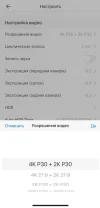
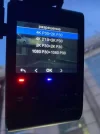
which has a 4K 21:9 resolution setting for the main camera
along with a 2K P30 resolution for the rear/telephoto camera.
The application does not have this setting, but it is in the A229 Pro menu.

TheSpanishInq
Active Member
- Joined
- Feb 26, 2020
- Messages
- 141
- Reaction score
- 72
- Location
- ~/
- Country
- Netherlands
- Dash Cam
- Viofo A229 Pro 2CH
Do you know how the 21:9 aspect ratio introduced in May last yearChanges that I noticed during setup after the firmware.
Video setting for front and rear cameras: 21:9
<snip>
differs from the one just released?which has a 4K 21:9 resolution setting for the main camera