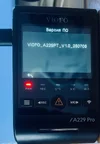
VIOFO A229 Pro FIRMWARE

A new section has appeared on the firmware site: A229 Pro Tele
It contains the firmware: FWA229PT_V1.0_250708 and EthcamTxFW_V1.3.1_250708.
@VIOFO-Support @viofo
What is the difference between these firmwares and the firmwares in the section: A229 Pro?
Are they interchangeable?
The firmware for them on official website are not interchangeable. But if you update the firmware for A229 Pro tele on A229 Pro, then it can support telephoto and 1080P rear camera.
 
Last edited:
Does anyone know what will happen if I update A229pro with firmware for A229pro telefoto without having a telephoto lens installed?
 
Does anyone know what will happen if I update A229pro with firmware for A229pro telefoto without having a telephoto lens installed?
Good question, not sure if it would work. Would make sense if Viofo locked it down so that the upgrade process wouldn't work.

I wonder what the difference is with the A229 Pro Tele, as it is being marketed as a separate model. I do wonder if it's just packaged with the RTC300 Telephoto or is it actually an A229 Pro with hardware revisions.
 
Hi,

I noticed my rear camera experience some sort of color shift, you can see it happen in the footage below. Notice how every few seconds the image turns slightly green and go back to normal?
Rear camera fw is V1.3.1_250118 (came with this fw, never updated it)
Does anybody know what is causing this and how to stop it from happening?

 
Hi,

I noticed my rear camera experience some sort of color shift, you can see it happen in the footage below. Notice how every few seconds the image turns slightly green and go back to normal?
Rear camera fw is V1.3.1_250118 (came with this fw, never updated it)
Does anybody know what is causing this and how to stop it from happening?

I think if you were to contact Viofo they would tell you to format your SD card and update the firmware.
There is relatively new/updated firmware for the rear cam, possible the main cam too.

Link to Viofo firmware: https://www.viofo.com/pages/firmware

Screenshot 2025-09-07 093439.webp
 
Hi guys, this pro tele version firmware brings brand new color style for the main channel, it is recommended that you upgrade.


a229pt.webp
 
Hi guys, this pro tele version firmware brings brand new color style for the main channel, it is recommended that you upgrade.
Could this be the effect of HDR being turned on during the day?
Personally, I don't turn it on during the day, although I should try.
 
Does anyone know what will happen if I update A229pro with firmware for A229pro telefoto without having a telephoto lens installed?
Nothing will happend, the main camera and the additional lens have their own firmware, and they will not affect each other.I think this tele version is just different in color from the previous version, the pro tele version brings better color style.
 
Could this be the effect of HDR being turned on during the day?
Personally, I don't turn it on during the day, although I should try.
I never turn it off. I think the HDR feature is also suitable on during the day, and it can be beneficial in most scenarios.
 
to update to a clean firmware from 229P later, you need to add the letter T to the name of the firmware being installed!!
For example!!
FWA229P.bin = FWA229PT.bin
The T firmware will crash and then everything will be as usual!!

And to install T firmware you need to do this!
FWA229PT.bin = FWA229P.bin
After firmware reset to factory settings and format - mandatory!!
 

Attachments

  • T.webp
    T.webp
    62.9 KB · Views: 141
Last edited:
to update to a clean firmware from 229P later, you need to add the letter T to the name of the firmware being installed!!
For example!!
FWA229P.bin = FWA229PT.bin
The T firmware will crash and then everything will be as usual!!
The official website is missing an LD boot file, so it is necessary to change the file name for the upgrade. Here is a compressed package containing the LD file. After decompression, place it in the root directory of the TF card, and the device will automatically upgrade upon startup.

https://drive.google.com/file/d/1eEruXuJ5njAWNAfxjfZCOBqPtYBnx1s_/view
 
V1.4_250918

1. Added: Long-press menu button for 2 seconds to enter the menu.

2. Added: Display vehicle voltage value in the video with HK6 hardwire cable.

3. Fixed: Other minor bugs
.
 
Long press menu button to enter the menu? Why the heck would they do that? It's always been long press to POWER OFF and one press to enter menu while in Recording Mode.
 
Last edited:
Interesting that the rear camera FW has not been updated, even the main one includes bug fixes
@Karagandinez - do you think VIOFO will post the a matching rear camera FW too?

Different topic - should I do full reset after FW update? Haven't done for a while, and do have random camera reboot issue (regardless of temperature, mem card format). I am thinking to use toothpick method (vs button or app reset options) - open for suggestions.
 
@Karagandinez - do you think VIOFO will post the a matching rear camera FW too?
If there are any issues with the rear camera, Viofo may release a firmware update for the rear camera.
If there are no issues with the rear camera, then a new firmware update is not necessary.
Different topic - should I do full reset after FW update?
It is advisable to perform a full reset after updating the firmware.
Haven't done for a while, and do have random camera reboot issue (regardless of temperature, mem card format).
First, check the dash cam power supply.
It's also worth trying a different memory card.
 
Interesting that the rear camera FW has not been updated, even the main one includes bug fixes
@Karagandinez - do you think VIOFO will post the a matching rear camera FW too?

Different topic - should I do full reset after FW update? Haven't done for a while, and do have random camera reboot issue (regardless of temperature, mem card format). I am thinking to use toothpick method (vs button or app reset options) - open for suggestions.
I highly recommend manual settings default after any firmware change. FYI, the hard reset button on the side of the camera will just power cycle the camera, it does not default the cameras settings.
 
Back
Top