Viofo A329S Review

Confused now, that says 60fps on only one channel what am I missing here sorry

As I recall, from past discussions here, or elsewhere, the Starvis II cams from VIOFO would easily do 60 FPS in one channel mode. They will also do 60 FPS in two channel but the second channel I don't think will be any more than 30 FPS. It seems, above 90 FPS causes heat issues, and whatever other bad things may occur. 🙂

Presently the VIOFO website shows the one and two channel offerings with a 60 FPS offering, with 3 channel they are not really saying. That is on the product/shop page for each channel count package.

I don't recall what VIOFO had previously published, but, most of us here, realise that when marketing FPS and bit rates are cited, one really needs to read the manual to know for sure. That does not excuse marketing giving incorrect information to the web dev team, but it would be better if companies gave a bit more thought to how they market the features.

Below is a screen cap from the VIOFO online A329S manual.


329sFPS.webp
 
Last edited:
As I recall, from past discussions here, or elsewhere, the Starvis II cams from VIOFO would easily do 60 FPS in one channel mode. They will also do 60 FPS in two channel but the second channel I don't think will be any more than 30 FPS. It seems, above 90 FPS causes heat issues, and whatever other bad things may occur. 🙂

Presently the VIOFO website shows the one and two channel offerings with a 60 FPS offering, with 3 channel they are not really saying. That is on the product/shop page for each channel count package.

I don't recall what VIOFO had previously published, but, most of us here, realise that when marketing FPS and bit rates are cited, one really needs to read the manual to know for sure. That does not excuse marketing giving incorrect information to the web dev team, but it would be better if companies gave a bit more thought to how they market the features.

Below is a screen cap from the VIOFO online A329S manual.


View attachment 81055
Nailed it.
 
As I recall, from past discussions here, or elsewhere, the Starvis II cams from VIOFO would easily do 60 FPS in one channel mode. They will also do 60 FPS in two channel but the second channel I don't think will be any more than 30 FPS. It seems, above 90 FPS causes heat issues, and whatever other bad things may occur. 🙂

Presently the VIOFO website shows the one and two channel offerings with a 60 FPS offering, with 3 channel they are not really saying. That is on the product/shop page for each channel count package.

I don't recall what VIOFO had previously published, but, most of us here, realise that when marketing FPS and bit rates are cited, one really needs to read the manual to know for sure. That does not excuse marketing giving incorrect information to the web dev team, but it would be better if companies gave a bit more thought to how they market the features.

Below is a screen cap from the VIOFO online A329S manual.


View attachment 81055
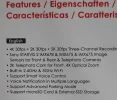
I pre ordered the A329s to get that free 256gb micro sd card, which means the online manual wasn't available yet. The latest online manual prior to the official release of of the a329s was for the a329. So at the time that I ordered the a329s, I only had the specs on the website and video reviews to rely on. The specs on the website as clearly shown in the screenshot I posted says 4k 60fps+2k 30fps+2k 30fps.
 

Attachments

  • IMG-8e9bb81893cc9573f3e6adfbeb88d22b-V.webp
    IMG-8e9bb81893cc9573f3e6adfbeb88d22b-V.webp
    40 KB · Views: 108
I pre ordered the A329s to get that free 256gb micro sd card, which means the online manual wasn't available yet. The latest online manual prior to the official release of of the a329s was for the a329. So at the time that I ordered the a329s, I only had the specs on the website and video reviews to rely on. The specs on the website as clearly shown in the screenshot I posted says 4k 60fps+2k 30fps+2k 30fps.

I completely agree, VIOFO boffed that big time, and, it is not the first time as I recall. The image I attached below, the one you posted, it is certainly misleading to the average customer when

4K Ultra HD 60fps/30fps Recording

is on the box. I do not know, but I suspect that is on all the A329x boxes...so it bounces somewhere between outright misleading or opportunistic marketing, leaving the customer to discover the complete story. In part, the verbiage is correct, but correct only within the context of how many channels are in use. VIOFO would be far better to use an asterisk and make a footnote about fps and channel count. IMO.

This sort of misinformation, or "opportunistic specs" such as claiming a dash cam is 4K when it really is a scaled up 2K seems to be an issue with a number of manufacturers, though it has gotten a bit better.


1749439762588.webp
 
I completely agree, VIOFO boffed that big time, and, it is not the first time as I recall. The image I attached below, the one you posted, it is certainly misleading to the average customer when

4K Ultra HD 60fps/30fps Recording

is on the box. I do not know, but I suspect that is on all the A329x boxes...so it bounces somewhere between outright misleading or opportunistic marketing, leaving the customer to discover the complete story. In part, the verbiage is correct, but correct only within the context of how many channels are in use. VIOFO would be far better to use an asterisk and make a footnote about fps and channel count. IMO.

This sort of misinformation, or "opportunistic specs" such as claiming a dash cam is 4K when it really is a scaled up 2K seems to be an issue with a number of manufacturers, though it has gotten a bit better.


View attachment 81057
And even if the box said it will run 30fps on all channels, it would've been too late because I already bought the product. I live overseas so I can't check what the box says before I buy it. So I really had nothing else to rely on but what the website says.
 
In some countries, returning merchandise is more of a bother than in the U.S.,of course it depends on how bought also. If from Amazon, and many people do get dashcams from Amazon, all we have to do is return to Amazon and we get a refund.

No doubt, you purchased based on published specs, specs which were inaccurate. VIOFO has proven to be quite honest with all of us, so I do not think they intentionally mislead in their advertisement. I think in the case of the back of the box, there is limited space for complete and accurate specs due to multiple languages, etc. None-the-less, what they did print is lacking in accuracy as far as channel count goes, for certain. I know from past experience, this shelf pack of theirs, and it is a quality shelf pack, can be quite expensive to manufacturer. In the U.S. it is almost cost prohibited and Asian printers are often used to produce the artwork and box due to reduce cost. Still, even then it is expensive.

As for what they had on the web site, that was just entirely incorrect. If they had shown 3 channels and done a 30fps for each channel, then it would have been correct.
 
But one of the selling points of the A329s is it's ability to run on 60fps, which is why I was sold to it. But it didn't say anywhere that it will run just on 30fps on 3 channels. I'm more on the part where it misleads people.

I was sold a product that didn't work as advertised.

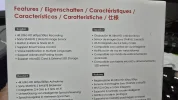
Where it is written on the A329S gift box that is recording at 60 fps? I can not see a single mention about 60 fps.

A329T-3CH-30FPS.webp

Where it is written on Viofo official website that A329S 3CH it is supporting 60FPS?

What is not working as advertised? The 30FPS?
 
Where is written on the A329S gift box that is recording at 60 fps? I can not see a single mention about 60 fps.
View attachment 81088
That's the back of the 3 channel retail box.
It does say 4K 60fps on the front of the box (bottom left)
1000058094.webp


Also, when you buy the A329S as a single channel option, that does have 60fps mentioned on it, and because it's the 1ch retail box, it doesn't say it's limited to 30fps when in multi-channel mode
 
Where is written on the A329S gift box that is recording at 60 fps? I can not see a single mention about 60 fps.
View attachment 81088
This is what's written in the box and the second photo is what it says on the spec sheet on the website. And it wasn't a gift box. I bought it.

EDIT: Viofo already corrected the misinformation on the website.
 

Attachments

  • 1749565208263.webp
    1749565208263.webp
    44.4 KB · Views: 124
  • 1749565303228.webp
    1749565303228.webp
    172.4 KB · Views: 131
That's the back of the 3 channel retail box.
It does say 4K 60fps on the front of the box (bottom left)
View attachment 81089


Also, when you buy the A329S as a single channel option, that does have 60fps mentioned on it, and because it's the 1ch retail box, it doesn't have 30fps mention it.
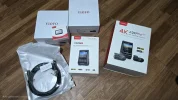
When they sent me my A329s, it was in a single channel box. The rear and cabin cameras came in their individual boxes.
 

Attachments

  • 1749565412690.webp
    1749565412690.webp
    316.9 KB · Views: 114
That's the back of the 3 channel retail box.
It does say 4K 60fps on the front of the box (bottom left)
View attachment 81089


Also, when you buy the A329S as a single channel option, that does have 60fps mentioned on it, and because it's the 1ch retail box, it doesn't say it's limited to 30fps when in multi-channel mode

This is an early sample version, the 4K 60fps is updated to 4K HDR icon in mass production.
 
Hi Guys.

How do you secure the SSD without sacrificing heat dissipation?

My SSD is in the glove box along with a flash light, the car's paperwork, some small tools etc. I believe that it's important for a storage device to remain stationary, especially when something is being written to it. I planned on putting it inside a pouch for it to be snug inside the glove box but when I held the SSD, it was warm. So I realized that putting it inside a pouch may elevate the generation of heat which is also bad for a storage device.

Here's what I'm hoping for:

1. Secured. The SSD to stay in place wherever you put it, especially when you go over a bump or a sharp turn.
2. A ventilated area that will help dissipate the heat of the SSD.
3. Easily accessible if I need to remove the SSD so I can review files on my computer.

Any ideas?
 
Last edited:
How do you secure the SSD without sacrificing heat dissipation?
Heavy duty sticky backed Velcro is probably a good solution, then you are only insulating part of one side.
A bit of vibration isn't an issue for a solid state drive, but you don't want impacts as it hits the sides of the glovebox, velcro should sort that.
The drive shouldn't produce a lot of heat for its amount of surface area, but putting it inside something insulating should be avoided.

Rubber tie down straps might be good for some situations, but they need something to tie it down to, and gloveboxes don't tend to have anything.
 
Heavy duty sticky backed Velcro is probably a good solution, then you are only insulating part of one side.
A bit of vibration isn't an issue for a solid state drive, but you don't want impacts as it hits the sides of the glovebox, velcro should sort that.
The drive shouldn't produce a lot of heat for its amount of surface area, but putting it inside something insulating should be avoided.

Rubber tie down straps might be good for some situations, but they need something to tie it down to, and gloveboxes don't tend to have anything.
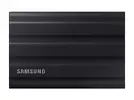
Thank you. I thought of using velcro. But I'm quite apprehensive because I'm using the Samsung T7 Shield which isn't flat. It has ridges that won't give me that much surface area for a velcro to stick on.
 

Attachments

  • 1750004436092.webp
    1750004436092.webp
    8.7 KB · Views: 103
Thank you. I thought of using velcro. But I'm quite apprehensive because I'm using the Samsung T7 Shield which isn't flat. It has ridges that won't give me that much surface area for a velcro to stick on.
Heavy duty velcro is very strong sticking.

To go over the top, you could even put velcro on one side, and sticky heatsinks on the other for extra cooling
 
Hi Guys.

How do you secure the SSD without sacrificing heat dissipation?

My SSD is in the glove box along with a flash light, the car's paperwork, some small tools etc. I believe that it's important for a storage device to remain stationary, especially when something is being written to it. I planned on putting it inside a pouch for it to be snug inside the glove box but when I held the SSD, it was warm. So I realized that putting it inside a pouch may elevate the generation of heat which is also bad for a storage device.

Here's what I'm hoping for:

1. Secured. The SSD to stay in place wherever you put it, especially when you go over a bump or a sharp turn.
2. A ventilated area that will help dissipate the heat of the SSD.
3. Easily accessible if I need to remove the SSD so I can review files on my computer.

Any ideas?

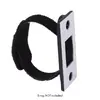
Look for something like SpeedWraps

SpeedWraps

They can be had with an adhesive backing and you use a Velcro strap to attach the SSD to the SpeedWrap. Two of these should do and you have an easy way to remove the SSD when you want to.

I have not used this brand, but you can look for something similar if you prefer a different brand.


speedwrap.webp
 
Hi Guys.

How do you secure the SSD without sacrificing heat dissipation?

My SSD is in the glove box along with a flash light, the car's paperwork, some small tools etc. I believe that it's important for a storage device to remain stationary, especially when something is being written to it. I planned on putting it inside a pouch for it to be snug inside the glove box but when I held the SSD, it was warm. So I realized that putting it inside a pouch may elevate the generation of heat which is also bad for a storage device.

Here's what I'm hoping for:

1. Secured. The SSD to stay in place wherever you put it, especially when you go over a bump or a sharp turn.
2. A ventilated area that will help dissipate the heat of the SSD.
3. Easily accessible if I need to remove the SSD so I can review files on my computer.

Any ideas?
Easy. I used 3M command picture hanging strips, stuck one side to the glovebox, then another pair to that and stuck that to the SSD.

Worked wonders for me and even now that's how I mount my 70mai battery pack in my cars glovebox (for heavier items), doesn't slide around at all (worked better than the velcro straps 70mai had in the retail packaging).
 
Back
Top