VIOFO A229 Pro - Testing / Review - RCG

I believe that the rear camera cable is different between the A229 Duo (coax cable for rear), and the A229 Pro (usb type-c cable). If you're using a viofo hardwire kit then I believe they are the same between the Duo and the Pro.
 
@palchan
Does A229 Pro use the same cables and mounting plate as A229 Duo? I am hoping that if I replace my A229 Duo with A220 Pro, I don't have to start over the whole process of wiring so that all I have to do is to swap the cameras.
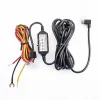
The power cabling is similar, but if you used the HK4 to power the A229 Duo, you need to make sure you have the updated HK4 (produced in mid 2023 or later) and it will need to show "20AWG+24AWG" on the USB cable which indicates it has the thicker power wire (20AWG).

The video cable for the rear camera is different. The A229 Duo used the a coaxial cable, while the A229 Pro uses a cable with USB-C connectors.

The GPS mount is not the same. It looks the same physically, but the A229 Pro has an updated Quad-Mode GPS module. If you attempt to use the A229 Duo's GPS module with the A229 Pro/Plus dash camera it will show "No GPS" on the screen.
 
@palchan

The power cabling is similar, but if you used the HK4 to power the A229 Duo, you need to make sure you have the updated HK4 (produced in mid 2023 or later) and it will need to show "20AWG+24AWG" on the USB cable which indicates it has the thicker power wire (20AWG).

The video cable for the rear camera is different. The A229 Duo used the a coaxial cable, while the A229 Pro uses a cable with USB-C connectors.

The GPS mount is not the same. It looks the same physically, but the A229 Pro has an updated Quad-Mode GPS module. If you attempt to use the A229 Duo's GPS module with the A229 Pro/Plus dash camera it will show "No GPS" on the screen.

What is the difference between the cables based on dates? Only wire gauge or other differences? My first one came with the A229 Pro from VIOFO, was getting ready to order one from the VIOFO Amazon store but am now unsure if I should.
 
What is the difference between the cables based on dates? Only wire gauge or other differences? My first one came with the A229 Pro from VIOFO, was getting ready to order one from the VIOFO Amazon store but am now unsure if I should.
The older HK4 and HK3-C hardwire kits used a smaller wire gauge (24 AWG) for the 5V constant battery power sent to the dash camera, while the newer units will have a 20 AWG wire for the constant battery power. The first dash camera that required the thicker wire gauge was the A139 Pro 3CH. Any issue I've reported to VIOFO with the A229 Pro / A229 Plus, they stated I must use the "optimized" HK4 hardwire kit to make sure there are no power starvation issues. The 5-volt side of the hardwire kit still has a listed 5V/2A rating which is the same as the earlier HK4/HK3-C hardwire kits. There may be other optimizations, but none have been publicly disclosed (unless I've missed a post on DCT that lists that info). The optimized HK4/HK3-C have been available for the past several months.
 
Thank you! My HK4 says the 20agw + 24agw on it so that one is good to go. I will call BBMC and if they can send the newer one then I will order from them.
 
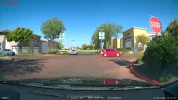
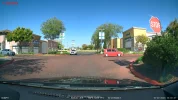
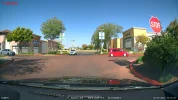
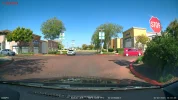
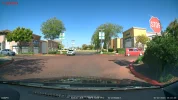
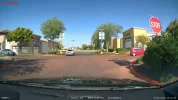
My A229 Pro 3CH has firmware versions v1.0_231009 (front) and v1.0_230928 (rear) installed. I drove my car today and I found footage where objects with a red color would change from a deep red to a muted red color and then back. There are other examples in today's footage of a change in the color red, but the most dramatic one was when my car was stopped at a stop sign and the color of the stop sign, the red car turning in front of my car and the red curbs changed their color within a few frames in the video. I've reported this to VIOFO.

Example One: Red / Muted Red / Red

viofo_a229_pro_01_before_red_change_2023_1020_120241_F.MP4_snapshot_00.56.webp viofo_a229_pro_02_red_change_2023_1020_120241_F.MP4_snapshot_00.56.webp viofo_a229_pro_03_after_red_change_2023_1020_120241_F.MP4_snapshot_00.56.webp

Example Two: Red / Muted Red / Red

viofo_a229_pro_04_before_red_change_2023_1020_120241_F.MP4_snapshot_00.56.webp viofo_a229_pro_05_red_change_2023_1020_120241_F.MP4_snapshot_00.56.webp viofo_a229_pro_06_after_red_change_2023_1020_120241_F.MP4_snapshot_00.56.webp
 
The older HK4 and HK3-C hardwire kits used a smaller wire gauge (24 AWG) for the 5V constant battery power sent to the dash camera, while the newer units will have a 20 AWG wire for the constant battery power. The first dash camera that required the thicker wire gauge was the A139 Pro 3CH. Any issue I've reported to VIOFO with the A229 Pro / A229 Plus, they stated I must use the "optimized" HK4 hardwire kit to make sure there are no power starvation issues. The 5-volt side of the hardwire kit still has a listed 5V/2A rating which is the same as the earlier HK4/HK3-C hardwire kits. There may be other optimizations, but none have been publicly disclosed (unless I've missed a post on DCT that lists that info). The optimized HK4/HK3-C have been available for the past several months.
Hi, could anyone kindly confirm if this is the newer hk4? This is the picture provided by online retailer from China and they claimed it’s the new one. Not sure how true is it but I do not wish to end up with something else.

Thanks a bunch.
 

Attachments

  • IMG_4508.webp
    IMG_4508.webp
    84.5 KB · Views: 102
Hi, could anyone kindly confirm if this is the newer hk4? This is the picture provided by online retailer from China and they claimed it’s the new one. Not sure how true is it but I do not wish to end up with something else.

Thanks a bunch.
No that is not a picture of the optimized HK4. In the picture you provided, it has only one wire gauge listed of "24AWG" and that is what the older versions showed on the USB cable insulation. The optimized HK4 will have "20AWG+24AWG" on the USB cable insulation.

Zoomed In Pic You Provided
1698041799203.webp

Optimized HK4
1698041785867.webp
 
That is interesting and concerning. 🤔 I messaged VIOFO and asked if the second HK4 USB-C I needed for my second A229 Pro would be the optimised one and, they responded yes it would.
When placing the order I did select the Accessories for the A229 Pro and selected the HK4 USB-C cable that was identified for the A229 Pro. The order shipped today, so it will be another ten to
fifteen days before I know which one I receive.

Before ordering from VIOFO I did try BBMC but they indicated to me they do not have the optimised HK4 yet.
 
No that is not a picture of the optimized HK4. In the picture you provided, it has only one wire gauge listed of "24AWG" and that is what the older versions showed on the USB cable insulation. The optimized HK4 will have "20AWG+24AWG" on the USB cable insulation.

Zoomed In Pic You Provided
View attachment 68702
Optimized HK4
View attachment 68701
Thanks for confirming! Guess I won’t proceed with the purchase then.

Was contemplating direct Viofo and risk of local support in future or wait for my local distributor which gonna take another month or two and might not bring in due to heat (should it fail the heat test like 3ch a139 pro).
 
I put together a "short" video with some front and rear video samples from five of the front dash cameras I have installed in my car at the moment. I have four rear camera video samples since the A119 Mini 2 is a single channel dash camera mounted only on the front windshield.

Dash Cameras: VIOFO A229 Pro / A119 Mini 2 / A139 Pro / Thinkware U3000 / BlackVue DR970X

 
Nice work Robert.
Did you put a black sheet on your parcel shelf?
I'm not seeing the usual window glare on the rear cameras.
If you have room, and time permitting could you put your second A119 Mini 2 on the rear window?
It would be nice to compare with the A229 Pro Rear camera since they have the same image sensor, (IMX675).
Also since the Mini 2 accepts a CPL Filter, and the A229 Pro Rear cannot, that would be a nice comparison too.
-Chuck
 
I put together a "short" video with some front and rear video samples from five of the front dash cameras I have installed in my car at the moment. I have four rear camera video samples since the A119 Mini 2 is a single channel dash camera mounted only on the front windshield.

Dash Cameras: VIOFO A229 Pro / A119 Mini 2 / A139 Pro / Thinkware U3000 / BlackVue DR970X


Great way to compare the dash cams.
How long does it take you. I ask because it takes me ages to do one camera lol

I noticed the 139 and 229 Pro seem to have the same colour for the road as if they are driving in outback Australia!

Eg light brown rather than Tarmac colour.

It's that what you have found in various test of the two dash cams?

Cheers
Edit due to slow internet, placing 2 replies so I've removed 1
 
Last edited:
Did you put a black sheet on your parcel shelf?
I'm not seeing the usual window glare on the rear cameras.
If you have room, and time permitting could you put your second A119 Mini 2 on the rear window?
It would be nice to compare with the A229 Pro Rear camera since they have the same image sensor, (IMX675).
Also since the Mini 2 accepts a CPL Filter, and the A229 Pro Rear cannot, that would be a nice comparison too.
I put that black bed sheet in the parcel shelf area about 18 months ago.

I'll see if I can get the second A119 Mini 2 dash camera on the rear window. I'm offline tomorrow, so I'll look into this later this week.
 
How long does it take you. I ask because it takes me ages to do one camera lol
It takes me about 30 minutes to download the video files from my Friday driving trips using my Windows batch scripts to my NAS disk. It took about 2.5 hours to create the combined video file. This is actually one of the easier videos to put together. It only requires syncing the video (first by audio sync tool in Adobe Premiere Pro and then I fine tune it by doing a visual comparison frame-by-frame at the start of the first video for each group). After that, it's just a few simple math calculations for the center of each camera's video and the percentage of the edge to crop off on the right side to allow the videos to the right of that video to be visible. My review videos take forever! They can take 30 to 50 hours to create any supporting documents, gather screenshots, unboxing pics and then the editing of the final video.

I noticed the 139 and 229 Pro seem to have the same colour for the road as if they are driving in outback Australia!

Eg light brown rather than Tarmac colour.

It's that what you have found in various test of the two dash cams?
The A229 Pro is still going through some tests with a few different firmware versions. The A139 Pro front footage has looked like that for some time. I can't recall exactly what version firmware it was when it started looking like that.
 
It takes me about 30 minutes to download the video files from my Friday driving trips using my Windows batch scripts to my NAS disk. It took about 2.5 hours to create the combined video file. This is actually one of the easier videos to put together. It only requires syncing the video (first by audio sync tool in Adobe Premiere Pro and then I fine tune it by doing a visual comparison frame-by-frame at the start of the first video for each group). After that, it's just a few simple math calculations for the center of each camera's video and the percentage of the edge to crop off on the right side to allow the videos to the right of that video to be visible. My review videos take forever! They can take 30 to 50 hours to create any supporting documents, gather screenshots, unboxing pics and then the editing of the final video.


The A229 Pro is still going through some tests with a few different firmware versions. The A139 Pro front footage has looked like that for some time. I can't recall exactly what version firmware it was when it started looking like that.
Took me similar even though it was only two cameras for me in Premiere Pro. Even with saved templates it still takes a bit for the Crop percentages to figure out cos of the varying resolutions. Export is pretty speedy.

Anyways, good job mate. What stood out to me was that the A139 Pro just looks blown out in the sky and unfinished product when compared to the A229 Pro. The Blackvue and Thinkware really failed to impress me, especially with the rear camera quality. Just seems lazy and unoptimised firmware to me.

The A119 Mini 2 handled the exposure changes turning around in the carpark quite well, the other Viofo seemed to cop the glare from the sun. All in all, Viofo punched above their weight
 
I noticed the 139 and 229 Pro seem to have the same colour for the road as if they are driving in outback Australia!

Eg light brown rather than Tarmac colour.
These two cameras come with a CPL and thus should have been colour calibrated with the CPL fitted. Should really have been tested with the CPL on if you want the colours "correct".
 
This is actually one of the easier videos to put together. It only requires syncing the video

Thanks for the reply. You make it sound easy lol
My review videos take forever! They can take 30 to 50 hours to create any supporting documents, gather screenshots, unboxing pics and then the editing of the final video

Now I feel a bit better about how long it takes for the review videos.
A229 Pro is still going through some tests with a few different firmware versions.

Yes it looks like it needs it.

Cheers
 
Took me similar even though it was only two cameras for me in Premiere Pro. Even with saved templates it still takes a bit for the Crop percentages to figure out cos of the varying resolutions. Export is pretty speedy.

Anyways, good job mate. What stood out to me was that the A139 Pro just looks blown out in the sky and unfinished product when compared to the A229 Pro. The Blackvue and Thinkware really failed to impress me, especially with the rear camera quality. Just seems lazy and unoptimised firmware to me.

The A119 Mini 2 handled the exposure changes turning around in the carpark quite well, the other Viofo seemed to cop the glare from the sun. All in all, Viofo punched above their weight
@rcg530

What seems to take me so long on top of what you both have mentioned is trying to remember all the things i want to add.
I've finally got my computer to stop crashing when using Vegas pro which is a big win. Lol
 
@rcg530

What seems to take me so long on top of what you both have mentioned is trying to remember all the things i want to add.
I've finally got my computer to stop crashing when using Vegas pro which is a big win. Lol
That was my issue going in, with Resolve. Absolute turd basket for me, and the second I tweeted about Resolve being a piece of crap (for me), the fanboys came crawling out of the cracks

But definitely once the workflow is there and the computer stops crashing, you're off to the races
 
Back
Top