A229 Pro Firmware Update OTA Works.... (Over the Air) LN

LateralNW

Well-Known Member
Joined
Nov 7, 2016
Messages
1,972
Reaction score
1,230
Country
Australia
Dash Cam
VArious
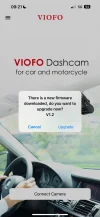
I did a little test the other day and discovered that "Over The Air" (OTA) update works on the A229 Pro..... with a caveat...

Note the Over the Air update offered is version 1.2 Firmware which I downloaded.

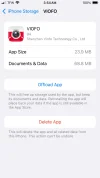
Having a iphone means I can't get to the downloaded file to check what version it is 🤔

Everything seems to work however I decided not to install the sw as Viofo didn't even have the version I'm running on their web site. I'm sure that will change now that they are back from the Chinese Lunar New Year.

Interestingly, the over the air use to work way back for the A129 Duo but then for no obvious reason just stopped.

I don't recommend anyone updating their A229 Pro until @viofo @VIOFO-Support update us.

It might be in a test state but I'm only guessing. @viofo would you like update us?


This is with a production A229 Pro 3 channel unit. (At the time of testing the other channels weren't connected.)
Dashcam Firmware Version fw 240105
Latest App version
 
I don't recommend anyone updating their A229 Pro until @viofo @VIOFO-Support update us.
"Damn the torpedoes full speed ahead"
I just tried, no worky. lol
 

Attachments

  • 3 .webp
    3 .webp
    40.6 KB · Views: 152
  • 2 .webp
    2 .webp
    82.6 KB · Views: 159
  • 1 .webp
    1 .webp
    49.3 KB · Views: 146
"Damn the torpedoes full speed ahead"
I just tried, no worky. lol

In your image 1.png it looks like the LTE is not on.

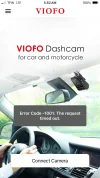
I got that timeout message after I disconnected from A129 Duo.

I had to enter the app and then connect to the A229 Pro go into settings and then came out and tried the OTA firmware download and it worked but I didn't install it.
 
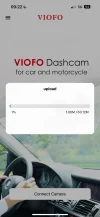
The upload will just time out everything else is working. And for the upload internet wouldn’t be even required. The WiFi is connected but not shown because there is no internet over WiFi.
 

Attachments

  • IMG_0837.webp
    IMG_0837.webp
    64.8 KB · Views: 114
  • IMG_0838.webp
    IMG_0838.webp
    80.6 KB · Views: 119
  • IMG_0839.webp
    IMG_0839.webp
    60.4 KB · Views: 106
It requires the latest firmware to support, it is supported in the V1.1_240117.
We will announce this feature soon.
 
I really like OTA, even if i even more hate to touch my phone.
 
What is this new version supposed to change and/or fix?
Adds cloud & radar parking mode.
J/k
I’m hoping for;
1.) Optimize night time HDR performance.
2.) Restore “Disable GPS in Parking Mode” setting.
3.) LCD Display Horizon Alignment Line (50% Road / 50% Sky
4.) Fix dropped frames issue
And may others.
 

Attachments

  • 8.) 50% Road & 50% Sky Horizon Alignment Line  .webp
    8.) 50% Road & 50% Sky Horizon Alignment Line .webp
    29.5 KB · Views: 118
  • A119 Mini 2 .webp
    A119 Mini 2 .webp
    472.8 KB · Views: 126
  • Like
Reactions: gse
Adds cloud & radar parking mode.
J/k
I’m hoping for;
1.) Optimize night time HDR performance.
2.) Restore “Disable GPS in Parking Mode” setting.
3.) LCD Display Horizon Alignment Line (50% Road / 50% Sky
4.) Fix dropped frames issue
And may others.
Please elaborate on "cloud".
 
Correcting this post.
V1.1240117 is what I'm running.
 
Last edited:
Current OTA update marked as V1.2 but truly this is VIOFO_A229P_V1.1_231201.
So we should wait for Viofo update FW file on server anyway.
 
I did a little test the other day and discovered that "Over The Air" (OTA) update works on the A229 Pro..... with a caveat...

Note the Over the Air update offered is version 1.2 Firmware which I downloaded.

Having a iphone means I can't get to the downloaded file to check what version it is 🤔

Everything seems to work however I decided not to install the sw as Viofo didn't even have the version I'm running on their web site. I'm sure that will change now that they are back from the Chinese Lunar New Year.
Thanks for the post. Good to see @viofo working on OTA for the future.

Has anyone tried this on an android phone. I personally get nothing on the android app. But get offered a 1.2 firmware on the iOS app.
 
This is now fully supported for A229 Pro and Plus.

1. It requires to update the APP.
2. Manually update the firmware to the V1.2 first, then it will support OTA update for the future version.

The V1.2 will be released soon.
 
@LateralNW
It’s here, would you be so kind? lol
 
@LateralNW
It’s here, would you be so kind? lol
Guessing we'll need a v1.3 or anything newer than this v1.2 , for it to work....
 
Back
Top