VIOFO A329S - Testing/Review - RCG

Congrats on getting the PPV 10-8.
When you get a chance can you post a photo showing the location of the two IR Interior cameras, (how close they are to each other)?
It looks like you mounted them as close as possible to each other, I'm just curious I'd they are side by side, or on top of each other.
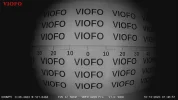
I have both of the interior cameras mounted side-by-side. Their mounting base fit into a recess just behind the passenger side seat belt warning indicator. The A229 Pro interior camera is aim a bit higher so that the upper limit to the field of view only includes a minimal amount of the vehicle's headliner. To achieve the same objective with the A329S interior camera, I had to aim it a bit lower due to the fish eye lens.

Getting nighttime footage from multiple interior cameras always adds to the amount of driving since you only want one camera's IR LEDs on at a time. Capturing nighttime footage with the IR LEDs on for both interior cameras produces a false over-illuminated image. If the car's engine remains "stable/reliable", I'll try to get some nighttime footage early next week.

1746839542684.webp
 
I just noticed everything out the rear windows is overexposed on the A329S.
The A229 Pro is not overexposed.
Can this be fixed with HDR / Lens Adjustment / Image Quality Improvement, etc?
Both the A229 Pro and A329S were configured with "Auto HDR", so HDR was not enabled during today's daytime drive. I'll try turning on HDR during the daytime to see if it makes any difference.
 
Getting nighttime footage from multiple interior cameras always adds to the amount of driving since you only want one camera's IR LEDs on at a time.
If you film some test footage with your car in your garage with all the lights off I'll pay for the gas. lol
I'd like to see how much FOV is lost in complete darkness when the IR LED's are illuminated like this;
 

Attachments

  • Interior LED's On .webp
    Interior LED's On .webp
    54.6 KB · Views: 100
  • IR Interior .webp
    IR Interior .webp
    136 KB · Views: 101
Both the A229 Pro and A329S were configured with "Auto HDR", so HDR was not enabled during today's daytime drive. I'll try turning on HDR during the daytime to see if it makes any difference.
I think I remember @Mtz saying HDR should always be enabled with the IR Interior cameras.
Or maybe he was talking about the Telephoto.
Or maybe is was @viofo that said that.
Remember when the A229 Pro was released, and the first firmware version did not have independent HDR On/Off settings for each camera, (front, rear, interior).
And we asked for individual HDR On/Off settings for each camera.
 
If you film some test footage with your car in your garage with all the lights off I'll pay for the gas. lol
I'd like to see how much FOV is lost in complete darkness when the IR LED's are illuminated like this;
The last time I captured IR camera footage while in my garage, there were so many "floating pieces of dust" in the video footage that it was a bit distracting. I'll see what I can do this weekend to get some "clean air" footage. 🙂 I just checked the A229 Pro HDR settings in the app and it only shows HDR settings for front and rear cameras. The A329S has HDR settings for front, interior and rear cameras.
 
I just checked the A229 Pro HDR settings in the app and it only shows HDR settings for front and rear cameras. The A329S has HDR settings for front, interior and rear cameras.
Now I remember, it was Viofo that said HDR should always be enabled on the IR Interior camera with no way to disable.
Hopefully Viofo will fix that firmware setting on the A329S.
 
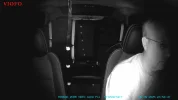
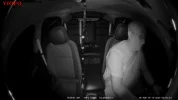
@Chuck McCoy here are two frame grabs from the A229 Pro 1080p interior camera and the A329S 1440p interior camera with HDR on. My car was in my "dark" garage. Still a few floating dust particles in the video, but I found some video frames that were "dust free". The A329S interior camera has the fish eye mode setting set to on.

viofo_a229_pro_night_2025_0509_235816_014309I.MP4_snapshot_00.30.webp viofo_a329s_night_2025_0510_000011_000377I.MP4_snapshot_00.30.webp
 
@Chuck McCoy here are two frame grabs from the A229 Pro 1080p interior camera and the A329S 1440p interior camera with HDR on. My car was in my "dark" garage. Still a few floating dust particles in the video, but I found some video frames that were "dust free". The A329S interior camera has the fish eye mode setting set to on.
Wow, this is a huge improvement, (FOV / resolution).
Viofo should be very proud.
I wonder how long it will take to get IMX678 IR Interior cameras.
Also, thank you for wearing your seat belt. lol
 
Yesterday, I installed the A329S 3-channel in my dash camera test car. I also have the A229 Pro 3-channel installed in that car.
Did you also re-install the A329 2-CH?
I’d like to know if the A329S 3-CH Front & Rear camera image quality has been improved, or stayed the same.
 
Answers updated on official release day, or when I get permission.
1.) Official release date Viofo.com?

Did you also re-install the A329 2-CH?
I’d like to know if the A329S 3-CH Front & Rear camera image quality has been improved, or stayed the same.

I am perplexed...I thought you had your own A329S dash cam to test?
 
Wow, this is a huge improvement, (FOV / resolution).
Viofo should be very proud.
I wonder how long it will take to get IMX678 IR Interior cameras.
Also, thank you for wearing your seat belt. lol
seems to be similar to what Vantrue did with the IMX675 adding IR and using IMX675
 
Wow, this is a huge improvement, (FOV / resolution).
Viofo should be very proud.
I wonder how long it will take to get IMX678 IR Interior cameras.
Also, thank you for wearing your seat belt. lol
Appears to be not quite wide enough to capture the cop's face at the window?

Might do better if the camera was mounted a little further forward, so it will depend on the car, maybe in many cars, it would get the cop's face?
 
I just noticed everything out the rear windows is overexposed on the A329S.
The A229 Pro is not overexposed.
Can this be fixed with HDR / Lens Adjustment / Image Quality Improvement, etc?
That is the difference between HDR and no-HDR, that is why you almost always want HDR always on for the interior camera, which I hope is the default setting?
 
Did you also re-install the A329 2-CH?
I’d like to know if the A329S 3-CH Front & Rear camera image quality has been improved, or stayed the same.
I'm working on getting the A329 2CH installed in that car [Caprice] as well. One of the battery packs I purchased a few years ago [Thinkware iVolt Mini] I had in the Caprice, pre-engine repair, was moved to another car [Highlander Hybrid]. That battery pack, in the other car, is now having charging problems. I working on solving the battery pack issue [even temporarily], so I can get an A329 2ch into the Caprice for testing with the A229 Pro 3Ch and A329S 3Ch.
 
That is the difference between HDR and no-HDR, that is why you almost always want HDR always on for the interior camera, which I hope is the default setting?
The default setting for the HDR setting is "On" for all three cameras of the A329S.
 
I found my iVolt Mini battery pack charging problem was a charging cable problem. That means I can move it back to my main dash camera test car [Chevy Caprice PPV]. I now have a VIOFO A229 3ch, A329S 3ch, and an A329 2ch in one car.

1746910852395.webp
 
Man that’s pure nostalgia.
 
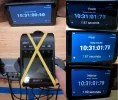
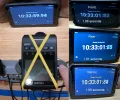
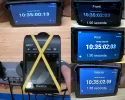
I received new test firmware from VIOFO that improves the response time to an impact event in LPID parking mode. I ran three tests with the test firmware using my pre-production A329S 3-channel configuration.

The impact event time to the first frame recorded times range from 1.67 seconds to 1.91 seconds across the three tests runs. A nice reduction in the response time to an impact event in LPID parking mode.

1747073797261.webp1747073815194.webp1747073842522.webp
 
I wish there were a way to activate the parking mode with the bluetooth button. I have a Tesla, so no easily accessible ACC to tap for a trigger.

It would be great to tap a button to activate and deactivate parking mode.
 
I received new test firmware from VIOFO that improves the response time to an impact event in LPID parking mode. I ran three tests with the test firmware using my pre-production A329S 3-channel configuration.

The impact event time to the first frame recorded times range from 1.67 seconds to 1.91 seconds across the three tests runs. A nice reduction in the response time to an impact event in LPID parking mode.

View attachment 80181View attachment 80182View attachment 80183
Have you tested in a vehicle mounted to the windshield?

I am finding it hard to make any videos pertaining to the product being that it is pre production. Final production does seem a little ways away still.
 
Back
Top